
branch-ai
Reasoning canvas for AI CLIs — captures extended thinking from Claude Code, Codex, Gemini, and Droid as a navigable, forkable tree. Rewind, fork from any node, inject facts mid-thought. Local-first, ships an MCP server.
Install / Use
claude mcp add nikolas-sapa -- npx -y github:nikolas-sapa/branch-aiIf the server publishes to npm under a different name, use that package instead — check the repo README.
MCP Server
Model Context Protocol server
Quality Score
Category
AI & Machine LearningSupported Platforms
Our assessment of branch-ai
branch-ai scores 83/100 on our quality scale, 657th of 938 AI & Machine Learning skills we index.
Its MCP Server is 17 KB long, well organised into 34 sections with 9 code examples: a thorough specification that gives an agent plenty to work with.
It has 3 GitHub stars, so there is little community track record yet; judge it on its content.
Maintenance, license and trust
- The repository was last updated 20 days ago, so branch-ai is actively maintained.
- Our last check on 2026-09-14 found the source still online.
- It is released under the MIT license, a permissive license that allows use, modification and commercial use with attribution.
- Its trust signals score 92/100, with 1 caution from licensing, adoption, age or documentation. These come from repository metadata, not a code audit — read the skill file before letting an agent act on it.
Safety scan
No issues foundOur scan of the first 100 KB of the file found no instruction hijacking, hidden characters, credential access, data exfiltration or destructive commands. An AI review of the same text found nothing harmful.
AI review by kimi-k2.7-code on 2026-09-29. Automated pattern scan on 2026-09-29. It catches known dangerous patterns, not every risk — read a skill before letting an agent act on it.
branch-ai compared with similar skills
All 4 of these similar skills score higher than branch-ai; compare them before choosing.
| Skill | Score | Stars | Updated | Format |
|---|---|---|---|---|
| branch-ai (this skill)by nikolas-sapa | 83 | 3 | 20d ago | MCP Server |
| claude-memby thedotmack | 100 | 102.9k | today | CLAUDE.md |
| Agent-Reachby Panniantong | 100 | 101.9k | today | CLAUDE.md |
| Understand-Anythingby Egonex-AI | 100 | 88.1k | 2d ago | CLAUDE.md |
| headroomby headroomlabs-ai | 100 | 77.7k | today | CLAUDE.md |
Frequently asked questions
- How do I install branch-ai?
- Run
claude mcp add nikolas-sapa -- npx -y github:nikolas-sapa/branch-ai. The install tabs above show the steps for each supported agent. - Which AI agents does branch-ai work with?
- It is written for Claude Code, Claude Desktop, Gemini CLI and OpenAI Codex, as a MCP Server file. Other agents that read the same format can often use it too.
- Is branch-ai safe to use?
- Our scan of the first 100 KB of the file found no instruction hijacking, hidden characters, credential access, data exfiltration or destructive commands. An AI review of the same text found nothing harmful. It is MIT-licensed and scores 92/100 on trust signals. Skills are instructions an agent will follow, so read the file before installing it and do not approve commands you do not understand.
- Is branch-ai still maintained?
- The repository was last updated 20 days ago, so branch-ai is actively maintained.
Skill content
View source on GitHubbranch-ai


The reasoning canvas for any AI CLI. Works with Claude Code, OpenAI Codex, Google Gemini, or Factory.ai Droid — captures each tool's reasoning as a navigable, forkable tree. Walk backward through the thinking, explore alternative paths from any point, or add a new fact mid-thought and watch how the conclusion changes.
See it live: Try the public demo — view real reasoning trees. To create your own and fork them, install locally below.
Why this exists. When an AI works through a hard problem, the reasoning vanishes the moment you see the answer. Branch preserves every reasoning step, lets you rewind to any point, and explore "what if I changed this assumption?" — without starting over.
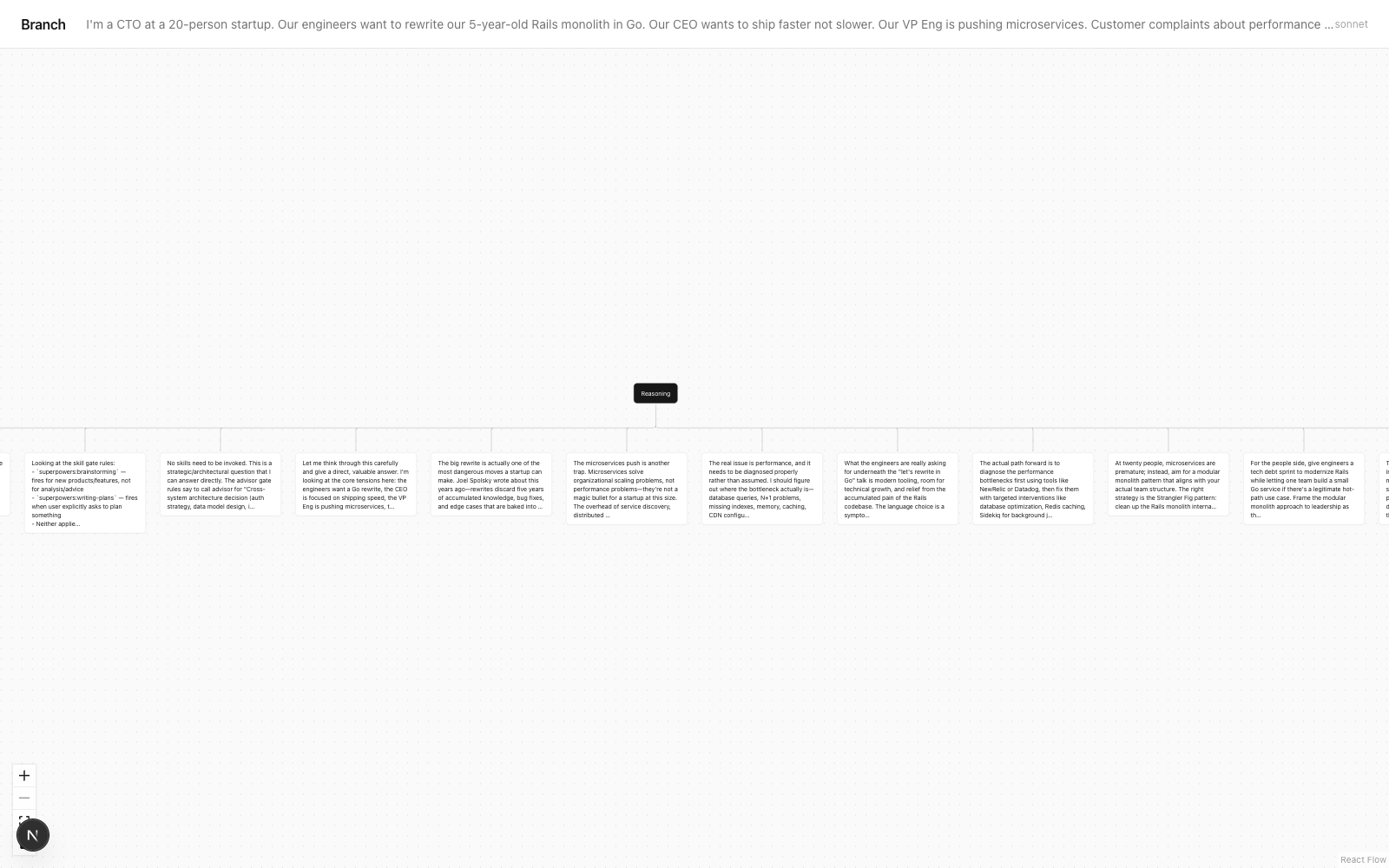
What is Branch AI?
Branch is a reasoning canvas for AI CLIs that captures the extended thinking from Claude Code, OpenAI Codex, Gemini CLI, and Factory Droid as a navigable, forkable tree. Instead of watching reasoning scroll past in your terminal and vanish, Branch turns it into a tree you can rewind, fork from any step, and edit mid-thought.
Why Branch
Terminal output is a transcript — you read it once and it's gone. Branch keeps the reasoning as structure. From any node you can fork an alternative path, inject a new fact and re-reason from that point, or record why you decided what you decided and what would change the answer later. It works with four AI CLIs, runs fully local by default, and ships an MCP server so agents can externalize their own reasoning.
Branch vs. the alternatives
| | Branch | Scrolling terminal output | LLM tracing (LangSmith, Langfuse) | Chat/session loggers | |---|---|---|---|---| | Captures reasoning as a navigable tree | Yes | No (linear text) | Spans/timeline, not forkable | Messages only, not reasoning steps | | Fork from any step / explore alternatives | Yes | No | No | No | | Inject a fact mid-thought and re-reason | Yes | No | No | No | | Built for interactive CLI use (no app instrumentation) | Yes | n/a | No — for apps you build | Varies | | Local-first, no API key required | Yes | Yes | No (hosted) | Varies |
Honest scope: if you need production tracing across a deployed agent app with dashboards and eval runs, use LangSmith/Langfuse — that's what they're for. Branch is for the interactive loop: one developer, one hard question, at the CLI, wanting to see and steer the reasoning.
When to use Branch
- You're working a hard decision through Claude Code / Codex / Gemini and want to see how it got there, not just the answer.
- You want to explore "what if I changed this assumption?" without re-running the whole prompt from scratch.
- You want to record a decision — what you picked, what you rejected, and what would make you revisit it.
- You want your Claude Code agent to externalize and fork its own reasoning via MCP.
- You want to compare or merge the reasoning from two different runs or two different models.
FAQ
Does Branch need an API key? No. Branch uses your existing CLI auth (Claude Code, Codex, Gemini, or Droid). It never asks for its own API key.
Which AI CLIs does it support?
Claude Code (richest reasoning capture), OpenAI Codex CLI, Google Gemini CLI, and Factory Droid. Run branch doctor to see which are on your PATH.
Is my reasoning uploaded anywhere?
No, unless you opt in. Sessions save to ~/.branch/sessions/ on your machine. Sharing is per-session and explicit (branch share <id>).
What's the MCP server for?
branch-mcp gives Claude Code 13 tools so an agent can externalize its reasoning as a tree, fork it, inject facts, diff/merge runs, and record decisions — from inside a session.
Does it capture everything the model "thinks"? No. It captures the surfaced reasoning steps when extended thinking is on. Token-level cognition is never exposed by any API — Branch captures what the model narrates, not everything it computes.
Supported CLIs
- Claude Code — full thinking-block capture (richest reasoning)
- OpenAI Codex CLI — captures reasoning summaries from o3 / gpt-5
- Google Gemini CLI — captures Flash thinking-mode output
- Factory.ai Droid — routes across underlying models; captures thinking when the routed model supports it
Run branch doctor after install to see which are available on your PATH.
What you get
branch "prompt"— CLI that captures reasoning as a navigable tree (auto-detects which AI CLI to use, or pass--cli claude|codex|gemini)branch-mcp— MCP server so Claude Code agents can externalize their own reasoning, fork it, or add facts mid-thought- Web viewer — React Flow canvas where you click any node to explore an alternative path or add a new fact
branch decide— record what you decided, what you rejected, and what would change the answer laterbranch doctor— see which AI CLIs are installed and which one Branch will use by default
Requirements
- Node 20.5+ for the standalone CLI (Node 20.6+ for source development with
node --import tsx) - Node 20.9+ for the optional local viewer
- At least one AI CLI on PATH:
- Claude Code signed in (Claude Pro, Max, or Team subscription)
- OpenAI Codex CLI (
codexbinary) - Google Gemini CLI (
geminibinary) - Factory.ai Droid (
droidbinary)
- Branch uses your existing CLI auth — no API keys required by Branch itself
Install
npm install -g branch-ai
The published CLI package excludes the viewer. Clone the repository to run the local viewer with Node 20.9+. Viewer auto-start failures are handled by the CLI; they do not raise the standalone CLI Node requirement.
Quickstart
# Terminal 1 — start the viewer
git clone https://github.com/nikolas-sapa/branch-ai && cd branch-ai
npm run viewer
# viewer runs on http://localhost:7432

# Terminal 2 — run the CLI
branch "Should I deploy on Friday afternoon? Think carefully through the tradeoffs"
# opens the reasoning tree in your browser automatically
CLI
branch [--cli claude|codex|gemini|droid] [--model <model>] [--local] "your prompt"
--cli— pick an AI CLI. Defaults to auto-detect (first available on PATH).--model— model name (each adapter has its own defaults; e.g.sonnetfor Claude,gpt-5for Codex,gemini-2.5-flashfor Gemini,defaultfor Droid)--local— skip auto-sharing for a single run whenBRANCH_AUTO_SHARE=1is set (auto-share is OFF by default — see Privacy section)
Run branch doctor to see which CLIs are available and which Branch will use by default.
Sessions are saved to ~/.branch/sessions/<id>.json. The viewer reads them from there.
All commands
| Command | What it does |
|---|---|
| branch --help / branch -h | Show usage without running a prompt |
| branch --version / branch -V | Show installed package version |
| branch "prompt" | Run a prompt and open the reasoning tree |
| branch list | Recent sessions |
| branch search <query> | Search across all sessions including decision conclusions |
| branch share <id> | Upload a session to Vercel Blob for sharing |
| branch decide <id> | Record a decision anchor for a session |
| branch decisions | List all sessions with recorded decisions |
| branch export <id> | Export as Markdown or Mermaid |
| branch diff <a> <b> | Compare two sessions |
| branch tag <id> <tag> | Tag a session |
| branch pin <id> | Pin a session to the top of the list |
| branch replay <id> [--model X] | Re-run a session's original prompt (optionally with a different model) and link the new run back to the source |
| branch merge <a> <b> | Synthesize two sessions into a third — finds agreement, divergence, and a unified answer |
| branch watch on\|off\|status | Install/remove a Claude Code Stop hook that auto-saves every CC session as a Branch tree |
| branch mcp install <client> | Add the branch-mcp server to a client's config file (claude-code, claude-desktop, cursor, codex, cline) |
| branch mcp install --all | Install branch-mcp into every supported client at once |
| branch mcp uninstall <client> | Remove branch-mcp from a client's config |
| branch mcp status | Show which clients have branch-mcp installed |
Environment variables
BRANCH_VIEWER_URL— override where the CLI prints the viewer link. Default:http://localhost:7432.BLOB_READ_WRITE_TOKEN— Vercel Blob token. Required forbranch share <id>(manual upload). By itself, this does NOT cause auto-upload — seeBRANCH_AUTO_SHARE.BRANCH_AUTO_SHARE— set to1to opt in to auto-upload of everybranch "prompt"run. Off by default. Use--localto opt out per-run when auto-share is on.
Decision anchors
After a reasoning session, record what you actually decided:
branch decide <sessionId>
# interactive prompts: conclusion, rejected alternatives, confidence, revisit trigger

# or non-interactive:
branch decide <id> --conclusion "Build modular monolith" --rejected "Microservices;Mongo migration" --confidence high --revisit-if "Team grows past 15 engineers"
Decisions show up in branch list with a [decided] marker and the conclusion line. branch decisions shows only settled questions. The viewer renders a decision card at the top of the session.
Gallery
The viewer ships a /gallery route with a hardcoded list of curated reasoning examples you can explore in the tree canvas:
http://localhost:7432/gallery
Click any card to open the full session — fork from any node, add a new fact, or compare with branch diff.
Privacy note: The gallery is NOT auto-populated. Only the sessions explicitly listed in viewer/lib/gallery.ts and bundled into viewer/public/gallery-sessions/ ship with the viewer. Your own sessions in ~/.branch/sessions/ are private to your machine unless you choose to share them.
Privacy
By default, Branch is fully local:
- Sessions save to
~/.branch/sessions/<id>.json— only on your machine - The viewer reads from your local disk
- Nothing leaves your machine unless you explicitly share
Sharing is opt-in per use:
branch share <id>— manual upload of one session to public Vercel BlobBRANCH_AUTO_SHARE=1(env var) — opt in to auto-upload every run; remove the var to stop--localflag — skip auto-share for a single run whenBRANCH_AUTO_SHARE=1is set
When you share, the entire session JSON (prompt + reasoning tree + final answer + decision) is uploaded to a publicly readable URL. Don't share sessions containing secrets, internal company data, or anything you wouldn't post on GitHub.
MCP server — use Branch from inside Claude Code
Add this to ~/.claude.json under mcpServers:
"branch": {
  "type": "stdio",
  "command": "branch-mcp",
  "env": { "BRANCH_VIEWER_URL": "http://localhost:7432" }
}
Restart Claude Code. From inside any CC session you'll have 13 tools:
branch_think({ prompt, model? })— externalize Claude's own reasoning as a tree. Returns viewer URL.branch_fork({ sessionId, nodeId, modifier })— fork from any node in an existing session.branch_inject({ sessionId, nodeId, fact })— inject a new fact at a node and re-reason from there.branch_list_sessions({ limit? })— recent trees.branch_search({ query, limit? })— full-text search acr
Truncated for display — read the full file on GitHub.
Related Skills
claude-mem
102.9kPersistent Context Across Sessions for Every Agent – Captures everything your agent does during sessions, compresses it with AI, and injects relevant context back into future sessions. Works with Claude Code, OpenClaw, Codex, Gemini, Hermes, Copilot, OpenCode + More
Agent-Reach
101.9kGive your AI agent eyes to see the entire internet. Read & search Twitter, Reddit, YouTube, GitHub, Bilibili, XiaoHongShu — one CLI, zero API fees.
Understand-Anything
88.1kGraphs that teach > graphs that impress. Turn any code into an interactive knowledge graph you can explore, search, and ask questions about. Works with Claude Code, Codex, Cursor, Copilot, Gemini CLI, and more.
headroom
77.7kCompress tool outputs, logs, files, and RAG chunks before they reach the LLM. 20% fewer tokens for coding agents, 60-95% fewer tokens for JSON, same answers. Library, proxy, MCP server.

Languages
Trust signals
From repository metadata: license, adoption, age and documentation. Not a code audit — see the Safety scan above for what the skill file itself contains.