
MyclimateAP
climateAP的爬虫程序;免费获取气候数据
Install / Use
/learn @nieluyi/MyclimateAPREADME
myclimateAP
climateAP的爬虫程序;免费获取气候数据
简单介绍一下项目:
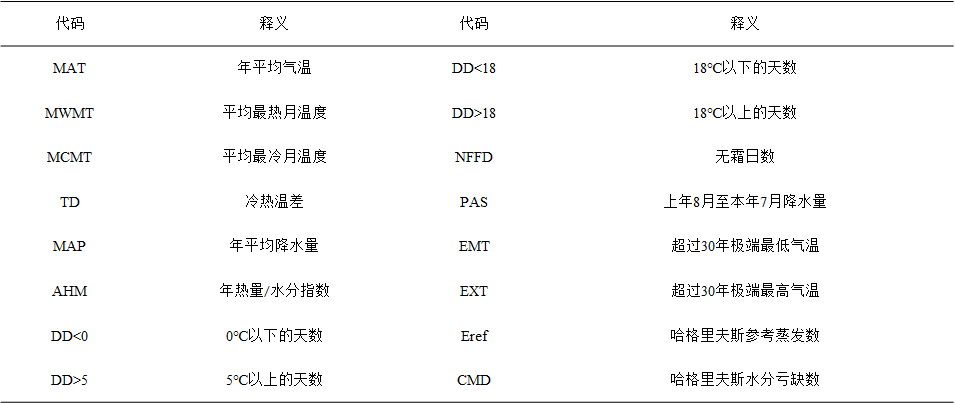
主要是在学习climateAP时出于对繁琐的数据获取过程的感到疲惫,编写的爬虫软件,气候数据基本介绍如下:
如果想使用该项目,首先在dos窗口cd至项目目录输入:
pip --default-timeout=100 install -r requirements.txt -i https://pypi.douban.com/simple/
安装完毕后
2.项目前置
安装完成后,需要对项目config目录下的config.json文件进行配置,文件中需要修改的几个变量介绍如下:
start_date : 气候数据开始年份,格式为 year_年份
end_date : 气候数据结束年份,格式为 year_年份
input_data : gps坐标数据的绝对路径(仅可使用csv文件),包含 lat(维度),lng(经度),el(海拔),示例文件为 '输入.csv'
future : 获取气候数据的情景,通常为 Select+a+GCM+and+a+period,意为选择特定时期
注意:项目中的'输入.csv'文件给出了基本示例,其中变量名称/首行(lat、lng、el)不可以更改
3.启动爬虫
作为基于scrapy的爬虫程序,有两种启动方式
1.py程序启动
通过total_Start.py文件,右键->run,启动爬虫
2.命令行启动
命令行进入项目目录,输入 scrapy crawl mydomain 启动爬虫
4.爬取结果
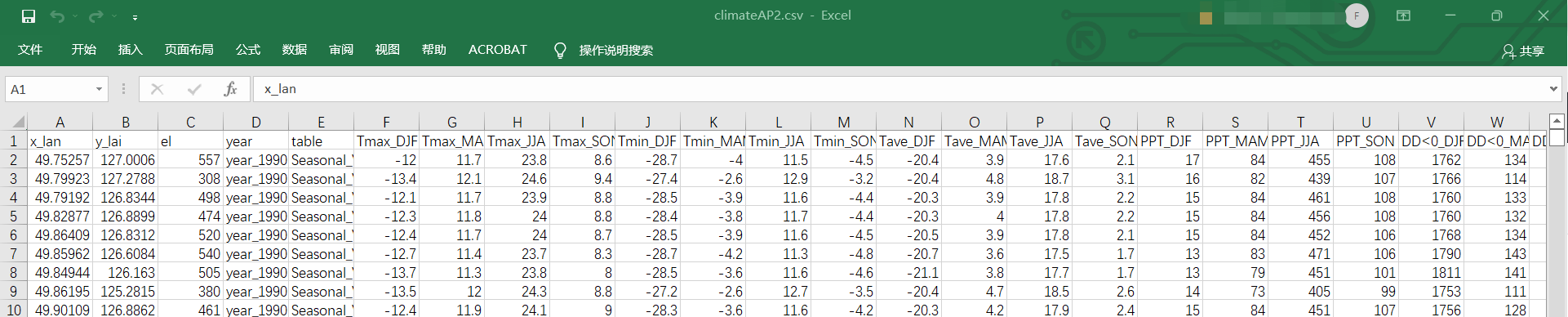
爬取的气候数据分为年度、季度、月度,分别对应climateAP1.csv、climateAP2.csv、climateAP3.csv三个文件;
变量名称中 'max' 对应 '>' , 'min' 对应 '<';
数据按照climateAP.net网站中给出的数据顺序进行排列,可根据网站中获取的数据与本程序获取的数据进行对照,确保数据的正确。
climateAP1.csv

climateAP2.csv
climateAP3.csv

Related Skills
node-connect
333.3kDiagnose OpenClaw node connection and pairing failures for Android, iOS, and macOS companion apps
frontend-design
82.0kCreate distinctive, production-grade frontend interfaces with high design quality. Use this skill when the user asks to build web components, pages, or applications. Generates creative, polished code that avoids generic AI aesthetics.
openai-whisper-api
333.3kTranscribe audio via OpenAI Audio Transcriptions API (Whisper).
commit-push-pr
82.0kCommit, push, and open a PR
