
Alarmo
Easy to use alarm system integration for Home Assistant
Install / Use
/learn @nielsfaber/AlarmoREADME
Alarmo

This is an alarm system integration for Home Assistant. It provides a user interface for setting up your own alarm system completely from the browser.
- Alarmo
- Introduction
- Installation
- Updating
- Uninstalling
- Usage
- Third party platforms
- Making Contributions
- Say thank you
Introduction
This is an integration for the alarm_control_panel domain in HA.
It allows to combine existing sensors for creating a security system for your house.
The integration is comparable with the Manual Alarm in HA, but also has some additional features that makes it easier to use.
Alarmo consists of 3 parts:
- Alarmo component: a custom component for HA that controls the states of the alarm panel entities in HA.
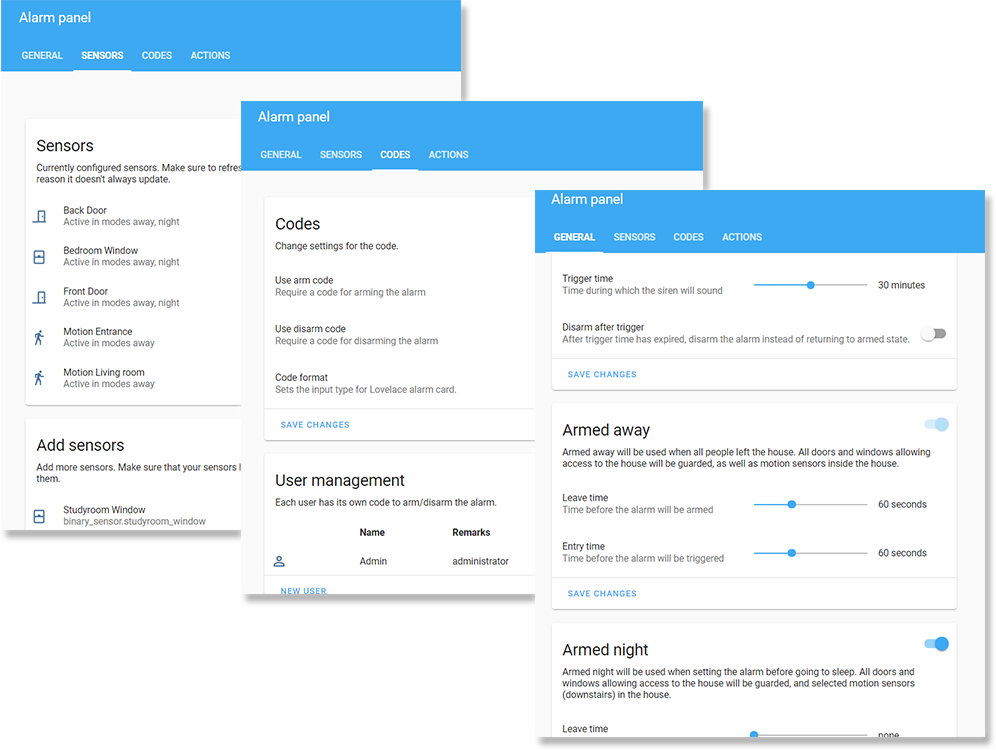
- Alarmo panel: a GUI for configuring the settings of your alarm (sensors, delays, actions etc.)
- Alarmo card: a custom card for arming / disarming the alarm.
Features
- Fully compatible with Home Assistant and the Alarm Panel Card.
- Has an integrated panel for complete management via UI (no YAML required).
- No restarts required when making changes.
- Can set up to 4 arm modes (armed_away, armed_home, armed_night, armed_custom_bypass), each with configurable delays and security perimeter.
- Supports configuring your existing HA entities as security sensors. These sensors will be watched automatically.
- Allows setting up multiple users with individual pincode and permission levels.
- Will restore its previous state after restart of HA.
- Built-in actions: receive push notifications when anything changes in the alarm, activate a siren when the alarm is triggered, etc.
- Supports splitting up your house security system into multiple areas which can be armed independently.
Preview
Installation

Updating
<details> <summary>Click to show updating instructions</summary> <ol> <li>Update the files: <ul> <li><u>Using HACS:</u><br> In the HACS panel, there should be an notification when a new version is available. Follow the instructions within HACS to update the installation files. </li> <li><u>Manually:</u><br> Download the <a href="https://github.com/nielsfaber/alarmo/releases">latest release</a> as a zip file and extract it into the <code>custom_components</code> folder in your HA installation, overwriting the previous installation. </li> </ul> <li>Restart HA to load the changes.</li> <li>(Optional) Verify the version number. <ul> <li><u>Verify version of the backend</u>:<br> In HA, go to Configuration -> Integrations. In the Alarmo card, you should see a link with '1 device', click it. In the table click the 'Alarmo' device, and you should see the Device info. The 'firmware version' represents the installed version number. </li> <li><u>Verify version of the frontend</u>:<br> In the Alarmo configuration panel, the version number is displayed in the top right. If the version does not match with the backend version, your browser has an outdated version stored in the cache. <br> To clear the cache, you should do a <a href="https://refreshyourcache.com/en/cache/">force refresh</a> of your browser. </li> </ul> </li> </ol> </details>Uninstalling
<details> <summary>Click to show uninstall instructions</summary> <ol> <li><u>Remove Alarmo from HA:</u><br> In HA go to Configuration -> Integrations. In the Alarmo card, click the button with the 3 dots, and click 'Delete'. </li> <li>Remove the files: <ul> <li> <u>When installed with HACS:</u><br> In the HACS panel go to integrations and look for Alarmo. Click the button with the 3 dots and click 'Uninstall'. </li> <li> <u>When installed manually:</u><br> In the <code>custom_components</code> directory, remove the 'alarmo' folder. </li> </ul> </li> <li>Restart HA to make all traces of the component dissapear. </li> </ol> </details>Usage
Alarm functionality
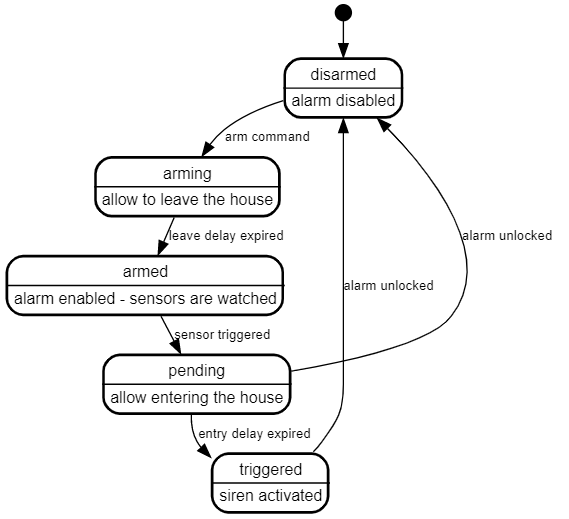
The following diagram describes the operational states of the alarm and provides a simplified overview of the functionality.
Arm modes
The alarm can be activated (armed) in a certain mode. This mode defines a certain set of sensors and represents the security zone (or perimeter).
The following modes are supported:
- Armed away
- Armed night
- Armed home
- Armed vacation
- Armed custom bypass (let's just call it armed custom from now on)
In the tab general you can find the settings for each mode. There are flip switches to enable/disable modes.
Alarmo entity
After installing Alarmo the entity alarm_control_panel.alarmo shall be added to HA.
You can use this entity together with the Alarm panel card, or in conjuction with automations to automatically arm/disarm the alarm.
States
The Alarmo entity follows the state definitions as defined by HA:
| State | Description |
| -------------------------- | ---------------------------------------------------------------------------------------- |
| disarmed | The alarm is disabled/off. |
| arming | The alarm is arming.<br>After the leave delay has expired, the alarm will be armed. |
| armed_away | The alarm is armed in away mode. |
| armed_home | The alarm is armed in home mode. |
| armed_night | The alarm is armed in night mode. |
| armed_vacation | The alarm is armed in vacation mode. |
| armed_custom_bypass | The alarm is armed in custom mode. |
| pending | The alarm is pending.<br>After the entry delay has expired, the alarm will be triggered. |
| triggered | The alarm is triggered. |
| unavailable<br>unknown | Something is wrong.<br>Check the logs for more information. |
Attributes
The Alarmo entity defines the following attributes:
| Attribute | Default value | Example value when set | Description
