ConditionalAccessDocumentation
Microsoft Entra Conditional Access Documentation with PowerShell
Install / Use
/learn @nicolonsky/ConditionalAccessDocumentationREADME
Document Conditional Access with PowerShell




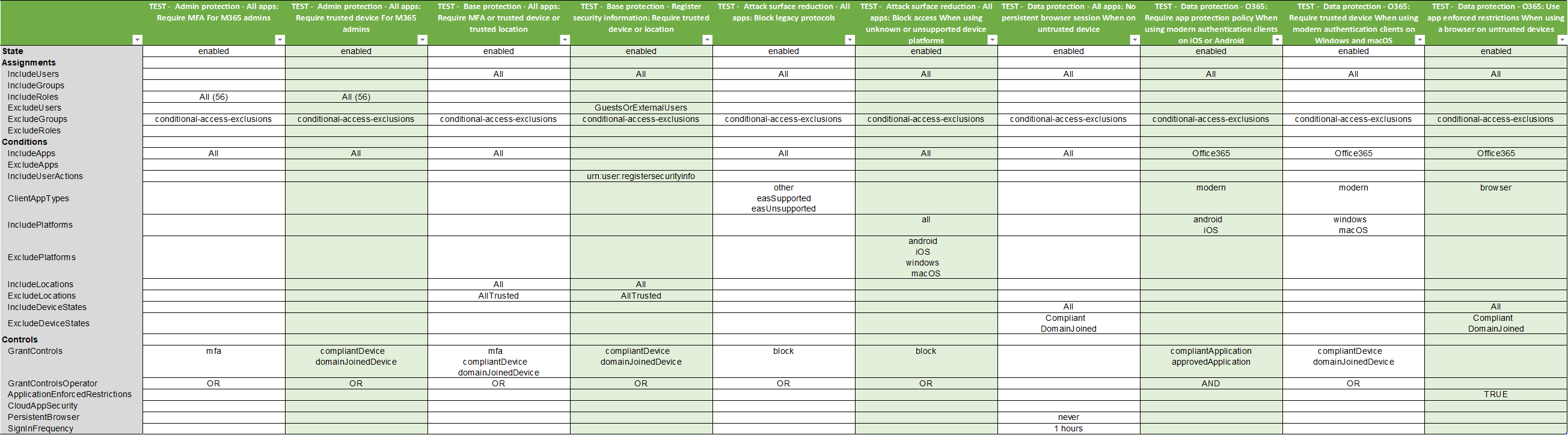
This PowerShell script documents your Microsoft Entra Conditional Access policies. The script exports all data as a csv file which can be pretty formatted as excel workbook. To ensure all policies can be retrieved and documented the script uses the Microsoft Graph Beta API endpoint.
Installation & Usage
-
Install this script from the PowerShell gallery (dependent
Microsoft.Graph.Authenticationmodule is automatically installed):Install-Script -Name Invoke-ConditionalAccessDocumentation -Scope CurrentUser- Script is saved to the user's default script location:
- Windows :
C:\Users\%USERNAME%\Documents\WindowsPowerShell\Scripts - macOS:
~/.local/share/powershell/scripts
- Windows :
-
Connect to Microsoft Graph
- Grant initial admin consent:
Connect-Graph -Scopes "Application.Read.All", "Group.Read.All", "Policy.Read.All", "RoleManagement.Read.Directory", "User.Read.All" -ContextScope Process - After initial admin consent has been granted you can connect with:
Connect-Graphfor subsequent usage - If you want to connect via Bearer Token from your Browser session you can use the following snippet to connect:
Connect-MgGraph -AccessToken $((Get-Clipboard -Raw).Replace("Bearer ","").Replace("`n","") | ConvertTo-SecureString -AsPlainText -Force)
- Grant initial admin consent:
-
Run script via PowerShell dot sourcing
.\Invoke-ConditionalAccessDocumentation.ps1
-
(Optional) Pretty format the csv with excel & save it as excel workbook