
Runcvm
RunCVM (Run Container VM) is an experimental open-source Docker container runtime, for launching standard container workloads - as well as Systemd, Docker, even OpenWrt - in VMs using 'docker run`
Install / Use
/learn @newsnowlabs/RuncvmREADME
RunCVM Container Runtime
Introduction
RunCVM (Run Container Virtual Machine) is an experimental open-source Docker container runtime for Linux, created by Struan Bartlett at NewsNow Labs, that makes launching standard containerised workloads and system workloads (e.g. Systemd, Docker, even OpenWrt) in VMs as easy as launching a container.
<p align="center"> <a title="Click to view on Asciinema" href="https://asciinema.org/a/630469" target="_blank"><img src="https://github.com/newsnowlabs/runcvm/assets/354555/7b1a7c87-5444-4a7e-bac6-75607382571e" alt="Install RunCVM and then launch an Alpine Container/VM" width="900"></a> <br clear="all" /> <a title="Click to view on Asciinema" href="https://asciinema.org/a/630469" target="_blank">View on Asciinema</a> </p>Quick start
Install:
curl -s -o - https://raw.githubusercontent.com/newsnowlabs/runcvm/main/runcvm-scripts/runcvm-install-runtime.sh | sudo sh
Now launch an nginx VM listening on port 8080:
docker run --runtime=runcvm --name nginx1 --rm -p 8080:80 nginx
Launch a MariaDB VM, with 2 cpus and 2G memory, listening on port 3306:
docker run --runtime=runcvm --name mariadb1 --rm -p 3306:3306 --cpus 2 --memory 2G --env=MARIADB_ALLOW_EMPTY_ROOT_PASSWORD=1 mariadb
Launch a vanilla ubuntu VM, with interactive terminal:
docker run --runtime=runcvm --name ubuntu1 --rm -it ubuntu
Gain another interactive console on ubuntu1:
docker exec -it ubuntu1 bash
Launch with VNC:
docker run --runtime=runcvm --name ubuntu2 --env=RUNCVM_DISPLAY_MODE=vnc -p 5900:5900 ubuntu
Launch a VM with 1G memory and a 1G ext4-formatted backing file mounted at /var/lib/docker and stored in the underlying container's filesystem:
docker run -it --runtime=runcvm --memory=1G --env=RUNCVM_DISKS=/disks/docker,/var/lib/docker,ext4,1G <docker-image>
Launch a VM with 2G memory and a 5G ext4-formatted backing file mounted at /var/lib/docker and stored in a dedicated Docker volume on the host:
docker run -it --runtime=runcvm --memory=2G --mount=type=volume,src=runcvm-disks,dst=/disks --env=RUNCVM_DISKS=/disks/docker,/var/lib/docker,ext4,5G <docker-image>
Launch a 3-node Docker Swarm on a network with 9000 MTU and, on the swarm, an http global service:
git clone https://github.com/newsnowlabs/runcvm.git && \
cd runcvm/tests/00-http-docker-swarm && \
NODES=3 MTU=9000 ./test
Graphical workloads with VNC
Launch Ubuntu:
cat <<EOF | docker build --tag=ubuntu-x -
FROM ubuntu:jammy
ENV DEBIAN_FRONTEND=noninteractive
RUN apt update && apt -y install --install-recommends apt-utils kmod wget iproute2 systemd ca-certificates curl gnupg udev dbus lightdm
ENTRYPOINT ["/lib/systemd/systemd"]
ENV RUNCVM_DISPLAY_MODE=vnc
EOF

docker run -d --runtime=runcvm -m 2g --name=vnc -p 5900:5900 ubuntu-x
System workloads
Docker+Sysbox runtime demo - Launch Ubuntu running Systemd and Docker with Sysbox runtime; then within it run an Alpine Sysbox container; and, within that install dockerd and run a container from the 'hello-world' image:
cat <<EOF | docker build --tag=ubuntu-docker-sysbox -
FROM ubuntu:jammy
RUN apt update && apt -y install apt-utils kmod wget iproute2 systemd \
    ca-certificates curl gnupg udev dbus && \
    curl -fsSL https://get.docker.com | bash
RUN wget -O /tmp/sysbox.deb \
    https://downloads.nestybox.com/sysbox/releases/v0.6.2/sysbox-ce_0.6.2-0.linux_amd64.deb && \
    apt -y install /tmp/sysbox.deb
ENTRYPOINT ["/lib/systemd/systemd"]
ENV RUNCVM_DISKS='/disks/docker,/var/lib/docker,ext4,1G;/disks/sysbox,/var/lib/sysbox,ext4,1G'
VOLUME /disks
EOF

docker run -d --runtime=runcvm -m 2g --name=ubuntu-docker-sysbox ubuntu-docker-sysbox

docker exec ubuntu-docker-sysbox bash -c "docker run --rm --runtime=sysbox-runc alpine ash -x -c 'apk add docker; dockerd &>/dev/null & sleep 5; docker run --rm hello-world'"

docker rm -fv ubuntu-docker-sysbox
Nested RunCVM demo - Launch Ubuntu running Systemd and Docker with RunCVM runtime installed; then within it run an Alpine RunCVM Container/VM; and, within that install dockerd and, within that, run a container from the 'hello-world' image:
cat <<EOF | docker build --tag=ubuntu-docker-runcvm -
FROM ubuntu:jammy
RUN apt update && apt -y install apt-utils kmod wget iproute2 systemd \
    ca-certificates curl gnupg udev dbus && \
    curl -fsSL https://get.docker.com | bash
COPY --from=newsnowlabs/runcvm:latest /opt /opt/
RUN rm -f /etc/init.d/docker && \
    bash /opt/runcvm/scripts/runcvm-install-runtime.sh --no-dockerd && \
    echo kvm_intel >>/etc/modules
ENTRYPOINT ["/lib/systemd/systemd"]
ENV RUNCVM_DISKS='/disks/docker,/var/lib/docker,ext4,1G'
VOLUME /disks
EOF

docker run -d --runtime=runcvm -m 2g --name=ubuntu-docker-runcvm ubuntu-docker-runcvm

docker exec ubuntu-docker-runcvm bash -c "docker run --rm --runtime=runcvm alpine ash -x -c 'apk add docker; dockerd &>/dev/null & sleep 5; docker run --rm hello-world'"

docker rm -fv ubuntu-docker-runcvm
Docker+GVisor runtime demo - Launch Ubuntu running Systemd and Docker with GVisor runtime; then within it run the 'hello-world' image in a GVisor container:
cat <<EOF | docker build --tag=ubuntu-docker-gvisor -
FROM ubuntu:jammy
RUN apt update && apt -y install apt-utils kmod wget iproute2 systemd \
    ca-certificates curl gnupg udev dbus jq && \
    curl -fsSL https://get.docker.com | bash
RUN curl -fsSL https://gvisor.dev/archive.key | gpg --dearmor -o /usr/share/keyrings/gvisor-archive-keyring.gpg
RUN echo "deb [arch=amd64 signed-by=/usr/share/keyrings/gvisor-archive-keyring.gpg] https://storage.googleapis.com/gvisor/releases release main" >/etc/apt/sources.list.d/gvisor.list && \
    apt update && \
    apt-get install -y runsc
RUN [ ! -f /etc/docker/daemon.json ] && echo '{}' > /etc/docker/daemon.json; cat /etc/docker/daemon.json | jq '.runtimes.runsc.path="/usr/bin/runsc"' | tee /etc/docker/daemon.json
ENTRYPOINT ["/lib/systemd/systemd"]
ENV RUNCVM_DISKS='/disks/docker,/var/lib/docker,ext4,1G'
VOLUME /disks
EOF

docker run -d --runtime=runsc -m 2g --name=ubuntu-docker-gvisor ubuntu-docker-gvisor

docker exec ubuntu-docker-gvisor bash -c "docker run --rm --runtime=runsc hello-world"

docker rm -fv ubuntu-docker-gvisor
Launch OpenWrt - with port forward to LuCI web UI on port 10080:
docker import --change='ENTRYPOINT ["/sbin/init"]' https://archive.openwrt.org/releases/23.05.2/targets/x86/generic/openwrt-23.05.2-x86-generic-rootfs.tar.gz openwrt-23.05.2 && \
docker network create --subnet 172.128.0.0/24 runcvm-openwrt && \
echo -e "config interface 'loopback'\n\toption device 'lo'\n\toption proto 'static'\n\toption ipaddr '127.0.0.1'\n\toption netmask '255.0.0.0'\n\nconfig device\n\toption name 'br-lan'\n\toption type 'bridge'\n\tlist ports 'eth0'\n\nconfig interface 'lan'\n\toption device 'br-lan'\n\toption proto 'static'\n\toption ipaddr '172.128.0.5'\n\toption netmask '255.255.255.0'\n\toption gateway '172.128.0.1'\n" >/tmp/runcvm-openwrt-network && \
docker run -it --rm --runtime=runcvm --name=openwrt --network=runcvm-openwrt --ip=172.128.0.5 -v /tmp/runcvm-openwrt-network:/etc/config/network -p 10080:80 openwrt-23.05.2
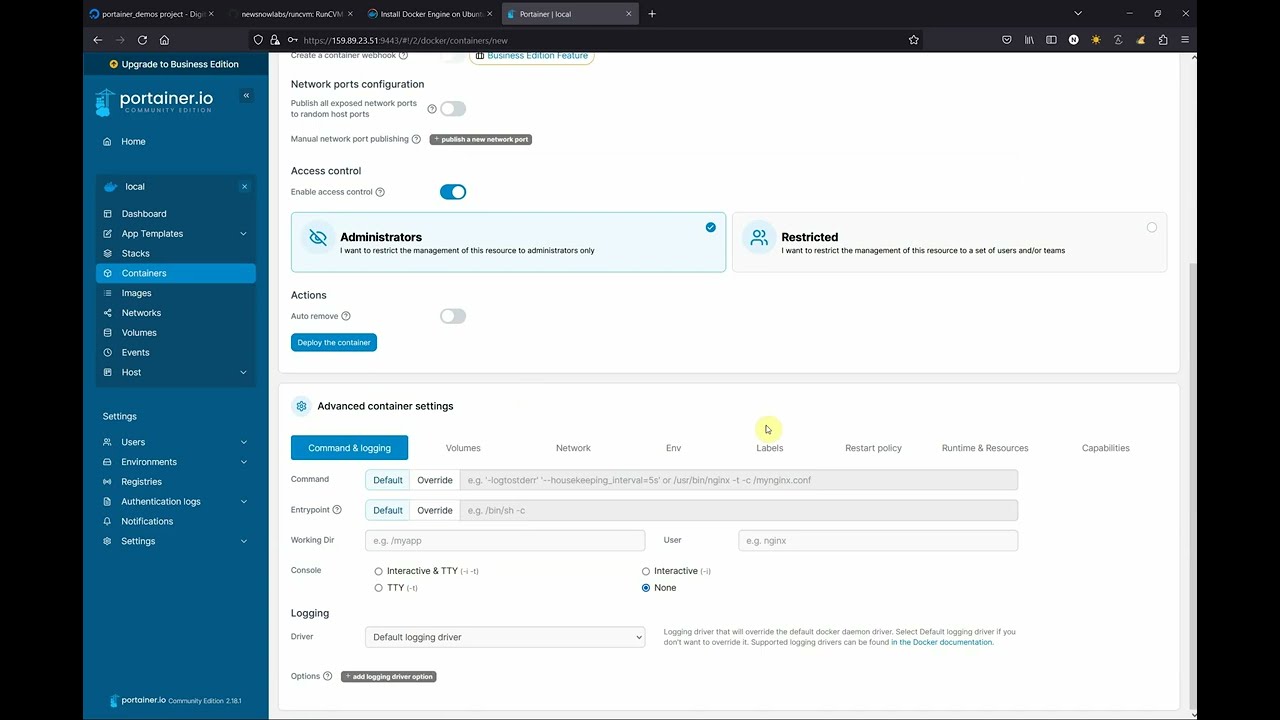
RunCVM-in-Portainer walk-through
Motivation
RunCVM was born out of difficulties experienced using the Docker and Podman CLIs to launch Kata Containers v2, and a belief that launching containerised workloads in VMs using Docker needn't be so complicated.
Motivations included: efforts to re-add OCI CLI commands for docker/podman to Kata v2 to support Docker & Podman; other Kata issues #3358, #1123, #1133, #3038; #5321; #6861; Podman issues #8579 and #17070; and Kubernetes issue #40114; though please note, since authoring RunCVM some of these issues may have been resolved.
Like Kata, RunCVM aims to be a secure container runtime with lightweight virtual machines that feel and perform like containers, but provide stronger workload isolation using hardware virtualisation technology.
However, while Kata aims to launch standard container images inside a restricted-privileges namespace inside a VM running a single fixed and heavily customised kernel and Linux distribution optimised for this purpose, RunCVM intentionally aims to launch container or VM images as the VM's root filesystem using stock or bespoke Linux kernels, the upshot being RunCVM's can run VM workloads that Kata's security and kernel model would explicitly prevent.
For example:
- RunCVM can launch system images expecting to interface directly with hardware, like OpenWRT
- RunCVM can launch VMs nested inside a RunCVM VM - i.e. an 'inner' RunCVM Container/VM guest can be launched by Docker running within an 'outer' RunCVM Container/VM guest (assuming the host supports nested VMs) - in this sense, RunCVM is 'reentrant'.
RunCVM fe
Related Skills
node-connect
351.8kDiagnose OpenClaw node connection and pairing failures for Android, iOS, and macOS companion apps
prose
351.8kOpenProse VM skill pack. Activate on any `prose` command, .prose files, or OpenProse mentions; orchestrates multi-agent workflows.
frontend-design
110.9kCreate distinctive, production-grade frontend interfaces with high design quality. Use this skill when the user asks to build web components, pages, or applications. Generates creative, polished code that avoids generic AI aesthetics.
openai-whisper-api
351.8kTranscribe audio via OpenAI Audio Transcriptions API (Whisper).
