
ismail
A DAW for AI agents: write music as text, read the audio back as text. MCP server, CLI and an agent skill.
Install / Use
claude mcp add newsbubbles -- npx -y github:newsbubbles/ismailIf the server publishes to npm under a different name, use that package instead — check the repo README.
MCP Server
Model Context Protocol server
Quality Score
Category
OtherSupported Platforms
Tags
Our assessment of ismail
ismail scores 81/100 on our quality scale, 144th of 193 Other skills we index.
Its MCP Server is 27 KB long, well organised into 19 sections with 7 code examples: a thorough specification that gives an agent plenty to work with.
It has 10 GitHub stars, so there is little community track record yet; judge it on its content.
Maintenance, license and trust
- The repository was last updated today, so ismail is actively maintained.
- It is released under the MIT license, a permissive license that allows use, modification and commercial use with attribution.
- Its trust signals score 97/100, with no cautions. These come from repository metadata, not a code audit — read the skill file before letting an agent act on it.
ismail compared with similar skills
All 4 of these similar skills score higher than ismail; compare them before choosing.
| Skill | Score | Stars | Updated | Format |
|---|---|---|---|---|
| ismail (this skill)by newsbubbles | 81 | 10 | today | MCP Server |
| Agent-Reachby Panniantong | 100 | 87.5k | 16d ago | CLAUDE.md |
| headroomby headroomlabs-ai | 100 | 74.2k | today | CLAUDE.md |
| rufloby ruvnet | 100 | 73.7k | today | CLAUDE.md |
| CowAgentby zhayujie | 100 | 47.2k | today | CLAUDE.md |
Frequently asked questions
- How do I install ismail?
- Run
claude mcp add newsbubbles -- npx -y github:newsbubbles/ismail. The install tabs above show the steps for each supported agent. - Which AI agents does ismail work with?
- It is written for Claude Code and Claude Desktop, as a MCP Server file. Other agents that read the same format can often use it too.
- Is ismail safe to use?
- It is MIT-licensed and scores 97/100 on trust signals. Skills are instructions an agent will follow, so read the file before installing it and do not approve commands you do not understand.
- Is ismail still maintained?
- The repository was last updated today, so ismail is actively maintained.
Skill content
View source on GitHubismail
A DAW for AI agents. It can't hear, so it reads. And it plays live.
Your agent writes the song as notes, sounds and code, reads back what it made, and then performs it: DJ decks, transitions, requests taken while the music plays.

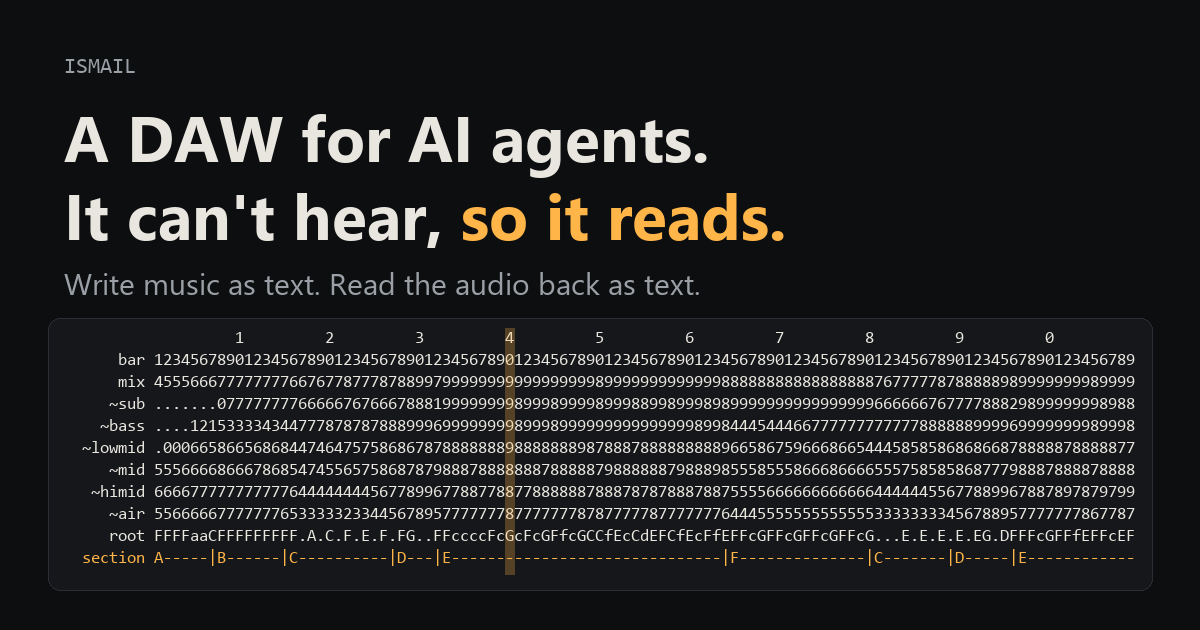
Listen to songs an agent made with it, each shown with the text the agent read while making it. The playhead runs across that text as the song plays.
| song | what it is | |---|---| | Live set: Clash, Poppycock, Mycelium | recorded live: the agent plays three of its songs in full on decks at 150 BPM (orchestral into dubstep into psytrance), each blended into the next, every song re-rendered from its notes | | Tidewater | strings measured from recordings (mimic), piano, taiko and gong; 22 dB from a pianissimo solo cello to the fortissimo tutti | | Mycelium Protocol | psytrance at 145 BPM, sounds fitted to a reference record's drums and bass | | Poppycock | dubstep, one bass voice whose note velocity picks each hit's articulation | | Fantaisie-Impromptu | Chopin on a piano synthesized from measured notes, no samples | | AstraSMB | drum and bass at 174 BPM | | Clash | hybrid orchestral fight cue, every instrument synthesized | | Two Kinds of Tears | solo piano, a minor theme that returns in major | | Bass of Storms | fan remix of Song of Storms as dubstep |

Luigi Manson, made with ismail (fan remix of the Luigi's Mansion theme).
Not a music generator
ismail is not a model that turns a prompt into audio, like Suno. It is a set of tools your own agent uses to write the song as notes, sounds and code, render it, read back what came out, and edit it. That changes what you get:
- Iterative, precise edits. Change one note, one patch, one bar or one fader and re-render; nothing else moves.
- Songs are code. A project file and a build script: git history, diffs, branches and code review work on a track.
- Any sound. Synths, drum synths, samplers, voices written in Python and speech; any sound can become an instrument.
- Local and open. MIT licensed, runs on your machine, no content filter and no music subscription (you bring the agent).
- It improves with your model. The music is the agent's own work, so a stronger model with the same prompt should write a better song.
- It plays live. The same songs, instruments and effects run in real time: the agent loads finished songs on decks and mixes them, jams with you, and changes the music between its turns while it keeps playing. A text-to-song service hands you a finished file; streaming models such as Lyria RealTime steer a style with prompts, but cannot play the exact song you wrote or change one bar of it.
Suno is still better at realistic sung vocals, a polished song from one sentence in under a minute, and genre sound learned from recorded music. And why not Ableton or FL Studio? They were built for a person with ears and a mouse; an agent can press their buttons through bridges but still can't hear what it did. ismail puts everything an agent needs to write and to perceive into compact text, and if something is missing, your agent can add it. More on the showcase page.
What it is
A DAW built to be operated by an AI agent. Everything goes in as text (notes, instrument patches, effect chains, automation) and everything comes back as text: levels, spectra, drum patterns, piano rolls, chords, vowels, song structure, and structured comparisons against a reference track. The agent never needs ears or images to work (a spectrogram PNG is there if you want one).
One set of operations, three ways in:
- MCP server for Claude Code, Cursor or any MCP client:
python -m ismail.mcp_server(stdio, 90 tools) - CLI:
python -m ismail -p <project> <op> [args] - Python:
from ismail import api
Install
Python 3.10 or newer.
git clone https://github.com/newsbubbles/ismail
cd ismail
pip install -e .                      # engine, analysis, CLI, MCP server
pip install -e ".[perceptual]"        # optional: CLAP perceptual metric (torch + transformers, model about 600 MB)
pip install -e ".[separate]"          # optional: demucs stem separation for reference tracks
pip install -e ".[live]"              # optional: play live to your speakers (sounddevice)
If demucs fights your torch install, use pip install --no-deps demucs and then pip install dora-search einops julius lameenc openunmix.
MP3 previews need ffmpeg on your PATH (or set ISMAIL_FFMPEG to the binary).
Runs on Windows, macOS and Linux; CI tests all three on every push. The one OS-specific op is sound_speak (text to speech for vocal samples), which uses the engine the OS already has:
| OS | Engine | Voices |
|---|---|---|
| Windows | SAPI via PowerShell | David, Zira, any installed |
| macOS | say | Samantha, Alex, anything in say -v ? |
| Linux | espeak-ng or espeak | en-us, en+f3 ... (sudo apt install espeak-ng) |
Use it with Claude Code
-
Tools. Open Claude Code in this folder and the bundled
.mcp.jsonregisters the server; the tools show up asmcp__ismail__*. To use ismail from any folder instead:claude mcp add -s user ismail -- python -m ismail.mcp_server -
Skill (recommended).
skills/ismailteaches the agent how to compose with ismail: plan a Session Sheet before writing notes, write a Listening Report after every render, and judge reference matches with the comparison tools instead of by feel. Link it into your skills folder:# macOS / Linux ln -s "$(pwd)/skills/ismail" ~/.claude/skills/ismail# Windows New-Item -ItemType Junction -Path "$env:USERPROFILE\.claude\skills\ismail" -Target "$PWD\skills\ismail" -
Ask for music. For example: "make a 16 bar deep house loop in F minor in songs/demo and render an mp3". The agent calls
guideonce for the conventions (it is a tool and a CLI op), then works through the tools.
Use it with Cursor
-
Tools. Opening this folder in Cursor picks up
.cursor/mcp.json. To use ismail in other projects, add the same entry to~/.cursor/mcp.json:{"mcpServers": {"ismail": {"command": "python", "args": ["-m", "ismail.mcp_server"]}}} -
Skill.
.cursor/rules/ismail.mdcis an agent-requested rule that points Cursor's agent atskills/ismail/SKILL.md. Copy that rule (and theskills/ismailfolder) into another project to use it there.
Any other MCP client works the same way: run python -m ismail.mcp_server over stdio.
Quick start (CLI)
Every tool is also a CLI op. Arguments are key=value pairs (values parsed as JSON when they can be) or one JSON object.
python -m ismail guide                                # read first: workflow and conventions
python -m ismail ops                                  # list operations
python -m ismail help notes_write                     # one op's arguments and docs
python -m ismail -p songs/demo project_new bpm=124 length_bars=8
python -m ismail -p songs/demo track_add name=bass instrument='"preset:acid_bass"'
python -m ismail -p songs/demo notes_write '{"track": "bass", "bar": 1, "notes": "0 E2 0.5 110; 0.5 E3 0.25", "repeat": 8}'
python -m ismail -p songs/demo render stems=true out=v1 mp3=also
python -m ismail -p songs/demo analyze_melody source=track:bass bars=[1,2]
render writes renders/latest.wav (every analysis tool reads it), plus renders/<out>.wav when you name the render. mp3='also' adds renders/<out>.mp3 for listening; mp3='only' writes the named render as mp3 only.
Keep your projects under songs/ (git-ignored) or anywhere else; a project is just a folder.
Concepts
- Project: a folder with
project.json(tempo, grid offset, tracks, buses, master, sound bank, reference) plussounds/,renders/,cache/,history/(undo snapshots) andcomparisons/. - Time: bars are 1-indexed; note times are beats relative to the bar you write at.
offset_secis the time of bar 1, so a project can sit exactly on a reference recording's grid. - Notes:
'<beat> <pitch> <dur> [vel]', one per line or;-separated. Drum and step patterns:pattern_writewith strings likeX...x...X...x...(X 127, x 100, o 70, - 45,_ties). - Instruments: two synth engines. sprite (
"type": "synth"or"sprite": saw, square, pulse, triangle, sine, additive, wavetable and noise oscillators, unison, FM, drive, SVF and ladder filters, envelopes, LFOs, mono glide) is right for synth sounds. mimic ("type": "mimic") plays instruments measured from recordings (see below). Plussampler, drum synths (kick,snare,hat,clap,tom,noise_hit),kit(pitch to instrument map) andcode(a Python voice function for anything else).presets_listhas starting points. - Effects: eq, filter, distortion, bitcrush, compressor (with sidechain), duck, gate, delay, reverb, chorus, flanger, phaser, tremolo/autopan, width, limiter, vocoder, formant, and a guitar rig: fuzz, univibe, amp (tone stack, power stage with sag), cab, rotary speaker, tape, wah. Tracks, buses and the master fader can be automated.
- Voices: engineered instruments kept as Python modules, so a project stores a name instead of code (see below).
- Sound bank: sounds made from any instrument and effect chain (
sound_make), speech (sound_speak), imported files, and averaged events cut from a recording (sound_extract). Bank sounds work as sampler sources, wavetables, vocoder modulators and audio clips. - Undo and batch: every edit snapshots the project (
undo);batchapplies a list of ops atomically.
Voices: instruments as code
Some instruments are easier to write than to patch: a measured grand piano, a dubstep bass whose note velocity picks the articulation, a set of sound effects. These live as voice modules, Python files that define voice(freq, t, vel, gate, sr) and return a mono (n,) or stereo (2, n) array. freq is in Hz, t is an array of seconds from the note start that covers the held time plus the instrument's tail, vel is 0 to 1, gate is how long the note is held in seconds, and sr is the sample rate.
The library is grouped in family folders under ismail/voices/; names stay flat, so a track says "voice": "grand_piano" whatever folder it lives in, and voices_list shows the family.
| family | voice | what it is |
|---|---|---|
| keys | grand_piano | grand piano calibrated from measured notes (partials, decay times, inharmonicity, stereo image, hammer knock, dampers); fn: voice_sym is an undamped sympathetic string |
| keys | additive_piano | a lighter additive piano with no data file |
| strings | violin, cello, contrabass | mimic profiles measured from real recordings (use `{"type": "
Truncated for display — read the full file on GitHub.
Related Skills
Agent-Reach
87.5kGive your AI agent eyes to see the entire internet. Read & search Twitter, Reddit, YouTube, GitHub, Bilibili, XiaoHongShu — one CLI, zero API fees.
headroom
74.2kCompress tool outputs, logs, files, and RAG chunks before they reach the LLM. 20% fewer tokens for coding agents, 60-95% fewer tokens for JSON, same answers. Library, proxy, MCP server.
ruflo
73.7k🌊 The original agent harness. Deploy intelligent multi-player swarms, coordinate autonomous workflows, and build conversational AI systems. Features adaptive memory, self-learning intelligence, federation, vector RAG integration, and native Claude Code / Codex / Hermes and many more Integrated
CowAgent
47.2kOpen-source personal AI assistant & Agent Harness. Plans tasks, runs tools and skills, self-evolves with memory and knowledge. Multi-agent, multi-model, multi-channel. Lightweight, extensible, one-line install.

Languages
Trust signals
From repository metadata: license, adoption, age and documentation. Not a code audit — see the Safety scan above for what the skill file itself contains.