
Rag
🚀 Retrieval Augmented Generation (RAG) with txtai. Combine search and LLMs to find insights with your own data.
Install / Use
/learn @neuml/RagREADME
🚀 RAG with txtai
<p align="center"> <img src="https://raw.githubusercontent.com/neuml/rag/master/images/overview.png"/> </p> <p align="center"> <a href="https://github.com/neuml/rag/releases"> <img src="https://img.shields.io/github/release/neuml/rag.svg?style=flat&color=success" alt="Version"/> </a> <a href="https://github.com/neuml/rag"> <img src="https://img.shields.io/github/last-commit/neuml/rag.svg?style=flat&color=blue" alt="GitHub last commit"/> </a> <a href="https://github.com/neuml/rag/issues"> <img src="https://img.shields.io/github/issues/neuml/rag.svg?style=flat&color=success" alt="GitHub issues"/> </a> </p>This project is a Retrieval Augmented Generation (RAG) Streamlit application backed by txtai.
Retrieval Augmented Generation (RAG) helps generate factually correct content by limiting the context in which a LLM can generate answers. This is typically done with a search query that hydrates a prompt with a relevant context.
This application supports two categories of RAG.
- Vector RAG: Context supplied via a vector search query
- Graph RAG: Context supplied via a graph path traversal query
Quickstart
The two primary ways to run this application are as a Docker container and with a Python virtual environment. Running through Docker is recommended, at least to get an idea of the application's capabilities.
Docker
neuml/rag is available on Docker Hub:
This can be run with the default settings as follows.
docker run -d --gpus=all -it -p 8501:8501 neuml/rag
Python virtual environment
The application can also be directly installed and run. It's recommended that this be run within a Python virtual environment.
pip install -r requirements.txt
Start the application.
streamlit run rag.py
Demo
<p align="center"> <img src="https://raw.githubusercontent.com/neuml/rag/master/images/demo.gif"/> </p>The short video clip above gives a brief overview on this RAG system. It shows a basic vector RAG query. It also shows a Graph RAG query with uploaded data. The following sections cover more on these concepts.
RAG

Traditional RAG or vector RAG runs a vector search to find the top N most relevant matches to a user's input. Those matches are passed to an LLM and the answer is returned.
The query Who created Linux? runs a vector search for the best matching documents in the Embeddings index. Those matches are then placed into a LLM prompt. The LLM prompt is executed and the answer is returned.
Graph RAG
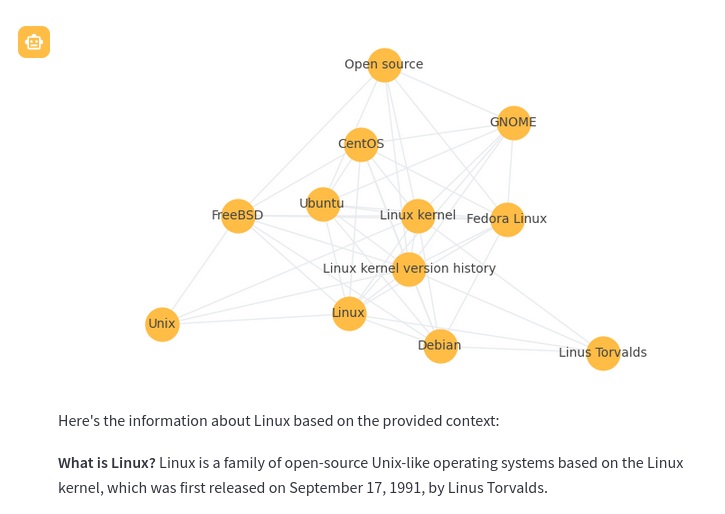
Graph RAG is a new method that uses knowledge or semantic graphs to generate a context. Instead of a vector search, graph path queries are run. Graph RAG in the context of this application supports the following methods to generate context.
-
Graph query with the
gq:prefix. This is a form of graph query expansion. It starts with a vector search to find the top n results. Those results are then expanded using a graph network stored alongside the vector database.gq: Tell me about Linux
-
Graph path query. This query takes a list of concepts and finds the nodes that match closest to those concepts. A graph path traversal then runs to build a context of nodes related to those concepts. The result of this traversal is passed to the LLM as the context.
linux -> macos -> microsoft windows
-
Combination of both. This first runs a graph path query then runs a graph query only within the context of that path traversal.
linux -> macos -> microsoft windows gq: Tell me about Linux
Every Graph RAG query response will also show a corresponding graph to help understand how the query works. Each node in the graph is a section (paragraph). The node nodes are generated with a LLM prompt that applies a topic label at upload time.
Adding data to the index
Regardless of whether the RAG application was a new Embeddings index or an existing one, additional data can be added.
Data can be added as follows.
| Method | |
|:------------------------------------------- |:-------------------------------------- |
| # file path or URL |  |
|
|
| # custom notes and text as a string here! | 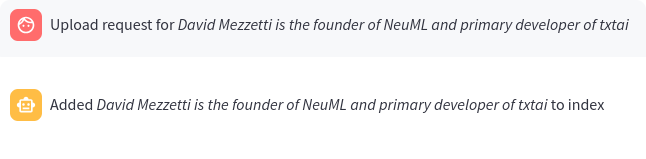 |
|
When a query begins with a # the URL or file is read by the RAG application and loaded into the index. This method also supports loading text directly into the index. For example # txtai is an all-in-one AI framework would create a new entry in the Embeddings database.
Configuration parameters
The RAG application has a number of environment variables that can be set to control how the application behaves.
| Variable | Description | Default Value |
|:----------- |:------------------------------------------- |:----------------------------------- |
| TITLE | Main title of the application | 🚀 RAG with txtai |
| EXAMPLES | List of queries separated by ; | Who created Linux? |
| | | gq: Tell me about Linux |
| | | linux -> macos -> microsoft windows |
| | | linux -> macos -> microsoft windows gq: Tell me about Linux |
| LLM | Path to LLM | Qwen3-4B-Instruct-2507 |
| EMBEDDINGS | Embeddings database path | neuml/txtai-wikipedia-slim |
| MAXLENGTH | Maximum generation length | 2048 for topics, 4096 for RAG |
| STRIPTHINK | Strip thinking text from responses | False |
| CONTEXT | RAG context size | 10 |
| TEXTBACKEND | Text extraction backend | available |
| DATA | Optional directory to index data from | None |
| PERSIST | Optional directory to save index updates to | None |
| TOPICSBATCH | Optional batch size for LLM topic queries | None |
In the application, these settings can be shown by typing :settings.
See the following examples for setting this configuration with the Docker container. When running within a Python virtual environment, simply set these as environment variables.
GPT-OSS
docker run -d --gpus=all -it -p 8501:8501 -e LLM=openai/gpt-oss-20b neuml/rag
GPT-OSS via Ollama
docker run -d --gpus=all -it -p 8501:8501 --add-host=host.docker.internal:host-gateway \
-e LLM=ollama/gpt-oss -e OLLAMA_API_BASE=http://host.docker.internal:11434 \
neuml/rag
GPT-5.1
docker run -d --gpus=all -it -p 8501:8501 -e LLM=gpt-5.1 -e OPENAI_API_KEY=your-api-key neuml/rag
Run with another embeddings index
docker run -d --gpus=all -it -p 8501:8501 -e EMBEDDINGS=neuml/arxiv neuml/rag
Start with an empty embeddings index
docker run -d --gpus=all -it -p 8501:8501 -e EMBEDDINGS= neuml/rag
Build an embeddings index with a local directory of files
docker run -d --gpus=all -it -p 8501:8501 -e DATA=/data/path -v local/path:/data/path neuml/rag
Use the Docling text extraction backend
docker run -d --gpus=all -it -p 8501:8501 -e TEXTBACKEND=docling neuml/rag
Persist embeddings and cache models
docker run -d --gpus=all -it -p 8501:8501 -e DATA=/data/path -e EMBEDDINGS=/data/embeddings \
-e PERSIST=/data/embeddings -e HF_HOME=/data/modelcache -v localdata:/data neuml/rag
See the documentation for the LLM pipeline and Embeddings for more information.
