
Utf8Json
Definitely Fastest and Zero Allocation JSON Serializer for C#(NET, .NET Core, Unity, Xamarin).
Install / Use
/learn @neuecc/Utf8JsonREADME
THIS PROJECT IS ARCHIVED, USE COMMUNITY FORK INSTEAD.
Utf8Json - Fast JSON Serializer for C#


Definitely Fastest and Zero Allocation JSON Serializer for C#(.NET, .NET Core, Unity and Xamarin), this serializer write/read directly to UTF8 binary so boostup performance. And I adopt the same architecture as the fastest binary serializer, MessagePack for C# that I've developed.
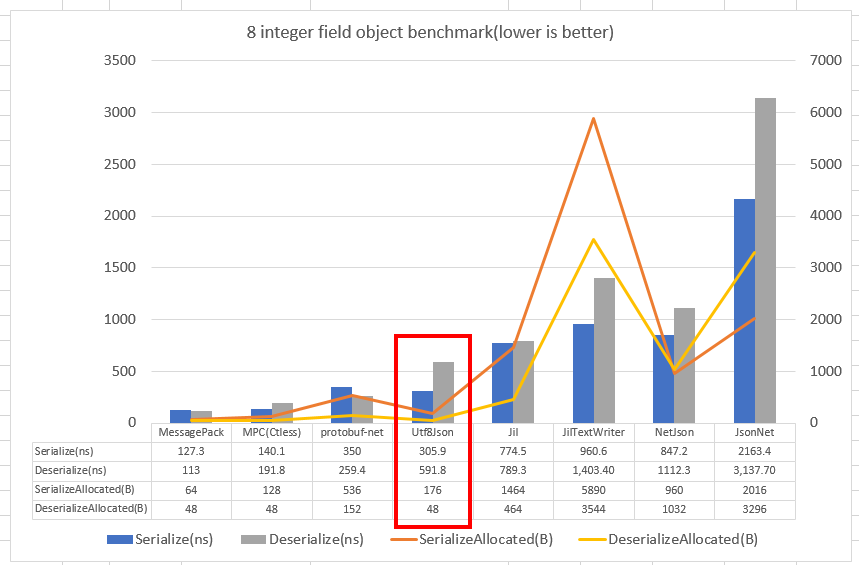
This benchmark is convert object to UTF8 and UTF8 to object benchmark. It is not to string(.NET UTF16), so Jil, NetJSON and Json.NET contains additional UTF8.GetBytes/UTF8.GetString call. Definitely means does not exists encoding/decoding cost. Benchmark code is in sandbox/PerfBenchmark by BenchmarkDotNet.
I've tested more benchmark - Benchmark of Jil vs Utf8Json for test many dataset patterns(borrwed from Jil Benchmark) and three input/output compare(
Object <-> byte[](Utf8), Object <-> Stream(Utf8) and Object <-> String(UTF16)). If target is UTF8(bothbyte[]andStream), Utf8Json wins and memory allocated is extremely small.
Utf8Json does not beat MessagePack for C#(binary), but shows a similar memory consumption(there is no additional memory allocation) and achieves higher performance than other JSON serializers.
The crucial difference is that read and write directly to UTF8 binaries means that there is no overhead. Normaly serialization requires serialize to Stream or byte[], it requires additional UTF8.GetBytes cost or StreamReader/Writer overhead(it is very slow!).
TargetClass obj1;

// Object to UTF8 byte[]
[Benchmark]
public byte[] Utf8JsonSerializer()
{
    return Utf8Json.JsonSerializer.Serialize(obj1, jsonresolver);
}

// Object to String to UTF8 byte[]
[Benchmark]
public byte[] Jil()
{
    return utf8.GetBytes(global::Jil.JSON.Serialize(obj1));
}

// Object to Stream with StreamWriter
[Benchmark]
public void JilTextWriter()
{
    using (var ms = new MemoryStream())
    using (var sw = new StreamWriter(ms, utf8))
    {
        global::Jil.JSON.Serialize(obj1, sw);
    }
}
For example, the OutputFormatter of ASP.NET Core needs to write to Body(Stream), but using Jil's TextWriter overload is slow. (This not means Jil is slow, for example StreamWriter allocate many memory(char[1024] and byte[3075]) on constructor (streamwriter.cs#L203-L204) and other slow features unfortunately).
// ASP.NET Core, OutputFormatter
public class JsonOutputFormatter : IOutputFormatter //, IApiResponseTypeMetadataProvider
{
    const string ContentType = "application/json";
    static readonly string[] SupportedContentTypes = new[] { ContentType };

    public Task WriteAsync(OutputFormatterWriteContext context)
    {
        context.HttpContext.Response.ContentType = ContentType;

        // Jil, normaly JSON Serializer requires serialize to Stream or byte[].
        using (var writer = new StreamWriter(context.HttpContext.Response.Body))
        {
            Jil.JSON.Serialize(context.Object, writer, _options);
            writer.Flush();
            return Task.CompletedTask;
        }

        // Utf8Json
        // Utf8Json.JsonSerializer.NonGeneric.Serialize(context.ObjectType, context.HttpContext.Response.Body, context.Object, resolver);
    }
}
The approach of directly write/read from JSON binary is similar to corefxlab/System.Text.Json and corefxlab/System.Text.Formatting. But it is not yet finished and not be general serializer.
Corefxlab has UTF8String and C# discussing UTF8String Constants but maybe it is far future.
Install and QuickStart
The library provides in NuGet except for Unity. Standard library availables for .NET Framework 4.5 and .NET Standard 2.0.
Install-Package Utf8Json
And official Extension Packages for support other library(ImmutableCollection) or binding for framework(ASP.NET Core MVC).
Install-Package Utf8Json.ImmutableCollection
Install-Package Utf8Json.UnityShims
Install-Package Utf8Json.AspNetCoreMvcFormatter
NuGet page links - Utf8Json, Utf8Json.ImmutableCollection, Utf8Json.UnityShims, Utf8Json.AspNetCoreMvcFormatter
for Unity, you can download from releases page. There providing .unitypackage. Unity support details, see Unity section.
You can find third-party extension package like Utf8Json.FSharpExtensions for F# types, NServiceBus.Utf8Json or others.
QuickStart, you can call Utf8Json.JsonSerializer.Serialize/Deserialize.
var p = new Person { Age = 99, Name = "foobar" };

// Object -> byte[] (UTF8)
byte[] result = JsonSerializer.Serialize(p);

// byte[] -> Object
var p2 = JsonSerializer.Deserialize<Person>(result);

// Object -> String
var json = JsonSerializer.ToJsonString(p2);

// Write to Stream
JsonSerializer.Serialize(stream, p2);
In default, you can serialize all public members. You can customize serialize to private, exclude null, change DateTime format(default is ISO8601), enum handling, etc. see the Resolver section.
Performance of Serialize
This image is what code is generated when object serializing.

// Disassemble generated serializer code.
public sealed class PersonFormatter : IJsonFormatter<Person>
{
    private readonly byte[][] stringByteKeys;

    public PersonFormatter()
    {
        // pre-encoded escaped string byte with "{", ":" and ",".
        this.stringByteKeys = new byte[][]
        {
            JsonWriter.GetEncodedPropertyNameWithBeginObject("Age"), // {\"Age\":
            JsonWriter.GetEncodedPropertyNameWithPrefixValueSeparator("Name") // ,\"Name\":
        };
    }

    public sealed Serialize(ref JsonWriter writer, Person person, IJsonFormatterResolver jsonFormatterResolver)
    {
        if (person == null) { writer.WriteNull(); return; }

        // WriteRawX is optimize byte->byte copy when we know src size.
        UnsafeMemory64.WriteRaw7(ref writer, this.stringByteKeys[0]);
        writer.WriteInt32(person.Age); // itoa write directly to avoid ToString + UTF8 encode
        UnsafeMemory64.WriteRaw8(ref writer, this.stringByteKeys[1]);
        writer.WriteString(person.Name);

        writer.WriteEndObject();
    }

    // public unsafe Person Deserialize(ref JsonReader reader, IJsonFormatterResolver jsonFormatterResolver)
}
Object to JSON's main serialization cost is write property name. Utf8Json create cache at first and after that only do memory copy. Optimize part1, concatenate "{", ":" and "." to cached propertyname. Optimize part2, use optimized custom memory copy method(see: UnsafeMemory.cs). Normally memory copy is used Buffer.BlockCopy but it has some overhead when target binary is small enough, releated to dotnet/coreclr - issue #9786 Optimize Buffer.MemoryCopy and dotnet/coreclr - Add a fast path for byte[] to Buffer.BlockCopy #3118. Utf8Json don't use Buffer.BlockCopy and generates length specialized copy code that can reduce branch cost.
Number conversion is often high cost. If target encoding is UTF8 only, we can use itoa algorithm so avoid int.ToString and UTF8 encode cost. Especialy double-conversion, Utf8Json ported google/double-conversion algorithm, it is fast dtoa and atod works.
Other optimize techniques.
- High-level API uses internal memory pool, don't allocate working memory under 64K
- Struct JsonWriter does not allocate any more and write underlying byte[] directly, don't use TextWriter
- Avoid boxing all codes, all platforms(include Unity/IL2CPP)
- Heavyly tuned dynamic IL code generation, it generates per option so reduce option check: see:DynamicObjectResolver.cs
- Call Primitive API directly when IL code generation knows target is primitive
- Getting cached generated formatter on static generic field(don't use dictionary-cache because lookup is overhead)
- Don't use
IEnumerable<T>abstraction on iterate collection, speciali
