FIBR3DEmul
Custom 3 and 5 axis FDM process simulator.
Install / Use
/learn @neuebot/FIBR3DEmulREADME
FIBR3DEmul - a Quick Start guide
FIBR3DEmul—an open-access simulation solution for 3D printing processes of FDM machines with 3+ actuated axes
The FIBR3DEmul software was created to simulate the FDM process of a printer with 3+ moving axis. Its package contains,
- a G-Code parser application
- a V-REP/CoppeliaSim plugin
- a V-REP/CoppeliaSim scenario with a 5-axis printer
- G-Code example files
For more information about the simulator please refer to the published article at https://link.springer.com/article/10.1007/s00170-019-04713-y.
This solution was primarily developed for Windows machines, mainly due to the parser that was created in C#, although you can probably find a way to make it work in Linux OS. The CoppeliaSim simulator runs both in Windows or Linux OS and so you should not have any problem working on either.
Before we create a working setup make sure you have the following software installed in your machine:
- CoppeliaSim minimum required version 4.0.0
If you want to compile the binaries from the source code you need the additional software:
- CMake
- Visual Studio
- Boost minimum required version 1.6.4
- Eigen minimum version 3
Installing the CMake and VStudio software should be straightforward. To install Boost and Eigen libraries refer to their getting started pages,
- https://www.boost.org/doc/libs/1_74_0/more/getting_started/windows.html
- http://eigen.tuxfamily.org/dox/GettingStarted.html
The Parser
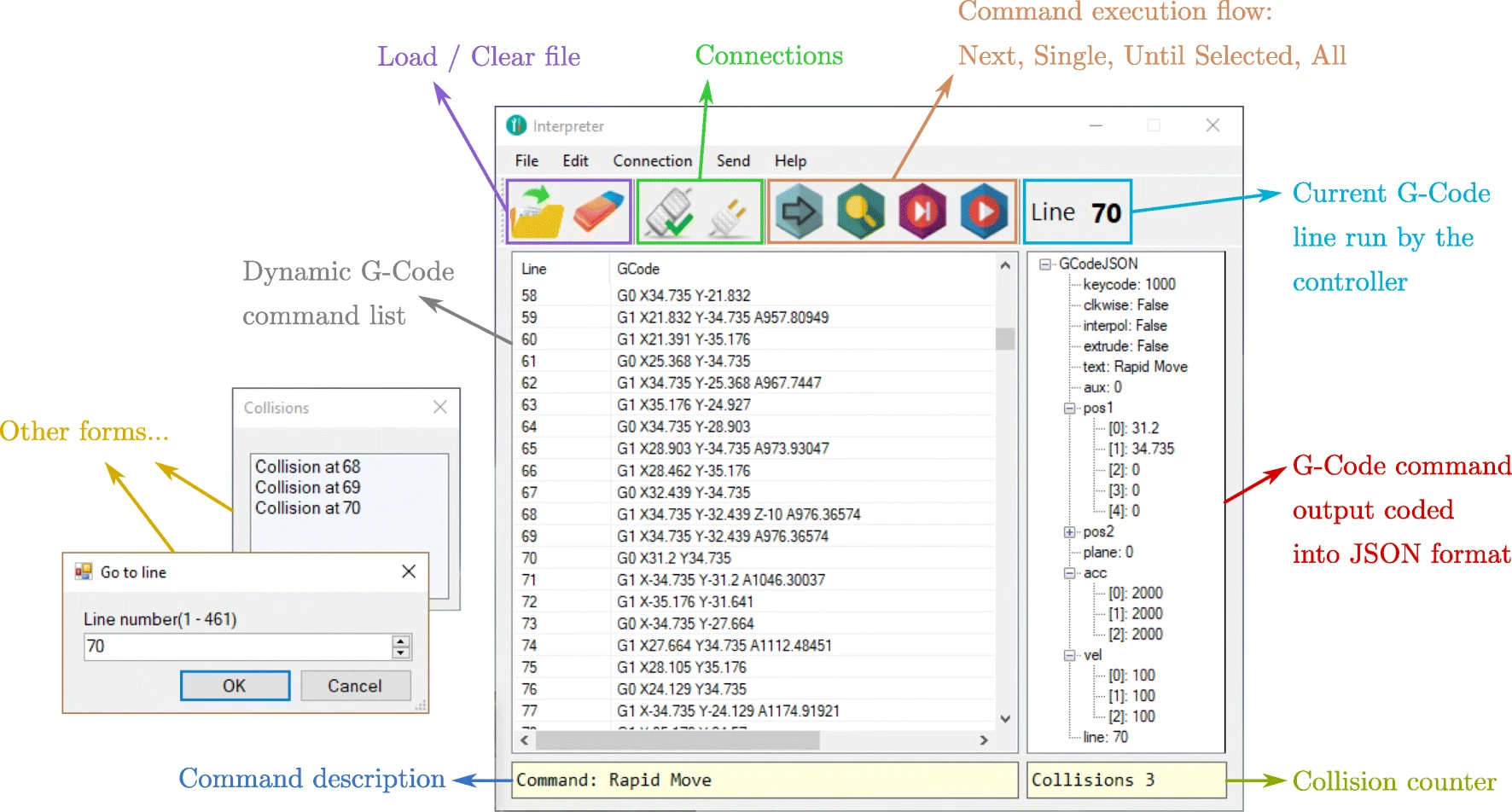
The parser source code and Visual Studio solution can be found at the gcode_interpreter folder. The executable can be found at the gcode_interpreter\GCodeInterpreter\bin\[Debug/Release] folder.
For those who want to compile and/or debug the solution, you have to launch the file GCodeInterpreter.sln. Then you can just build the solution to generate your executable or alternatively run the program in debug mode if you want to introspect how it interacts with the simulator.
The Plugin
The plugin source code can be found at the v-rep_plugin folder.
The dll files for both Debug and Release can be found at v-rep_plugin\build\[Debug/Release].
Instead, if you want to compile your own version, you can generate the VStudio solution using the CMakelists.txt file. :warning: Make sure the Boost and Eigen libraries are found when generating the solution with CMake.
Putting all together
First, let us place the plugin at the CoppeliaSim root folder.
- Copy the
simExtFIBR3D.dllfrom thev-rep_plugin\build\[Debug/Release]folder - Paste it in the CoppeliaSim root folder, which in your machine should be at the
%ProgramFiles%\CoppeliaRobotics\[CoppeliaSimEdu/CoppeliaSimPro]folder. - Launch the CoppeliaSim and go to Tools > User settings and uncheck the Hide console window
- You should see a command line window with information about the simulator launch, make sure that the following lines appear:
Plugin 'FIBR3D': loading...
Plugin 'FIBR3D': load succeeded.

- Open the
example_scene.ttt - Start the simulation
- Launch the GCodeInterpreter
- Load your G-Code file.
- Start your simulation! :smile:
READMEs cannot host large gifs... :unamused: Here is a link to a quick launch example -> https://i.imgur.com/UKYKbTL.gif