
Shconfparser
It's a Network configuration parser, which translates the show outputs of cisco and other vendors. Show config parser is unique tool of translates show commands into tree, table, data formats
Install / Use
/learn @network-tools/ShconfparserREADME
Show Configuration Parser (shconfparser)




🚀 Version 3.0 - Modern Python library (3.8+) with uv support! See docs/ for guides.
Introduction
Show configuration parser (shconfparser) is a Python library for parsing network device configurations. This library examines the config and breaks it into a set of parent and clild relationships.
shconfparser is a vendor independent library where you can parse the following formats:
- Tree structure
i.e. show running - Table structure
i.e. show ip interface - Data
i.e. show version
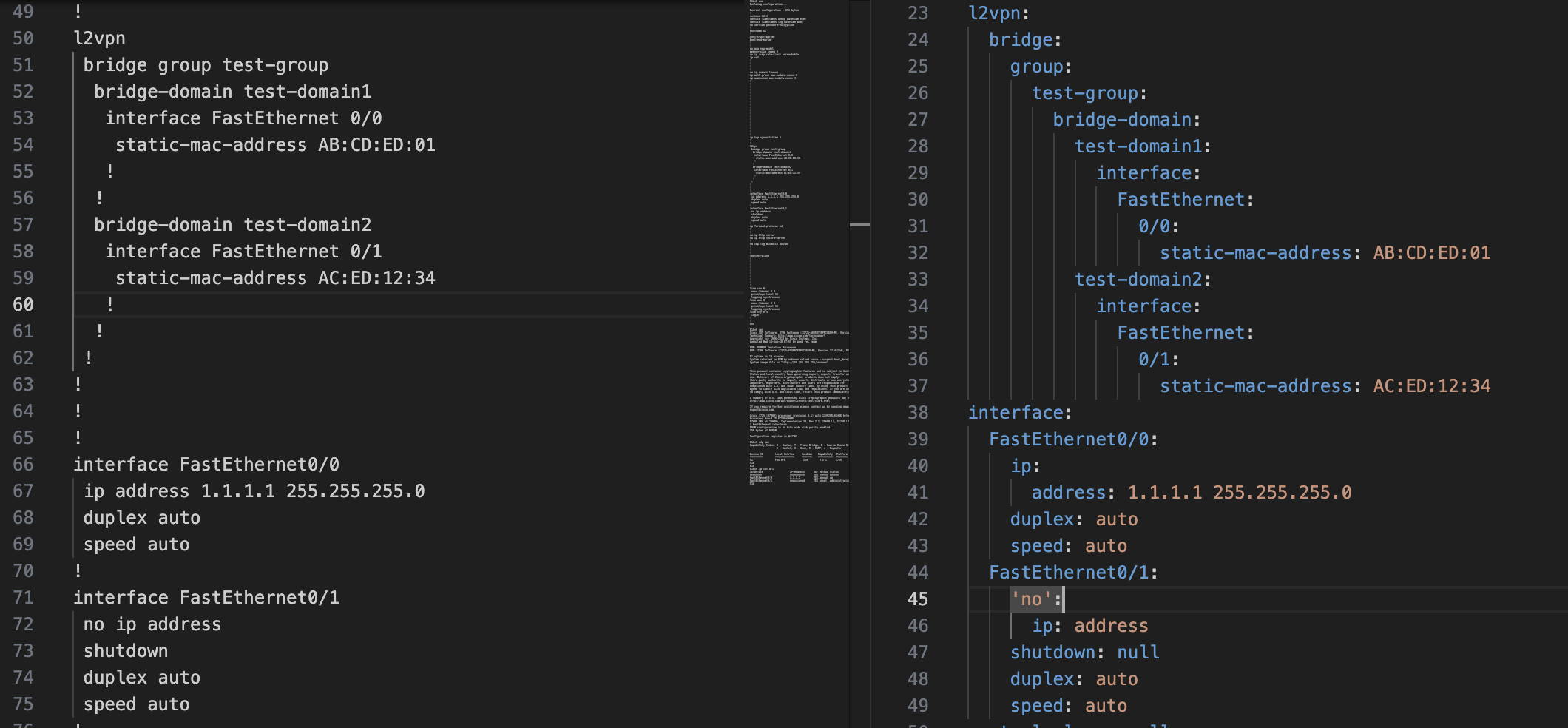
Modern Format (JSON/YAML) - Hierarchical Structure
 <br/>
<br/>
<br/>
<br/>
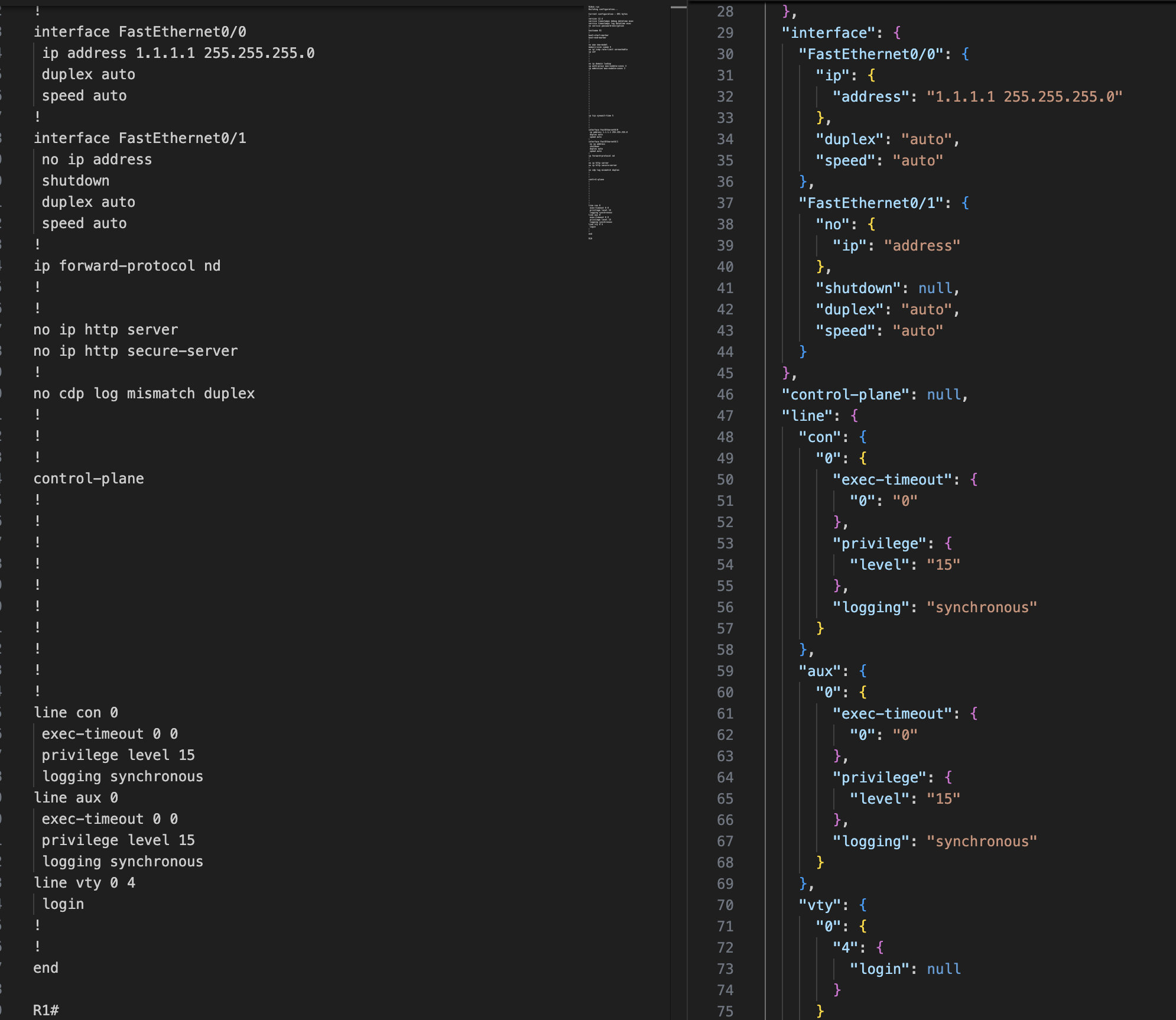
Legacy Format - OrderedDict with Full Keys
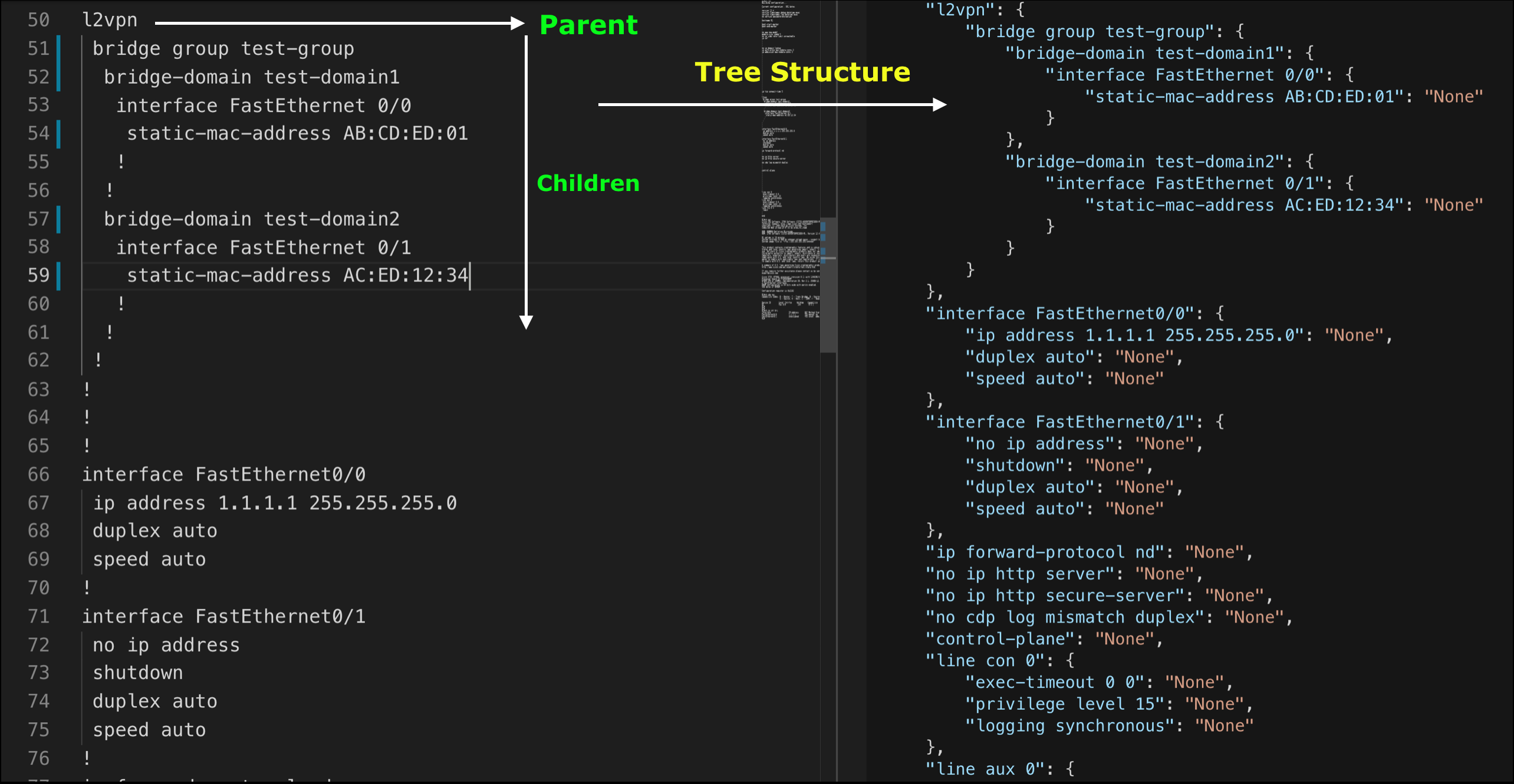
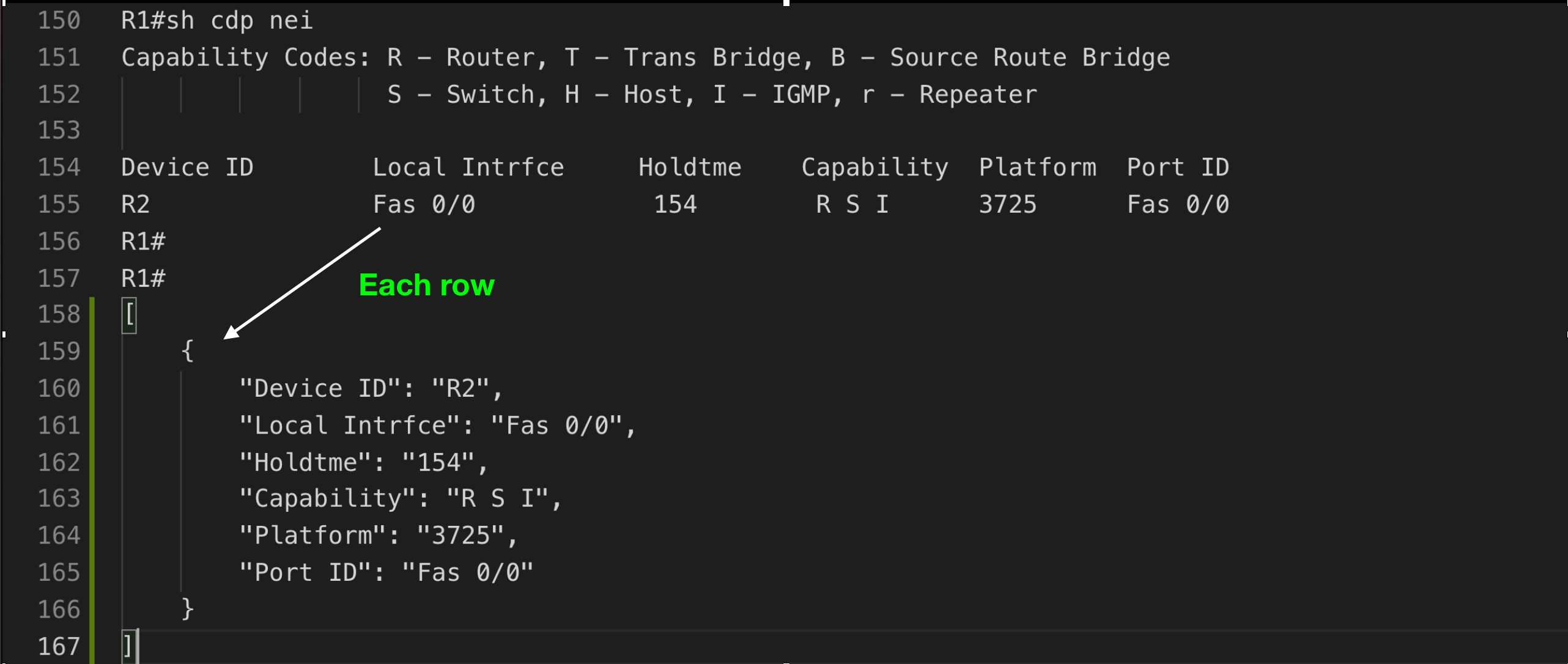
Table Structure
Key Features
✨ Zero Dependencies - Uses only Python standard library
⚡ Fast - Modern tooling with uv package manager support
🔒 Type Safe - Full type hints and py.typed marker
🎯 Vendor Independent - Works with any network device configuration
📊 Multiple Formats - Parse trees, tables, and unstructured data
📄 Format Flexibility - Output as JSON or YAML structures
🔍 XPath Queries - NSO-style queries with context tracking (NEW!)
🧪 Well Tested - 80%+ code coverage, tested on Python 3.8-3.13
Quick Start
Installation
pip install shconfparser
Faster with uv:
curl -LsSf https://astral.sh/uv/install.sh | sh
uv pip install shconfparser
Basic Usage
Modern format (recommended - hierarchical structure with XPath):
from shconfparser.parser import Parser

# Use modern format for cleaner output and XPath support
p = Parser(output_format='json')  # or 'yaml'
data = p.read('running_config.txt')

# Parse directly (no split needed for single show running command)
tree = p.parse_tree(data)
print(p.dump(tree, indent=2))

# Query with XPath
result = p.xpath('/hostname')
print(result.data)  # 'R1'
p = Parser()  # Defaults to 'legacy' format
# or explicitly: Parser(output_format='legacy')
data = p.read('running_config.txt')
tree = p.parse_tree(data)
print(p.dump(tree, indent=4))
# Returns OrderedDict with full command strings as keys
# Example: {'interface FastEthernet0/0': {...}}
Multiple show commands in one file:
from shconfparser.parser import Parser

p = Parser(output_format='json')  # Modern format recommended
data = p.read('multiple_commands.txt')  # Contains multiple show outputs
data = p.split(data)  # Split into separate commands
data.keys()
# odict_keys(['running', 'version', 'cdp_neighbors', 'ip_interface_brief'])

# Now parse each command separately
data['running'] = p.parse_tree(data['running'])

headers = ['Device ID', 'Local Intrfce', 'Holdtme', 'Capability', 'Platform', 'Port ID']
data['cdp_neighbors'] = p.parse_table(data['cdp_neighbors'], header_names=headers)

print(p.dump(data['running'], indent=2))
p = Parser()
p.read('multiple_commands.txt')
p.split(p.r.data)

# Access split data from internal property
data = p.s.shcmd_dict
data['running'] = p.parse_tree(data['running'])
print(p.dump(data['running'], indent=4))
Usage Examples
Check Library Version
import shconfparser
print(shconfparser.__version__)  # '3.0.0'
Parse Tree Structure (show running-config)
from shconfparser.parser import Parser

p = Parser()

# Single command file - parse directly
data = p.read('running_config.txt')
tree = p.parse_tree(data)  # No split() needed

# Access nested configuration
print(p.dump(tree['interface FastEthernet0/0'], indent=2))
# {
#   "ip address 1.1.1.1 255.255.255.0": null,
#   "duplex auto": null,
#   "speed auto": null
# }
Parse Table Structure (show cdp neighbors)
# Single command file
p = Parser()
data = p.read('cdp_neighbors.txt')

# Parse table directly (no split needed)
headers = ['Device ID', 'Local Intrfce', 'Holdtme', 'Capability', 'Platform', 'Port ID']
cdp_data = p.parse_table(data, header_names=headers)

# Access as list of dictionaries
for neighbor in cdp_data:
    print(f"{neighbor['Device ID']} on {neighbor['Local Intrfce']}")
# Output: R2 on Fas 0/0
Parse Unstructured Data (show version)
# Single command file
p = Parser()
data = p.read('show_version.txt')

# Parse show version output directly
version_data = p.parse_data(data)  # No split() needed

# Search for specific information
import re
for line in version_data.keys():
    if re.search(r'IOS.*Version', line):
        print(line)
# Output: Cisco IOS Software, 3700 Software (C3725-ADVENTERPRISEK9-M), Version 12.4(25d)...
Search in Tree
# Search for all interfaces
pattern = r'interface\s+\w+.*'
matches = p.search.search_all_in_tree(pattern, tree)

for key, value in matches.items():
    print(value)
# interface FastEthernet0/0
# interface FastEthernet0/1
Search in Table
# Find specific device in CDP table
pattern = r'R\d+'
match = p.search.search_in_table(pattern, cdp_data, 'Device ID')
print(match)
# {'Device ID': 'R2', 'Local Intrfce': 'Fas 0/0', ...}
Output Format Selection
Parse configurations in legacy (OrderedDict) or modern (dict) hierarchical structures:
from shconfparser.parser import Parser

# Legacy format (backward compatible - OrderedDict with full keys)
p = Parser()  # Defaults to 'legacy'
# or explicitly: Parser(output_format='legacy')
data = p.read('running_config.txt')
tree = p.parse_tree(data)  # Returns OrderedDict
print(type(tree))  # <class 'collections.OrderedDict'>
# Example: {'interface FastEthernet0/0': {'ip address 1.1.1.1': ''}}

# Modern formats: JSON or YAML (hierarchical dict structure)
p = Parser(output_format='json')  # Hierarchical dict
# or: Parser(output_format='yaml')  # Same structure, different name
data = p.read('running_config.txt')
tree = p.parse_tree(data)  # Returns dict
print(type(tree))  # <class 'dict'>
# Example: {'interface': {'FastEthernet0/0': {'ip': {'address': '1.1.1.1'}}}}

# Override format per call
p = Parser()  # Legacy by default
tree_legacy = p.parse_tree(data)  # OrderedDict
tree_json = p.parse_tree(data, format='json')  # dict
Format Comparison:
# Legacy format - preserves exact CLI structure (OrderedDict)
{
    "interface FastEthernet0/0": {
        "ip address 1.1.1.1 255.255.255.0": "",
        "duplex auto": ""
    }
}

# Modern formats (json/yaml) - hierarchical and programmatic (dict)
{
    "interface": {
        "FastEthernet0/0": {
            "ip": {
                "address": "1.1.1.1 255.255.255.0"
            },
            "duplex": "auto"
        }
    }
}
Benefits of modern formats (json/yaml):
- Cleaner hierarchy for nested configurations
- Better for programmatic access
- XPath query support
- Easier to convert to actual JSON/YAML files
- Natural structure for complex configs
XPath Queries (New in 3.0!)
Query YAML-formatted configurations using NSO-style XPath with optional context tracking:
from shconfparser.parser import Parser

# XPath requires YAML format
p = Parser(output_format='yaml')
data = p.read('running_config.txt')
tree = p.parse_tree(data)

# Simple queries
result = p.xpath('/hostname')
print(result.data)  # 'R1'

# Wildcards - find all interface duplex settings
result = p.xpath('/interface/*/duplex')
print(result.matches)  # ['auto', 'auto']
print(result.count)    # 2

# Predicates with slashes (network interface names)
result = p.xpath('/interface[FastEthernet0/0]/duplex')
print(result.data)  # 'auto'

# Recursive search - find anywhere in tree
result = p.xpath('//duplex')
print(result.matches)  # ['auto', 'auto']

# Predicate wildcards
result = p.xpath('/interface[FastEthernet*]/ip/address')
print(result.data)  # '1.1.1.1 255.255.255.0'
Context Options - Solve the "which interface?" problem:
# Problem: Can't identify source with wildcards
result = p.xpath('/interface/*/duplex')
print(result.matches)  # ['auto', 'auto'] - Which interface?

# Solution 1: context='none' (default - just values)
result = p.xpath('/
Related Skills
node-connect
352.9kDiagnose OpenClaw node connection and pairing failures for Android, iOS, and macOS companion apps
frontend-design
111.5kCreate distinctive, production-grade frontend interfaces with high design quality. Use this skill when the user asks to build web components, pages, or applications. Generates creative, polished code that avoids generic AI aesthetics.
openai-whisper-api
352.9kTranscribe audio via OpenAI Audio Transcriptions API (Whisper).
qqbot-media
352.9kQQBot 富媒体收发能力。使用 <qqmedia> 标签,系统根据文件扩展名自动识别类型(图片/语音/视频/文件)。
