
ClockMoe
A digital clock for Windows desktop. Rainmeter skin.
Install / Use
/learn @nek7u/ClockMoeREADME
<!-- https://guides.github.com/features/mastering-markdown/ -->
Changelog



ClockMoe
A digital clock skin for Rainmeter.
Rainmeter is a desktop customization tool for Windows.
https://forum.rainmeter.net/viewtopic.php?t=35913
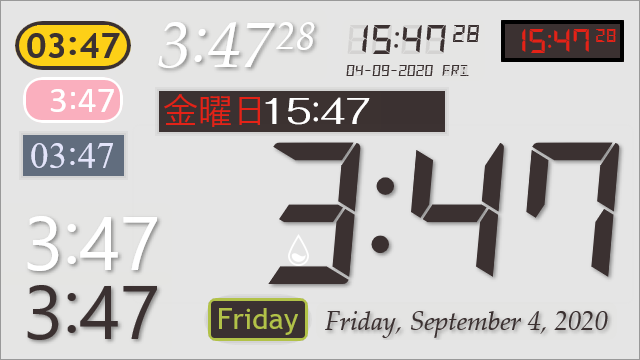
Features
- Digital clock for Windows desktop. Rainmeter skin.
- Synchronized with the Windows system clock.
- 12-hour/24-hour clock settings.
Download
- ClockMoe_20210203.rmskin (263 KB, github.com)
SHA25646506a625c1c42f7faadea22a717bd0b34b32257e1e7634c9607d04ed51f0d2a
Changelog (YYYY-MM-DD)
- 2021-02-03
- Fixed a wrong code in the context menu files.
- 2021-01-19
- Open
https://time.is/in a browser by double-clicking the skin.
- Open
- 2020-12-23
- Fixed Leading zero setting doesn't be applied immediately.
- Fixed Text padding.
- 2020-09-09
- Changed text padding, text shadow, etc.
- 2020-09-04
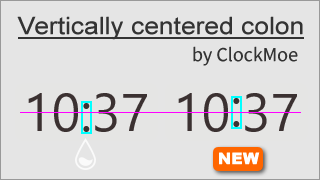
- Applied a vertically centered colon.
- 2020-09-01
- Added Date skin and Day of the Week skin.
- 2020-08-28
- Added Skin.ini, available some fonts included with Windows.
- 2020-08-25
- Fixed wrong code about "Display seconds".
- 2020-08-24
- Initial release.
Install & Activate the skin
- If you don't have Rainmeter installed, download and install the Rainmeter application first.
- Double-click the downloaded ClockMoe_xxxx.rmskin and [Install].
- Click the Rainmeter icon at the bottom-right of desktop.
- [Manage Rainmeter] window > [Skins] tab
- Select the ClockMoe\Digital\Skin.ini and [Load]
Usage
- Right-click the skin to access the option settings.
- Mouse wheel over the skin to change the size.
- Middle-click to change the clock style.
- Double-click to open
https://time.is/<default> in a browser.
Credits
- DSEG Font Family v0.46(2020-03-15) by keshikan
- Lua script for synchronized with os clock, millisecond, T-Minus by killall-q
- Advanced context menus by jsmorley
View on GitHub80/100

Security Score
Audited on Mar 3, 2026
No findings