
Nanoblog
Open source microblog with buffering and Twitter crossposting
Install / Use
/learn @nanoblog/NanoblogREADME
Nanoblog - open source microblog with scheduled posts and Twitter crossposting
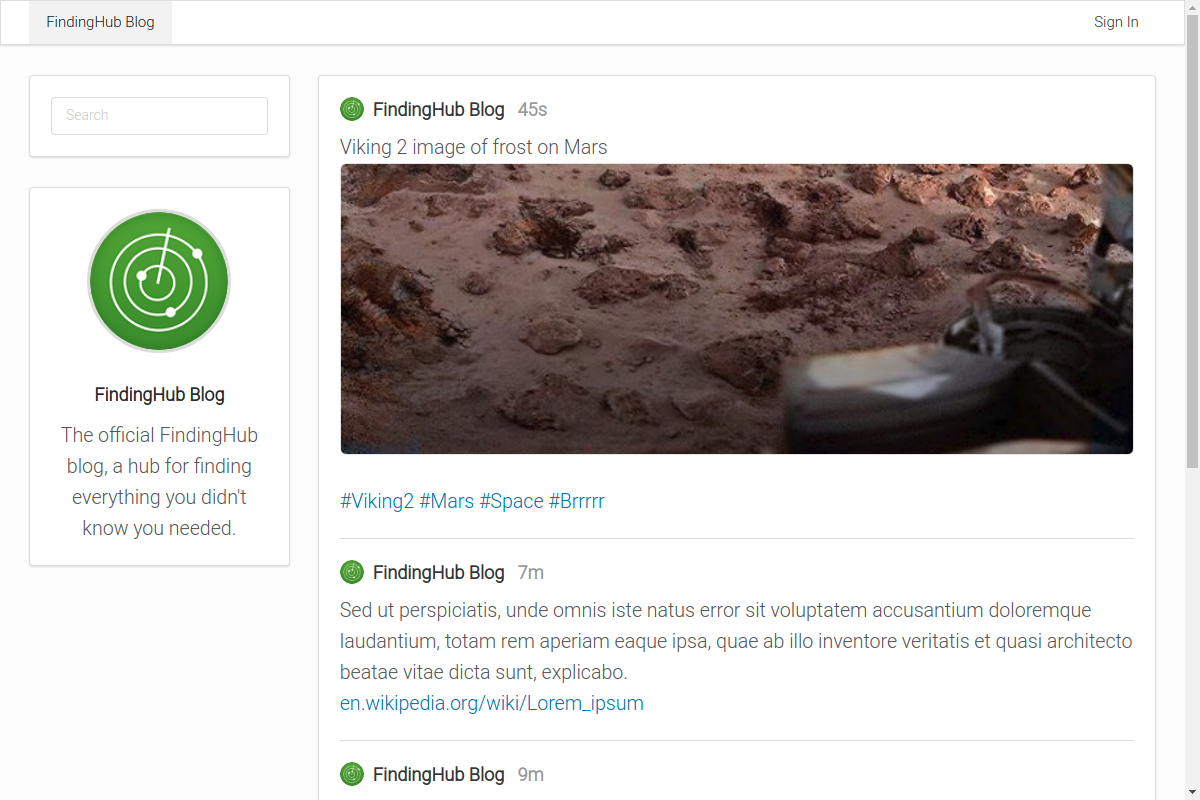
Nanoblog is a simple and professional blog with a 280 character limit that supports crossposting to your Twitter account. Posts can also be buffered for automatic publication on a selected schedule to keep your blog and Twitter account fresh.
After adding Nanoblog, start writing blog posts, creating threads, and crossposting to Twitter by connecting your account.
Features
- Blogging on Easy Mode
- 280 character limit makes blogging accessible to everyone and threading makes it possible to write more when desired.
- Scheduled Posts
- Add posts to your queue to automatically publish on a selected schedule.
- Twitter Crossposting
- Add your Twitter account to enable crossposting to your timeline.
- Threaded Posts AKA tweetstorms
- Click the “Add another update” button to enable thread posting.
- Web Analytics
- Add javascript tracking code to your blog posts for web analytics.
- Single Sign-On (SSO) with SAML
- Support for SAML providers like G Suite and Okta.
Run Nanoblog on Portal Cloud
Portal Cloud is a hosting service that enables anyone to run open source cloud applications.
Sign up for Portal Cloud and get $15 free credit.
Run Nanoblog on a VPS
Running Nanoblog on a VPS is designed to be as simple as possible.
- Public Docker image
- Single static Go binary with assets bundled
- Automatic TLS using Let's Encrypt
- Redirects http to https
- No database required
- Works with a reverse proxy or standalone.
1. Get a server
Recommended Specs
- Type: VPS or dedicated
- Distribution: Ubuntu 16.04 (Xenial)
- Memory: 512MB or greater
2. Add a DNS record
Create a DNS record for your domain that points to your server's IP address.
Example: nanoblog.example.com A 172.x.x.x
3. Enable Let's Encrypt
Nanoblog runs a TLS ("SSL") https server on port 443/tcp. It also runs a standard web server on port 80/tcp to redirect clients to the secure server. Port 80/tcp is required for Let's Encrypt verification.
Requirements
- Your server must have a publicly resolvable DNS record.
- Your server must be reachable over the internet on ports 80/tcp and 443/tcp.
Usage
Example usage:
# Download the nanoblog binary.
$ sudo wget -O /usr/bin/nanoblog https://github.com/nanoblog/nanoblog/raw/master/nanoblog-linux-amd64

# Make it executable.
$ sudo chmod +x /usr/bin/nanoblog

# Allow it to bind to privileged ports 80 and 443.
$ sudo setcap cap_net_bind_service=+ep /usr/bin/nanoblog

$ nanoblog --http-host nanoblog.example.com
Arguments
  -backlink string
        backlink (optional)
  -cpuprofile file
        write cpu profile to file
  -datadir string
        data dir (default "/data")
  -debug
        debug mode
  -help
        display help and exit
  -http-addr string
        HTTP listen address (default ":80")
  -http-host string
        HTTP host (required)
  -letsencrypt
        enable TLS using Let's Encrypt on port 443 (default true)
  -memprofile file
        write mem profile to file
  -version
        display version and exit
Run as a Docker container
The official image is nanoblog/nanoblog.
Follow the official Docker install instructions: Get Docker CE for Ubuntu
Make sure to change the --env NANOBLOG_HTTP_HOST to your publicly accessible domain name.
# Your data directory must be bind-mounted as `/data` inside the container using the `--volume` flag.
# Create a data directoy
$ mkdir /data

docker create \
    --name nanoblog \
    --restart always \
    --volume /data:/data \
    --network host \
    --env NANOBLOG_HTTP_HOST=nanoblog.example.com \
    nanoblog/nanoblog:latest

$ sudo docker start nanoblog

$ sudo docker logs nanoblog

<log output>
Updating the container image
Pull the latest image, remove the container, and re-create the container as explained above.
# Pull the latest image
$ sudo docker pull nanoblog/nanoblog

# Stop the container
$ sudo docker stop nanoblog

# Remove the container (data is stored on the mounted volume)
$ sudo docker rm nanoblog

# Re-create and start the container
$ sudo docker create ... (see above)
Help / Reporting Bugs
Email support@portal.cloud
Related Skills
node-connect
347.2kDiagnose OpenClaw node connection and pairing failures for Android, iOS, and macOS companion apps
frontend-design
108.0kCreate distinctive, production-grade frontend interfaces with high design quality. Use this skill when the user asks to build web components, pages, or applications. Generates creative, polished code that avoids generic AI aesthetics.
openai-whisper-api
347.2kTranscribe audio via OpenAI Audio Transcriptions API (Whisper).
qqbot-media
347.2kQQBot 富媒体收发能力。使用 <qqmedia> 标签,系统根据文件扩展名自动识别类型(图片/语音/视频/文件)。
