
Graphview
Flutter GraphView is used to display data in graph structures. It can display Tree layout, Directed and Layered graph. Useful for Family Tree, Hierarchy View.
Install / Use
/learn @nabil6391/GraphviewREADME
GraphView
Get it from


Flutter GraphView is used to display data in graph structures. It can display Tree layout, Directed and Layered graph. Useful for Family Tree, Hierarchy View.
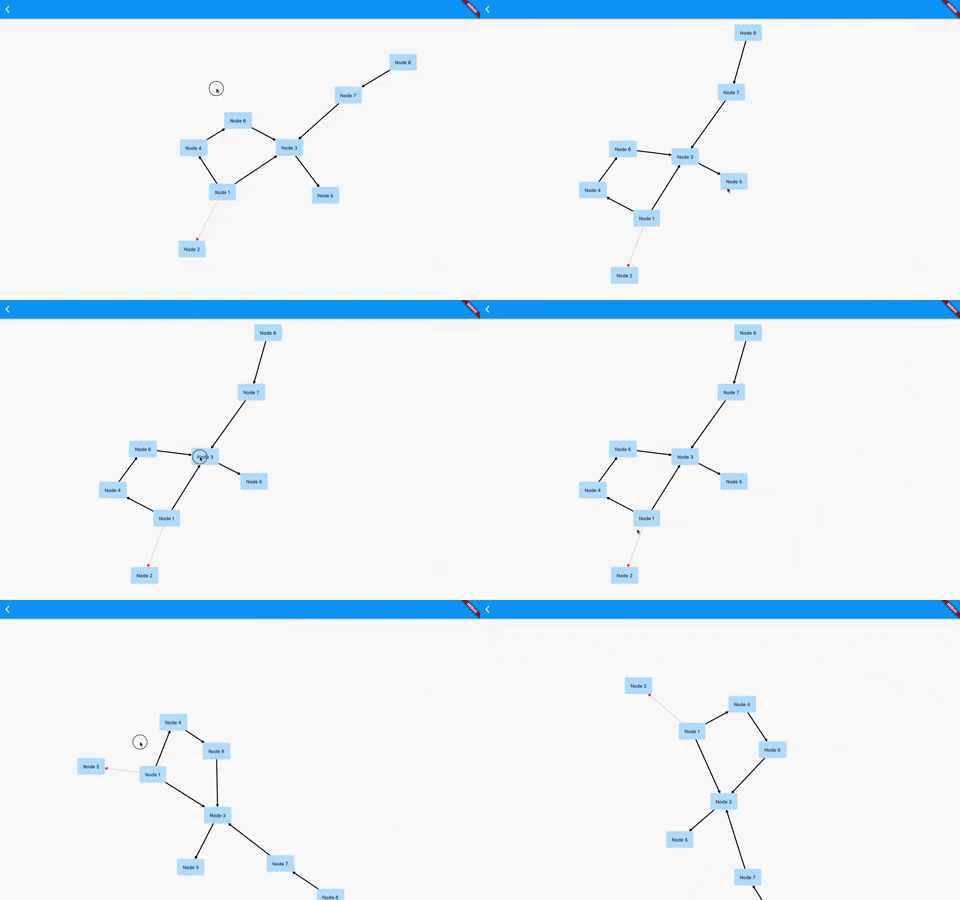
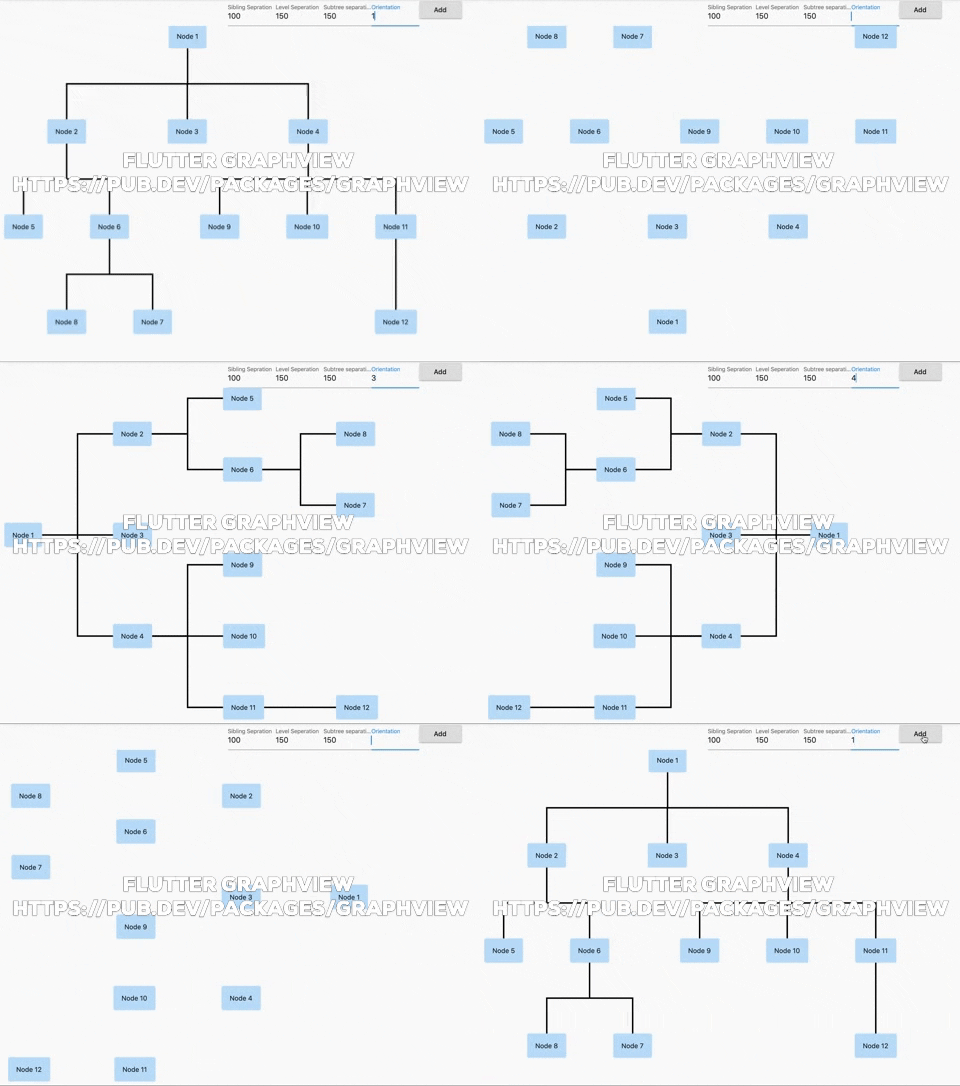

Overview
The library is designed to support different graph layouts and currently works excellent with small graphs. It now includes advanced features like node animations, expand/collapse functionality, and automatic camera positioning.
You can have a look at the flutter web implementation here: http://graphview.surge.sh/
Features
- Multiple Layout Algorithms: Tree, Directed Graph, Layered Graph, Balloon, Circular, Radial, Tidier Tree, and Mindmap layouts
- Node Animations: Smooth expand/collapse animations with customizable duration
- Interactive Navigation: Jump to nodes, zoom to fit, auto-centering capabilities
- Node Expand/Collapse: Hierarchical node visibility control with animated transitions
- Customizable Rendering: Custom edge renderers, paint styling, and node builders
- Touch Interactions: Pan, zoom, and tap handling with InteractiveViewer integration
Layouts
Tree
Uses Walker's algorithm with Buchheim's runtime improvements (BuchheimWalkerAlgorithm class). Supports different orientations. All you have to do is using the BuchheimWalkerConfiguration.orientation with either ORIENTATION_LEFT_RIGHT, ORIENTATION_RIGHT_LEFT, ORIENTATION_TOP_BOTTOM and
ORIENTATION_BOTTOM_TOP (default). Furthermore parameters like sibling-, level-, subtree separation can be set.
Useful for: Family Tree, Hierarchy View, Flutter Widget Tree
Tidier Tree
An improved tree layout algorithm (TidierTreeLayoutAlgorithm class) that provides better spacing and positioning for complex hierarchical structures. Supports all orientations and provides cleaner node arrangements.

Useful for: Complex hierarchies, Organizational charts, Decision trees
Directed graph
Directed graph drawing by simulating attraction/repulsion forces. For this the algorithm by Fruchterman and Reingold (FruchtermanReingoldAlgorithm class) was implemented.
Useful for: Social network, Mind Map, Cluster, Graphs, Intercity Road Network
Layered graph
Algorithm from Sugiyama et al. for drawing multilayer graphs, taking advantage of the hierarchical structure of the graph (SugiyamaAlgorithm class). You can also set the parameters for node and level separation using the SugiyamaConfiguration. Supports different orientations. All you have to do is using the SugiyamaConfiguration.orientation with either ORIENTATION_LEFT_RIGHT, ORIENTATION_RIGHT_LEFT, ORIENTATION_TOP_BOTTOM and ORIENTATION_BOTTOM_TOP (default).
Useful for: Hierarchical Graph which it can have weird edges/multiple paths
Balloon Layout
A radial tree layout (BalloonLayoutAlgorithm class) that arranges child nodes in circular patterns around their parents. Creates balloon-like structures that are visually appealing for hierarchical data.

Useful for: Mind maps, Radial trees, Circular hierarchies
Circular Layout
Arranges all nodes in a circle (CircleLayoutAlgorithm class). Includes edge crossing reduction algorithms for better readability. Supports automatic radius calculation and custom positioning.

Useful for: Network visualization, Relationship diagrams, Cyclic structures
Radial Tree Layout
A tree layout that converts traditional tree structures into radial/polar coordinates (RadialTreeLayoutAlgorithm class). Nodes are positioned based on their distance from the root and angular position.

Useful for: Radial dendrograms, Phylogenetic trees, Sunburst-style hierarchies
Mindmap Layout
Specialized layout for mindmap-style visualizations (MindmapAlgorithm class) where child nodes are distributed on left and right sides of the root node.

Useful for: Mind maps, Concept maps, Brainstorming diagrams
Usage
Basic Setup
Currently GraphView must be used together with a Zoom Engine like InteractiveViewer. To change the zoom values just use the different attributes described in the InteractiveViewer class.
To create a graph, we need to instantiate the Graph class. Then we need to pass the layout and also optional the edge renderer.
void main() {
  runApp(MyApp());
}

class MyApp extends StatelessWidget {
  @override
  Widget build(BuildContext context) => MaterialApp(
        home: TreeViewPage(),
      );
}

class TreeViewPage extends StatefulWidget {
  @override
  _TreeViewPageState createState() => _TreeViewPageState();
}

class _TreeViewPageState extends State<TreeViewPage> {
  final GraphViewController controller = GraphViewController();

  @override
  Widget build(BuildContext context) {
    return Scaffold(
        body: Column(
      mainAxisSize: MainAxisSize.max,
      children: [
        Wrap(
          children: [
            Container(
              width: 100,
              child: TextFormField(
                initialValue: builder.siblingSeparation.toString(),
                decoration: InputDecoration(labelText: "Sibling Separation"),
                onChanged: (text) {
                  builder.siblingSeparation = int.tryParse(text) ?? 100;
                  this.setState(() {});
                },
              ),
            ),
            Container(
              width: 100,
              child: TextFormField(
                initialValue: builder.levelSeparation.toString(),
                decoration: InputDecoration(labelText: "Level Separation"),
                onChanged: (text) {
                  builder.levelSeparation = int.tryParse(text) ?? 100;
                  this.setState(() {});
                },
              ),
            ),
            Container(
              width: 100,
              child: TextFormField(
                initialValue: builder.subtreeSeparation.toString(),
                decoration: InputDecoration(labelText: "Subtree separation"),
                onChanged: (text) {
                  builder.subtreeSeparation = int.tryParse(text) ?? 100;
                  this.setState(() {});
                },
              ),
            ),
            Container(
              width: 100,
              child: TextFormField(
                initialValue: builder.orientation.toString(),
                decoration: InputDecoration(labelText: "Orientation"),
                onChanged: (text) {
                  builder.orientation = int.tryParse(text) ?? 100;
                  this.setState(() {});
                },
              ),
            ),
            ElevatedButton(
              onPressed: () {
                final node12 = Node.Id(r.nextInt(100));
                var edge = graph.getNodeAtPosition(r.nextInt(graph.nodeCount()));
                print(edge);
                graph.addEdge(edge, node12);
                setState(() {});
              },
              child: Text("Add"),
            )
          ],
        ),
        Expanded(
          child: GraphView.builder(
              graph: graph,
              algorithm: BuchheimWalkerAlgorithm(builder, TreeEdgeRenderer(builder)),
              controller: controller,
              animated: true,
              autoZoomToFit: true,
              builder: (Node node) {
                // I can decide what widget should be shown here based on the id
                var a = node.key.value as int;
                return rectangleWidget(a);
              },
          ),
        ),
      ],
    ));
  }

  Random r = Random();

  Widget rectangleWidget(int a) {
    return InkWell(
      onTap: () {
        print('clicked');
      },
      child: Container(
          padding: EdgeInsets.all(16),
          decoration: BoxDecoration(
            borderRadius: BorderRadius.circular(4),
            boxShadow: [
              BoxShadow(color: Colors.blue[100], spreadRadius: 1),
            ],
          ),
          child: Text('Node ${a}')),
    );
  }

  final Graph graph = Graph()..isTree = true;
  BuchheimWalkerConfiguration builder = BuchheimWalkerConfiguration();

  @override
  void initState() {
    final node1 = Node.Id(1);
    final node2 = Node.Id(2);
    final node3 = Node.Id(3);
    final node4 = Node.Id(4);
    final node5 = Node.Id(5);
    final node6 = Node.Id(6);
    final node8 = Node.Id(7);
    final node7 = Node.Id(8);
    final node9 = Node.Id(9);
    final node10 = Node.Id(10);
    final node11 = Node.Id(11);
    final node12 = Node.Id(12);

    graph.addEdge(node1, node2);
    graph.addEdge(node1, node3, paint: Paint()..color = Colors.red);
    graph.addEdge(node1, node4, paint: Paint()..color = Colors.blue);
    graph.addEdge(node2, node5);
    graph.addEdge(node2, node6);
    graph.addEdge(node6, node7, paint: Paint()..color = Colors.red);
    graph.addEdge(node6, node8, paint: Paint()..color = Colors.red);
    graph.addEdge(node4, node9);
    graph.addEdge(node4, node10, paint: Paint()..color = Colors.black);
    graph.addEdge(node4, node11, paint: Paint()..color = Colors.red);
    graph.addEdge(node11, node12);

    builder
      ..siblingSeparation = (100)
      ..levelSeparation = (150)
