
Blazor.Components
UI components for ASP.NET Blazor (Tree, Selector)
Install / Use
/learn @mwinkler/Blazor.ComponentsREADME
Blazor Components
Some Blazor components I'm working on:
<!---->See running example: https://blazorcomponents.z6.web.core.windows.net/
<a name="tree"></a>Tree
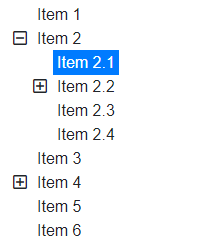
<Tree
    Nodes="Items"
    SelectedNode="SelectedItem"
    ChildSelector="item => item.Childs">
    <TitleTemplate>@context.Text</TitleTemplate>
</Tree>
Client Dependencies
<link rel="stylesheet" href="_content/MW.Blazor.Tree/styles.css" />
<link rel="stylesheet" href="https://use.fontawesome.com/releases/v5.8.1/css/all.css" integrity="sha384-50oBUHEmvpQ+1lW4y57PTFmhCaXp0ML5d60M1M7uH2+nqUivzIebhndOJK28anvf" crossorigin="anonymous">
Code example
Code example (Lazy Loading)
Live Demo

Features / Tasks
- [x] Generic data support
- [x] Item templating
- [x] Styling (Bootstrap/Font Awesome)
- [x] Subtree loading indicator (lazy loading)
- [x] Disabling selection of nodes
- [x] Single selection
- [ ] Multi selection (Checkboxes)
- [x] Event population (OnSelect, OnExpand, ...)
- [x] Support EventCallback<>
Change Log
- 1.3
- Add new property 'OnNodeExpand' to handle lazy loading
- Add new style 'NodeLoadingClass' to indicate branch loading
- 1.2
- Added optional property 'NodeDisabled' to evaluate if node is selectable
- Added new style class 'NodeTitleSelectableClass' (set if node is selectable)
- Added new style class 'NodeTitleDisabledClass' (set if node is disabled)
- 1.1.8
- Add default for 'ChildSelector' property
- 1.1.7
- Pass 'Style' to childs
- 1.1.6
- Update to .NET Core 3.0 (Final)
- 1.1.4
- Update to .NET Core 3.0-preview9
- 1.1.3
- Update to .NET Core 3.0-preview8
- 1.1.2
- Update to .NET Core 3.0-preview6
- 1.1.1
- Convert from razor to blazor lib
- 1.1.0
- Update to .NET Core 3 preview4
- Move to namespace
MW.Blazor - Implement EventCallback
- Breaking Change: SelectedNodes (
IList<TItem>) -> SelectedNode (TItem)
<a name="tagselector"></a>Tag Selector

<TagSelector
    SelectableTags="@Tags"
    SelectedTags="@Selected"
    Filter="@((item,term) => item.Contains(term))">
    <TagTemplate>@context</TagTemplate>
</TagSelector>
Client Dependencies
<link rel="stylesheet" href="_content/MW.Blazor.TagSelector/styles.css" />
<script src="_content/MW.Blazor.TagSelector/interop.js"></script>

Features / Tasks
- [x] Generic data support
- [x] Item templating
- [x] Autocomplete
- [x] Selection via keys (up/down/enter)
- [x] Styling (Bootstrap)
- [ ] Disabling selection of items
- [x] Event population (OnSelect, OnRemove)
- [x] Support EventCallback<>
Change Log
- 1.2.3
- Update to .NET Core 3.0 (Final)
- 1.2.1
- Update to .NET Core 3.0-preview9
- 1.2
- Add new callback 'OnCreateTag' to catch user input and create tag on the fly (Issue #1)
- 1.1.3
- Update to .NET Core 3.0-preview8
- 1.1.2
- Update to .NET Core 3.0-preview6
- 1.1.1
- Convert from razor to blazor lib
- Add EventCallback for SelectedTags
- 1.1.0
- Update to .NET Core 3 preview4
- Move to namespace
MW.Blazor - Implement EventCallback
<a name="pagepanel"></a>Page Panel

<PagePanel PageIndex="@CurrentPage" Style="height:250px">
    <Page Widths="50%;100%;200%">
        <div class="d-flex justify-content-center align-items-center h-100 text-white h4" style="background:#00ff90">
            Page 1
        </div>
    </Page>
    <Page Widths="50%;30%;20%;50%">
        <div class="d-flex justify-content-center align-items-center h-100 text-white h4" style="background:#1596c7">
            Page 2
        </div>
    </Page>
    <Page Widths="70%;70%;20%;50%">
        <div class="d-flex justify-content-center align-items-center h-100 text-white h4" style="background:#b823be">
            Page 3
        </div>
    </Page>
    <Page Widths="60%;60%;60%;100%">
        <div class="d-flex justify-content-center align-items-center h-100 text-white h4" style="background:#ff6a00">
            Page 4
        </div>
    </Page>
</PagePanel>

<button onclick="@(() => CurrentPage--)"><</button>
@CurrentPage
<button onclick="@(() => CurrentPage++)">></button>


@functions { int CurrentPage { get; set; } }
Client Dependencies
<link rel="stylesheet" href="_content/MW.Blazor.PagePanel/styles.css" />

Features / Tasks
- [x] Multiple pages on same page
- [ ] Defaults for 'Widths' property
- [ ] Property for transition time
- [ ] Simplify 'Widths' property
Change Log
- 1.1.6
- Update to .NET Core 3.0 (Final)
- 1.1.4
- Update to .NET Core 3.0-preview9
- 1.1.3
- Update to .NET Core 3.0-preview8
- 1.1.2
- Update to .NET Core 3.0-preview6
- 1.1.1
- Convert from razor to blazor lib
- 1.1.0
- Update to .NET Core 3 preview4
- Move to namespace
MW.Blazor - Use CascadeValue to provide current page index
Related Skills
node-connect
341.6kDiagnose OpenClaw node connection and pairing failures for Android, iOS, and macOS companion apps
frontend-design
84.6kCreate distinctive, production-grade frontend interfaces with high design quality. Use this skill when the user asks to build web components, pages, or applications. Generates creative, polished code that avoids generic AI aesthetics.
openai-whisper-api
341.6kTranscribe audio via OpenAI Audio Transcriptions API (Whisper).
commit-push-pr
84.6kCommit, push, and open a PR
