
Zeta Comic Generator
An experiment in AI and art to create dynamic comic strips.
Install / Use
npx skills add mwilber/zeta-comic-generatorInstalls into whichever agent you are using.
README
Zeta Comic Generator
An experiment in AI and art to create dynamic comic strips.
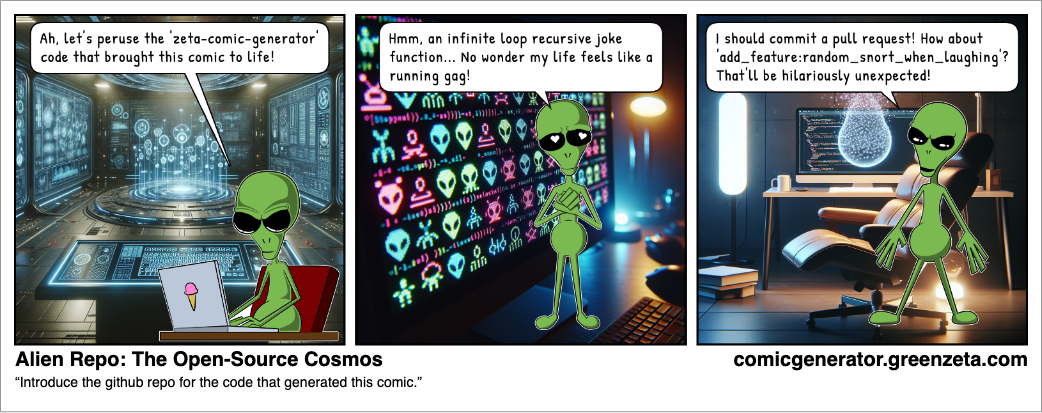
The Process
Write a sentence or two describing a premise for the comic strip. GPT, and variaous other AI models, take the premise and write a three panel comic strip describing: dialog, background scenery, and character action. The text description of the background scenery is sent to an image generator to produce background images. The character action is selected from a list of pre-drawn character art featuring Alpha Zeta, the alien mascot of GreenZeta.com. All of these assets are merged together into a comic strip!
For a more detailed description, check out Zeta Comics: Blending AI & Art in Digital Stories.
This Project
The code in this rep is meant to be an example of interacting with various public AI APIs, as well as rendering a comic strip with JavaScript. It is provided for review purposes only and does not include instructions for setting up the required PHP/MySQL server.
Feel free to dig in and adapt any of this to your own project. The Alpha Zeta character art located in the assets/character_art directory is (c) Matthew Wilber. Feel free to use the images without modification. Attribution is appriciated but not required.
ComicRenderer
The ComicRenderer, DialogBalloon and CharacterAction classes are designed to be used independently of this project. The CharacterAction class is designed to work with the character art included in the assets/character_art folder of this project. If you create your own character art, you will need to update the dialog balloon coordinates in CharacterActions to the appropriate locations in your images.
To use in your own project, simply copy the scripts/modules/ComicRenderer folder into your project and import the ComicRenderer from ComicRenderer.js.
import { ComicRenderer } from "./ComicRenderer/ComicRenderer.js";
To use the ComicRenderer, instantiate the class and pass it a DOM element.
const comicRenderer = new ComicRenderer(document.getElementById("#comic-strip"));
Then pass a valid JSON script object to the comicRenderer.LoadScript() method.
let script = {
    "title": "A Simulated Comic",
    "panels": [
        {
            "scene": "Panel 1 Scene.",
            "dialog": [
                {
                    "character": "alpha",
                    "text": "I'm saying something."
                }
            ],
            "panelEl": {},
            "background": "A simulated background.",
            "images": [
                {
                    "url": "https://comicgenerator.greenzeta.com/backgrounds/6648d7d1475af.png",
                    "type": "background"
                },
                {
                    "url": "https://comicgenerator.greenzeta.com/assets/character_art/standing.png",
                    "type": "character",
                    "character": "alpha",
                    "action": "standing"
                }
            ],
            "action": "standing"
        },
        {
            "scene": "Panel 2 Scene.",
            "dialog": [
                {
                    "character": "alpha",
                    "text": "I'm saying something else."
                }
            ],
            "panelEl": {},
            "background": "A simulated background.",
            "images": [
                {
                    "url": "https://comicgenerator.greenzeta.com/backgrounds/6648d7d213f01.png",
                    "type": "background"
                },
                {
                    "url": "https://comicgenerator.greenzeta.com/assets/character_art/typing.png",
                    "type": "character",
                    "character": "alpha",
                    "action": "typing"
                }
            ],
            "action": "typing",
            "altAction": "hopeful"
        },
        {
            "scene": "Panel 3 Scene.",
            "dialog": [
                {
                    "character": "alpha",
                    "text": "I'm saying a punch line."
                }
            ],
            "panelEl": {},
            "background": "A simulated background.",
            "images": [
                {
                    "url": "https://comicgenerator.greenzeta.com/backgrounds/6648d7d361767.png",
                    "type": "background"
                },
                {
                    "url": "https://comicgenerator.greenzeta.com/assets/character_art/joyous.png",
                    "type": "character",
                    "character": "alpha",
                    "action": "joyous"
                }
            ],
            "action": "joyous"
        }
    ],
    "prompt": ""
};
comicRenderer.LoadScript(script);
Related Skills
node-connect
385.5kDiagnose OpenClaw Android, iOS, or macOS node pairing, QR/setup code, route, auth, and connection failures.
blender-python-addon
40.5kBlender Python add-on rules for operators, panels, properties, registration, testing, and API-safe scripting
flutter-development-guidelines-cursorrules-prompt-file
40.5kCursor rules for Flutter development with MVVM architecture, Riverpod state management, Material widgets, and Dart style guidelines.
commit-push-pr
140.7kCommit, push, and open a PR
