
Logpaste
A simple web service for storing text log files
Install / Use
/learn @mtlynch/LogpasteREADME
logpaste



A minimalist web service for uploading and sharing log files.
Features
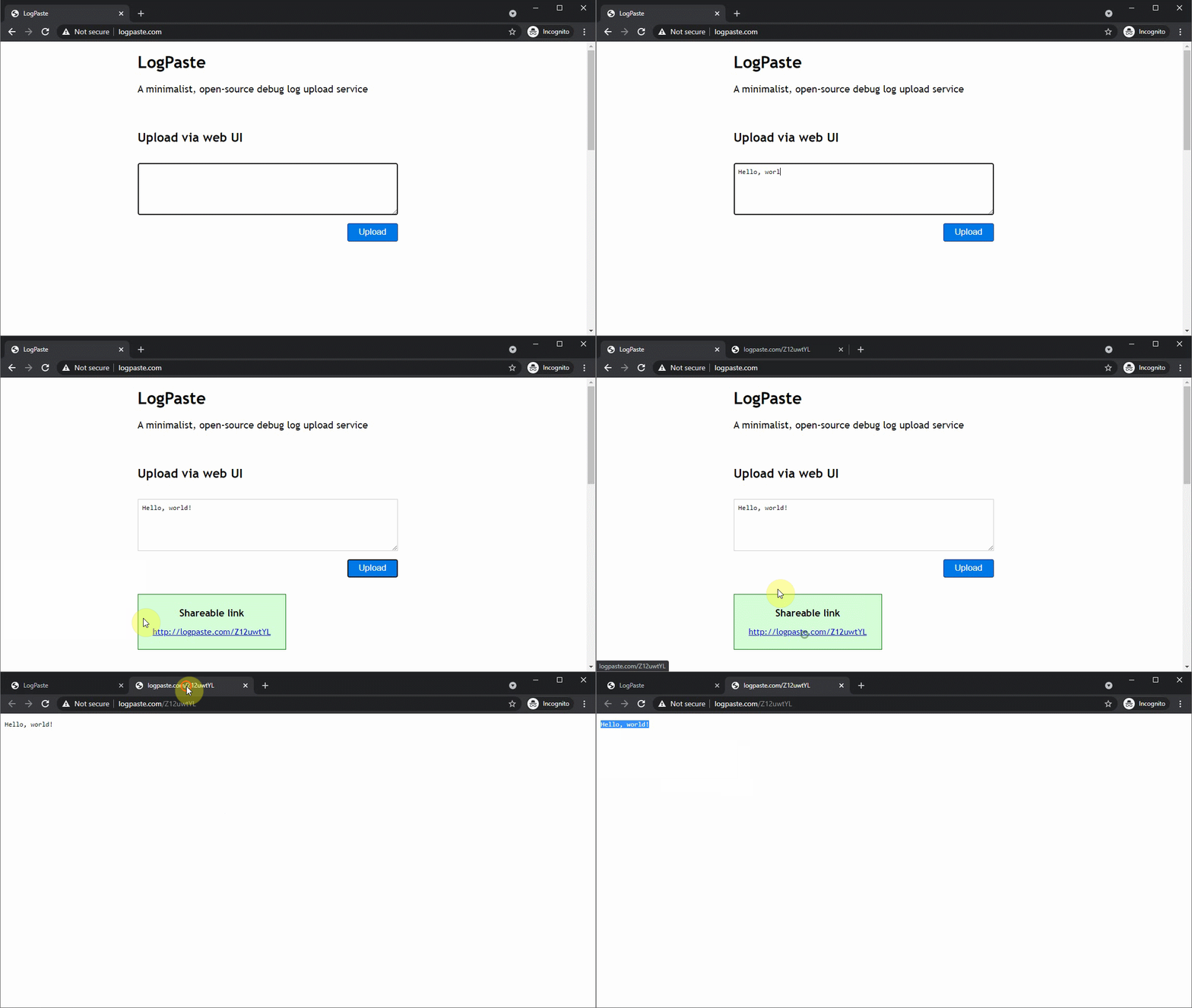
- Accept text uploads from command-line, JavaScript, and web UI
- Simple to deploy
- Runs in a single Docker container
- Fits in the free tier of Heroku
- Easy database management
- Syncs persistent data to any S3-compatible cloud storage provider
- Customizable UI without changing source code
Demo
Run LogPaste
From source
PORT=3001 go run cmd/logpaste/main.go
From Docker
To run LogPaste within a Docker container, mount a volume from your local system to store the LogPaste sqlite database.
docker run \
  -e "PORT=3001" \
  -p 3001:3001/tcp \
  --volume "${PWD}/data:/app/data" \
  --name logpaste \
  mtlynch/logpaste
From Docker + cloud data replication
If you specify settings for an S3 bucket, LogPaste will use Litestream to automatically replicate your data to S3.
You can kill the container and start it later, and it will restore your data from the S3 bucket and continue as if there was no interruption.
LITESTREAM_ACCESS_KEY_ID=YOUR-ACCESS-ID
LITESTREAM_SECRET_ACCESS_KEY=YOUR-SECRET-ACCESS-KEY
LITESTREAM_REGION=YOUR-REGION
DB_REPLICA_URL=s3://your-bucket-name/db

docker run \
  -e "PORT=3001" \
  -e "LITESTREAM_ACCESS_KEY_ID=${LITESTREAM_ACCESS_KEY_ID}" \
  -e "LITESTREAM_SECRET_ACCESS_KEY=${LITESTREAM_SECRET_ACCESS_KEY}" \
  -e "LITESTREAM_REGION=${LITESTREAM_REGION}" \
  -e "DB_REPLICA_URL=${DB_REPLICA_URL}" \
  -p 3001:3001/tcp \
  --name logpaste \
  mtlynch/logpaste
Some notes:
- Only run one Docker container for each S3 location
- LogPaste can't sync writes across multiple instances.
With custom site settings
LogPaste offers some options to customize the text for your site. Here's an example that uses a custom title, subtitle, and footer:
docker run \
  -e "PORT=3001" \
  -p 3001:3001/tcp \
  --name logpaste \
  mtlynch/logpaste \
  -title 'My Cool Log Pasting Service' \
  -subtitle 'Upload all your logs for FooBar here' \
  -footer '<h2>Notice</h2><p>Only cool users can share logs here.</p>' \
  -showdocs=false \
  -perminutelimit 5
Parameters
Command-line flags
| Flag | Meaning | Default Value |
| ----------------- | -------------------------------------------------- | ------------------------------------------------------ |
| -title | Title to display on homepage | "LogPaste" |
| -subtitle | Subtitle to display on homepage | "A minimalist, open-source debug log upload service" |
| -footer | Footer to display on homepage (may include HTML) | |
| -showdocs | Whether to display usage documentation on homepage | true |
| -perminutelimit | Number of pastes to allow per IP per minute | 0 (no limit) |
| -maxsize | Max file size users can upload | 2 (2 MiB) |
Docker environment variables
You can adjust behavior of the Docker container by passing these parameters with docker run -e:
| Environment Variable | Meaning |
| ------------------------------ | ------------------------------------------------------------------------------------------------- |
| PORT | TCP port on which to listen for HTTP connections (defaults to 3001) |
| LP_BEHIND_PROXY | Set to y if running behind an HTTP proxy to improve logging |
| DB_REPLICA_URL | S3 URL where you want to replicate the LogPaste datastore (e.g., s3://mybucket.mydomain.com/db) |
| LITESTREAM_REGION | AWS region where your S3 bucket is located |
| LITESTREAM_ACCESS_KEY_ID | AWS access key ID for an IAM role with access to the bucket where you want to replicate data. |
| LITESTREAM_SECRET_ACCESS_KEY | AWS secret access key for an IAM role with access to the bucket where you want to replicate data. |
Docker build args
If you rebuild the Docker image from source, you can adjust the build behavior with docker build --build-arg:
| Build Arg | Meaning | Default Value |
| -------------------- | --------------------------------------------------------------------------- | ------------- |
| litestream_version | Version of Litestream to use for data replication | v0.3.9 |
Deployment
LogPaste is easy to deploy to cloud services. Here are some places it works well:
- fly.io (recommended)
- Heroku
- Google Cloud Run
- Amazon LightSail
Further reading
- "How Litestream Eliminated My Database Server for $0.03/month": Explains the motivation behind LogPaste
