
Mtgatracker
MTGATracker is a deck tracker for MTG Arena, offering an in-game overlay that shows real time info about your deck in MTGA. It can also record & analyze your past matches to show personal aggregated gameplay history information, like lifetime wins/losses by deck, by event, etc.
Install / Use
/learn @mtgatracker/MtgatrackerREADME
MTGATracker





MTGA Tracker is an electron-based app that helps you track your MTGA decks!
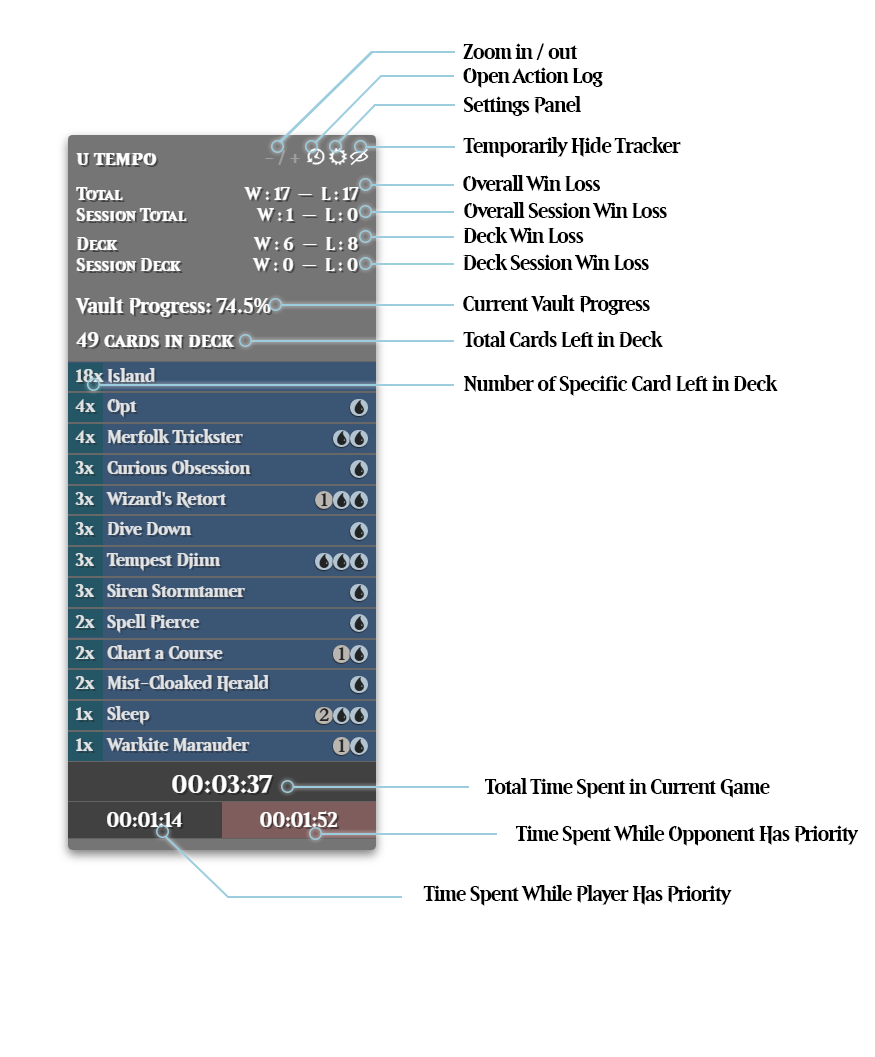
I'm not reading anything else until you tell me how to use it
I figured as much. I know this doc is long, please at least take a moment and scroll to disclaimers before continuing, though.
Option 1 (recommended): Run from a release
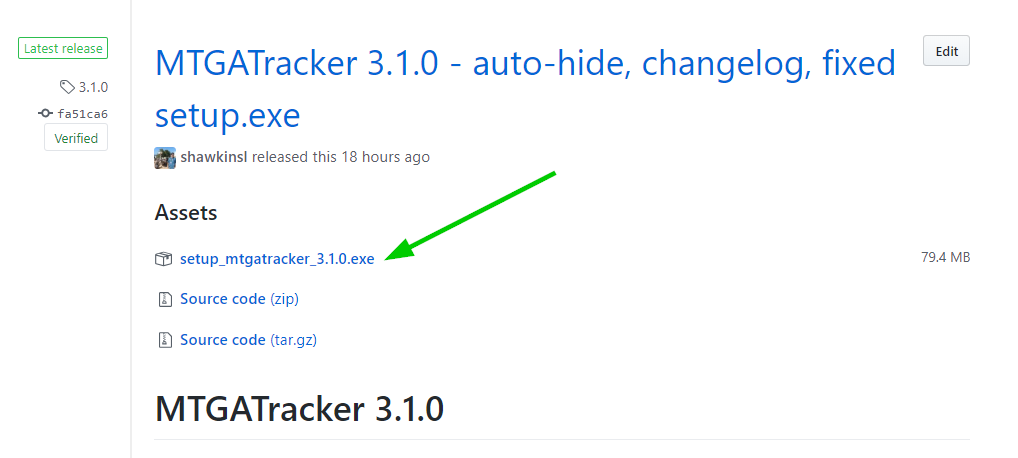
Download the latest release from the "releases" link above (or right here). Use your favorite md5 tool to verify what you downloaded is legitimate.
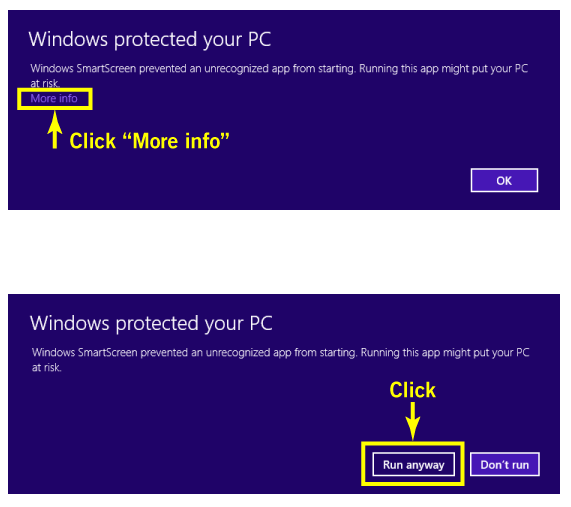
Note that you may have to tell Windows Defender to allow MTGA Tracker to run, as MTGA Tracker is currently unsigned (did you know that code-signing keys & certs cost over $100 per year?) Your antivirus will likely also want to scan it the first few times you run it. See more in the Signing section below.
OR, Option 2: Run from source
This option is not required or recommended unless you intend to contribute code changes to MTGATracker
Make sure you have all of the following installed:
- python3.6+
- node.js / npm
- (optional, but recommended) Git Bash
Note that if you choose to skip Git Bash, you're on your own w.r.t. formatting shell commands.
-
Open Git Bash
-
Make sure python is installed by typing:
python --version. You should see:you@yourmachine MINGW64 ~ $ python --version Python 3.6.4 -
Make sure npm is installed by typing:
npm --version. You should see:you@yourmachine MINGW64 ~ $ npm --version 5.6.0 -
Run these commands
cd /c/path/where/you/want/the/code git clone https://github.com/shawkinsl/mtga-tracker.git cd mtga-tracker # next 4 lines """optional""" python -m ensurepip pip install virtualenv --user python -m virtualenv venv source venv/Scripts/activate # read more about virtualenv here: http://www.pythonforbeginners.com/basics/how-to-use-python-virtualenv pip install -r requirements.txt cd electron # tell npm to use python2.7 for node-gyp npm config set python python2.7 npm install . -
If all went well, you should now be able to:
npm startAnd the decktracker UI should launch!
Note: check out debug flags, which can be set via command line main.js
FAQ
Something with the tracker isn't working for me! What do I do?
Check out our troubleshooting guide here. If nothing in here helps, please send us a message in the #troubleshooting channel on Discord with the following template:
Help! My tracker is
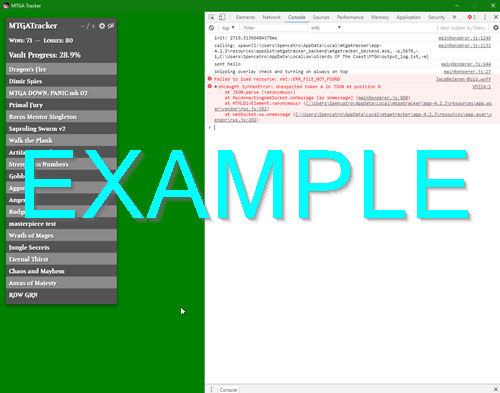
<short description of issue>.Here's a screenshot of my tracker in debug mode:
<insert a screenshot of MTGATracker in debug mode, including the debug output in the console on the right side>
Something with Inspector isn't working for me! What do I do?
Please message Spencatro#6059 on Discord privately with the following template:
Help! Inspector is
<short description of issue>.I signed in to Inspector using
<discord or twitch>, and my username is<twitch or discord username>. My MTGA username is<your username, case sensitive>. The first 8 digits of my trackerID is<the first 8 digits of your tracker key, located in tracker settings under "Inspector">.
Why doesn't MTGATracker properly handle sideboarding in Competitive Draft (etc)?
This is actually an issue with WotC's logging. There is no way for us to determine what happens during sideboarding based on what is written to the log. We've filed the following bug report with WotC and will be ecstatic to fix our stuff once they resolve it:
Bug report: I tried to replace my entire deck with my sideboard during a competitive draft event, but something went wrong!
OK, nothing actually went wrong, but the point of this bug report is that based on the log, there is no way to tell what happened with the sideboard anyways! The log doesn't properly record sideboard events.
It looks like the client is attempting to tell the server that... something happened with sideboarding with this log message:
(Filename: C:\buildslave\unity\build\Runtime/Export/Debug.bindings.h Line: 43)
[UnityCrossThreadLogger]Received unhandled GREMessageType: GREMessageType_SubmitDeckReq { "type": "GREMessageType_SubmitDeckReq", "systemSeatIds": [ 1 ], "msgId": 638, "gameStateId": 455, "submitDeckReq": { "deck": { "deckCards": [ 68510, 68544, 68544, 68728, 68496, 68496, 68496, 68628, 68628, 68681, 68727, 68522, 68522, 68523, 68612, 68534, 68546, 68531, 68535, 68549, 68667, 68529, 68516, 68497, 68526, 67017, 67017, 67017, 67017, 67017, 67017, 67017, 67019, 67019, 67019, 67019, 67019, 67019, 67019, 67019 ], "sideboardCards": [ 68525, 68537, 68537, 68464, 68464, 68464, 68479, 68539, 68549, 68549, 68601, 68703, 68606, 68477, 68542, 68611, 68507, 68523, 68527, 68522 ] } } }
(Filename: C:\buildslave\unity\build\Runtime/Export/Debug.bindings.h Line: 43)
However, the contents of that log chunk is incorrect (i.e. the cards I actually sideboarded in are still in the sideboardCards array).
This issue is causing issues with third party log tracking programs.
Thanks!
Building
Building from windows? Try sh build.sh from git bash. If that doesn't work, get in touch with @shawkinsl to figure it
out. There's an open issue to improve this process--help us get CI/CD set up? See
contributing ;)
Output will end up in MTGATracker-<os>-<arch> .
Building is probably not supported on OSX yet. (But then again, neither is MTGA, so what are you even doing?)
Native App
Backend
The back end is at it's core a python log parser project. There's a websockets app tacked on top to communicate state with the frontend.
Front end
The front end of MTGA Tracker is an electron app that uses node / websocket to communicate with the backend
Project layout
app - python backend for watching MTGA logs
electron - native electron app
scripts - various scripts and utilities. either one-time use, or just don't really fit anywhere
webtasks - node.js / webtask.io code for webapp and app to talk to
docs - code for mtga-tracker.com (called docs for github pages)
Signing code
Currently MTGATracker ~~is self-signed.~~ (Edit: since this doesn't do anything, we won't bother until we get a real cert. Did you know that code-signing certs cost over $100 a year?! We didn't.) So MTGATracker will likely go unsigned for now.
Regardless, under the guidance of this stackoverflow question, use the following commands to self-sign binaries (not really that useful, but good practice in case MTGATracker ever does get a real cert).
# generate a pfx certificate
PS C:\Users\Spencatro> $cert = New-SelfSignedCertificate -DnsName mtgatracker.com -Type CodeSigning -CertStoreLocation Cert:\CurrentUser\My
PS C:\Users\Spencatro> $CertPassword = ConvertTo-SecureString -String "my_passowrd" -Force –AsPlainText
PS C:\Users\Spencatro> Export-PfxCertificate -Cert "cert:\CurrentUser\My\$($cert.Thumbprint)" -FilePath "c:\t.pfx" -Password $CertPassword

# use windows SDK to sign with the certificate
PS C:\Program Files (x86)\Windows Kits\10\bin\x64> ./signtool.exe sign /v /f C:\Users\Spencatro\t.pfx /t http://timestamp.comodoca.com/authenticode /p my_password C:\Users\Spencatro\PycharmProjects\mtga-tools\MTGATracke
Related Skills
imsg
336.9kiMessage/SMS CLI for listing chats, history, and sending messages via Messages.app.
node-connect
336.9kDiagnose OpenClaw node connection and pairing failures for Android, iOS, and macOS companion apps
claude-opus-4-5-migration
83.0kMigrate prompts and code from Claude Sonnet 4.0, Sonnet 4.5, or Opus 4.1 to Opus 4.5
frontend-design
83.0kCreate distinctive, production-grade frontend interfaces with high design quality. Use this skill when the user asks to build web components, pages, or applications. Generates creative, polished code that avoids generic AI aesthetics.
