
WindowsForms.Console
Component for WindowsForm
Install / Use
/learn @msx752/WindowsForms.ConsoleREADME


WindowsForms.Console
Component of WindowsForm
Usage
- import nuget package to the project
Install-Package WindowsForms.Console
-
add 'FConsole' component to FormControl (you can see how to)
-
look at sample project (for more example)
Example Usage
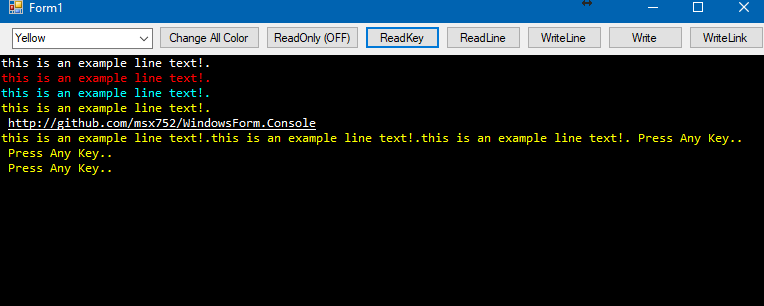
All examples assume you have added the FConsole control to your form (named fconsole1). Both direct usage and extension methods are shown. For input, async/await is recommended.
// Write a line to the console
fconsole1.WriteLine("Hello, World!");
this.WriteLine("Hello, World!"); // Extension method (inside a Form)

// Write a line with a specific color
fconsole1.WriteLine("Success!", Color.Green);
this.WriteLine("Success!", Color.Green); // Extension method

// Write text without a newline
fconsole1.Write("Processing...");
this.Write("Processing..."); // Extension method

// Write colored text without a newline
fconsole1.Write("Warning!", Color.Orange);
this.Write("Warning!", Color.Orange); // Extension method

// Read a line from the console (asynchronous)
string input = await fconsole1.ReadLine();
string input2 = await this.ReadLine(); // Extension method

// Read a single key from the console (asynchronous)
char key = await fconsole1.ReadKey();
char key2 = await this.ReadKey(); // Extension method
Note:
ReadLineandReadKeyare asynchronous and should be awaited inside an async method for best UI responsiveness. Synchronous blocking is possible but not recommended on the UI thread.
Supported Platforms
Dependencies
- System.Windows.Form
- System
FrameworkReferences for the .NetCore and upper
- Microsoft.WindowsDesktop.App.WindowsForm
Example Project
- component is used in MSniper Project
Related Skills
node-connect
342.5kDiagnose OpenClaw node connection and pairing failures for Android, iOS, and macOS companion apps
frontend-design
85.3kCreate distinctive, production-grade frontend interfaces with high design quality. Use this skill when the user asks to build web components, pages, or applications. Generates creative, polished code that avoids generic AI aesthetics.
openai-whisper-api
342.5kTranscribe audio via OpenAI Audio Transcriptions API (Whisper).
qqbot-media
342.5kQQBot 富媒体收发能力。使用 <qqmedia> 标签,系统根据文件扩展名自动识别类型(图片/语音/视频/文件)。
