
NetSpeed
A floating view on screen showing network speed.
Install / Use
/learn @mrrobot97/NetSpeedREADME
先看下效果:
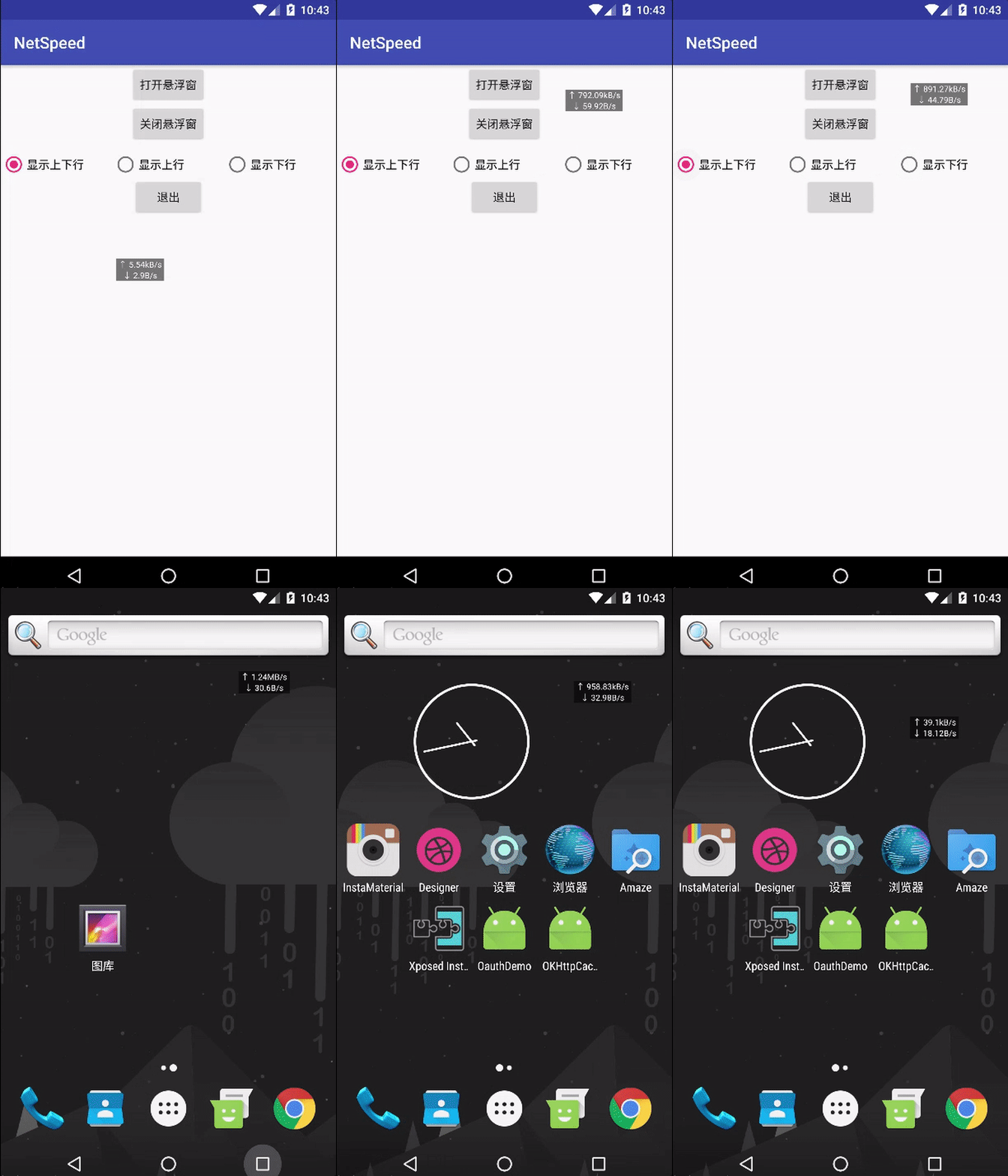
这里主要是在桌面上显示一个悬浮窗,利用了WindowManager以及Service,接下来看看如何实现这样一个效果: 首先APP必须获得在桌面上显示悬浮窗的机会,很多第三方ROM都限制了这一权限,我们首先就是要申请改权限,代码如下:
public boolean checkDrawOverlayPermission() {
        if (!Settings.canDrawOverlays(this)) {
            Intent intent = new Intent(Settings.ACTION_MANAGE_OVERLAY_PERMISSION,
                    Uri.parse("package:" + getPackageName()));
            startActivityForResult(intent, REQUEST_CODE);
            return false;
        }
        return true;
    }
该函数首先检查APP是否有显示悬浮窗的权限,如果没有,就跳转到该APP设置悬浮窗权限的界面,如下图所示:

然后先编写我们的悬浮窗,布局很简单,就是两个TextView:
<?xml version="1.0" encoding="utf-8"?>
<RelativeLayout xmlns:android="http://schemas.android.com/apk/res/android"
    android:orientation="vertical" android:layout_width="match_parent"
    android:layout_height="match_parent"
    android:background="#88000000">


    <TextView
        android:layout_marginLeft="3dp"
        android:layout_marginRight="3dp"
        android:id="@+id/speed_up"
        android:text="upload speed"
        android:gravity="left"
        android:textSize="10dp"
        android:layout_centerHorizontal="true"
        android:textColor="@android:color/white"
        android:layout_width="wrap_content"
        android:layout_height="wrap_content" />

    <TextView
        android:layout_marginLeft="3dp"
        android:layout_marginRight="3dp"
        android:id="@+id/speed_down"
        android:layout_below="@id/speed_up"
        android:text="download speed"
        android:gravity="left"
        android:textSize="10dp"
        android:layout_centerHorizontal="true"
        android:textColor="@android:color/white"
        android:layout_width="wrap_content"
        android:layout_height="wrap_content" />

</RelativeLayout>
SpeedView:
public class SpeedView extends FrameLayout {
    private Context mContext;
    public TextView downText;
    public TextView upText;
    private WindowManager windowManager;
    private int statusBarHeight;
    private float preX,preY,x,y;

    public SpeedView(Context context) {
        super(context);
        mContext=context;
        init();
    }

    private void init() {
        statusBarHeight=WindowUtil.statusBarHeight;
        windowManager= (WindowManager) mContext.getSystemService(Context.WINDOW_SERVICE);
        //a view inflate itself, that's funny
        inflate(mContext,R.layout.speed_layout,this);
        downText= (TextView) findViewById(R.id.speed_down);
        upText= (TextView) findViewById(R.id.speed_up);
    }

    @Override
    public boolean onTouchEvent(MotionEvent event) {
        switch (event.getAction()){
            case MotionEvent.ACTION_DOWN:
                preX=event.getRawX();preY=event.getRawY()-statusBarHeight;
                return true;
            case MotionEvent.ACTION_MOVE:
                x=event.getRawX();y=event.getRawY()-statusBarHeight;
                WindowManager.LayoutParams params= (WindowManager.LayoutParams) getLayoutParams();
                params.x+=x-preX;
                params.y+=y-preY;
                windowManager.updateViewLayout(this,params);
                preX=x;preY=y;
                return true;
            default:
                break;

        }
        return super.onTouchEvent(event);
    }
在SpeedView里我们重写了onTouchEvent事件,这样就能响应我们的拖拽事件了,注意这里更新SpeedView的位置是通过改变WindowManager.LayoutParam的x和y来实现的,调用windowManager.updateViewLayout(this,params)来更新位置。
因为我们的网速显示悬浮窗要脱离于Activity的生命周期而独立存在,因此需要通过Service来实现:
public class SpeedCalculationService extends Service {
    private WindowUtil windowUtil;
    private boolean changed=false;

    @Override
    public void onCreate() {
        super.onCreate();
        WindowUtil.initX= (int) SharedPreferencesUtils.getFromSpfs(this,INIT_X,0);
        WindowUtil.initY= (int) SharedPreferencesUtils.getFromSpfs(this,INIT_Y,0);
        windowUtil=new WindowUtil(this);
    }

    @Override
    public int onStartCommand(Intent intent, int flags, int startId) {
        changed=intent.getBooleanExtra(MainActivity.CHANGED,false);
        if(changed){
            windowUtil.onSettingChanged();
        }else{
            if(!windowUtil.isShowing()){
                windowUtil.showSpeedView();
            }
            SharedPreferencesUtils.putToSpfs(this,MainActivity.IS_SHOWN,true);
        }
        //return super.onStartCommand(intent, flags, startId);
        return START_STICKY;
    }


    @Nullable
    @Override
    public IBinder onBind(Intent intent) {
        return null;
    }

    @Override
    public void onDestroy() {
        super.onDestroy();
        WindowManager.LayoutParams params= (WindowManager.LayoutParams) windowUtil.speedView.getLayoutParams();
        SharedPreferencesUtils.putToSpfs(this, INIT_X,params.x);
        SharedPreferencesUtils.putToSpfs(this, INIT_Y,params.y);
        if(windowUtil.isShowing()){
            windowUtil.closeSpeedView();
            SharedPreferencesUtils.putToSpfs(this,MainActivity.IS_SHOWN,false);
        }
        Log.d("yjw","service destroy");
    }
}
这里的WindowUtil其实就是一个工具类,帮助我们控制悬浮窗SpeedView的显示与隐藏:
public class WindowUtil {
    public static int statusBarHeight=0;
    //记录悬浮窗的位置
    public static int initX,initY;
    private WindowManager windowManager;
    public SpeedView speedView;
    private WindowManager.LayoutParams params;
    private Context context;

    public boolean isShowing() {
        return isShowing;
    }

    private boolean isShowing=false;

    public static final int INTERVAL=2000;
    private long preRxBytes,preSeBytes;
    private long rxBytes,seBytes;
    private Handler handler=new Handler(){
        @Override
        public void dispatchMessage(Message msg) {
            super.dispatchMessage(msg);
            calculateNetSpeed();
            sendEmptyMessageDelayed(0,INTERVAL);
        }
    };

    public void onSettingChanged(){
        String setting= (String) SharedPreferencesUtils.getFromSpfs(context,MainActivity.SETTING,MainActivity.BOTH);
        if(setting.equals(MainActivity.BOTH)){
            speedView.upText.setVisibility(View.VISIBLE);
            speedView.downText.setVisibility(View.VISIBLE);
        }else if(setting.equals(MainActivity.UP)){
            speedView.upText.setVisibility(View.VISIBLE);
            speedView.downText.setVisibility(View.GONE);
        }else{
            speedView.upText.setVisibility(View.GONE);
            speedView.downText.setVisibility(View.VISIBLE);
        }
    }

    private void calculateNetSpeed() {
        rxBytes=TrafficStats.getTotalRxBytes();
        seBytes=TrafficStats.getTotalTxBytes()-rxBytes;
        double downloadSpeed=(rxBytes-preRxBytes)/2;
        double uploadSpeed=(seBytes-preSeBytes)/2;
        preRxBytes=rxBytes;
        preSeBytes=seBytes;
        //根据范围决定显示单位
        String upSpeed=null;
        String downSpeed=null;

        NumberFormat df= java.text.NumberFormat.getNumberInstance();
        df.setMaximumFractionDigits(2);

        if(downloadSpeed>1024*1024){
            downloadSpeed/=(1024*1024);
            downSpeed=df.format(downloadSpeed)+"MB/s";
        }else if(downloadSpeed>1024){
            downloadSpeed/=(1024);
            downSpeed=df.format(downloadSpeed)+"B/s";
        }else{
            downSpeed=df.format(downloadSpeed)+"B/s";
        }

        if(uploadSpeed>1024*1024){
            uploadSpeed/=(1024*1024);
            upSpeed=df.format(uploadSpeed)+"MB/s";
        }else if(uploadSpeed>1024){
            uploadSpeed/=(1024);
            upSpeed=df.format(uploadSpeed)+"kB/s";
        }else{
            upSpeed=df.format(uploadSpeed)+"B/s";
        }

        updateSpeed("↓ "+downSpeed,"↑ "+upSpeed);
    }

    public WindowUtil(Context context) {
        this.context = context;
        windowManager= (WindowManager) context.getSystemService(Context.WINDOW_SERVICE);
        speedView=new SpeedView(context);
        params=new WindowManager.LayoutParams();
        params=new WindowManager.LayoutParams();
        params.x=initX;
        params.y=initY;
        params.width=params.height=WindowManager.LayoutParams.WRAP_CONTENT;
        params.type=WindowManager.LayoutParams.TYPE_PHONE;
        params.gravity= Gravity.LEFT|Gravity.TOP;
        params.format= PixelFormat.RGBA_8888;
        params.flags=WindowManager.LayoutParams.FLAG_NOT_FOCUSABLE| WindowManager.LayoutParams.FLAG_NOT_TOUCH_MODAL;
                //设置悬浮窗可以拖拽至状态栏的位置
//        | WindowManager.LayoutParams.FLAG_FULLSCREEN| WindowManager.LayoutParams.FLAG_LAYOUT_IN_SCREEN;

    }

    public void showSpeedView(){
        windowManager.addView(speedView,params);
        isShowing=true;
        preRxBytes= TrafficStats.getTotalRxBytes();
        preSeBytes=TrafficStats.getTotalTxBytes()-preRxBytes;
        handler.sendEmptyMessage(0);
    }

    public void closeSpeedView(){
        windowManager.removeView(speedView);
        isShowing=false;
    }

    public void updateSpeed(String downSpeed,String upSpeed){
        speedView.upText.setText(upSpeed);
        speedView.downText.setText(downSpeed);
    }
}

```java

WindowUtil类中也包含了一个很重要的方法,那就是计算网速。这里计算网速的方法很简单,Android提供了一个类`TrafficStats`,这个类里面为我们提供了好多接口,我们用到了其中的两个:

	1.public static long getTotalTxBytes ()
	Return number of bytes transmitted since device boot. Counts packets across all network interfaces, and always increases monotonically since device boot. Statistics are measured at the network layer, so they include both TCP and UDP usage.
	2.public static long getTotalRxPackets ()
	Return number of packets received since device boot. Counts packets across all network interfaces, and always increases monotonically since device boot. Statistics are measured at the network layer, so they include both TCP and UDP usage.


可以看出,getTotalTxBytes()方法返回系统自开机到现在为止所一共传输的数据的字节数,包括上
