
Arraymancer
A fast, ergonomic and portable tensor library in Nim with a deep learning focus for CPU, GPU and embedded devices via OpenMP, Cuda and OpenCL backends
Install / Use
/learn @mratsim/ArraymancerREADME




Arraymancer - A n-dimensional tensor (ndarray) library.
Arraymancer is a tensor (N-dimensional array) project in Nim. The main focus is providing a fast and ergonomic CPU, Cuda and OpenCL ndarray library on which to build a scientific computing ecosystem.
The library is inspired by Numpy and PyTorch and targets the following use-cases:
- N-dimensional arrays (tensors) for numerical computing
- machine learning algorithms (as in Scikit-learn: least squares solvers, PCA and dimensionality reduction, classifiers, regressors and clustering algorithms, cross-validation).
- deep learning
The ndarray component can be used without the machine learning and deep learning component. It can also use the OpenMP, Cuda or OpenCL backends.
Note: While Nim is compiled and does not offer an interactive REPL yet (like Jupyter), it allows much faster prototyping than C++ due to extremely fast compilation times. Arraymancer compiles in about 5 seconds on my dual-core MacBook.
Reminder of supported compilation flags:
-d:release: Nim release mode (no stacktraces and debugging information)-d:danger: No runtime checks like array bound checking-d:blas=blaslibname: Customize the BLAS library used by Arraymancer. By default (i.e. if you don't define this setting) Arraymancer will try to automatically find a BLAS library (e.g.blas.so/blas.dllorlibopenblas.dll) on your path. You should only set this setting if for some reason you want to use a specific BLAS library. See nimblas for further information-d:lapack=lapacklibname: Customize the LAPACK library used by Arraymancer. By default (i.e. if you don't define this setting) Arraymancer will try to automatically find a LAPACK library (e.g.lapack.so/lapack.dllorlibopenblas.dll) on your path. You should only set this setting if for some reason you want to use a specific LAPACK library. See nimlapack for further information-d:openmp: Multithreaded compilation-d:mkl: Deprecated flag which forces the use of MKL. Implies-d:openmp. Use-d:blas=mkl -d:lapack=mklinstead, but only if you want to force Arraymancer to use MKL, instead of looking for the available BLAS / LAPACK libraries-d:openblas: Deprecated flag which forces the use of OpenBLAS. Use-d:blas=openblas -d:lapack=openblasinstead, but only if you want to force Arraymancer to use OpenBLAS, instead of looking for the available BLAS / LAPACK libraries-d:cuda: Build with Cuda support-d:cudnn: Build with CuDNN support, implies-d:cuda-d:avx512: Build with AVX512 support by supplying the-mavx512dqflag to gcc / clang. Without this flag the resulting binary does not use AVX512 even on CPUs that support it. Setting this flag, however, makes the binary incompatible with CPUs that do not support AVX512. See the comments in #505 for a discussion (fromv0.7.9)- You might want to tune library paths in nim.cfg after installation for OpenBLAS, MKL and Cuda compilation.
The current defaults should work on Mac and Linux; and on Windows after downloading
libopenblas.dllor another BLAS / LAPACK DLL (see the Installation section for more information) and copying it into a folder in your path or into the compilation output folder.
Show me some code
The Arraymancer tutorial is available here.
Here is a preview of Arraymancer syntax.
Tensor creation and slicing
import math, arraymancer

const
    x = @[1, 2, 3, 4, 5]
    y = @[1, 2, 3, 4, 5]

var
    vandermonde = newSeq[seq[int]]()
    row: seq[int]

for i, xx in x:
    row = newSeq[int]()
    vandermonde.add(row)
    for j, yy in y:
        vandermonde[i].add(xx^yy)

let foo = vandermonde.toTensor()

echo foo

# Tensor[system.int] of shape "[5, 5]" on backend "Cpu"
# |1          1       1       1       1|
# |2          4       8      16      32|
# |3          9      27      81     243|
# |4         16      64     256    1024|
# |5         25     125     625    3125|

echo foo[1..2, 3..4] # slice

# Tensor[system.int] of shape "[2, 2]" on backend "Cpu"
# |16      32|
# |81     243|

echo foo[_|-1, _] # reverse the order of the rows

# Tensor[int] of shape "[5, 5]" on backend "Cpu"
# |5      25      125     625     3125|
# |4      16       64     256     1024|
# |3       9       27      81      243|
# |2       4        8      16       32|
# |1       1        1       1        1|
Reshaping and concatenation
import arraymancer, sequtils

let a = toSeq(1..4).toTensor.reshape(2,2)

let b = toSeq(5..8).toTensor.reshape(2,2)

let c = toSeq(11..16).toTensor
let c0 = c.reshape(3,2)
let c1 = c.reshape(2,3)

echo concat(a,b,c0, axis = 0)
# Tensor[system.int] of shape "[7, 2]" on backend "Cpu"
# |1      2|
# |3      4|
# |5      6|
# |7      8|
# |11    12|
# |13    14|
# |15    16|

echo concat(a,b,c1, axis = 1)
# Tensor[system.int] of shape "[2, 7]" on backend "Cpu"
# |1      2     5     6    11    12    13|
# |3      4     7     8    14    15    16|
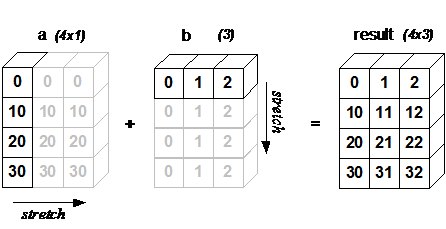
Broadcasting
Image from Scipy
import arraymancer

let j = [0, 10, 20, 30].toTensor.reshape(4,1)
let k = [0, 1, 2].toTensor.reshape(1,3)

echo j +. k
# Tensor[system.int] of shape "[4, 3]" on backend "Cpu"
# |0      1     2|
# |10    11    12|
# |20    21    22|
# |30    31    32|
A simple two layers neural network
From example 3.
import arraymancer, strformat

discard """
A fully-connected ReLU network with one hidden layer, trained to predict y from x
by minimizing squared Euclidean distance.
"""

# ##################################################################
# Environment variables

# N is batch size; D_in is input dimension;
# H is hidden dimension; D_out is output dimension.
let (N, D_in, H, D_out) = (64, 1000, 100, 10)

# Create the autograd context that will hold the computational graph
let ctx = newContext Tensor[float32]

# Create random Tensors to hold inputs and outputs, and wrap them in Variables.
let
  x = ctx.variable(randomTensor[float32](N, D_in, 1'f32))
  y = randomTensor[float32](N, D_out, 1'f32)

# ##################################################################
# Define the model

network TwoLayersNet:
  layers:
    fc1: Linear(D_in, H)
    fc2: Linear(H, D_out)
  forward x:
    x.fc1.relu.fc2

let
  model = ctx.init(TwoLayersNet)
  optim = model.optimizer(SGD, learning_rate = 1e-4'f32)

# ##################################################################
# Training

for t in 0 ..< 500:
  let
    y_pred = model.forward(x)
    loss = y_pred.mse_loss(y)

  echo &"Epoch {t}: loss {loss.value[0]}"

  loss.backprop()
  optim.update()
Teaser A text generated with Arraymancer's recurrent neural network
From example 6.
Trained 45 min on my laptop CPU on Shakespeare and producing 4000 characters
Whter!
Take's servant seal'd, making uponweed but rascally guess-boot,
Bare them be that been all ingal to me;
Your play to the see's wife the wrong-pars
With child of queer wretchless dreadful cold
Cursters will how your part? I prince!
This is time not in a without a tands:
You are but foul to this.
I talk and fellows break my revenges, so, and of the hisod
As you lords them or trues salt of the poort.

ROMEO:
Thou hast facted to keep thee, and am speak
Of them; she's murder'd of your galla?

# [...] See example 6 for full text generation samples
