
SmartGW
Domain based VPN Gateway/Proxy for all devices
Install / Use
/learn @mrahmadt/SmartGWREADME
SmartGW
SmartGW is a VPN Gateway/Proxy that allows you to route HTTP/HTTPS traffic for specific internet domains to go through VPN tunnel while keeping the other traffic goes through your ISP gateway.
Example:
- HTTP/HTTPS for netflix.com (from all devices in your network) --> Will go through your VPN tunnel.
- HTTP/HTTPS for youtube.com (from all devices in your network) --> Will go through your ISP gateway.
This can help you to:
- Access Geo-restricted content.
- Access any blocked domains.
- Use it with all your devices (Laptop, Mobiles, SmartTV...etc).
- Utilize your full ISP network speed to access any site that you don't want it to go through the VPN tunnel.
- Work with <a href="https://pi-hole.net/">Pi-Hole</a> for Network-wide Ad Blocking
- More browsing privacy?.
Features
- Works with all devices in local network (PC, Laptop, Mobiles, SmartTV...etc).
- No need to change any settings in your devices, install SmartGW and configure the DNS in your internet router.
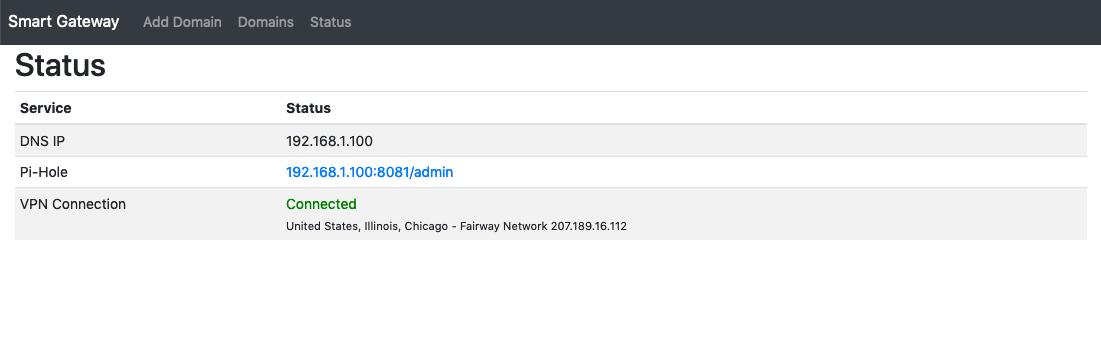
- Simple GUI to check SmartGW status and to add/remove any domain.
- Automatically connect to the fastest low latency VPN servers in a given country.
- Auto retry and auto-failover to next best VPN server if the connection dies.
How difficult it's?
The setup is straightforward, you need a Linux server, and a <a href="http://nordvpn.com">NordVPN</a> VPN subscription.
What Do I need to start?
- Linux server (any old laptop or <a href="https://en.wikipedia.org/wiki/Single-board_computer">single-board</a> such us <a href="https://www.raspberrypi.org/">Raspberry Pi</a> will work).
- <a href="http://nordvpn.com">NordVPN</a> VPN subscription.
- Static IP in your local network.
- <a href="https://docker.com/">Docker engine</a> with basic know how.
Instructions
- Install Linux.
- Set a static IP in your server.
- Install Docker.
- Download SmartGW source code.
- Rename example.env to .env and change the variables
#Your NordVPN Username
VPN_USERNAME=yourUsername@nordvpn.com
#Your NordVPN Password
VPN_PASSWORD=yourNordvpnPassword
#VPN country
VPN_OPTIONS=us
#Local network CIDR network
CIDR_NETWORK=192.168.1.0/24
#No need to change this
VPN_DNS1=103.86.96.100
#No need to change this
VPN_DNS2=103.86.99.100
#Pi-Hole web admin password
PIHOLE_PASSWORD=pihole
- Run SmartGW docker-compose
docker-compose up
- Open your browser and type your SmartGW IP (port 8080) (http://Your-Server-IP:8080/) and start adding your domains (e.g., yahoo.com).
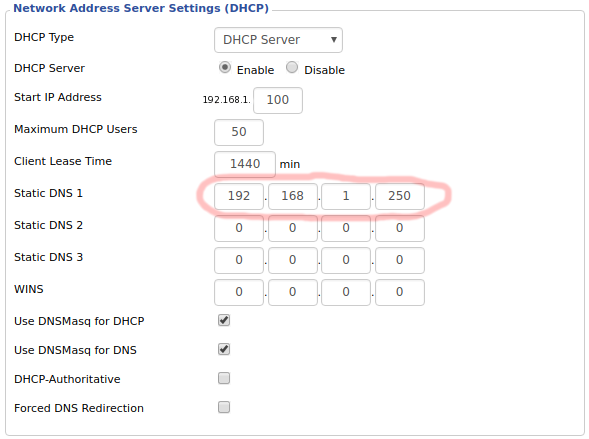
- Define SmartGW IP address as the only DNS entry in the router.
Login to your router’s configuration page and find the DHCP/DNS settings.
Note: make sure you adjust this setting under your LAN settings and not the WAN.
Enjoy!.
Screenshots
 .
.
