
PSAVanCanBridge
VAN - CAN protocol bridge (V2C) for cars made by PSA Group (Peugeot, Citroen)
Install / Use
/learn @morcibacsi/PSAVanCanBridgeREADME
PSA VAN-CAN protocol bridge
Sponsorship

This project is kindly sponsored by PCBWay. They make it easy (and affordable) to get high-quality PCBs, from quick prototypes to fully assembled boards.
I’ve been really happy with their process—simple ordering, helpful support, fast turnaround, and the option for both SMD and THT assembly.
Thanks to PCBWay, you can also order the latest revision of this board directly from them, the files needed for manufacturing can be found in [this repository][psavancanbridgehw].
What is it ?
In the early 2000s, the PSA Group (Peugeot and Citroën) used a VAN+CAN architecture in their cars. This protocol, also known as AEE2001, used the VAN bus to communicate with various comfort-related equipment and the CAN bus for communication between the BSI and the engine ECU. Around 2005, PSA transitioned to a full CAN (or CAN+CAN) architecture. The CAN+CAN system underwent several evolutions—AEE2004, AEE2007, and later AEE2010—none of which are backward compatible. This means, for example, that a head unit from a newer architecture will not work in a car with an older one. Actually AEE2004 and AEE2007 are mostly compatible and when I refer to AEE2004 below it applies to AEE2007 as well.
The goal of this project is to enable newer peripherals—mainly head units (RD4, RD43, RD45), telematics units (RT6, RCC, NAC, etc.), and multifunction displays (EMF-C, matrix display - MATT)—to function in cars using older protocols.
This is the third iteration of the software and it supports the following conversions (with compatible hardware):
- AEE2001 ⇒ AEE2004 (VAN-CAN conversion)
- AEE2001 ⇒ AEE2010 (VAN-CAN conversion)
- AEE2004 ⇒ AEE2010 (CAN-CAN conversion)
In essence, this software merges the functionality of my previous two projects: PSA VAN-CAN bridge and PSA CAN bridge.
Why ?
Because it's fun! But seriously, I wanted to replace the head unit in my car with one that supports MP3 playback while retaining functionality of the original steering wheel remote stalk. I also wanted a shiny new display from newer models to work in my car. If you're interested, you can read the full development story in the History section in the wiki.
Versions
As mentioned before, this is the third iteration of the software. The previous versions are still available in separate branches, but they will no longer receive updates. The versions may differ in features, and not all features will necessarily be carried over to the latest version. However, feel free to open an issue if there's something you'd like to see supported—I might reconsider it upon request.
Liability
I've used the software in my own car for years without any issues. However, I take no responsibility if something goes wrong when you build and install it in your own vehicle. Use both the software and hardware at your own risk.
Warning
⚠️ There is a known issue with certain vehicles where the board can cause the BSI to crash. Please read the details and the workaround here: #34
PCB
You need a custom PCB for the software. I built several hardware revisions using various ESP32 microcontrollers, integrating CAN transceivers and the TSS463C VAN controller onto one board. The KiCad project files are available in [this repository][psavancanbridgehw].
Tindie
I've started selling pre-assembled and pre-programmed boards on Tindie for anyone who doesn't want to build one themselves—or just wants to support my work.
You can find the board here: https://www.tindie.com/products/39807/

VAN-CAN (AEE2001 ⇒ AEE2004)
Components
To make the project work in your car, you'll need:
- Head unit (RD4/RD43/RD45)
- Multifunction display
- ISO-Quadlock-Display-JST XH6 conversion cable (see more info in the wiki)
- ISO-fakra aerial antenna converter
- PSA VAN-CAN protocol bridge hardware

Functionality
I implemented features found in the original V2C boards (see the history section in the wiki)—and more! Here's a video demonstrating most of the functionality. Click on the image to start playing the video.
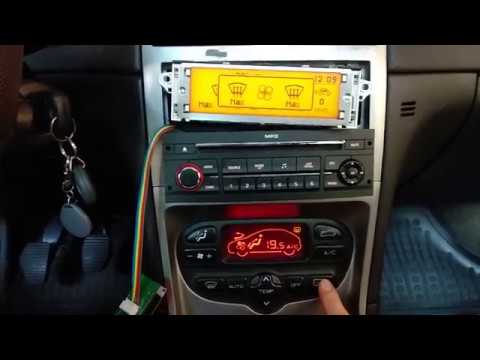
List of supported functions:
- Head unit support: RD4/RD43/RD45/RT6/NAC
- Radio remote stalk support
- VIN bridging for the anti-theft functionality of the RD4/RD43/RD45 head units
- Speed and RPM data for automatic volume correction
- Multifunction display (MFD) messages
- Air conditioning status: fan speed, recirculation, rear demist, A/C on, temperature, airflow direction (via diagnostics)
- Odometer features: fuel level, coolant temp, lighting and indicator status, MIL, airbag warning, etc.
- Illumination control (based on sidelight and dipped beam status)
- Trip computer data
- Door status messages
- Outside temperature
- Economy mode and seatbelt warnings (if the vehicle speed is above 10km/h)
- Semi-automatic VIN coding for head unit anti-theft beep suppression
FAQ:
- Does the odometer from XY work?
- Yes, it should. However, some functions are managed by the odometer itself (ESP deactivation button, door lock button, automatic door locking above 10 km/h, hazard lights, etc.). Because of this, you need to keep at least the printed circuit board from the original odometer, hidden somewhere behind the dashboard.
- Do SMEG, RT6, NAC, etc. work? Which one is the most reliable?
- All of them should work the same. However, you may need to configure your head unit in the BSI to one that supports navigation. This will enable the additional data frames in your car that are required for navigation.
- Is it possible to use a head unit from one generation with a display from another generation? For example: RD4 (AEE2004) with a 6-pin display (AEE2010), or RD3 (AEE2001) with a 6-pin display (AEE2010) or a 12-pin display (AEE2004)?
- No. Not even by chaining multiple devices together. The radio and display are tightly coupled and exchange a large number of messages during operation. While it would be theoretically possible to support such a mixed setup, it simply isn't worth the effort to implement.
Removing the original display (AEE2001 - VAN)
Removing the original display disables the trip computer, door status messages, and the digital A/C system also might stop working. For instance, in the 307, the VAN wires for A/C are routed through the display, breaking the circuit when it's removed. To fix this, create two jumpers on the original connector (pins 4–5 for DATA, 17–18 for DATAB).

The reason behind the missing functionality is due to the fact that the display queries the BSI for the trip computer data, and the door statuses. There is an open issue regarding the replacement of the display I mentioned above, please read that.
Head unit anti-theft protection
PSA head units store the vehicle's VIN. If there's a mismatch between the VIN in the head unit and the one sent on the CAN bus by the BSI, the head unit emits a periodic beep. To resolve this, configure the correct VIN in the device setup page - see the setup section below.
Compatibility
The VAN-CAN part of the software was tested on a 2004 Peugeot 307 SW. It should work on most PSA cars with VAN bus, including (but not limited to):
- Peugeot 206 (multiplexed -MUX- versions from 2001.09 onward)
- Peugeot 206+
- Peugeot 307 (2001- early 2005)
- Peugeot 406 (from 2000)
- Peugeot 1007 (2005-2007)
- Peugeot Partner
- Citroen C2
- Citroen C3 (2001-2005)
- Citroen C5 (2001-2005)
- Citroen C8 (2001-2005)
- Citroen Berlingo
- Citroen Xsara / Picasso
- EuroVan2 (Peugeot 807,Citroen C8, Fiat Ulysse, Lancia Phedra)
Installation
The easiest place to install the hardware is behind the head unit. Use a patch lead to convert ISO to Quadlock, exposing VAN and CAN pins to a JST XH6 connector for the bridge hardware. Below you can find the schematics.
⚠️ In board rev. 1.5 and later the DATA and the DATAB lines are swapped, so if you are upgrading your board, you need to swap these two lines.
Board rev. <= 1.4

Board rev. >= 1.5

CAN-CAN (AEE2004 ⇒ AEE2010)
Similar projects
There are a few projects like this which were intended to convert AEE2004 to AEE2010:
- https://github.com/kurkpitaine/stellantis-can-adapter
- https://github.com/ludwig-v/arduino-psa-comfort-can-adapter
- https://github.com/fmiglior/psa_can2004_to_can2010
- https://github.com/npioterczak/rcc_nac_adapter_T4
- https://github.com/V3nn3tj3/arduino-psa-nac-interface-public
They might be good, but I wanted my own version which I can easily modify whenever I want. They might have more features, but for me the goal isn't to replicate every possible use-case, just to have those which I mostly use. Of course I might implement some of the features they have, but that isn't the main goal.
Components
Components vary depending on what you’re replacing. Common setups include:
- Head unit
