
Percol
adds flavor of interactive filtering to the traditional pipe concept of UNIX shell
Install / Use
/learn @mooz/PercolREADME
percol
                                __
    ____  ___  ______________  / /
   / __ \/ _ \/ ___/ ___/ __ \/ /
  / /_/ /  __/ /  / /__/ /_/ / /
 / .___/\___/_/   \___/\____/_/
/_/
percol adds flavor of interactive selection to the traditional pipe concept on UNIX.
What's this
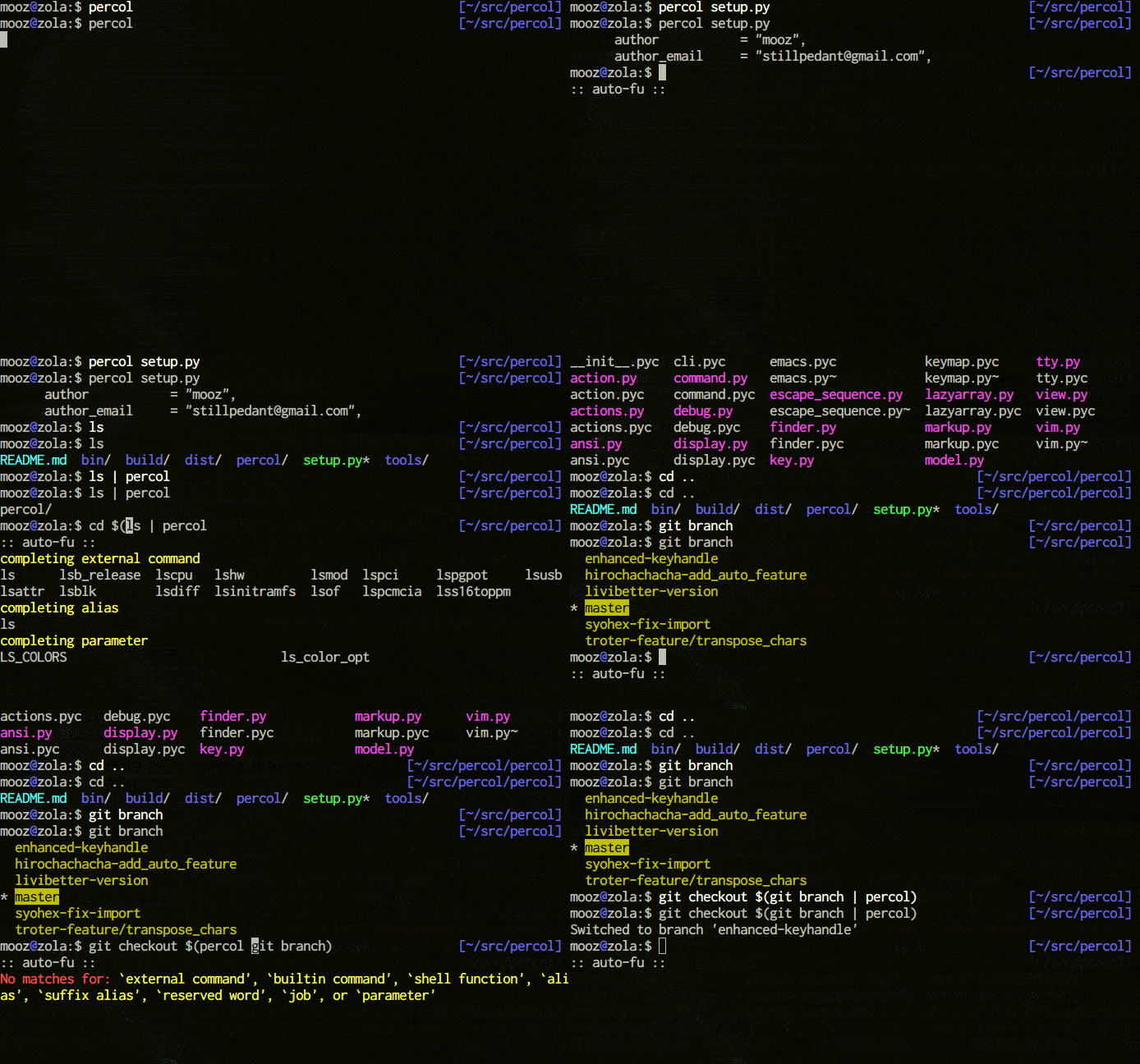
percol is an interactive grep tool in your terminal. percol
- receives input lines from
stdinor a file, - lists up the input lines,
- waits for your input that filter/select the line(s),
- and finally outputs the selected line(s) to
stdout.
Since percol just filters the input and output the result to stdout,
it can be used in command-chains with | in your shell (UNIX philosophy!).
Features
- Efficient: With lazy loads of input lines and query caching, percol handles huge inputs efficiently.
- Customizable: Through configuration file (
rc.py), percol's behavior including prompts, keymaps, and color schemes can be heavily customizable.- See configuration for details.
- Migemo support: By supporting C/Migemo, percol filters Japanese inputs blazingly fast.
- See matching method for details.
Related projects
- canything by @keiji0
- A seminal work in interactive grep tools.
- zaw by @nakamuray
- A zsh-friendly interactive grep tool.
- peco by @lestrrat
- An interactive grep tool written in Go language.
- fzf by @junegunn
- An interactive grep tool written in Go language.
Installation
percol currently supports only Python 2.x.
PyPI
$ sudo pip install percol
Manual
First, clone percol repository and go into the directory.
$ git clone git://github.com/mooz/percol.git
$ cd percol
Then, run a command below.
$ sudo python setup.py install
If you don't have a root permission (or don't wanna install percol with sudo), try next one.
$ python setup.py install --prefix=~/.local
$ export PATH=~/.local/bin:$PATH
Usage
Specifying a filename.
$ percol /var/log/syslog
Specifying a redirection.
$ ps aux | percol
Example
Interactive pgrep / pkill
Here is an interactive version of pgrep,
$ ps aux | percol | awk '{ print $2 }'
and here is an interactive version of pkill.
$ ps aux | percol | awk '{ print $2 }' | xargs kill
For zsh users, command versions are here (ppkill accepts options like -9).
function ppgrep() {
    if [[ $1 == "" ]]; then
        PERCOL=percol
    else
        PERCOL="percol --query $1"
    fi
    ps aux | eval $PERCOL | awk '{ print $2 }'
}

function ppkill() {
    if [[ $1 =~ "^-" ]]; then
        QUERY=""            # options only
    else
        QUERY=$1            # with a query
        [[ $# > 0 ]] && shift
    fi
    ppgrep $QUERY | xargs kill $*
}
zsh history search
In your .zshrc, put the lines below.
function exists { which $1 &> /dev/null }

if exists percol; then
    function percol_select_history() {
        local tac
        exists gtac && tac="gtac" || { exists tac && tac="tac" || { tac="tail -r" } }
        BUFFER=$(fc -l -n 1 | eval $tac | percol --query "$LBUFFER")
        CURSOR=$#BUFFER         # move cursor
        zle -R -c               # refresh
    }

    zle -N percol_select_history
    bindkey '^R' percol_select_history
fi
Then, you can display and search your zsh histories incrementally by pressing Ctrl + r key.
tmux
Here are some examples of tmux and percol integration.
bind b split-window "tmux lsw | percol --initial-index $(tmux lsw | awk '/active.$/ {print NR-1}') | cut -d':' -f 1 | tr -d '\n' | xargs -0 tmux select-window -t"
bind B split-window "tmux ls | percol --initial-index $(tmux ls | awk \"/^$(tmux display-message -p '#{session_name}'):/ {print NR-1}\") | cut -d':' -f 1 | tr -d '\n' | xargs -0 tmux switch-client -t"
By putting above 2 settings into tmux.conf, you can select a tmux window with ${TMUX_PREFIX} b keys and session with ${TMUX_PREFIX} B keys.
Attaching to running tmux sessions can also be made easier with percol with this function(tested to work in bash and zsh)
function pattach() {
    if [[ $1 == "" ]]; then
        PERCOL=percol
    else
        PERCOL="percol --query $1"
    fi

    sessions=$(tmux ls)
    [ $? -ne 0 ] && return

    session=$(echo $sessions | eval $PERCOL | cut -d : -f 1)
    if [[ -n "$session" ]]; then
        tmux att -t $session
    fi
}
Calling percol from Python
Even though Percol is mainly designed as a UNIX command line tool, you can call it from your Python code like so:
from cStringIO import StringIO
from percol import Percol
from percol.actions import no_output

def main(candidates):
    si, so, se = StringIO(), StringIO(), StringIO()
    with Percol(
            actions=[no_output],
            descriptors={'stdin': si, 'stdout': so, 'stderr': se},
            candidates=iter(candidates)) as p:
        p.loop()
    results = p.model_candidate.get_selected_results_with_index()
    return [r[0] for r in results]

if __name__ == "__main__":
    candidates = ['foo', 'bar', 'baz']
    results = main(candidates)
    print("You picked: {!r}".format(results))
Configuration
Configuration file for percol should be placed under ${HOME}/.percol.d/ and named rc.py.
Here is an example ~/.percol.d/rc.py.
# X / _ / X
percol.view.PROMPT  = ur"<bold><yellow>X / _ / X</yellow></bold> %q"

# Emacs like
percol.import_keymap({
    "C-h" : lambda percol: percol.command.delete_backward_char(),
    "C-d" : lambda percol: percol.command.delete_forward_char(),
    "C-k" : lambda percol: percol.command.kill_end_of_line(),
    "C-y" : lambda percol: percol.command.yank(),
    "C-t" : lambda percol: percol.command.transpose_chars(),
    "C-a" : lambda percol: percol.command.beginning_of_line(),
    "C-e" : lambda percol: percol.command.end_of_line(),
    "C-b" : lambda percol: percol.command.backward_char(),
    "C-f" : lambda percol: percol.command.forward_char(),
    "M-f" : lambda percol: percol.command.forward_word(),
    "M-b" : lambda percol: percol.command.backward_word(),
    "M-d" : lambda percol: percol.command.delete_forward_word(),
    "M-h" : lambda percol: percol.command.delete_backward_word(),
    "C-n" : lambda percol: percol.command.select_next(),
    "C-p" : lambda percol: percol.command.select_previous(),
    "C-v" : lambda percol: percol.command.select_next_page(),
    "M-v" : lambda percol: percol.command.select_previous_page(),
    "M-<" : lambda percol: percol.command.select_top(),
    "M->" : lambda percol: percol.command.select_bottom(),
    "C-m" : lambda percol: percol.finish(),
    "C-j" : lambda percol: percol.finish(),
    "C-g" : lambda percol: percol.cancel(),
})
Customizing prompt
In percol, a prompt consists of two part: PROMPT and RPROMPT, like zsh. As the following example shows, each part appearance can be customized by specifying a prompt format into percol.view.PROMPT and percol.view.RPROMPT respectively.
percol.view.PROMPT = ur"<blue>Input:</blue> %q"
percol.view.RPROMPT = ur"(%F) [%i/%I]"
In prompt formats, a character preceded by % indicates a prompt format specifier and is expanded into a corresponding system value.
%%- Display
%itself
- Display
%q- Display query and caret
%Q- Display query without caret
%n- Page number
%N- Total page number
%i- Current line number
%I- Total line number
%c- Caret position
%k- Last input key
Dynamic prompt
By changing percol.view.PROMPT into a getter, percol prompts becomes more fancy.
# Change prompt in response to the status of case sensitivity
percol.view.__class__.PROMPT = property(
    lambda self:
    ur"<bold><blue>QUERY </blue>[a]:</bold> %q" if percol.model.finder.case_insensitive
    else ur"<bold><green>QUERY </green>[A]:</bold> %q"
)
Custom format specifiers
# Display finder name in RPROMPT
percol.view.prompt_replacees["F"] = lambda self, **args: self.model.finder.get_name()
percol.view.RPROMPT = ur"(%F) [%i/%I]"
Customizing styles
For now, styles of following 4 items can be customized in rc.py.
percol.view.CANDIDATES_LINE_BASIC    = ("on_default", "default")
percol.view.CANDIDATES_LINE_SELECTED = ("underline", "on_yellow", "white")
percol.view.CANDIDATES_LINE_MARKED   = ("bold", "on_cyan", "blac
Related Skills
node-connect
335.2kDiagnose OpenClaw node connection and pairing failures for Android, iOS, and macOS companion apps
frontend-design
82.5kCreate distinctive, production-grade frontend interfaces with high design quality. Use this skill when the user asks to build web components, pages, or applications. Generates creative, polished code that avoids generic AI aesthetics.
openai-whisper-api
335.2kTranscribe audio via OpenAI Audio Transcriptions API (Whisper).
commit-push-pr
82.5kCommit, push, and open a PR
