
OpenAlprWebhookProcessor
An OpenALPR Webhook Processor for IP Camera Overlays
Install / Use
/learn @mlapaglia/OpenAlprWebhookProcessorREADME
OpenALPR Webhook Processor
A comprehensive license plate recognition management system that processes webhooks from OpenALPR web servers, manages IP cameras, and provides intelligent alerting capabilities. <img width="1672" height="1061" alt="Untitled" src="https://github.com/user-attachments/assets/073f4ac9-d63d-452d-a80c-b9dcbd12bb29" />
🎯 Core Features
License Plate Processing
- Real-time Processing: Receives and processes license plate webhooks from OpenALPR web servers
- Data Storage: Stores plate numbers, vehicle descriptions, timestamps, and confidence scores
- Image Management: Handles full vehicle images and cropped license plate images
- Statistics: Tracks plate frequency and visit patterns
Camera Management
- Multi-Camera Support: Manage multiple IP cameras with individual configurations
- Manufacturer Support: Compatible with Hikvision and Dahua camera systems
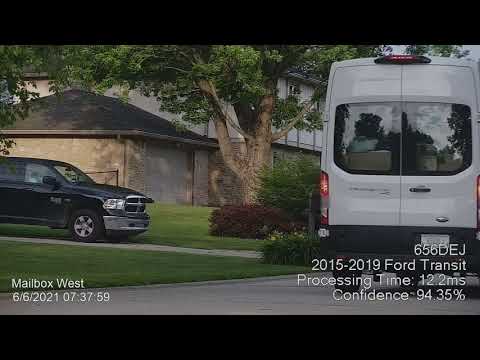
- Live Overlay Updates: Display detected license plates directly on camera video feeds
- Automatic Day/Night Mode: Schedule sunrise/sunset camera mode switching
- Focus Control: Automatic zoom and focus adjustments based on time of day
- Camera Masking: Define detection areas to improve accuracy
Intelligent Alerting
- Custom Alert Rules: Set up alerts for specific license plates or patterns
- Multiple Notification Channels: Push notifications, Pushover integration, and webhook forwarding
- Real-time Notifications: Instant alerts when monitored plates are detected
Machine Learning Predictions
- Visit Prediction: Predict when specific license plates will next appear
- Pattern Recognition: Analyze historical data to identify visiting patterns
- Batch Processing: Handle multiple prediction requests simultaneously
- Model Training: Automatic background model retraining with latest data
📊 Management Interface
Dashboard & Monitoring
- Live Feed: Real-time license plate detection updates
- Search & Filter: Find specific plates by number, date, or camera
- Statistics View: Plate frequency analysis and visit patterns
- System Logs: Monitor application activity and troubleshoot issues
Configuration Management
- User Management: Multi-user support
- Camera Configuration: Set up overlay text, day/night schedules, and focus settings
- Alert Configuration: Configure notification preferences and alert rules
- Ignore Lists: Define plates to exclude from processing or alerts
- Webhook Forwarding: Send processed data to external systems
Advanced Features
- Two-Factor Authentication: Enhanced security for user accounts
- Data Enrichment: Enhance plate data with additional information sources
- Real-time Updates: Live system status and connection monitoring
- Debug Tools: System diagnostics and scheduled job monitoring
🚀 Quick Start
Command Line
dotnet ./OpenAlprWebhookProcessor.dll
Docker
docker run -d \
  --name=openalprwebhookprocessor \
  --net=bridge \
  -v /host/path/:/app/config/ \
  -p 3859:80 \
  mlapaglia/openalprwebhookprocessor
📸 Screenshots
License Plates Dashboard
<img width="1299" height="1080" alt="image" src="https://github.com/user-attachments/assets/d33508f8-e249-411b-b756-ade35ff04841" />Camera Configuration
<img width="1876" height="1078" alt="image" src="https://github.com/user-attachments/assets/a48fadb6-0c6d-4d6d-8fef-cc9d4ba7976f" />Agent Settings
<img width="1544" height="1192" alt="image" src="https://github.com/user-attachments/assets/cd29300e-9610-4328-a158-f96ea9660f11" />🎥 Demo Video
📦 Docker Hub
Available at: mlapaglia/openalprwebhookprocessor
💾 Data Storage
The application requires persistent storage for:
- License plate database
- User settings and configurations
- Machine learning models
- Camera snapshots and images
Mount a volume to /app/config/ to persist data between container restarts.
🛠️ Development
Prerequisites
- .NET 10 SDK
- Node.js 24+ and npm
- Angular CLI:
npm install -g @angular/cli
Getting Started
Backend (ASP.NET Core)
-
Navigate to the server project directory:
cd OpenAlprWebhookProcessor.Server -
Restore dependencies:
dotnet restore -
Start the backend server:
dotnet runThe backend will start at
https://localhost:5001
Frontend (Angular)
-
Navigate to the client project directory:
cd openalprwebhookprocessor.client -
Install dependencies:
npm install -
Start the development server:
npm startThe frontend will start at
https://localhost:4200and automatically proxy API requests to the backend.
Running Both Together
For the best development experience, run both the backend and frontend simultaneously:
-
Terminal 1 - Start the backend:
cd OpenAlprWebhookProcessor.Server dotnet run -
Terminal 2 - Start the frontend:
cd openalprwebhookprocessor.client npm start -
Open your browser to
https://localhost:4200
Running Tests
- Backend Tests:
dotnet test(from the solution root) - Frontend Tests:
npm test(from the client directory)
