
Tabline.vim
Configure tabs within Terminal Vim
Install / Use
/learn @mkitt/Tabline.vimREADME
tabline.vim
Configure tab labels within Terminal Vim with a very succinct output.
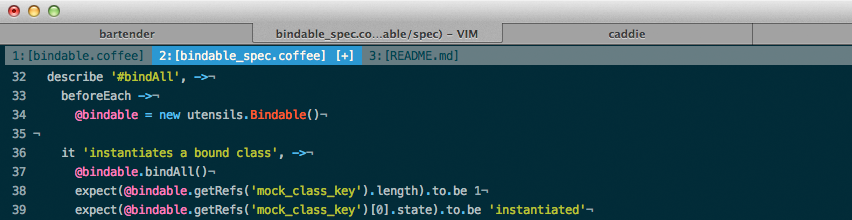
- Tab number
- Filename (basename only)
- [+] if the current buffer has been modified
Tabs in this case, refer to Vim Tabs and not the Terminal.app tabs.
Based on settings found from offensive thinking.
Installation
If you don't have a preferred installation method, I recommend installing pathogen.vim, and then simply copy and paste:
cd ~/.vim/bundle
git clone git://github.com/mkitt/tabline.vim.git
Configuration
Currently there are no configuration variables to define, you either rock it or you don't. This may change at some point in the future.
Make sure to set the following settings within your color theme:
hi TabLine      ctermfg=Black  ctermbg=Green     cterm=NONE
hi TabLineFill  ctermfg=Black  ctermbg=Green     cterm=NONE
hi TabLineSel   ctermfg=White  ctermbg=DarkBlue  cterm=NONE
To enable the close button in the upper right corner, add the following to your ~/.vimrc
let g:tablineclosebutton=1
Related Skills
node-connect
340.5kDiagnose OpenClaw node connection and pairing failures for Android, iOS, and macOS companion apps
frontend-design
84.2kCreate distinctive, production-grade frontend interfaces with high design quality. Use this skill when the user asks to build web components, pages, or applications. Generates creative, polished code that avoids generic AI aesthetics.
openai-whisper-api
340.5kTranscribe audio via OpenAI Audio Transcriptions API (Whisper).
commit-push-pr
84.2kCommit, push, and open a PR
