
hetzner-mcp
Enterprise-grade Model Context Protocol server for the full Hetzner platform. Cloud, Storage Box, and Robot dedicated servers. Cost-guarded, security-hardened, every endpoint live-tested.
Install / Use
claude mcp add mjmirza -- npx -y github:mjmirza/hetzner-mcpIf the server publishes to npm under a different name, use that package instead — check the repo README.
MCP Server
Model Context Protocol server
Quality Score
Category
SecuritySupported Platforms
Skill content
View source on GitHubhetzner-mcp
Manage your entire Hetzner platform from any AI assistant. Cloud servers, networks, volumes, firewalls, load balancers, IPs and DNS, plus Storage Boxes and Robot dedicated servers. One Model Context Protocol server, every surface, tested live, with a hard cost guard so you never get a surprise bill.








If this saves you time, please sponsor the project, leave a star, and follow along. Sponsorship is what lets me put real hours into building this out.
Star | Sponsor | Fork | Follow on GitHub | Follow on X | next8n.com
<sub>The Hetzner wordmark above is a trademark of Hetzner Online GmbH, shown only to identify the service this tool integrates with. This project is independent and is not affiliated with, endorsed by, or sponsored by Hetzner Online GmbH, and claims no rights to the logo. See <a href="docs/CREDITS.md">docs/CREDITS.md</a>.</sub>
</div>Please sponsor this project
This is built and maintained in the open, for free, under a license that only asks for attribution. If your team relies on it, becoming a sponsor directly buys the time to cover more endpoints, keep the endpoint audit current as Hetzner changes, and respond to issues and pull requests faster. Even a small monthly amount makes a real difference. Thank you.
Validated live, not theorized
Every tool and every scenario in this server was run live against the real Hetzner API, not described from theory. 91 automated checks across cloud, Storage Box, and Robot, with 0 failures. Every billed resource was created and then destroyed, a full load balanced stack was deployed and proven to round robin across two backends, and the account was left clean.
| Checks run live | Failures | Tools exercised | Surfaces | |---|---|---|---| | 91 | 0 | every registered tool | cloud, storage box, robot |
Read the full validation report for the per tool table, the cost discipline, the diagrams, and the exact commands to reproduce it yourself (npm run validate:live, npm run eval, npm run deploy:demo).
Watch it work
Hetzner, managed from Claude Desktop in plain language. Open a chat, ask in plain words, and the answer comes straight back from your live account. No commands to memorize, no API to learn.
<div align="center"> <a href="https://youtu.be/OhaUP-Fhq_0"> <img src="https://img.youtube.com/vi/OhaUP-Fhq_0/maxresdefault.jpg" alt="Watch the hetzner-mcp demo on YouTube" width="720" /> </a> <br/> <sub><a href="https://youtu.be/OhaUP-Fhq_0">Watch the 2 minute demo on YouTube</a></sub> </div>Set up in one command
If you have Node, this is the whole setup.
npx hetzner-mcp setup
It asks for your Hetzner API token, checks it against the live Hetzner API on the spot, then writes the config for whichever assistant you use. It detects and wires Claude Desktop, Claude Code, Cursor, Windsurf, and VS Code, and backs up any existing config first.
No token yet? The wizard links you straight to the page that creates one. In the Hetzner Cloud Console, open your project, then Security, then API Tokens, then Generate, and choose Read and Write. The same token also covers Storage Boxes.
Check it anytime.
npx hetzner-mcp doctor
Doctor verifies your token against the live API and shows which assistants are wired, all read only, writing nothing.
Where your token is stored
Your token goes nowhere except Hetzner. The wizard saves it locally, inside your assistant's own config file, with owner only file permissions, and never prints it.
| Assistant | Where the token is written |
|---|---|
| Claude Desktop | the Claude config in your user Library (macOS), AppData (Windows), or .config (Linux) |
| Claude Code | ~/.claude.json |
| Cursor | ~/.cursor/mcp.json |
| Windsurf | the Windsurf mcp_config.json |
| VS Code | .vscode/mcp.json in your project |
Using a different assistant?
hetzner-mcp is a standard MCP server, so it works with any MCP client. For an assistant the wizard does not write to directly, print the block and paste it where that client keeps its MCP servers.
npx hetzner-mcp setup --print
A note on ChatGPT. OpenAI's MCP support is built around remote connectors rather than a local config file, so the desktop assistants above are the most direct fit for a local server like this. Any client that speaks MCP over stdio needs only the printed block.
Set it up by pasting one prompt
No setup effort. Copy the block below, paste it into Claude Code, Codex, Cursor, or any AI coding tool, and it installs the server, wires it into your flow, and walks you through the one manual step, getting a token.
Set up the hetzner-mcp server from https://github.com/mjmirza/hetzner-mcp so that from now on I can manage my whole Hetzner platform, Cloud servers, networks, volumes, firewalls, load balancers, IPs, DNS, Storage Boxes, and Robot dedicated servers, from this AI assistant, safely.

Steps:
1. Register the MCP server. Run this, replacing MY_TOKEN with my Hetzner Cloud API token:
   claude mcp add -s user hetzner -e HETZNER_CLOUD_TOKEN=MY_TOKEN -- npx -y hetzner-mcp
   For dedicated servers also add: -e HETZNER_ROBOT_USER=my-ws-user -e HETZNER_ROBOT_PASSWORD=my-ws-password
2. If I do not have a token yet, walk me through it. Hetzner Cloud Console at https://console.hetzner.com, my project, Security, API Tokens, Generate. Choose Read and Write to manage resources. The same token also works for Storage Boxes.
3. Install the provision skill so you can spin up a full stack end to end. Copy skills/hetzner-provision from the repo into my agent skills directory, for Claude Code that is ~/.claude/skills/hetzner-provision/.
4. Add a standing rule for yourself. never create a billed resource without showing me the live price and getting my explicit yes, and always offer to tear down test resources to stop cost.
5. Confirm it works with a free read. list my servers, my storage boxes, and if Robot is set, my dedicated servers.
6. Tell me exactly what you installed and how I provision or tear down anything from now on.
Want only a one time look, no install? Paste this instead.
Connect to my Hetzner account through the hetzner-mcp server, run npx -y hetzner-mcp with my Cloud API token, then show me everything I am running across Cloud, Storage Box, and Robot, with the monthly cost. Do not create or delete anything. Reads are free.
What this is, in plain words
Hetzner is a hosting company. It runs cloud servers, storage, and physical dedicated servers, and it exposes APIs to control all of it. This project is a small program, an MCP server, that lets an AI assistant like Claude do that controlling for you, safely. You ask in normal language, the assistant calls the right Hetzner endpoint, and the result comes back. You do not need to learn the API. You do need to give it an access token once, which this guide walks you through.
The single most important promise. Reading and listing are always free, and the tool will never create something that costs money without asking you first and showing you the price.
The three surfaces it covers
| Surface | What it manages | Credential needed | |---|---|---| | Cloud | servers, networks, volumes, firewalls, load balancers, floating and primary IPs, placement groups, SSH keys, images, certificates, and DNS zones | one Cloud API token | | Storage Box | backup storage boxes | the same Cloud API token | | Robot | physical dedicated servers and vSwitches | a separate Robot webservice user and password, only if you use dedicated servers |
All three are live tested against a real account. See docs/ENDPOINT-AUDIT.md for the exact, dated, per endpoint results.
Cost safety, the part you actually worry about
A wrong API call should never cost you money you did not intend. This tool is built around that.
- Every list and get is free on Hetzner. Use them as much as you like.
- Resources that are free to create, such as SSH keys, networks, firewalls, and placement groups, are created normally.
- Resources that cost money, such as servers, volumes, load balancers, floating and primary IPs, and storage boxes, are guarded. The tool refuses to create them unless you pass an explicit confirm, and it first fetches and shows you the live hourly and monthly price.
- Nothing in the test suite leaves a billed resource running. The whole build is tracked in a cost ledger in docs/ROADMAP.md, with a target of under five cents total.
Quick start
The fastest path is npx hetzner-mcp setup above. The steps below are the manual path, for wiring a client by hand or scripting it in CI.
Use it with Claude Code or any MCP client
It is published on npm. Point your MCP client at the package and give it your token. This uses npx, so nothing is installed permanently.
claude mcp add hetzner -e HETZNER_CLOUD_TOKEN=your-token -- npx -y hetzner-mcp
For Robot dedicated servers, also add the webservice credentials.
claude mcp add hetzner \
  -e HETZNER_CLOUD_TOKEN=your-token \
  -e HETZNER_ROBOT_USER=your-ws-user \
  -e HETZNER_ROBOT_PASSWORD=your-ws-password \
  -- npx -y hetzner-mcp
Install globally with npm
Install once and the hetzner-mcp command is on your PATH.
npm install -g hetzner-mcp
Then point your MCP client at the installed command instead of npx.
claude mcp add hetzner -e HETZNER_CLOUD_TOKEN=your-token -- hetzner-mcp
Run it from source
git clone https://github.com/mjmirza/hetzner-mcp
cd hetzner-mcp
npm install
cp .env.example .env   # then fill in your token
npm run build
npm start
Getting your credentials
Full, beginner friendly, step by step instructions, including the German console labels, are in docs/SETUP.md. The short version.
- Cloud token. https://console.hetzner.com, your project, Security, API Tokens, Generate. This one token also works for Storage Boxes.
- Robot user, only for dedicated servers. https://robot.hetzner.com, Settings, Web service and app settings, set a password, the username is assigned to you.
Visual walkthrough, getting the Cloud token
Open the Cloud Console, then your project.
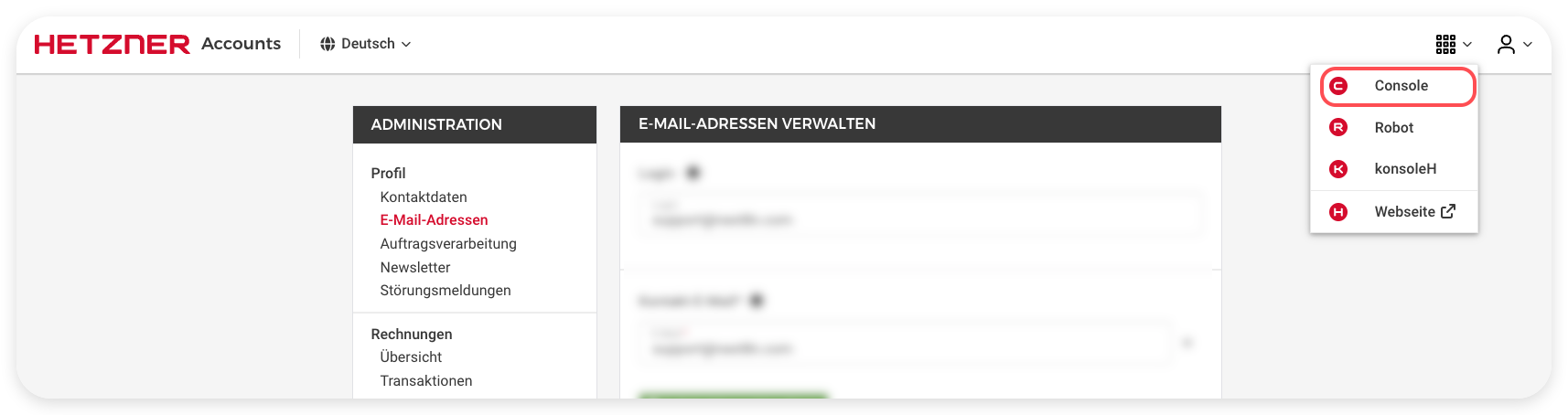
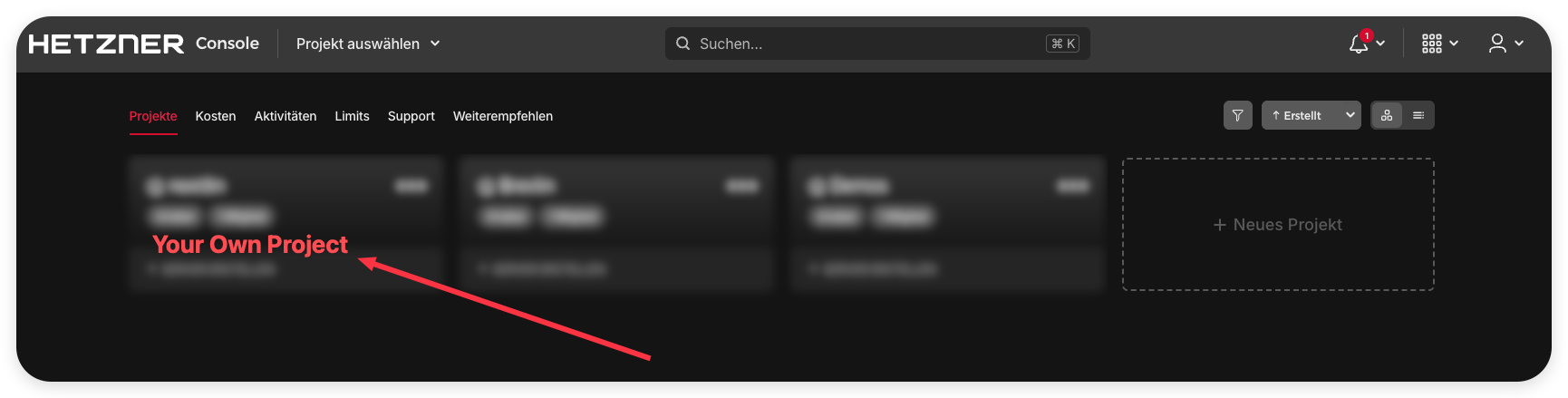
Open Security, t
Truncated for display — read the full file on GitHub.
Related Skills
momen-cursurrules-prompt-file
40.6kCursor rules for building custom frontends with Momen.app as headless BaaS with GraphQL API, actionflows, AI agents, and Stripe integration.
semiotic-react-dataviz-cursorrules-prompt-file
40.6kCursor rules for Semiotic data visualization library with 30+ chart types, MCP server, and AI-assisted chart generation.
Agent-Reach
72.2kGive your AI agent eyes to see the entire internet. Read & search Twitter, Reddit, YouTube, GitHub, Bilibili, XiaoHongShu — one CLI, zero API fees.
ruflo
68.0k🌊 The original agent meta-harness. Deploy intelligent multi-player swarms, coordinate autonomous workflows, and build conversational AI systems. Features adaptive memory, self-learning intelligence, RAG integration, and native Claude Code / Codex / Hermes and many more Integrated
