
MiniWord
.NET Word(docx) exporting template engine without COM+ & interop (support Linux and Mac)
Install / Use
/learn @mini-software/MiniWordREADME
<div align="center">
<p><a href="https://www.nuget.org/packages/MiniWord"><img src="https://img.shields.io/nuget/v/MiniWord.svg" alt="NuGet"></a> <a href="https://www.nuget.org/packages/MiniWord"><img src="https://img.shields.io/nuget/dt/MiniWord.svg" alt=""></a>
<a href="https://github.com/mini-software/MiniWord" rel="nofollow"><img src="https://img.shields.io/github/stars/mini-software/MiniWord?logo=github" alt="GitHub stars"></a>
<a href="https://www.nuget.org/packages/MiniWord"><img src="https://img.shields.io/badge/.NET-%3E%3D%204.5-red.svg" alt="version"></a>
<a href="https://deepwiki.com/mini-software/MiniWord"><img src="https://deepwiki.com/badge.svg" alt="Ask DeepWiki"></a>
</p>
</div>
<div style="text-align: center"><p><a href="https://openaitx.github.io/view.html?user=mini-software&project=MiniWord&lang=en"><img src="https://img.shields.io/badge/EN-white" alt="version"></a> <a href="https://openaitx.github.io/view.html?user=mini-software&project=MiniWord&lang=zh-CN"><img src="https://img.shields.io/badge/简中-white" alt="version"></a> <a href="https://openaitx.github.io/view.html?user=mini-software&project=MiniWord&lang=zh-TW"><img src="https://img.shields.io/badge/繁中-white" alt="version"></a> <a href="https://openaitx.github.io/view.html?user=mini-software&project=MiniWord&lang=ja"><img src="https://img.shields.io/badge/日本語-white" alt="version"></a> <a href="https://openaitx.github.io/view.html?user=mini-software&project=MiniWord&lang=ko"><img src="https://img.shields.io/badge/한국어-white" alt="version"></a> <a href="https://openaitx.github.io/view.html?user=mini-software&project=MiniWord&lang=th"><img src="https://img.shields.io/badge/ไทย-white" alt="version"></a> <a href="https://openaitx.github.io/view.html?user=mini-software&project=MiniWord&lang=fr"><img src="https://img.shields.io/badge/Français-white" alt="version"></a> <a href="https://openaitx.github.io/view.html?user=mini-software&project=MiniWord&lang=de"><img src="https://img.shields.io/badge/Deutsch-white" alt="version"></a> <a href="https://openaitx.github.io/view.html?user=mini-software&project=MiniWord&lang=es"><img src="https://img.shields.io/badge/Español-white" alt="version"></a> <a href="https://openaitx.github.io/view.html?user=mini-software&project=MiniWord&lang=it"><img src="https://img.shields.io/badge/Italiano-white" alt="version"></a> <a href="https://openaitx.github.io/view.html?user=mini-software&project=MiniWord&lang=ru"><img src="https://img.shields.io/badge/Русский-white" alt="version"></a> <a href="https://openaitx.github.io/view.html?user=mini-software&project=MiniWord&lang=pt"><img src="https://img.shields.io/badge/Português-white" alt="version"></a> <a href="https://openaitx.github.io/view.html?user=mini-software&project=MiniWord&lang=nl"><img src="https://img.shields.io/badge/Nederlands-white" alt="version"></a> <a href="https://openaitx.github.io/view.html?user=mini-software&project=MiniWord&lang=pl"><img src="https://img.shields.io/badge/Polski-white" alt="version"></a> <a href="https://openaitx.github.io/view.html?user=mini-software&project=MiniWord&lang=ar"><img src="https://img.shields.io/badge/العربية-white" alt="version"></a> <a href="https://openaitx.github.io/view.html?user=mini-software&project=MiniWord&lang=tr"><img src="https://img.shields.io/badge/Türkçe-white" alt="version"></a> <a href="https://openaitx.github.io/view.html?user=mini-software&project=MiniWord&lang=vi"><img src="https://img.shields.io/badge/Tiếng Việt-white" alt="version"></a> </p></div>
<div align="center"> Your <a href="https://github.com/mini-software/MiniWord">Star</a> and <a href="https://miniexcel.github.io">dotnate</a> can make MiniWord better </div>
<div style="text-align: center"><p><a href="https://openaitx.github.io/view.html?user=mini-software&project=MiniWord&lang=en"><img src="https://img.shields.io/badge/EN-white" alt="version"></a> <a href="https://openaitx.github.io/view.html?user=mini-software&project=MiniWord&lang=zh-CN"><img src="https://img.shields.io/badge/简中-white" alt="version"></a> <a href="https://openaitx.github.io/view.html?user=mini-software&project=MiniWord&lang=zh-TW"><img src="https://img.shields.io/badge/繁中-white" alt="version"></a> <a href="https://openaitx.github.io/view.html?user=mini-software&project=MiniWord&lang=ja"><img src="https://img.shields.io/badge/日本語-white" alt="version"></a> <a href="https://openaitx.github.io/view.html?user=mini-software&project=MiniWord&lang=ko"><img src="https://img.shields.io/badge/한국어-white" alt="version"></a> <a href="https://openaitx.github.io/view.html?user=mini-software&project=MiniWord&lang=th"><img src="https://img.shields.io/badge/ไทย-white" alt="version"></a> <a href="https://openaitx.github.io/view.html?user=mini-software&project=MiniWord&lang=fr"><img src="https://img.shields.io/badge/Français-white" alt="version"></a> <a href="https://openaitx.github.io/view.html?user=mini-software&project=MiniWord&lang=de"><img src="https://img.shields.io/badge/Deutsch-white" alt="version"></a> <a href="https://openaitx.github.io/view.html?user=mini-software&project=MiniWord&lang=es"><img src="https://img.shields.io/badge/Español-white" alt="version"></a> <a href="https://openaitx.github.io/view.html?user=mini-software&project=MiniWord&lang=it"><img src="https://img.shields.io/badge/Italiano-white" alt="version"></a> <a href="https://openaitx.github.io/view.html?user=mini-software&project=MiniWord&lang=ru"><img src="https://img.shields.io/badge/Русский-white" alt="version"></a> <a href="https://openaitx.github.io/view.html?user=mini-software&project=MiniWord&lang=pt"><img src="https://img.shields.io/badge/Português-white" alt="version"></a> <a href="https://openaitx.github.io/view.html?user=mini-software&project=MiniWord&lang=nl"><img src="https://img.shields.io/badge/Nederlands-white" alt="version"></a> <a href="https://openaitx.github.io/view.html?user=mini-software&project=MiniWord&lang=pl"><img src="https://img.shields.io/badge/Polski-white" alt="version"></a> <a href="https://openaitx.github.io/view.html?user=mini-software&project=MiniWord&lang=ar"><img src="https://img.shields.io/badge/العربية-white" alt="version"></a> <a href="https://openaitx.github.io/view.html?user=mini-software&project=MiniWord&lang=tr"><img src="https://img.shields.io/badge/Türkçe-white" alt="version"></a> <a href="https://openaitx.github.io/view.html?user=mini-software&project=MiniWord&lang=vi"><img src="https://img.shields.io/badge/Tiếng Việt-white" alt="version"></a> </p></div>
<div align="center"> Your <a href="https://github.com/mini-software/MiniWord">Star</a> and <a href="https://miniexcel.github.io">dotnate</a> can make MiniWord better </div>
Introduction
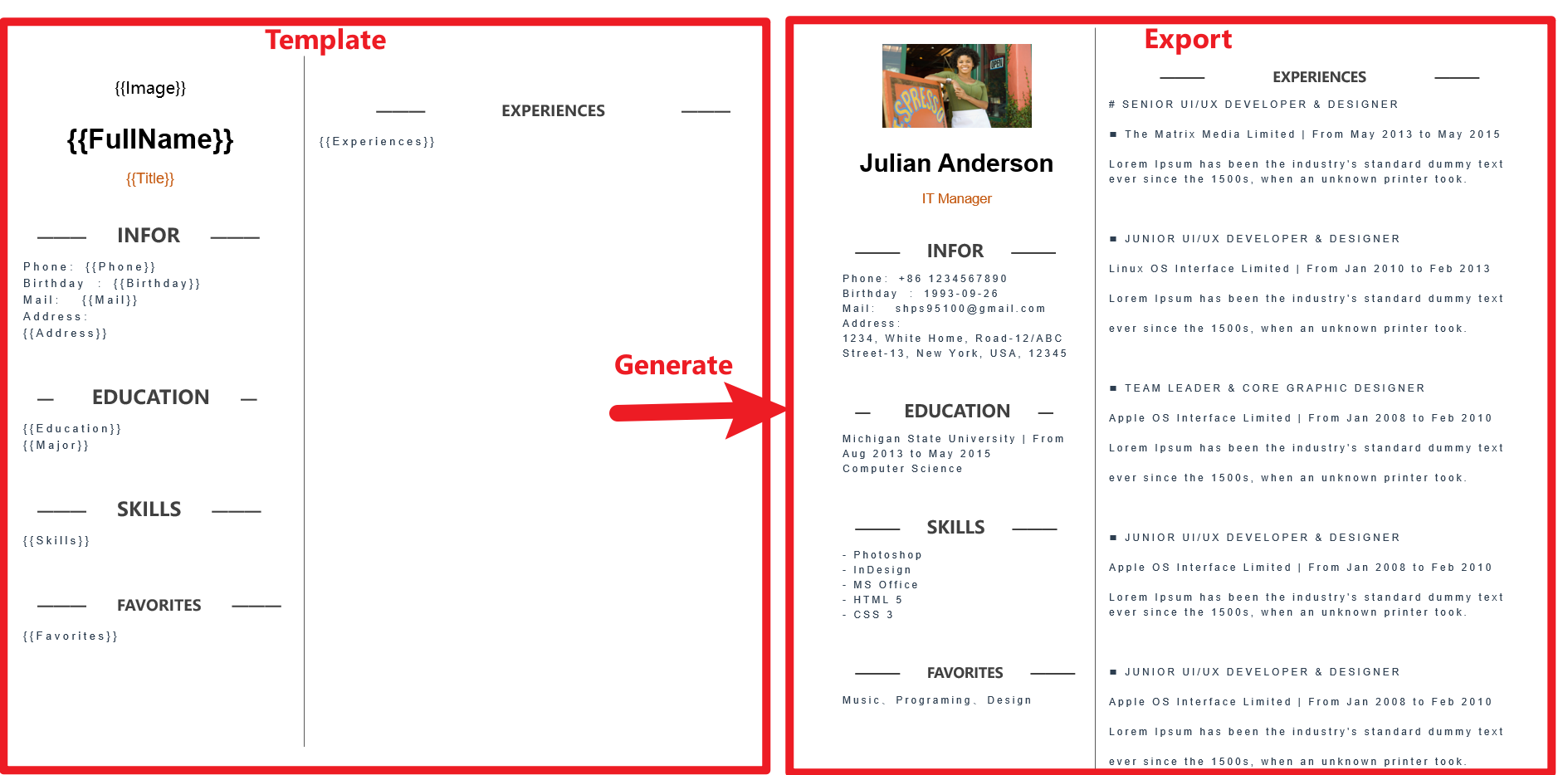
MiniWord is an easy and effective .NET Word Template library.
Getting Started
Installation
- nuget link : https://www.nuget.org/packages/MiniWord
Quick Start
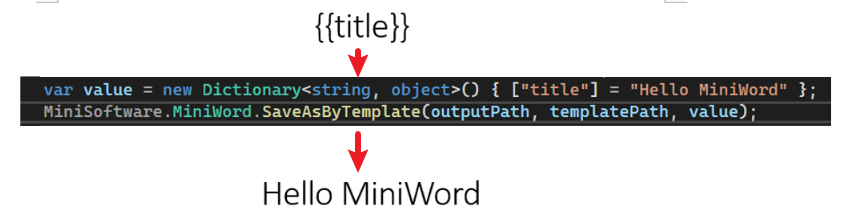
Template follow "WHAT you see is what you get" design,and the template tag styles are completely preserved.
var value = new Dictionary<string, object>(){["title"] = "Hello MiniWord"};
MiniSoftware.MiniWord.SaveAsByTemplate(outputPath, templatePath, value);
Input, Output
- Input support file path, byte[]
- Output support file path, byte[], stream
SaveAsByTemplate(string path, string templatePath, Dictionary<string, object> value)
SaveAsByTemplate(string path, byte[] templateBytes, Dictionary<string, object> value)
SaveAsByTemplate(this Stream stream, string templatePath, Dictionary<string, object> value)
SaveAsByTemplate(this Stream stream, byte[] templateBytes, Dictionary<string, object> value)
Tags
MiniWord template format string like Vue, React {{tag}},users only need to make sure tag and value parameter key same then system will replace them automatically.
Text
{{tag}}
Example
var value = new Dictionary<string, object>()
{
    ["Name"] = "Jack",
    ["Department"] = "IT Department",
    ["Purpose"] = "Shanghai site needs a new system to control HR system.",
    ["StartDate"] = DateTime.Parse("2022-09-07 08:30:00"),
    ["EndDate"] = DateTime.Parse("2022-09-15 15:30:00"),
    ["Approved"] = true,
    ["Total_Amount"] = 123456,
};
MiniWord.SaveAsByTemplate(path, templatePath, value);
Template

Result

Image
Value type is MiniWordPicture
Example
var value = new Dictionary<string, object>()
{
    ["Logo"] = new MiniWordPicture() { Path= PathHelper.GetFile("DemoLogo.png"), Width= 180, Height= 180 }
};
MiniWord.SaveAsByTemplate(path, templatePath, value);
Template
Result

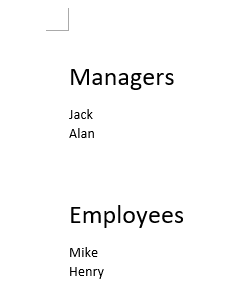
List
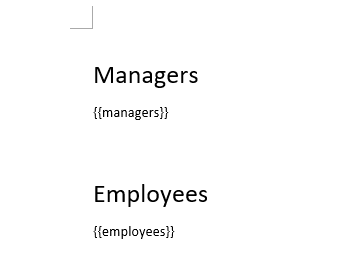
tag value is string[] or IList<string> type
Example
var value = new Dictionary<string, object>()
{
    ["managers"] = new[] { "Jack" ,"Alan"},
    ["employees"] = new[] { "Mike" ,"Henry"},
};
MiniWord.SaveAsByTemplate(path, templatePath, value);
Template
Result
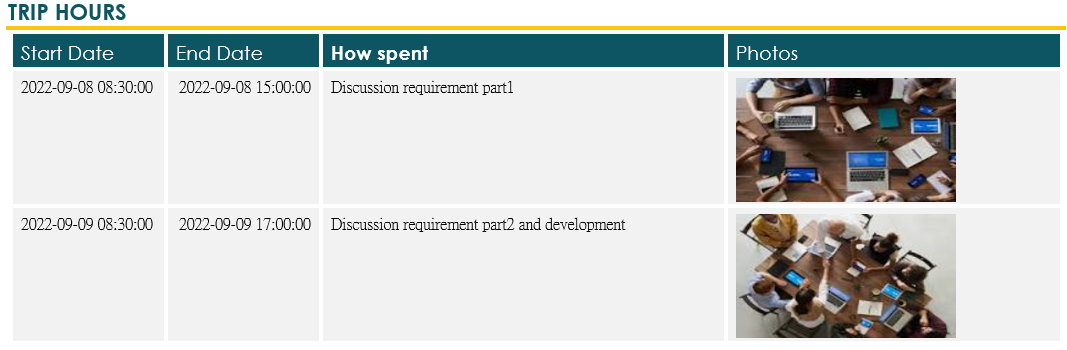
Table
Tag value is IEmerable<Dictionary<string,object>> type
Example
var value = new Dictionary<string, object>()
{
    ["TripHs"] = new List<Dictionary<string, object>>
    {
        new Dictionary<string, object>
        {
            { "sDate",DateTime.Parse("2022-09-08 08:30:00")},
            { "eDate",DateTime.Parse("2022-09-08 15:00:00")},
            { "How","Discussion requirement part1"},
            { "Photo",new MiniWordPicture() { Path = PathHelper.GetFile("DemoExpenseMeeting02.png"), Width = 160, Height = 90 }},
        },
        new Dictionary<string, object>
        {
            { "sDate",DateTime.Parse("2022-09-09 08:30:00")},
            { "eDate",DateTime.Parse("2022-09-09 17:00:00")},
            { "How","Discussion requirement part2 and development"},
            { "Photo",new MiniWordPicture() { Path = PathHelper.GetFile("DemoExpenseMeeting01.png"), Width = 160, Height = 90 }},
        },
    }
};
MiniWord.SaveAsByTemplate(path, templatePath, value);
Template

Result
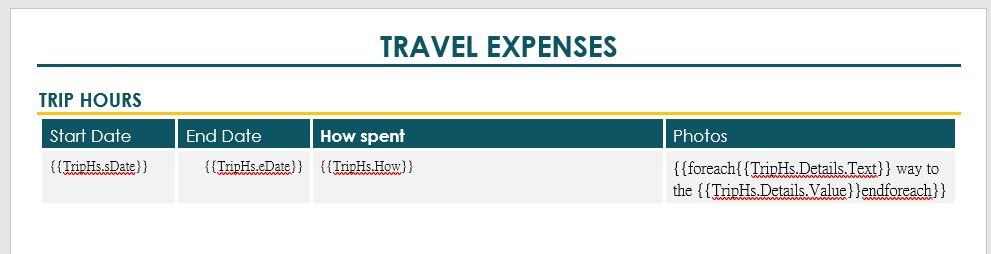
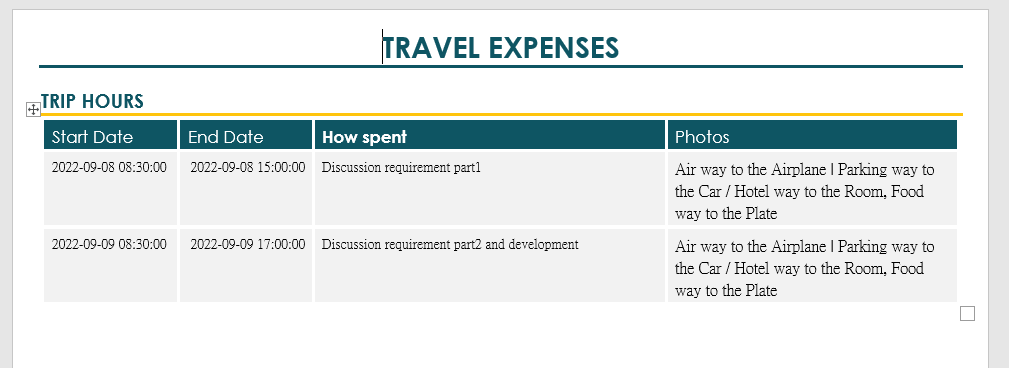
List inside list
Tag value is IEnumerable<MiniWordForeach> type. Adding {{foreach and endforeach}} tags to template is required.
Example
var value = new Dictionary<string, object>()
{
    ["TripHs"] = new List<Dictionary<string, object>>
    {
        new Dictionary<string, object>
        {
            { "sDate", DateTime.Parse("2022-09-08 08:30:00") },
            { "eDate", DateTime.Parse("2022-09-08 15:00:00") },
            { "How", "Discussion requirement part1" },
            {
                "Details", new List<MiniWordForeach>()
                {
                    new MiniWordForeach()
                    {
                        Value = new Dictionary<string, object>()
                        {
                            {"Text", "Air"},
                            {"Value", "Airplane"}
                        },
                        Separator = " | "
                    },
                    new MiniWordForeach()
                    {
                        Value = new Dictionary<string, object>()
                        {
                            {"Text", "Parking"},
                            {"Value", "Car"}
                        },
                        Separator = " / "
                    }
                }
            }
        }
    }
};
MiniWord.SaveAsByTemplate(path, templatePath, value);
Template
Result
<img width="755" alt="Screenshot 2023-08-08
