
Pymg
pymg is a CLI that can interpret Python files by the Python interpreter and display the error message in a more readable way if an exception occurs.
Install / Use
/learn @mimseyedi/PymgREADME




Table of Contents: <a class="anchor" id="contents"></a>
- Introduction
- Installation
- How to use pymg?
- How does pymg work?
- Bugs/Requests
- License
Introduction <a class="anchor" id="intro"></a>
pymg is a CLI tool that can interpret Python files by the Python interpreter and display the error message in a more readable way if an exception occurs.
Installation <a class="anchor" id="install"></a>
You can use pip to install:
python3 -m pip install pymg
And also to upgrade:
python3 -m pip install --upgrade pymg
<a class="anchor" id="usage"></a>

Using the --help option <a class="anchor" id="help"></a>
With the help of the (-h, --help) option, you can easily see how to use pymg and the explanations of the options.
Usage: pymg [OPTIONS] [PYTHON_FILE]...

  pymg is a CLI tool that can interpret Python files by the Python interpreter
  and display the error message in a more readable way if an exception occurs.

Options:
  -x, --syntax       It checks the syntax of the selected Python file. If
                     there is a syntax problem, an error message will be
                     displayed, otherwise 'INTACT' will be displayed.
  -t, --type         The type of exception that occurred will be displayed.
  -m, --message      The message of exception that occurred will be displayed.
  -f, --file         The full path of the Python file where the exception
                     occurred will be displayed.
  -s, --scope        The scope where the exception occurred will be displayed.
  -l, --line         The line number that caused the exception will be
                     displayed.
  -c, --code         The code that caused the exception will be displayed.
  -T, --trace        All paths that contributed to the creation of the
                     exception will be tracked, and then, with separation,
                     each created stack will be displayed.
  -i, --inner        Just like the --trace option, The exception that occurred
                     will be tracked and the result will be limited and
                     displayed to the internal content of the selected Python
                     file.
  -L, --locals       The last value of each scope's local variables before the
                     exception occurs will be displayed. This option can be
                     combined with --trace and --inner.
  -S, --search       With the help of stackoverflow api, the links of answered
                     posts related to the exception that occurred will be
                     displayed.
  -o, --output PATH  Writes the output to a text file. It has an argument that
                     contains the path of the text file.
  -r, --recent       Redisplays the last operation performed.
  -v, --version      Displays the current version of pymg installed on the
                     system.
  -h, --help         Show this message and exit.
Interpret the file without options <a class="anchor" id="no_option"></a>
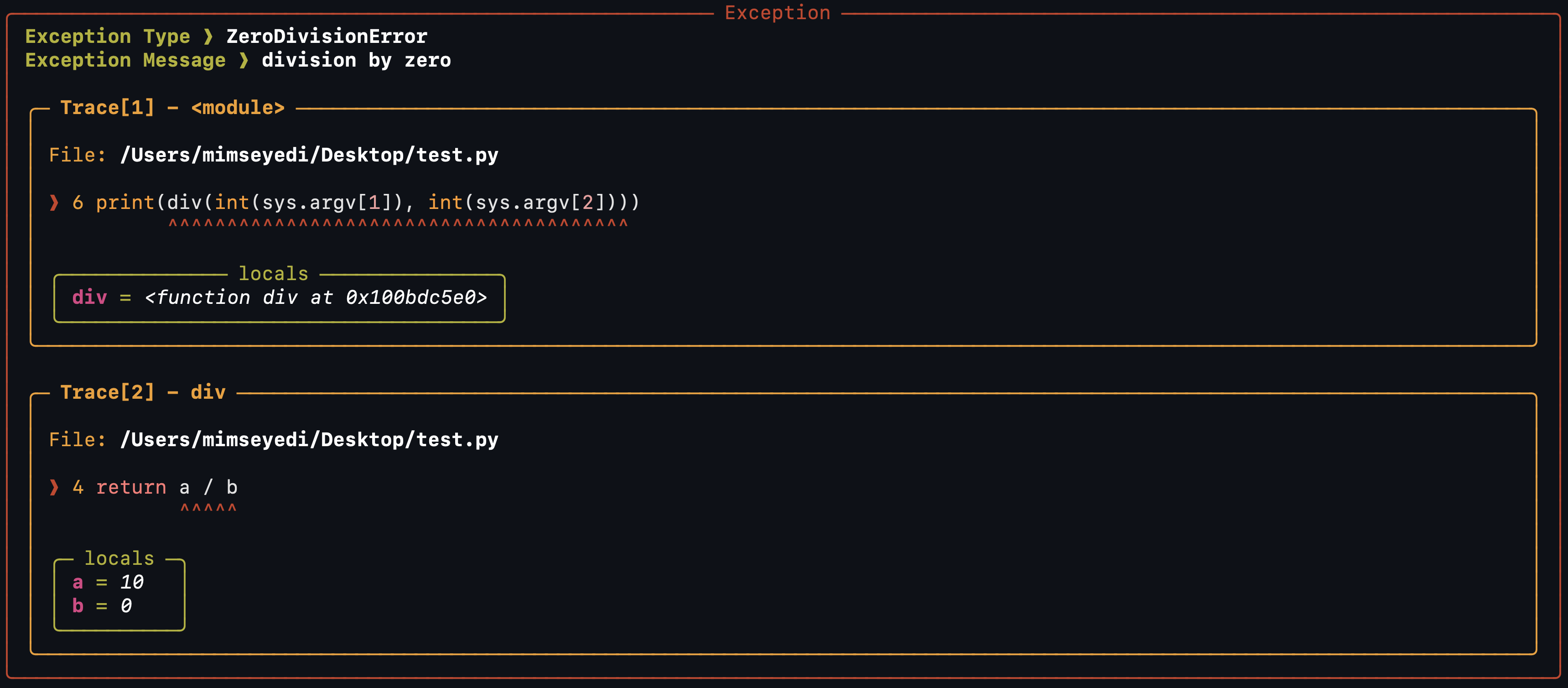
By default, (-i, --inner) and (-L, --locals) will happen if you don't select any options. Combining these two options will make an effective form of error message.
Let's check the test.py file as an example:
import sys

def div(a, b):
    return a / b

print(div(int(sys.argv[1]), int(sys.argv[2])))
The task of this program is very simple. It passes the two values it receives from the command line arguments to the div function, and the div function divides them.
Now let us interpret the test.py file with pymg so that the ZeroDivisionError exception occurs.
pymg test.py 4 0
Output:
Syntax validation using the --syntax option <a class="anchor" id="syntax"></a>
Let's create an intentional syntax problem in the test.py file:
import sys

def div(a, b):
    return (a / b

print(div(int(sys.argv[1]), int(sys.argv[2])))
Now we will use the (-x, --syntax) option:
pymg test.py 4 0 -x
Output:

SyntaxError always precedes exceptions, and even if you don't use the (-x, --syntax) option, it will be checked at interpret time.
Pay attention to the following command, which displays a similar output:
pymg test.py 4 0
Output:
IndentationError and TabError will also be checked in the syntax checking stage:
import sys

def div(a, b):
return a / b

print(div(int(sys.argv[1]), int(sys.argv[2])))
Output:

Combination of options <a class="anchor" id="combine"></a>
pymg allows you to combine options to access all the features of the exception separately and get different outputs:
pymg test.py 4 0 -f -s -l -c -m
Output:

But some options are ahead of others, you can see the prioritization of options <a href="https://github.com/mimseyedi/pymg/blob/master/docs/guide/how_does_pymg_work.md#pri_options">here</a>.
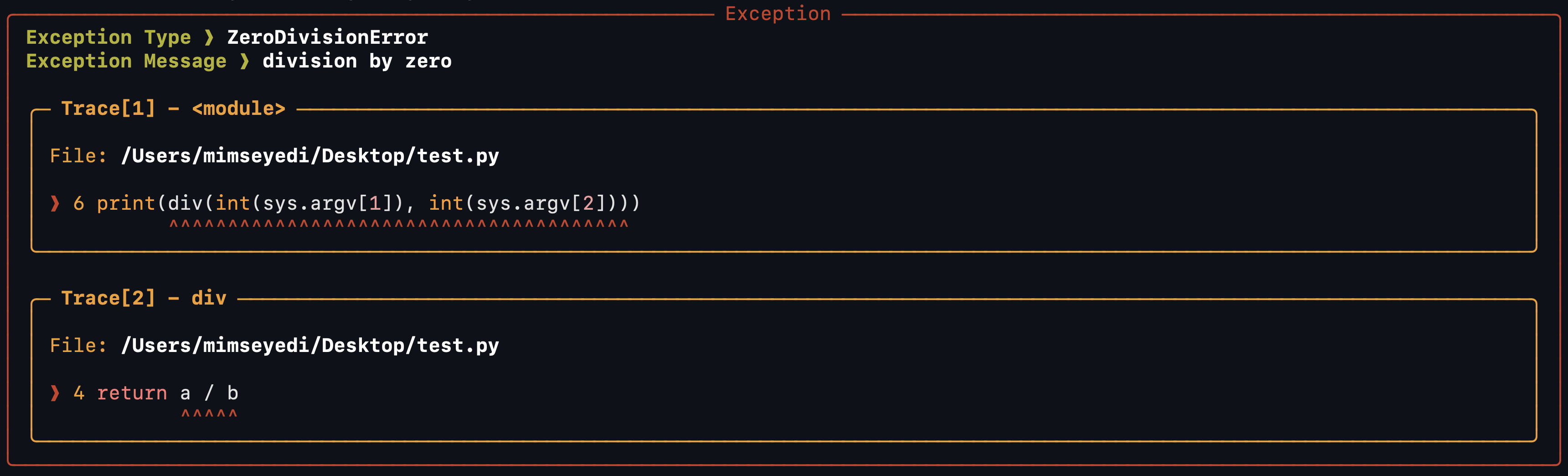
For example, using the (-T, --trace) option, other options will not work (Because all the options are included in this option):
pymg test.py 4 0 -f -s -l -c -m -T
Output:
Combination of --trace and --inner options with --locals <a class="anchor" id="T_i_L"></a>
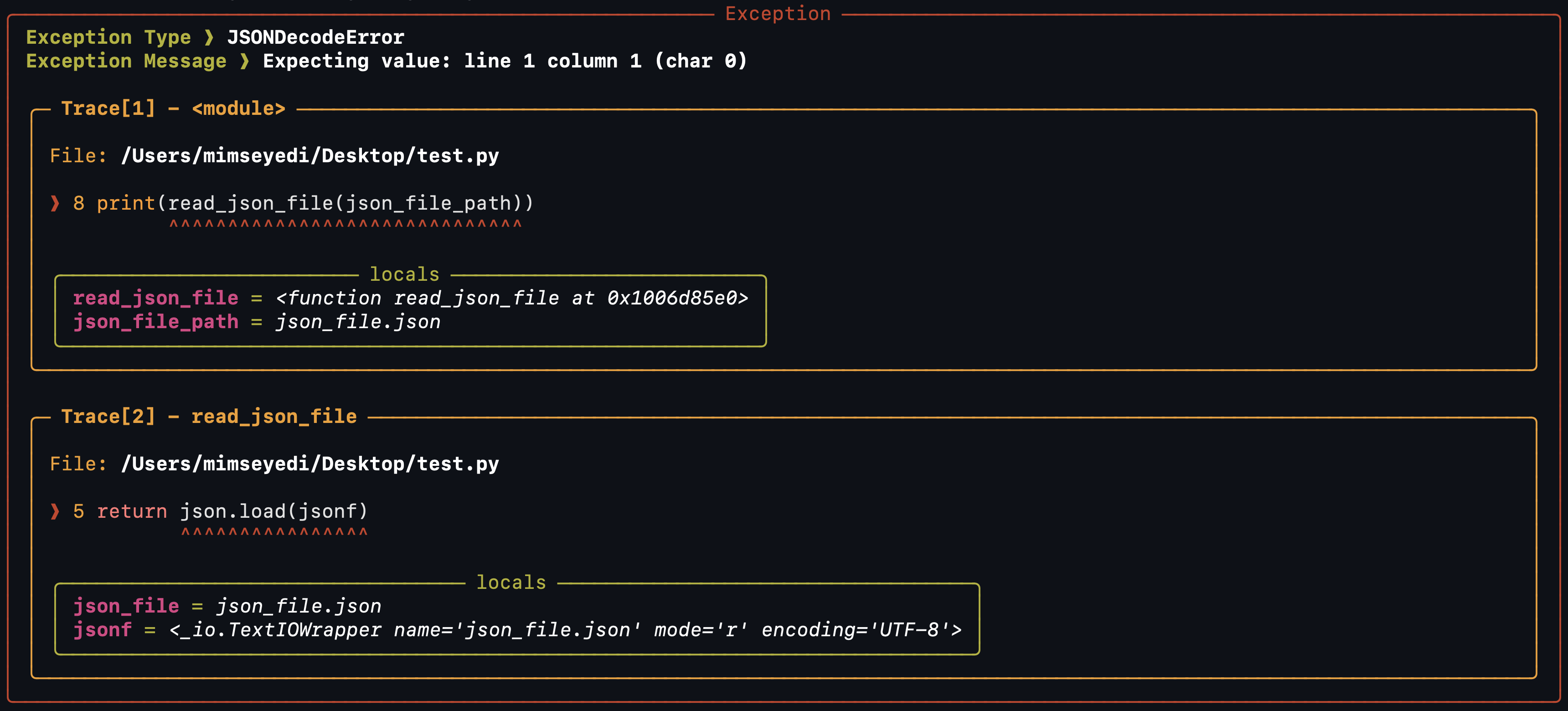
The (-T, --trace) and (-i, --inner) options can be combined with (-L, --locals) option:
pymg test.py -i -L
Output:
Using the --recent option <a class="anchor" id="recent"></a>
By using the --recent option, you can re-execute the last operation you have done. pymg saves your last move.
Search for a solution with the --search option <a class="anchor" id="search"></a>
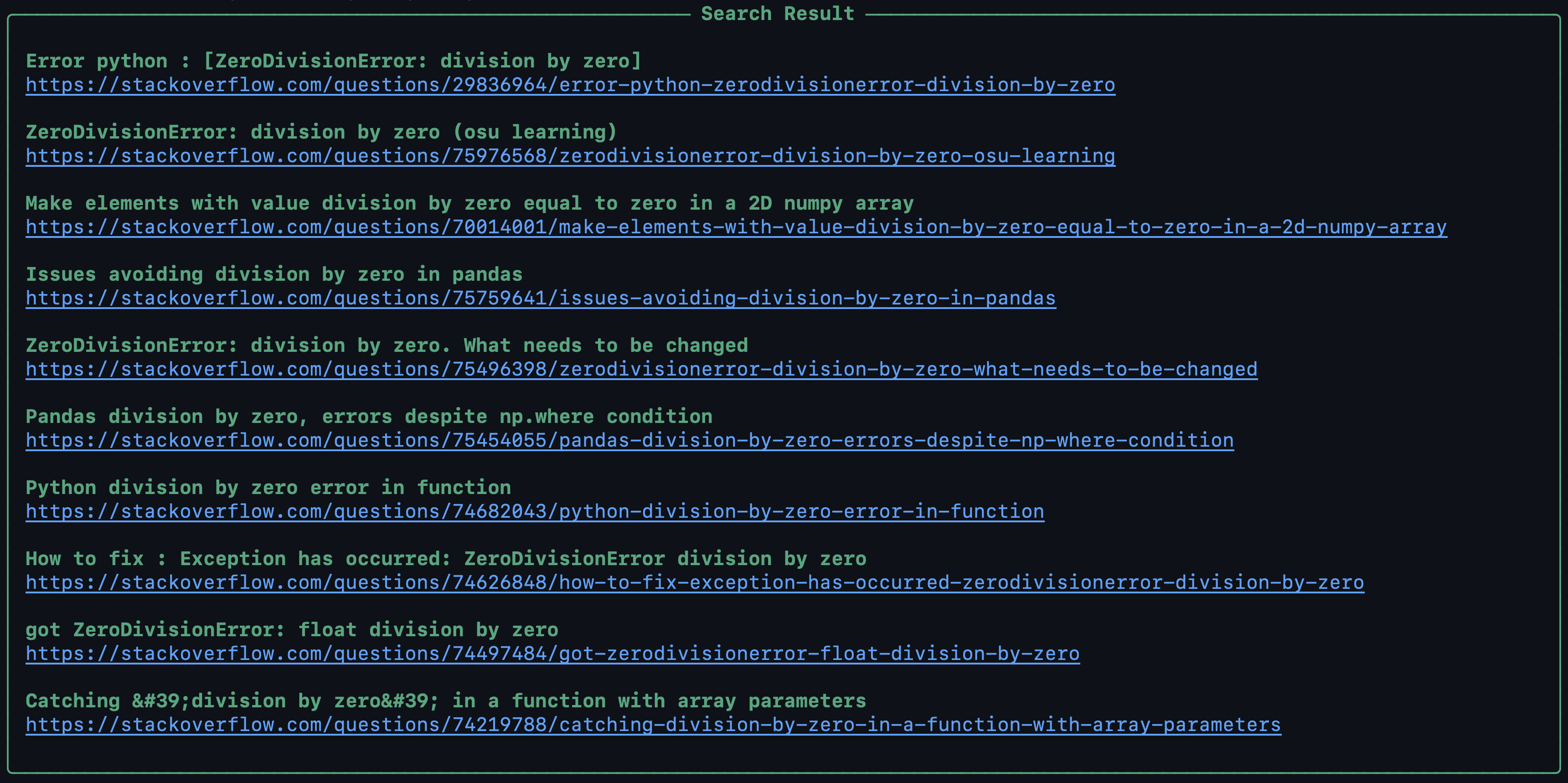
You can search for solutions to your problems in stackoverflow by using the (-S, --search) option. pymg searches stackoverflow for the exception and shows you the title and link of the posts that got the answer:
pymg test.py 4 0 -S
Output:
Write the output to the file with the --output option <a class="anchor" id="syntax"></a>
You can use the (-o, --output) option to write the generated output in a text file:
pymg test.py -T -L -o output.txt
output.txt
╭─────────────────────────────────────────── Exception ───────────────────────────────────────────╮
│ Exception Type ❱ JSONDecodeError                                                                │
│ Exception Message ❱ Expecting value: line 1 column 1 (char 0)                                   │
│                                                                                                 │
│ ╭─ Trace[1] - <module> ───────────────────────────────────────────────────────────────────────╮ │
│ │                                                                                             │ │
│ │ File: /Users/mimseyedi/Desktop/test.py                                                      │ │
│ │                                                                                             │ │
│ │ ❱ 8 print(read_json_file(json_file_path))                                                   │ │
│ │           ^^^^^^^^^^^^^^^^^^^^^^^^^^^^^^                                                    │ │
│ │                                                                                             │ │
│ │ ╭───────────────────────── locals ──────────────────────────╮                               │ │
│ │ │ read_json_file = <function read_json_file at 0x1012705e0> │                               │ │
│ │ │ json_file_path = json_file.json                           │                               │ │
│ │ ╰───────────────────────────────────────────────────────────╯                               │ │
│ ╰─────────────────────────────────────────────────────────────────────────────────────────────╯ │
│                                                                                                 │
│ ╭─ Trace[2] - read_json_file ─────────────────────────────────────────────────────────────────╮ │
│ │
Related Skills
node-connect
344.1kDiagnose OpenClaw node connection and pairing failures for Android, iOS, and macOS companion apps
claude-opus-4-5-migration
96.8kMigrate prompts and code from Claude Sonnet 4.0, Sonnet 4.5, or Opus 4.1 to Opus 4.5
frontend-design
96.8kCreate distinctive, production-grade frontend interfaces with high design quality. Use this skill when the user asks to build web components, pages, or applications. Generates creative, polished code that avoids generic AI aesthetics.
model-usage
344.1kUse CodexBar CLI local cost usage to summarize per-model usage for Codex or Claude, including the current (most recent) model or a full model breakdown. Trigger when asked for model-level usage/cost data from codexbar, or when you need a scriptable per-model summary from codexbar cost JSON.
