<p align="center">
<a href='https://github.com/mili-tan/AuroraDNS.GUI'><img src='https://mili.one/pics/aurora.png' width="50%" height="50%"/></a>
</p>
<p align="center">
<a href='https://github.com/mili-tan/AuroraDNS.GUI/blob/master/LICENSE.md'><img src='https://img.shields.io/github/license/mili-tan/AuroraDNS.GUI.svg' alt='license' referrerPolicy='no-referrer' /></a>
<a href='https://ci.appveyor.com/project/mili-tan/AuroraDNS-GUI'><img src='https://img.shields.io/appveyor/ci/mili-tan/AuroraDNS-GUI.svg?&logo=appveyor' alt='AppVeyor' referrerPolicy='no-referrer' /></a>
<a href='https://github.com/mili-tan/AuroraDNS.GUI/releases/latest'><img src='https://img.shields.io/github/release/mili-tan/AuroraDNS.GUI.svg' alt='GitHub-release' referrerPolicy='no-referrer' /></a>
<a href='https://github.com/mili-tan/AuroraDNS.GUI/releases/latest'><img src='https://img.shields.io/github/downloads/mili-tan/auroradns.gui/total.svg' alt='Github All Releases' referrerPolicy='no-referrer' /></a>
<a href='https://www.codefactor.io/repository/github/mili-tan/AuroraDNS.GUI/overview/master'><img src='https://www.codefactor.io/repository/github/mili-tan/AuroraDNS.GUI/badge/master' alt='CodeFactor' referrerPolicy='no-referrer' /></a>
<a href='https://app.fossa.io/projects/git%2Bgithub.com%2Fmili-tan%2FAuroraDNS.GUI?ref=badge_shield'><img src='https://app.fossa.io/api/projects/git%2Bgithub.com%2Fmili-tan%2FAuroraDNS.GUI.svg?type=shield' alt='FOSSA Status' referrerPolicy='no-referrer' /></a>
</p>
简介
给大家的本地 DNS over HTTPS 客户端。
AuroraDNS 是一个纯净、~~简陋~~简单的、面向普通用户的,图形化的本地 DoH 客户端。
它在本地将 DNS over HTTPS 转换为传统的 DNS 协议。
正在使用 Windows 11? Windows 11 已经内置了 DNS over HTTPS 支持,也许您应该试试 ArashiDNS.Dekunua
正在使用 Linux 或在寻找 CLI?请试试看更轻量和现代的继任者 ArashiDNS.C
快速开始
从 Releases 下载最新版本 现在体验。
可能需要 Microsoft .NET Framework 4.7.2 运行环境。
无需复杂配置,开箱即可使用。
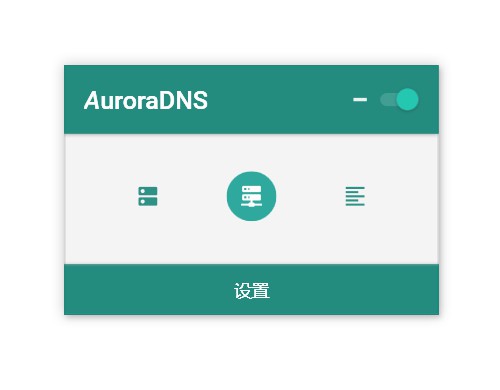
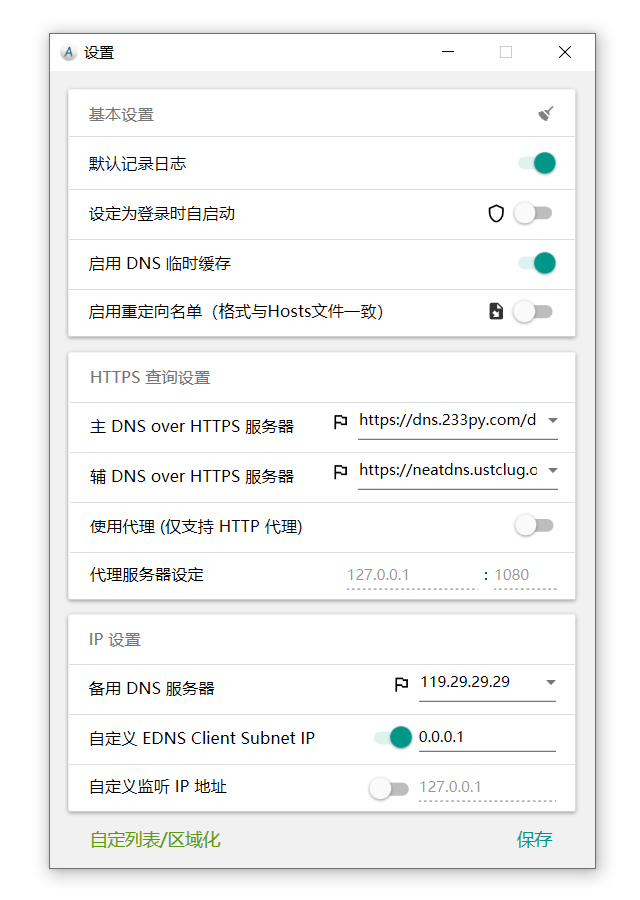
使用与测试
使用前,请关闭同类软件以防端口冲突(如 DNSCrypt )
普通用户指导
如果您有命令行使用经验,请查看:高级用户指导
- 打开本软件之后,确认打开左上角“启用 DNS 服务”开关
- 打开下方最左侧“设为系统 DNS”按钮
高级用户指导
使用 CMD 命令
- 使用本软件提供的本地 DNS 服务解析
baidu.com
nslookup baidu.com 127.0.0.1
如果有解析,即代表本软件生效。如果无效,请先尝试排除一切可能情况之后发送 Issue
然后只需检查 DNS 是否已设置为 127.0.0.1
ipconfig /all
注意: 使用的网卡 DNS 要设为 127.0.0.1 才能生效
如果没有设置,请参考此文章 将第一个 DNS 设置为 127.0.0.1
第二个 DNS 推荐设为 腾讯 119.29.29.29 或者运营商提供的 DNS
如果已设置,只需刷新 DNS 缓存即可(点击本软件设置界面的“刷新缓存”按钮 或者使用如下命令)
ipconfig /flushdns
反馈
- 作为一个初学者,可能存在非常多的问题,还请多多谅解。
- 如果有 Bug 或者希望新增功能,请在 issues 中提出。
- 如果你添加了新的功能或者修正了问题,也请向我提交 PR,非常感谢。
致谢
<img src='https://i.loli.net/2020/08/03/LWNj2BM6mxuYtRU.png' width="8%" height="8%" align="right"/>
我一直在使用 ReSharper,它真的可以说是令人惊叹的工具,使我的开发效率提升了数倍。
感谢 JetBrains 为本项目提供了 ReSharper 开源许可证授权。
Credits
没有他们,就没有 AuroraDNS 的诞生。
请查阅 Credits ,其中包含了我们的协作者与使用到的其他开源软件。
License
Copyright (c) 2018 Milkey Tan. Code released under the MIT License.

