
YMCirclePickerView
Fully customizable horizontal circle picker view for iOS
Install / Use
/learn @miletliyusuf/YMCirclePickerViewREADME
YMCirclePickerView
Fully customizable horizontal circle picker view.
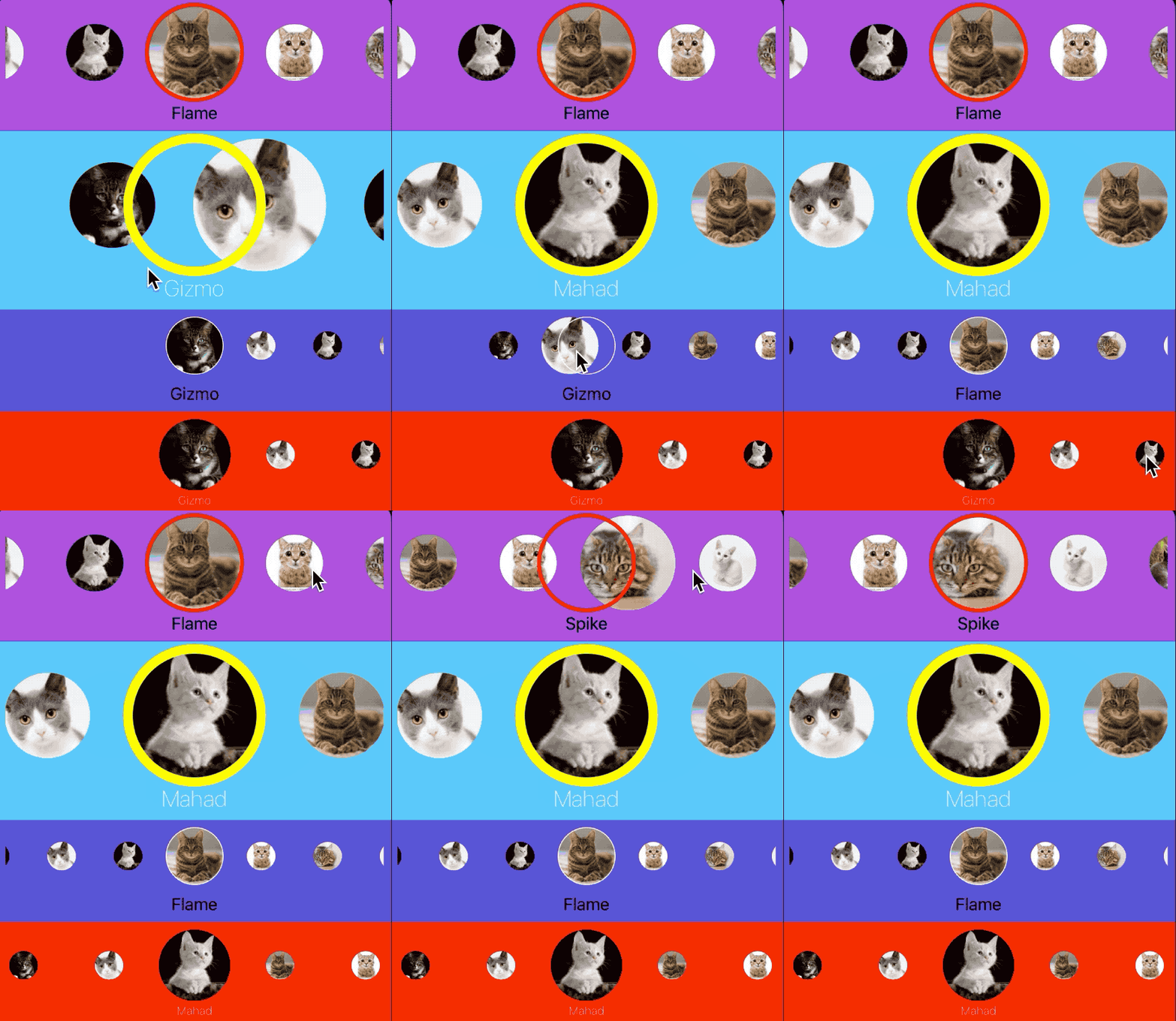






Requirements
- iOS 9.0+
- Xcode 11+
- Swift 5.0+
Usage
Interface Builder Usage
- Add an empty view in your view and set it's Class to
YMCirclePickerViewwith it's module.
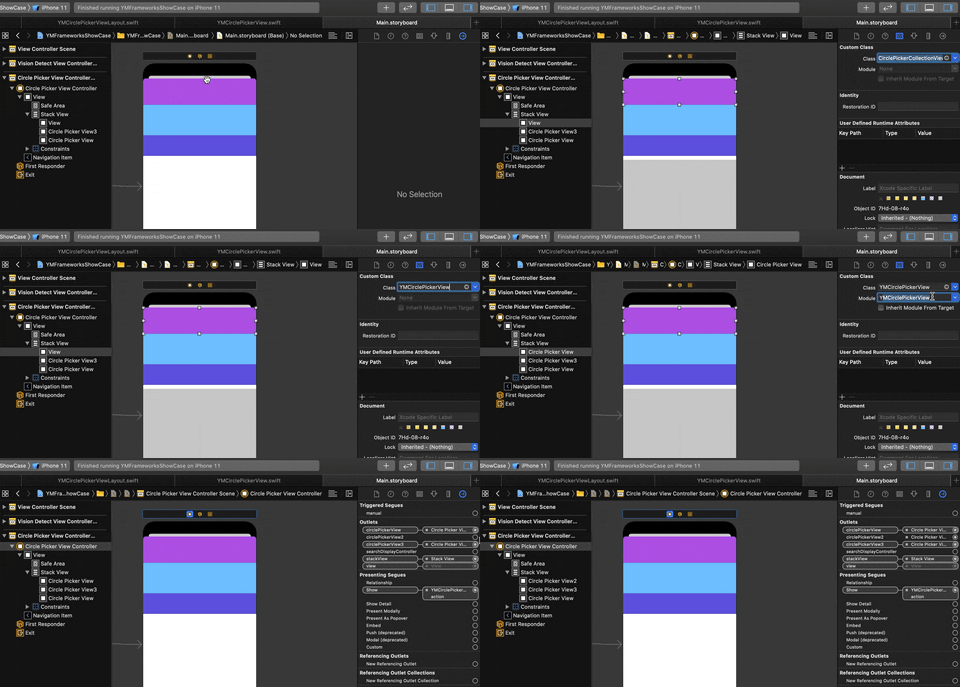
- Add datasource and delegate(if necessary) then customize layout and style presentations in code.
import YMCirclePickerView

@IBOutlet private weak var circlePickerView: YMCirclePickerView!

circlePickerView.delegate = self
circlePickerView.dataSource = self
circlePickerView.presentation = YMCirclePickerViewPresentation(
   layoutPresentation: YMCirclePickerViewLayoutPresentation(
   	itemSize: CGSize(width: 100.0, height: 100.0),
   	unselectedItemSize: CGSize(width: 60.0, height: 60.0),
   	spacing: 5.0,
   	initialIndex: 3
   ),
   stylePresentation: YMCirclePickerViewStylePresentation(
   	selectionColor: .red,
   	selectionLineWidth: 4.0,
   	titleLabelDistance: 3.0
   )
)
// Or you can use the default one.
circlePickerView.presentation = .default
Code Usage
It's as simple as interface builder implementation. Follow the below code as a guide.
let circlePickerView = YMCirclePickerView()
circlePickerView.backgroundColor = .red
circlePickerView.dataSource = self
circlePickerView.presentation = YMCirclePickerViewPresentation(
   layoutPresentation: YMCirclePickerViewLayoutPresentation(
   	itemSize: CGSize(width: 75.0, height: 75.0),
   	unselectedItemSize: CGSize(width: 30.0, height: 30.0),
   	spacing: 15.0
   ),
   stylePresentation: YMCirclePickerViewStylePresentation(
   	selectionColor: .clear,
   	selectionLineWidth: 3.0,
   	titleLabelFont: .systemFont(ofSize: 12.0, weight: .thin),
   	titleLabelTextColor: .white,
   	titleLabelDistance: 3.0
   )
)
stackView.addArrangedSubview(circlePickerView)
DataSource and Delegate Methods
- Usage
Your data source class must be inherited from YMCirclePickerModel. Simple example for model class:
class ExampleCirclePickerModel: YMCirclePickerModel {

    override init() {

        super.init()
    }

    convenience init(image: UIImage, title: String) {

        self.init()
        self.image = image
        self.title = title
    }
}

// Use your custom class to conform data source like below

func ymCirclePickerView(ymCirclePickerView: YMCirclePickerView, itemForIndex index: Int) -> YMCirclePickerModel? {

	let model = data[index] as ExampleCirclePickerModel
	return model
}
or you can return your custom UIView as well.
func ymCirclePickerView(ymCirclePickerView: YMCirclePickerView, itemForIndex index: Int) -> UIView? {

    let view = UIView()
    view.backgroundColor = .red
    return view
}
- DataSource Methods
func ymCirclePickerView(ymCirclePickerView: YMCirclePickerView, itemForIndex index: Int) -> YMCirclePickerModel?
func ymCirclePickerView(ymCirclePickerView: YMCirclePickerView, itemForIndex index: Int) -> UIView?
func ymCirclePickerViewNumberOfItemsInPicker(ymCirclePickerView: YMCirclePickerView) -> Int
- Delegate Methods
func ymCirclePickerView(ymCirclePickerView: YMCirclePickerView, didSelectItemAt index: Int)
Installation
CocoaPods
To use YMCirclePickerView in your project add the following 'Podfile' to your project
source 'https://github.com/CocoaPods/Specs.git'
platform :ios, '9.0'
use_frameworks!

pod 'YMCirclePickerView'
Then run:
pod install
Carthage
Check out the Carthage docs on how to add a install. The YMCirclePickerView framework is already setup with shared schemes.
You can install Carthage with Homebrew using the following command:
$ brew update
$ brew install carthage
To integrate YMCirclePickerView into your Xcode project using Carthage, specify it in your Cartfile:
github "miletliyusuf/YMCirclePickerView"
TODO
- [ ] Selected image insets
Meta
Yusuf Miletli – Linkedin, miletliyusuf@gmail.com
Distributed under the MIT license. See LICENSE for more information.
Related Skills
node-connect
347.9kDiagnose OpenClaw node connection and pairing failures for Android, iOS, and macOS companion apps
frontend-design
108.7kCreate distinctive, production-grade frontend interfaces with high design quality. Use this skill when the user asks to build web components, pages, or applications. Generates creative, polished code that avoids generic AI aesthetics.
openai-whisper-api
347.9kTranscribe audio via OpenAI Audio Transcriptions API (Whisper).
qqbot-media
347.9kQQBot 富媒体收发能力。使用 <qqmedia> 标签,系统根据文件扩展名自动识别类型(图片/语音/视频/文件)。
