
FastAdapter
The bullet proof, fast and easy to use adapter library, which minimizes developing time to a fraction...
Install / Use
/learn @mikepenz/FastAdapterREADME
FastAdapter
The FastAdapter is here to simplify creating adapters for RecyclerViews. Don't worry about the adapter anymore. Just write the logic for how your view/item should look like, and you are done. It's blazing fast, minimizing the code you need to write, and is easy to extend.
<p align="center"> <a href="#whats-included-">What's included 🚀</a> • <a href="#setup">Setup 🛠️</a> • <a href="MIGRATION.md">Migration Guide 🧬</a> • <a href="#used-by">Used by</a> • <a href="https://play.google.com/store/apps/details?id=com.mikepenz.fastadapter.app">Sample App</a> </p>
What's included 🚀
- Core module 100% in Kotlin
- Click / Long-Click listeners
- Selection / Multi-Selection (MultiselectSample, CheckBoxSample, RadioButtonSample)
- Expandable items (ExpandableSample, IconGridSample ,AdvancedSample)
- Write less code, get better results
- Highly optimized code
- Simple Drag & Drop (SimpleItemListSample)
- Headers (StickyHeaderSample, AdvancedSample)
- Footers
- Filter (SimpleItemListSample)
- Includes suggestions from the Android Team
- Easily extensible
- Endless Scroll (EndlessScrollSample)
- "Leave-Behind"-Pattern (SwipeListSample)
- Split item view and model (ModelItem, MultiTypeModelItem)
- Chain other Adapters (SimpleItemListSample, StickyHeaderSample)
- Comes with useful Helpers
- ActionModeHelper (MultiselectSample)
- UndoHelper (MultiselectSample)
- FastScroller (external lib) (SimpleItemListSample)
- Paging (via Jetpack paging lib) (PagedActivity)
- More to come...
Preview
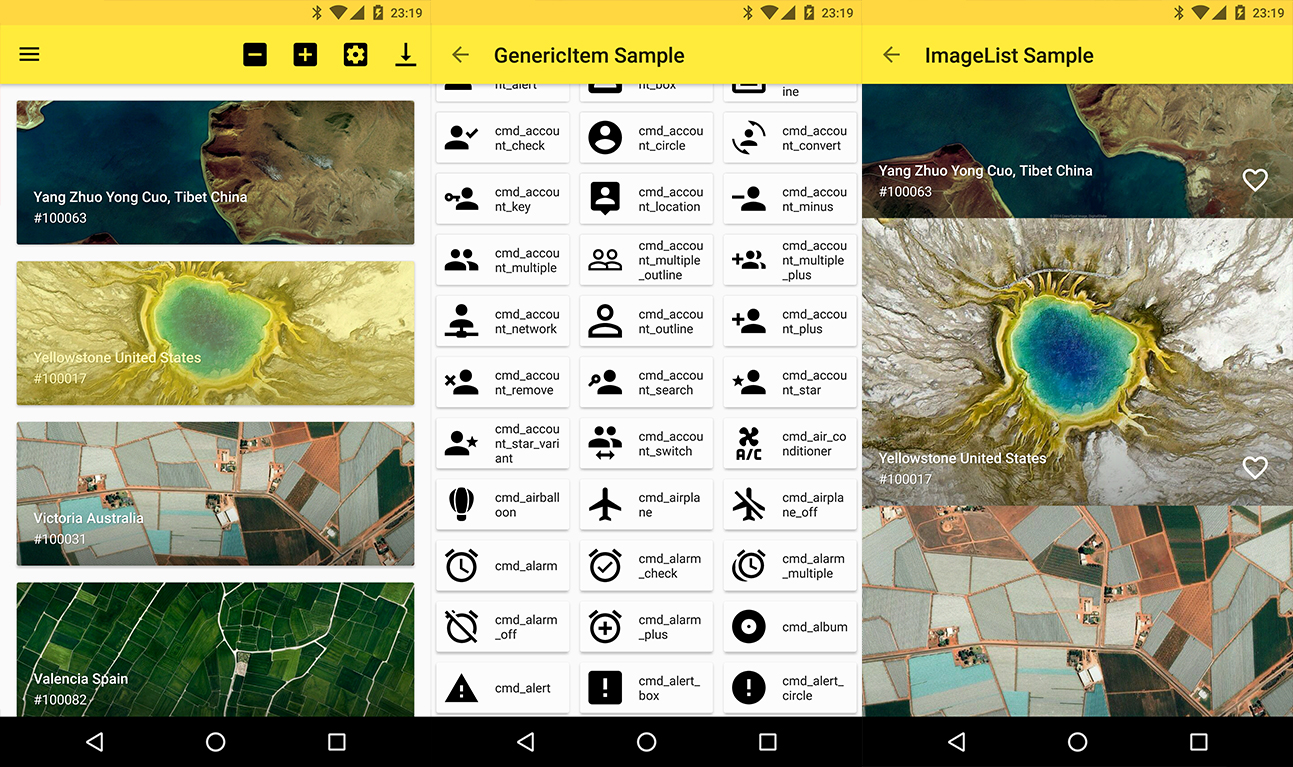
Screenshots 🎉
Setup
Latest releases 🛠
Provide the gradle dependency
The library is split up into core, commons, and extensions. The core functions are included in the following dependency.
implementation "com.mikepenz:fastadapter:${latestFastAdapterRelease}"
implementation "androidx.appcompat:appcompat:${androidX}"
implementation "androidx.recyclerview:recyclerview:${androidX}"
Expandable support is included and can be added via this
implementation "com.mikepenz:fastadapter-extensions-expandable:${latestFastAdapterRelease}"
Many helper classes are included in the following dependency.
implementation "com.mikepenz:fastadapter-extensions-binding:${latestFastAdapterRelease}" // view binding helpers
implementation "com.mikepenz:fastadapter-extensions-diff:${latestFastAdapterRelease}" // diff util helpers
implementation "com.mikepenz:fastadapter-extensions-drag:${latestFastAdapterRelease}" // drag support
implementation "com.mikepenz:fastadapter-extensions-paged:${latestFastAdapterRelease}" // paging support
implementation "com.mikepenz:fastadapter-extensions-scroll:${latestFastAdapterRelease}" // scroll helpers
implementation "com.mikepenz:fastadapter-extensions-swipe:${latestFastAdapterRelease}" // swipe support
implementation "com.mikepenz:fastadapter-extensions-ui:${latestFastAdapterRelease}" // pre-defined ui components
implementation "com.mikepenz:fastadapter-extensions-utils:${latestFastAdapterRelease}" // needs the `expandable`, `drag` and `scroll` extension.

// required for the ui components and the utils
implementation "com.google.android.material:material:${androidX}"
How to use
1. Implement your item
1a. Implement your item as usual (the easy way)
Just create a class which extends the AbstractItem as shown below. Implement the methods, and your item is ready.
open class SimpleItem : AbstractItem<SimpleItem.ViewHolder>() {
    var name: String? = null
    var description: String? = null

    /** defines the type defining this item. must be unique. preferably an id */
    override val type: Int
        get() = R.id.fastadapter_sample_item_id

    /** defines the layout which will be used for this item in the list */
    override val layoutRes: Int
        get() = R.layout.sample_item

    override fun getViewHolder(v: View): ViewHolder {
        return ViewHolder(v)
    }

    class ViewHolder(view: View) : FastAdapter.ViewHolder<SimpleItem>(view) {
        var name: TextView = view.findViewById(R.id.material_drawer_name)
        var description: TextView = view.findViewById(R.id.material_drawer_description)

        override fun bindView(item: SimpleItem, payloads: List<Any>) {
            name.text = item.name
            description.text = item.name
        }

        override fun unbindView(item: SimpleItem) {
            name.text = null
            description.text = null
        }
    }
}
1b. Implement item with ViewBinding (the easiest way)
class BindingIconItem : AbstractBindingItem<IconItemBinding>() {
    var name: String? = null

    override val type: Int
        get() = R.id.fastadapter_icon_item_id

    override fun bindView(binding: IconItemBinding, payloads: List<Any>) {
        binding.name.text = name
    }

    override fun createBinding(inflater: LayoutInflater, parent: ViewGroup?): IconItemBinding {
        return IconItemBinding.inflate(inflater, parent, false)
    }
}
Use the binding extension dependency in your application for this.
2. Set the Adapter to the RecyclerView
//create the ItemAdapter holding your Items
val itemAdapter = ItemAdapter<SimpleItem>()
//create the managing FastAdapter, by passing in the itemAdapter
val fastAdapter = FastAdapter.with(itemAdapter)

//set our adapters to the RecyclerView
recyclerView.setAdapter(fastAdapter)

//set the items to your ItemAdapter
itemAdapter.add(ITEMS)
3. Extensions
By default the FastAdapter only provides basic functionality, which comes with the abstraction of items as Item and Model.
And the general functionality of adding/removing/modifying elements. To enable selections, or expandables the provided extensions need to be activated.
3.1. SelectExtension
// Gets (or creates and attaches if not yet existing) the extension from the given `FastAdapter`
val selectExtension = fastAdapter.getSelectExtension()
// configure as needed
selectExtension.isSelectable = true
selectExtension.multiSelect = true
selectExtension.selectOnLongClick = false
// see the API of this class for more options.
3.2. ExpandableExtension
This requires the
fastadapter-extensions-expandableextension.
// Gets (or creates and attaches if not yet existing) the extension.
val expandableExtension = fastAdapter.getExpandableExtension()
// configure as needed
expandableExtension.isOnlyOneExpandedItem = true
For further details scroll down to the ExpandableItems (under advanced usage) section.
3. Click listener
fastAdapter.onClickListener = { view, adapter, item, position ->
    // Handle click here
    false
}
4. Click listeners for views inside your item
// just add an `EventHook` to your `FastAdapter` by implementing either a `ClickEventHook`, `LongClickEventHook`, `TouchEventHook`, `CustomEventHook`
fastAdapter.addEventHook(object : ClickEventHook<SimpleImageItem>() {
    override fun onBi
Related Skills
node-connect
339.1kDiagnose OpenClaw node connection and pairing failures for Android, iOS, and macOS companion apps
frontend-design
83.8kCreate distinctive, production-grade frontend interfaces with high design quality. Use this skill when the user asks to build web components, pages, or applications. Generates creative, polished code that avoids generic AI aesthetics.
openai-whisper-api
339.1kTranscribe audio via OpenAI Audio Transcriptions API (Whisper).
commit-push-pr
83.8kCommit, push, and open a PR
