
Envx
A powerful and secure environment variable manager for developers, featuring an intuitive Terminal User Interface (TUI) and comprehensive command-line interface.
Install / Use
/learn @mikeleppane/EnvxREADME
envx

 <img alt="Rust" src="https://img.shields.io/badge/Rust-1.85-orange">
<img alt="License" src="https://img.shields.io/badge/License-MIT-blue">
<img alt="Rust" src="https://img.shields.io/badge/Rust-1.85-orange">
<img alt="License" src="https://img.shields.io/badge/License-MIT-blue">
A powerful and secure environment variable manager for developers, featuring an intuitive Terminal User Interface (TUI) and comprehensive command-line interface.
🎥 Introduction Video
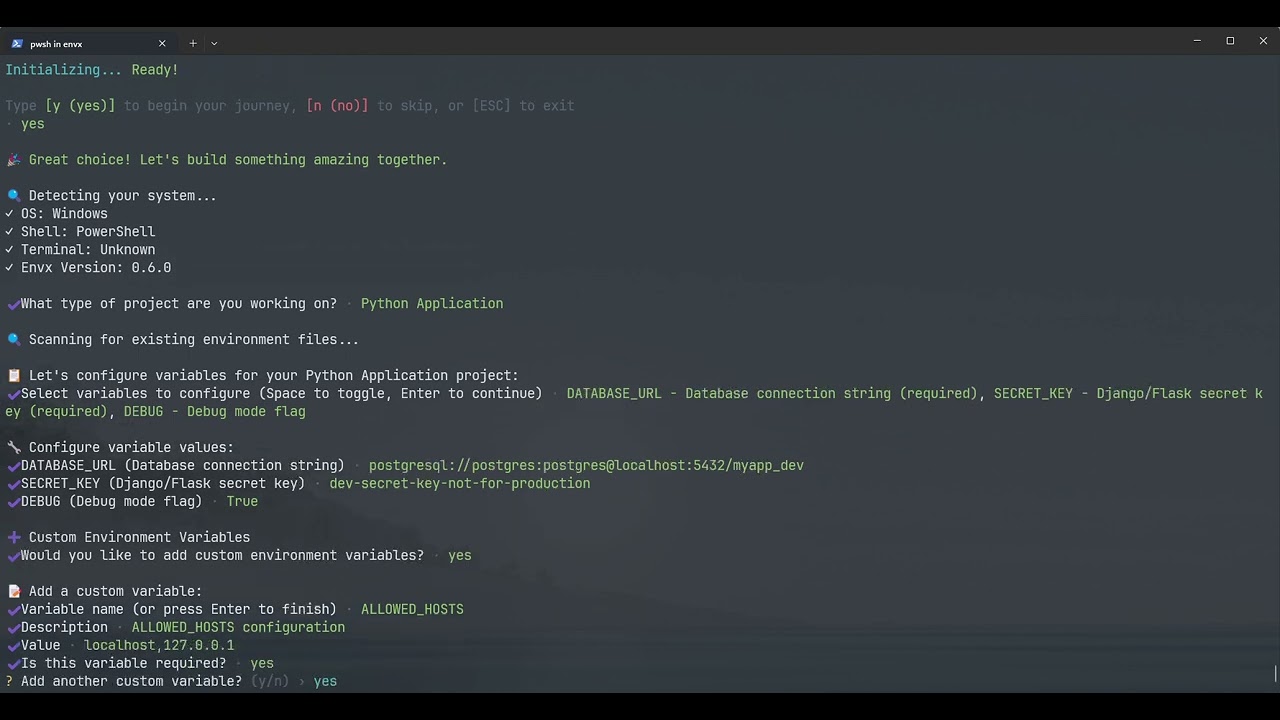
📸 Screenshots
<p align="center"> <img src="images/main.png" alt="Envx's Main Page" /> <span>Envx's Main Page</span> </p> <p align="center"> <img src="images/search.png" alt="Envx's Search Dialog" /> <span>Envx's Search Dialog</span> </p> <p align="center"> <img src="images/view.png" alt="Envx's View Dialog" /> <span>Envx's View Dialog</span> </p> <p align="center"> <img src="images/query.png" alt="Envx's CLI Query" /> <span>Envx's CLI Query Command</span> </p>🌟 Features
- 🖥️ Interactive TUI: Beautiful terminal interface for easy environment variable management
- 🔍 Smart Search: Fast filtering and searching across all environment variables
- 📊 Source Tracking: Distinguish between System, User, Process, Shell, and Application variables
- 📝 Multi-line Support: Edit complex environment variables with proper multi-line support
- 🔄 Import/Export: Support for multiple formats (JSON, YAML, TOML, ENV)
- 📸 Snapshots & Profiles Feature Implementation: Save and restore variable states
- 📁 Project Configuration: Define required variables, defaults, and scripts for consistent team environments
- 👀 Watch Mode & Monitor: Monitor file changes and sync automatically, track environment modifications in real-time
- ⚡ Performance: Built with Rust for blazing-fast performance
- 🎨 Cross-platform: Works on Windows, macOS, and Linux
📦 Installation
From Source
git clone https://github.com/yourusername/envx.git
cd envx
cargo install --path crates/envx
Using Cargo
cargo install envex
Pre-built Binaries
Download the latest release for your platform from the releases page.
🚀 Quick Start
Launch the TUI
envx tui
# or
envx ui
List all environment variables
envx list
Set a variable
envx set MY_VAR "my value"
Get a variable
envx get MY_VAR
📖 Command Line Usage
Overview
System Environment Variable Manager

Usage: envx.exe <COMMAND>

Commands:
  list     List environment variables
  get      Get a specific environment variable
  set      Set an environment variable
  delete   Delete environment variable(s)
  analyze  Analyze environment variables
  tui      Launch the TUI [aliases: ui]
  path     Manage PATH variable
  export   Export environment variables to a file
  import   Import environment variables from a file
  help     Print this message or the help of the given subcommand(s)

Options:
  -h, --help     Print help
  -V, --version  Print version
Core Commands
init - Initialize a new project with the setup wizard
Initialize a new project with interactive wizard

Usage: envx.exe init [OPTIONS]

Options:
  -t, --template <TEMPLATE>  Use a specific template
  -w, --wizard               Run interactive wizard
      --list-templates       List available templates
  -h, --help                 Print help
The init command launches an interactive setup wizard that helps you configure your project's environment variables.
The wizard will:
- Detect your project type (Web App, Python, Rust/Go, Docker, Microservices, or Custom)
- Guide you through setting up environment variables with values
- Create profiles for different environments (development, testing, production, etc.)
- Generate
.envfiles for each profile - Set up team collaboration features
- Configure validation rules
- Import existing
.envfiles if found
Example Usage
# Run the interactive setup wizard
envx init

# Or
envx init --wizard
What the Wizard Creates
After running the wizard, you'll have:
-
Project Configuration (
.envx/config.yaml):- Required environment variables with descriptions
- Default values for common variables
- Validation rules and patterns
- Auto-load configuration for .env files
-
Environment Profiles:
- Separate profiles for development, testing, production, etc.
- Profile-specific variable values
- Easy switching between environments
-
.envFiles (optional):- Generated
.envfiles for each profile - Pre-populated with your configured values
- Ready to use with your application
- Generated
Example Wizard Flow
✨ Welcome to envx! Your intelligent environment variable companion

This setup wizard will help you:
  📋 Define environment variables    ─ Set up your project's environment
  🚀 Create profiles                 ─ Configure dev, test, and production environments
  📦 Import existing files           ─ Seamlessly migrate from .env files
  📝 Generate .env files             ─ Create .env files for each profile
  👥 Enable team features            ─ Share configurations with your team

⏱️  Estimated time: 1-3 minutes
💡 Tip: Press ESC at any time to exit the wizard

Let's create the perfect setup for your project! 🎯
The wizard will guide you through:
- Selecting your project type
- Configuring environment variables with actual values
- Creating environment profiles with custom names if needed
- Setting up team features (optional)
- Configuring validation rules
After completion, the wizard will check if all required variables are set and provide guidance on next steps.
list - List environment variables
List environment variables

Usage: envx.exe list [OPTIONS]

Options:
  -s, --source <SOURCE>  Filter by source (system, user, process, shell)
  -q, --query <QUERY>    Search query
  -f, --format <FORMAT>  Output format (json, table, simple, compact) [default: table]
      --sort <SORT>      Sort by (name, value, source) [default: name]
      --names-only       Show only variable names
  -l, --limit <LIMIT>    Limit output to N entries
      --stats            Show statistics summary
  -h, --help             Print help
# List all variables
envx list

# List with a pattern
envx list --format table --sort name --query RUST

# List from specific source
envx list --source system
envx list --source user
get - Get a specific variable
Get a specific environment variable

Usage: envx.exe get [OPTIONS] <PATTERN>

Arguments:
  <PATTERN>  Variable name or pattern (supports *, ?, and /regex/)
  Examples:
    envx get PATH           - exact match
    envx get PATH*          - starts with PATH
    envx get *PATH          - ends with PATH
    envx get *PATH*         - contains PATH
    envx get P?TH           - P followed by any char, then TH
    envx get /^JAVA.*/      - regex pattern

Options:
  -f, --format <FORMAT>  Output format (simple, detailed, json) [default: simple]
  -h, --help             Print help
envx get PATH
envx get MY_CUSTOM_VAR
envx get RUST*
set - Set an environment variable
Set an environment variable

Usage: envx.exe set [OPTIONS] <NAME> <VALUE>

Arguments:
  <NAME>   Variable name
  <VALUE>  Variable value

Options:
  -p, --permanent  Make change permanent
  -h, --help       Print help
# Set for current session
envx set MY_VAR "value"

# Set persistently (survives reboot)
envx set MY_VAR "value" --permanent
delete - Remove an environment variable
Delete environment variable(s)

Usage: envx.exe delete [OPTIONS] <PATTERN>

Arguments:
  <PATTERN>  Variable name or pattern

Options:
  -f, --force  Force deletion without confirmation
  -h, --help   Print help
envx delete MY_VAR
envx delete TEMP_VAR
envx delete /JAVA.*/
analyze - Analyze environment variables
Analyze environment variables

Usage: envx.exe analyze [OPTIONS]

Options:
  -a, --analysis-type <ANALYSIS_TYPE>  Type of analysis (duplicates, invalid) [default: all]
  -h, --help                           Print help
envx analyze --analysis-type duplicates
envx analyze --analysis-type invalid
path - Manage PATH variable
Manage PATH variable

Usage: envx.exe path [OPTIONS] [COMMAND]

Commands:
  add     Add a directory to PATH
  remove  Remove a directory from PATH
  clean   Clean invalid/non-existent entries from PATH
  dedupe  Remove duplicate entries from PATH
  check   Check PATH for issues
  list    Show PATH entries in order
  move    Move a PATH entry to a different position
  help    Print this message or the help of the given subcommand(s)

Options:
  -c, --check      Check if all paths exist
  -v, --var <VAR>  Target PATH variable (PATH, Path, or custom like PYTHONPATH) [default: PATH]
  -p, --permanent  Apply changes permanently
  -h, --help       Print help
Import/Export Commands
export - Export variables to a file
Export environment variables to a file

Usage: envx.exe export [OPTIONS] <FILE>

Arguments:
  <FILE>  Output file path

Options:
  -v, --vars <VARS>      Variable names or patterns to export (exports all if not specified)
  -f, --format <FORMAT>  Export format (auto-detect from extension, or: env, json, yaml, txt)
  -s, --source <SOURCE>  Include only specific sources (system,
Related Skills
node-connect
346.8kDiagnose OpenClaw node connection and pairing failures for Android, iOS, and macOS companion apps
frontend-design
107.6kCreate distinctive, production-grade frontend interfaces with high design quality. Use this skill when the user asks to build web components, pages, or applications. Generates creative, polished code that avoids generic AI aesthetics.
openai-whisper-api
346.8kTranscribe audio via OpenAI Audio Transcriptions API (Whisper).
qqbot-media
346.8kQQBot 富媒体收发能力。使用 <qqmedia> 标签,系统根据文件扩展名自动识别类型(图片/语音/视频/文件)。
