
MonoTouch.Dialog
Tools to simplify creating dialogs with the user using MonoTouch
Install / Use
/learn @migueldeicaza/MonoTouch.DialogREADME
MonoTouch.Dialog
MonoTouch.Dialog is a foundation to create dialog boxes and show table-based information without having to write dozens of delegates and controllers for the user interface. Table support Pull-to-Refresh as well as built-in searching.
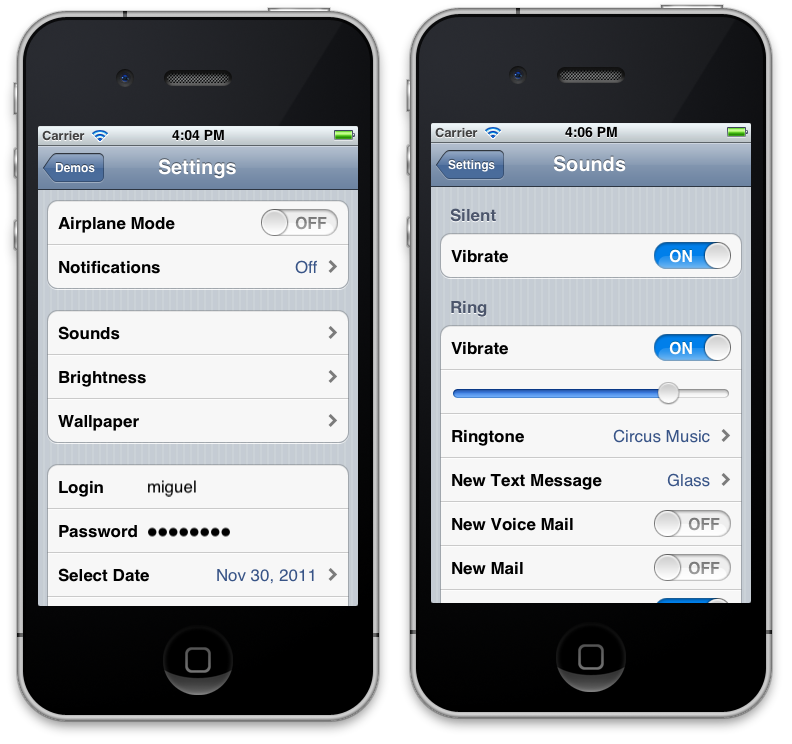
This was created with the following code:
return new RootElement ("Settings") {
    new Section (){
        new BooleanElement ("Airplane Mode", false),
        new RootElement ("Notifications", 0, 0) {
            new Section (null,
		    	 "Turn off Notifications to disable Sounds\n" +
                     "Alerts and Home Screen Badges for the\napplications below."){
                new BooleanElement ("Notifications", false)
            }
        }},
    new Section (){
    new RootElement ("Sounds"){
            new Section ("Silent") {
                new BooleanElement ("Vibrate", true),
            },
            new Section ("Ring") {
                new BooleanElement ("Vibrate", true),
                new FloatElement (null, null, 0.8f),
                new RootElement ("Ringtone", new RadioGroup (0)){
                    new Section ("Custom"){
                        new RadioElement ("Circus Music"),
                        new RadioElement ("True Blood"),
                    },
                    new Section ("Standard"){
                        from name in "Marimba,Alarm,Ascending,Bark".Split (',')
                             select (Element) new RadioElement (name)
                    }
                },
                new RootElement ("New Text Message", new RadioGroup (3)){
                    new Section (){
                        from name in "None,Tri-tone,Chime,Glass,Horn,Bell,Electronic".Split (',')
                            select (Element) new RadioElement (name)
                    }
                },
                new BooleanElement ("New Voice Mail", false),
                new BooleanElement ("New Mail", false),
                new BooleanElement ("Sent Mail", true),
            }
        },
        new RootElement ("Brightness"){
            new Section (){
                new FloatElement (null, null, 0.5f),
                new BooleanElement ("Auto-brightness", false),
            }
        },
        new RootElement ("Wallpaper"){ MakeWallPaper (); }
    },
    new Section () {
        new EntryElement ("Login", "Your login name", "miguel"),
        new EntryElement ("Password", "Your password", "password", true),
        new DateElement ("Select Date", DateTime.Now),
    },
}
It is also possible to create user interfaces using a local or remote Json objects, this can be useful to create interfaces driven by data generated on a server. See the section below "Json" for more information.
In addition to being a simple way to create dialogs, it also has been growing to contains a number of utility functions that are useful for iPhone development.
MonoTouch.Dialog is a retained system for implementing UITableViews as opposed to the on-demand nature of UITableView.
Currently this supports creating Dialogs based on navigation controllers that support both basic and advanced cells.
Some basic cells include:
- On/Off controls
- Slider (floats)
- String informational rendering
- Text Entry
- Password Entry
- Jump to HTML page
- Radio elements
- Dates, Times and Dates+Times
- Pull-to-refresh functionality.
- Activity indicators
Advanced cells include:
- Container for arbitrary UIViews
- Mail-like message displays
- Styled cells, with optional image downloading
The entire UI for TweetStation (http://github.com/migueldeicaza/TweetStation) an app published on the AppStore was built entirely using MonoTouch.Dialog.
You can download the app from the AppStore, and read the code to learn about some advanced used cases of MonoTouch.Dialog.
Miguel (miguel@gnome.org)
Additional Elements
Additional user-contributed elements are now available in
http://github.com/xamarin/monotouch-element-pack
Using MonoTouch.Dialog
MonoTouch.Dialog core entry point is a UIViewController called the MonoTouch.Dialog.DialogViewController. You initialize instances of this object from an object of type "RootElement" or "JsonElement".
RootElements can be created either manually with the "Elements" API by creating the various nodes necessary to render the information. You would use this if you need control, if you want to extend the features supported by MonoTouch.Dialogs or if you want to dynamically generate the content for your dialog. This is what is used for example in TweetStation for the main timeline views.
Additionally, there is a trivial Reflection-based constructor that can be used for quickly putting together dialogs, for example, creating an account page is as trivial as:
class AccountInfo {
    [Section]
    public bool AirplaneMode;

    [Section ("Data Entry", "Your credentials")]

    [Entry ("Enter your login name")]
    public string Login;

    [Caption ("Password"), Password ("Enter your password")]
    public string passwd;

    [Section ("Travel options")]
    public SeatPreference preference;
}

void Setup ()
{
    account = new AccountInfo ();

    var bc = new BindingContext (this, account, "Seat Selection");
}
Which produces this UI:

This is what the Elements API usage looks like, it is a more flexible API and the one I suggest you use for anything that requires customizations and goes beyond the basics of the Reflection-based attributes:
    var root = new RootElement ("Settings") {
      new Section (){
        new BooleanElement ("Airplane Mode", false),
        new RootElement ("Notifications", 0, 0) {
          new Section (null,
              "Turn off Notifications to disable Sounds\n" +
              "Alerts and Home Screen Badges for the."){
            new BooleanElement ("Notifications", false)
          }
        }},
      new Section (){
        new RootElement ("Brightness"){
          new Section (){
            new FloatElement (null, null, 0.5f),
            new BooleanElement ("Auto-brightness", false),
	new UILabel (new RectangleF (10, 10, 100, 40) {
	    Text = "I am a simple UILabel!"
	}
          }
        },
      },
      new Section () {
        new EntryElement ("Login", "enter", "miguel"),
        new EntryElement ("Password", "enter", "password", true),
        new DateElement ("Select Date", DateTime.Now),
        new TimeElement ("Select Time", DateTime.Now),
      },
To create nested UIs that provide automatic navigation, you would just create an instance of that class.
Autorotation is supported by default by setting the Autorotate property in the DialogViewController. Setting this value will propagate to the various components that are shiped with MonoTouch.Dialog like the WebView and the date and time pickers
Pull to Refresh Support
Pull to Refresh is a visual effect originally found in Tweetie2 which became a popular effect among many applications.
To add automatic pull-to-refersh support to your dialogs, you only need to do two things: hook up an event handler to be notified when the user pulls the data and notify the DialogViewController when the data has been loaded to go back to its default state.
Hooking up a notification is simple, just connect to the RefreshRequested event on the DialogViewController, like this:
dvc.RefreshRequested += OnUserRequestedRefresh;
Then on your method OnUserRequestedRefresh, you would queue some data loading, request some data from the net, or spin a thread to compute the data. Once the data has been loaded, you must notify the DialogViewController that the new data is in, and to restore the view to its default state, you do this by calling ReloadComplete:
dvc.ReloadComplete ();
Search Support
To support searching, set the EnableSearch property on your DialogViewController. You can also set the SearchPlaceholder property to use as the watermark text in the search bar.
Searching will change the contents of the view as the user types, it searches the visible fields and shows those to the user. The DialogViewController exposes three methods to programatically initiate, terminate or trigger a new filter operation on the results:
StartSearch, FinishSearch, PerformFilter
The system is extensible, so you can alter this behavior if you want, details are below.
Samples Included
The sample program exercises various features of the API and should be a useful guide on how to implement certain features. One of the demos uses the Elements API to replicate the "Settings" application on the iPhone.
The High-Level Reflection API
The Reflection-based dialog construction is used by creating an object of class MonoTouch.Dialog.BindingContext, the method takes three parameters:
-
An object that will be used to resolve Tap targets.
-
The object that will be edited.
A very simple dialog that contains a checkbox is shown here:
class Settings {
    public bool AirplaneMode;
}
The above will generate a page that contains a single item with the caption "Airplane Mode" and a on/off switch. The caption is computed based on the field name. In this case "AirplaneMode" becomes "Airplane Mode". MonoTouch.Dialogs supports other conventions so "AirplaneMode", "airplaneMode" and
