
UClock
A tight BPM clock generator for Arduino and PlatformIO using hardware timer interruption. AVR, Teensy, STM32xx, ESP32 and RP2040 support
Install / Use
/learn @midilab/UClockREADME
uClock - BPM Clock Generator Library
A professional-grade BPM clock generator library for Arduino and PlatformIO, designed for musicians, artists, and engineers creating sequencers, sync boxes, and real-time musical devices. It is built to be multi-architecture, portable, and easy to use within the open-source ecosystem.
Overview
uClock delivers precise, hardware-interrupt-driven clock timing for music and media applications. Whether you're building a MIDI sequencer, modular synthesizer clock, or synchronizing multiple devices, uClock provides the rock-solid timing foundation your project needs.
The library leverages hardware timer interrupts to ensure accurate BPM generation and synchronization, making it suitable for professional music production, live performance, and creative installations.
The absence of real-time features necessary for creating professional-level embedded devices for music and video on open-source community-based platforms like Arduino led to the development of uClock. By leveraging timer hardware interrupts, the library can schedule and manage real-time processing with safe shared resource access through its API.
Supported Platforms
- AVR: ATmega168/328, ATmega16u4/32u4, ATmega2560
- ARM: Teensy (all versions), STM32XX, Seeed Studio XIAO M0
- ESP32: All ESP32 family boards
- RP2040: Raspberry Pi Pico and compatible boards
Why uClock?
Open-source platforms like Arduino and PlatformIO traditionally lack the real-time capabilities required for professional music and video applications. uClock bridges this gap by providing:
- Precise timing through hardware interrupts
- Flexible clock resolutions from 1 to 960 PPQN
- External sync support for external sync configurations
- Shuffle and groove capabilities for humanized timing
- Multi-track sequencing with independent shuffle per track
- Multiple sync outputs for different device standards
Installation
PlatformIO
- Open platformio.ini, a project configuration file located in the root of PlatformIO project.
- Add the following line to the lib_deps option of [env:] section: midilab/uClock@^2.3.0
[env:...]
lib_deps =
    midilab/uClock@^2.3.0
- Build a project, PlatformIO will automatically install dependencies.
Arduino IDE
- Open your Arduino IDE
- Select the Library Manager Tab on left side
- Type "uclock" at the search box
- Click Install for latest version
Core Concepts
Clock Resolutions (PPQN)
PPQN (Pulses Per Quarter Note) determines the timing resolution of your clock:
- PPQN_1, 2, 4, 8, 12: Modular synthesis sync standards
- PPQN_24: Standard MIDI sync (24 pulses per beat)
- PPQN_48: Common in vintage drum machines
- PPQN_96: High-resolution internal clock (default)
- PPQN_384, 480, 960: Ultra-high resolution for modern sequencing and DAWs
Callback Architecture
uClock operates through a callback system that triggers your code at precise intervals:
| Callback | Purpose | Use Case |
|----------|---------|----------|
| setOnOutputPPQN() | Main clock pulse | Drive sequencers, process MIDI |
| setOnStep() | 16th note intervals | Step sequencers, drum patterns |
| setOnSync() | Custom sync outputs | Multiple device sync, modular CV |
| setOnClockStart() | Clock start event | Initialize sequences, send MIDI start |
| setOnClockStop() | Clock stop event | Reset states, send MIDI stop |
| setOnClockPause() | Clock pause event | Pause handling |
| setOnClockContinue() | Clock continue event | Resume from pause |
Quick Start
Basic 96 PPQN Clock
#include <uClock.h>

void onPPQNCallback(uint32_t tick) {
    // Called at each clock pulse (default 96 PPQN)
    // Drive your sequencer logic here
}

void setup() {
    // set main clock rate for output(sequencer resolution)
    uClock.setOutputPPQN(uClock.PPQN_96);
    // Configure callbacks
    uClock.setOnOutputPPQN(onPPQNCallback);

    // Set tempo
    uClock.setTempo(120.0);

    // Initialize and start
    uClock.init();
    uClock.start();
}

void loop() {
    // Your main code here
}
Basic MIDI Clock box with External Sync
Send clock message and sync to external midi clock.
#include <uClock.h>

// MIDI clock, start and stop byte definitions - based on MIDI 1.0 Standards.
#define MIDI_CLOCK 0xF8
#define MIDI_START 0xFA
#define MIDI_STOP  0xFC

// The callback function called by Clock each Pulse of 24PPQN clock resolution.
void onSync24Callback(uint32_t tick) {
  // Send MIDI_CLOCK to external gears
  Serial.write(MIDI_CLOCK);
}

// The callback function called when clock starts by using Clock.start() method.
void onClockStart() {
  Serial.write(MIDI_START);
}

// The callback function called when clock stops by using Clock.stop() method.
void onClockStop() {
  Serial.write(MIDI_STOP);
}

void setup() {

  // Initialize serial communication at 31250 bits per second, the default MIDI serial speed communication:
  Serial.begin(31250);

  // set main clock rate for output(sequencer resolution)
  uClock.setOutputPPQN(uClock.PPQN_96);
  // set main clock rate for input(expected sync signal rate)
  uClock.setInputPPQN(uClock.PPQN_24);

  // Set the callback function for the clock output to send MIDI Sync message based on 24PPQN
  uClock.setOnSync(uClock.PPQN_24, onSync24Callback);

  // Set the callback function for MIDI Start and Stop messages.
  uClock.setOnClockStart(onClockStart);
  uClock.setOnClockStop(onClockStop);

  // Inits the clock
  uClock.init();

  // set external clock mode
  uClock.setClockMode(uClock.EXTERNAL_CLOCK);

  // Set the clock BPM to 126 BPM
  //uClock.setTempo(126);
  //uClock.start();
}

void loop() {
  // call clockMe() each time you receive an external clock pulse
  // in this example we set inputPPQN to 24 PPQN
  // wich expects a signal clock rate comming from MIDI device
  // PS: Idealy you should do midi sync with another interruption schema
  // the more code on loop() the less accuracy the MIDI_CLOCK signal reads
  if (Serial.available() > 0) {
    uint8_t midi_byte = Serial.read();

    switch (midi_byte) {
        case MIDI_CLOCK:
            uClock.clockMe();
            break;

        case MIDI_START:
            uClock.start();
            break;

        case MIDI_STOP:
            uClock.stop();
            break;
    }
  }
}
Advanced Features
Multiple Sync Outputs
Generate different clock resolutions simultaneously for various devices:
#include <uClock.h>

#define SYNC_OUT_PIN 8
#define MIDI_CLOCK_BYTE 0xF8

void onSync1(uint32_t tick) {
    // Send modular sync (1 pulse per quarter note)
    triggerModularPulse();
}

void onSync2(uint32_t tick) {
    // Send Pocket Operators sync (2 pulse per quarter note)
    triggerPocketOperatorsPulse();
}

void onSync24(uint32_t tick) {
    // Send MIDI clock (24 PPQN)
    Serial.write(MIDI_CLOCK_BYTE);
}

void onSync48(uint32_t tick) {
    // Send 48 PPQN for vintage gear like Korg DIN Sync 48
    digitalWrite(SYNC_OUT_PIN, !digitalRead(SYNC_OUT_PIN));
}

void setup() {
    // set main clock rate for output(sequencer resolution)
    uClock.setOutputPPQN(uClock.PPQN_96);
    // set sync callbacks
    uClock.setOnSync(uClock.PPQN_1, onSync1);
    uClock.setOnSync(uClock.PPQN_2, onSync2);
    uClock.setOnSync(uClock.PPQN_24, onSync24);
    uClock.setOnSync(uClock.PPQN_48, onSync48);
    // do only init after all setup is done
    uClock.init();

    // Set the clock BPM to 126 BPM
    uClock.setTempo(126);
    uClock.start();
}

void loop() {
    // Your main code here
}
Available Sync Resolutions: All possible Clock Resolutions (PPQN) where setOnSync(resolution) <= setOutputPPQN(resolution)
Step Sequencer Extension
uClock includes a built-in extension specifically designed for creating step sequencers for synthesizers and drum machines. The extension provides multi-track support with independent per-track control, making it ideal for building complete rhythm machines and melodic sequencers.
Features
Current Features:
- ✅ 16th note orientation: Natural step sequencer workflow
- ✅ Multi-track support: Independent sequences with individual callbacks
- ✅ Per-track shuffle: Each track can have its own groove templatexs
Roadmap:
- 🔄 Per-track shift: Offset patterns in time (coming soon)
- 🔄 Per-track direction: Forward, reverse, ping-pong playback (coming soon)
#include <uClock.h>

#define MAX_STEPS 16
//#define TRACK_NUMBER 8

// a pattern example for drums mainly
uint8_t pattern[MAX_STEPS] = {1,0,0,0, 1,0,0,0, 1,0,0,0, 1,0,0,0};

// Called every 16th note
// not dependent on internal or external clock resolution
// single track callback(doesn't mean you can't code a multirack sequencer here)
void onStepCallback(uint32_t step) {
    if (pattern[step % MAX_STEPS])
        playNote();
}

// the multirack callback
//void onStepCallback(uint32_t step, uint8_t track) {
//}

void setup() {
    // Configure callbacks
    uClock.setOnStep(onStepCallback);
    // with multitrack support?
    //uClock.setOnStep(onStepCallback, TRACK_NUMBER);

    uClock.init();

    // Set the clock BPM to 126 BPM
    uClock.setTempo(126);
    uClock.start();
}

void loop() {
    // Your main code here
}
Shuffle and Groove
Add humanization and swing to your sequences with shuffle support. Re-create timeless groove signatures of legends like MPC60 or TR-909, or experiment with your own custom groove templates.
How Shuffle Works
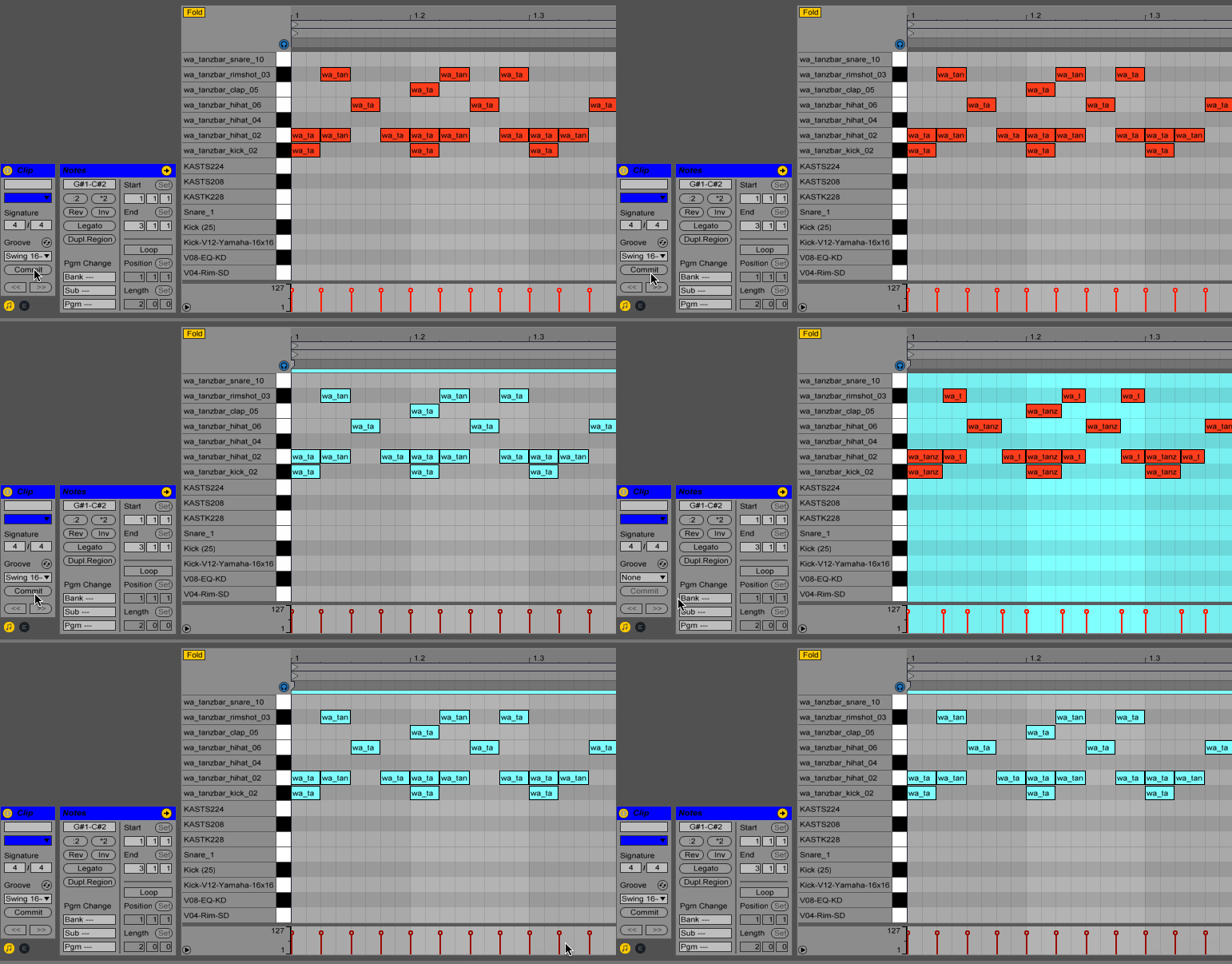
Shuffle operates by shifting individual steps earlier or later in time, along with adjusting note lengths to maintain musical coherence. As shown in the Ableton example above:
- Positive shuffle values: Delay the note trigger and shorten note length (to avoid overlapping with the next note)
- **Negative shuff
