
D3ploy
Deploy (WPF + runspaces) GUI to execute any script or distribute files to remote computers
Install / Use
/learn @micelshima/D3ployREADME
D3ploy
Powershell GUI to deploy your own scripts to remote computers. This version is totally rewritten in WPF and run code in different runspaces to keep the GUI responsive.
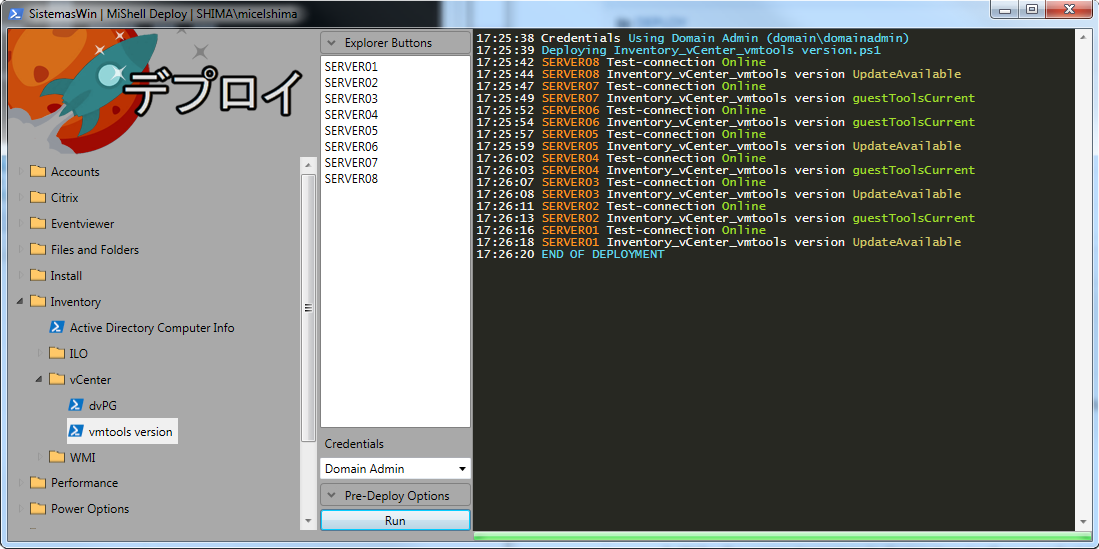
STEPS:
- Choose the script you want to run from ScriptRepository
- Write the computernames in Computers textbox or select txt file that contains them
- Select proper credentials from the credentials combobox or write a description for new ones.
- Choose whether you want to ping computers first, test the ports needed to work or do nothing
- Run!
This GUI allows you to execute any script to a list of computers. The only thing you need to do is store your own batches and powershell scripts under 'ScriptRepository' folder.
When creating your own powershell scripts just bear in mind that the list of computers will fill the variable $computername and the credentials will be saved in $creds (PSCredential Object) and $credsplain (user and plain password object) Here is an example for restarting a list of computers:
restart-computer -computername $computername -credential $creds -force -confirm:$false
I have uploaded some of my scripts and batches as examples. Notice that underscore '_' character in scriptnames is used to create tree levels inside the GUI treeview in order to keep them organized.
Enjoy!
Related Skills
tmux
342.5kRemote-control tmux sessions for interactive CLIs by sending keystrokes and scraping pane output.
blogwatcher
342.5kMonitor blogs and RSS/Atom feeds for updates using the blogwatcher CLI.
Unla
2.1k🧩 MCP Gateway - A lightweight gateway service that instantly transforms existing MCP Servers and APIs into MCP servers with zero code changes. Features Docker deployment and management UI, requiring no infrastructure modifications.
github-trending
Multi-agent orchestration system for infrastructure monitoring, incident response, and load testing with autonomous AI agents
