
Dynamic
Call hidden/private API in style! The Swift way.
Install / Use
/learn @mhdhejazi/DynamicREADME





A library that uses @dynamicMemberLookup and @dynamicCallable to access Objective-C API the Swifty way.
Table of contents
Introduction
Assume we have the following private Objective-C class that we want to access in Swift:
@interface Toolbar : NSObject
- (NSString *)titleForItem:(NSString *)item withTag:(NSString *)tag;
@end
There are three ways to dynamically call the method in this class:
1. Using performSelector()
let selector = NSSelectorFromString("titleForItem:withTag:")
let unmanaged = toolbar.perform(selector, with: "foo", with: "bar")
let result = unmanaged?.takeRetainedValue() as? String
2. Using methodForSelector() with @convention(c)
typealias titleForItemMethod = @convention(c)
    (NSObject, Selector, NSString, NSString) -> NSString

let selector = NSSelectorFromString("titleForItem:withTag:")
let methodIMP = toolbar.method(for: selector)
let method = unsafeBitCast(methodIMP, to: titleForItemMethod.self)
let result = method(toolbar, selector, "foo", "bar")
3. Using NSInvocation
SEL selector = @selector(titleForItem:withTag:);
NSMethodSignature *signature = [toolbar methodSignatureForSelector:selector];

NSInvocation *invocation = [NSInvocation invocationWithMethodSignature:signature];
invocation.target = toolbar;
invocation.selector = selector;

NSString *argument1 = @"foo";
NSString *argument2 = @"bar";
[invocation setArgument:&argument1 atIndex:2];
[invocation setArgument:&argument2 atIndex:3];

[invocation invoke];

NSString *result;
[invocation getReturnValue:&result];
Or, we can use Dynamic 🎉
let result = Dynamic(toolbar)            // Wrap the object with Dynamic
    .titleForItem("foo", withTag: "bar") // Call the method directly!
More details on how the library is designed and how it works here.
Examples
The main use cases for Dynamic is accessing private/hidden iOS and macOS API in Swift. And with the introduction of Mac Catalyst, the need to access hidden API arose as Apple only made a very small portion of the macOS AppKit API visible to Catalyst apps.
What follows are examples of how easy it is to access AppKit API in a Mac Catalyst with the help of Dynamic.
1. Get the NSWindow from a UIWindow in a MacCatalyst app
extension UIWindow {
    var nsWindow: NSObject? {
        var nsWindow = Dynamic.NSApplication.sharedApplication.delegate.hostWindowForUIWindow(self)
        if #available(macOS 11, *) {
            nsWindow = nsWindow.attachedWindow
        }
        return nsWindow.asObject
    }
}
2. Enter fullscreen in a MacCatalyst app
// macOS App
window.toggleFullScreen(nil)

// Mac Catalyst (with Dynamic)
window.nsWindow.toggleFullScreen(nil)
3. Using NSOpenPanel in a MacCatalyst app
// macOS App
let panel = NSOpenPanel()
panel.beginSheetModal(for: view.window!, completionHandler: { response in
    if let url: URL = panel.urls.first {
        print("url: ", url)
    }
})

// Mac Catalyst (with Dynamic)
let panel = Dynamic.NSOpenPanel()
panel.beginSheetModalForWindow(self.view.window!.nsWindow, completionHandler: { response in
    if let url: URL = panel.URLs.firstObject {
        print("url: ", url)
    }
} as ResponseBlock)

typealias ResponseBlock = @convention(block) (_ response: Int) -> Void
4. Change the window scale factor in MacCatalyst apps
iOS views in Mac Catalyst apps are automatically scaled down to 77%. To change the scale factor we need to access a hidden property:
override func viewDidAppear(_ animated: Bool) {
  view.window?.scaleFactor = 1.0 // Default value is 0.77
}

extension UIWindow {
  var scaleFactor: CGFloat {
    get {
      Dynamic(view.window?.nsWindow).contentView
        .subviews.firstObject.scaleFactor ?? 1.0
    }
    set {
      Dynamic(view.window?.nsWindow).contentView
        .subviews.firstObject.scaleFactor = newValue
    }
  }
}
Installation
You can use Swift Package Manager to install Dynamic by adding it in your Package.swift :
let package = Package(
    dependencies: [
        .package(url: "https://github.com/mhdhejazi/Dynamic.git", branch: "master")
    ]
)
How to use
The following diagram shows how we use Dynamic to access private properties and methods from the Objective-C object obj:
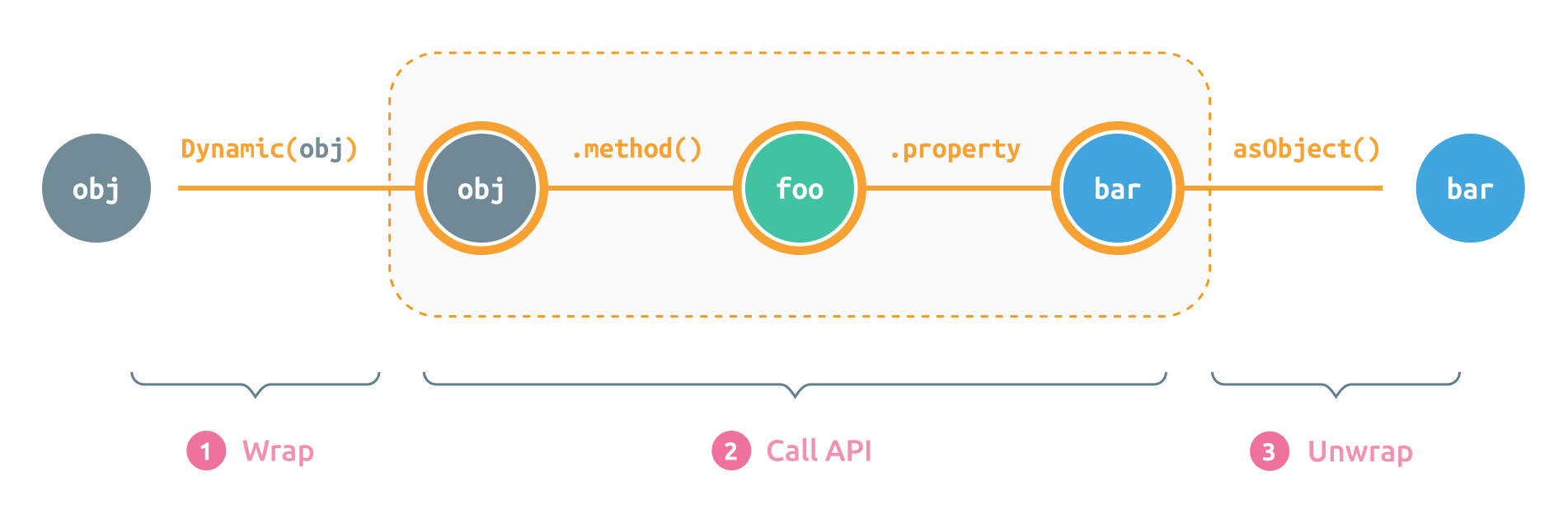
1. Wrap Objective-C objects
To work with Objective-C classes and instances, we need to wrap them with Dynamic first
Wrapping an existing object
If we have a reference for an existing Objective-C object, we can simply wrap it with Dynamic:
let dynamicObject = Dynamic(objcObject)
Creating new instances
To create a new instance from a hidden class, we prepend its name with Dynamic (or ObjC):
// Objective-C:
[[NSDateFormatter alloc] init];

// Swift:
let formatter = Dynamic.NSDateFormatter()
// Or maybe:
let formatter = ObjC.NSDateFormatter()
// Or the longer form:
let formatter = ObjC.NSDateFormatter.`init`()
Note 1: The
formatteris an instance ofDynamicthat wraps the new instance ofNSDateFormatter
Note 2:
ObjCis just a typealias forDynamic. Whatever you choose to use, stay consistent.
If the initializer takes parameters, we can pass them directly:
// Objective-C:
[[NSProgress alloc] initWithParent:foo userInfo:bar];

// Swift:
let progress = Dynamic.NSProgress(parent: foo, userInfo: bar)
// Or the longer form:
let progress = Dynamic.NSProgress.initWithParent(foo, userInfo: bar)
Both forms are equivalent because the library adds the prefix
initWithto the method selector in the first case. If you choose to use the shorter form, remember that you can only drop the prefixinitWithfrom the original initializer name. Whatever comes afterinitWithshould be the label of the first parameter.
Singletons
Accessing singletons is also straightforward:
// Objective-C:
[NSApplication sharedApplication];

// Swift:
let app = Dynamic.NSApplication.sharedApplication()
// Or we can drop the parenthesizes, as if `sharedApplication` was a static property:
let app = Dynamic.NSApplication.sharedApplication
Important Note: Although the syntax looks very similar to the Swift API, it's not always identical to the Swift version of the used API. For instance, the name of the above singleton in Swift is
sharednotsharedApplication, but we can only usesharedApplicatonhere as we're internally taking with the Objective-C classes. Always refer to the Objective-C documentation of the method you're trying to call to make sure you're using the right name.
2. Call the private API
After wrapping the Objective-C object, we can now access its properties and methods directly from the Dynamic object.
Accessing properties
// Objective-C:
@interface NSDateFormatter {
  @property(copy) NSString *dateFormat;
}

// Swift:
let formatter = Dynamic.NSDateFormatter()
// Getting the property value:
let format = formatter.dateFormat // `format` is now a Dynamic object
// Setting the property value:
formatter.dateFormat = "yyyy-MM-dd"
// Or the longer version:
formatter.dateFormat = NSString("yyyy-MM-dd")
Note 1: The variable
formatabove is now aDynamicobject that wraps the actual property value. The reason for returning aDynamicobject and not the actual value is to allow call chaining. We'll see later how we can unwrap the actual value from aDynamicobject.
Note 2: Although the property
NSDateFormatter.dataFormatis of the typeNSString, we can set it to a SwiftStringand the library will convert it toNSStringautomatically.
Calling methods
let formatter = Dynamic.NSDateFormatter()
let date = formatter.dateFromString("2020 Mar 30") // `date` is now a Dynamic object
// Objective-C:
[view resizeSubviewsWithOldSize:size];
[view beginPageInRect:rect atPlacement:point];

// Swift:
view.resizeSubviewsWithOldSize(size) // OR ⤸
view.resizeSubviews(withOldSize: size)

view.beginPageInRect(rect, atPlacement: point) // OR ⤸
view.beginPage(inRect: rect, atPlacement: point)
Calling the same method in different forms is possible because the library combines the method name (e.g.
resizeSubviews) with the first parameter label (e.g.withOldSize) to form the method selector (e.g.resizeSubviewsWithOldSize:). This means you can also call:view.re(sizeSubviewsWithOldSize: size), but please don't.
Objective-C block arguments
To pass a Swift closure for a block argument, we need to add @convention(block) to the closure type, and then cast the passed closure to this type.
// Objective-C:
- (void)beginSheetModalForWindow:(NSWindow *)sheetWindow
               completionHandler:(void (^)(NSModa
