
Codelyzer
Static analysis for Angular projects.
Install / Use
/learn @mgechev/CodelyzerREADME





codelyzer
A set of tslint rules for static code analysis of Angular TypeScript projects.
(If you are using ESLint check out the new angular-eslint repository.)
You can run the static code analyzer over web apps, NativeScript, Ionic, etc.
Vote for your favorite feature here. For more details about the feature request process see this document

How to use?
Angular CLI
Angular CLI has support for codelyzer. In order to validate your code with CLI and the custom Angular specific rules just use:
ng new codelyzer
ng lint
Note that by default all components are aligned with the style guide so you won't see any errors in the console.
Angular Seed
Another project which has out of the box integration with codelyzer is angular-seed. In order to run the linter you should:
# Skip if you've already cloned Angular Seed
git clone https://github.com/mgechev/angular-seed

# Skip if you've already installed all the dependencies of Angular Seed
cd angular-seed && npm i

# Run all the tslint and codelyzer rules
npm run lint
Note that by default all components are aligned with the style guide so you won't see any errors in the console.
Custom Setup
Preset
You can use the tslint-angular preset. All you need is:
npm i tslint-angular
After that create a tslint.json file with the following configuration:
{
  "extends": ["tslint-angular"]
}
Run the linter with:
./node_modules/.bin/tslint -c tslint.json
TSLint will now complain that there are rules which require type checking. In order to fix this, use the -p config option:
./node_modules/.bin/tslint -p tsconfig.json -c tslint.json
Custom Installation
You can easily use codelyzer with your custom setup:
npm i codelyzer tslint @angular/compiler @angular/core
A. Using codelyzer package in PATH
Create the following tslint.json file like:
{
  "extends": ["codelyzer"],
  "rules": {
    "component-class-suffix": true,
    "component-max-inline-declarations": true,
    "component-selector": [true, "element", "sg", "kebab-case"],
    "contextual-lifecycle": true,
    "directive-class-suffix": true,
    "directive-selector": [true, "attribute", "sg", "camelCase"],
    "no-attribute-decorator": true,
    "no-conflicting-lifecycle": true,
    "no-forward-ref": true,
    "no-host-metadata-property": true,
    "no-input-rename": true,
    "no-inputs-metadata-property": true,
    "no-lifecycle-call": true,
    "no-output-native": true,
    "no-output-on-prefix": true,
    "no-output-rename": true,
    "no-outputs-metadata-property": true,
    "no-pipe-impure": true,
    "no-queries-metadata-property": true,
    "no-unused-css": true,
    "prefer-inline-decorator": true,
    "prefer-output-readonly": true,
    "template-banana-in-box": true,
    "template-conditional-complexity": [true, 4],
    "template-cyclomatic-complexity": [true, 5],
    "template-i18n": [true, "check-id", "check-text"],
    "template-no-negated-async": true,
    "template-use-track-by-function": true,
    "use-component-selector": true,
    "use-component-view-encapsulation": true,
    "use-lifecycle-interface": true,
    "use-pipe-transform-interface": true
  }
}
To run TSLint with this setup you can use one of the following alternatives:
-
Install codelyzer globally
npm install -g codelyzer -
Run TSLint from a package.json script by adding a script like
tslint .to your package.json, similar to:
"scripts": {
  ...
  "lint": "tslint .",
  ...
},
Then run npm run lint
B. Using codelyzer from node_modules directory
Now create the following tslint.json file where your node_modules directory is:
{
  "rulesDirectory": ["node_modules/codelyzer"],
  "rules": {
    "component-class-suffix": true,
    "component-max-inline-declarations": true,
    "component-selector": [true, "element", "sg", "kebab-case"],
    "contextual-lifecycle": true,
    "directive-class-suffix": true,
    "directive-selector": [true, "attribute", "sg", "camelCase"],
    "no-attribute-decorator": true,
    "no-conflicting-lifecycle": true,
    "no-forward-ref": true,
    "no-host-metadata-property": true,
    "no-input-rename": true,
    "no-inputs-metadata-property": true,
    "no-lifecycle-call": true,
    "no-output-native": true,
    "no-output-on-prefix": true,
    "no-output-rename": true,
    "no-outputs-metadata-property": true,
    "no-pipe-impure": true,
    "no-queries-metadata-property": true,
    "no-unused-css": true,
    "prefer-inline-decorator": true,
    "prefer-output-readonly": true,
    "template-banana-in-box": true,
    "template-conditional-complexity": [true, 4],
    "template-cyclomatic-complexity": [true, 5],
    "template-i18n": [true, "check-id", "check-text"],
    "template-no-negated-async": true,
    "template-use-track-by-function": true,
    "use-component-selector": true,
    "use-component-view-encapsulation": true,
    "use-lifecycle-interface": true,
    "use-pipe-transform-interface": true
  }
}
Next you can create a component file in the same directory with name component.ts and the following content:
import { Component } from '@angular/core';

@Component({
  selector: 'codelyzer',
  template: ` <h1>Hello {{ name }}!</h1> `,
})
class Codelyzer {
  name: string = 'World';

  ngOnInit() {
    console.log('Initialized');
  }
}
As last step you can execute all the rules against your code with tslint:
./node_modules/.bin/tslint -c tslint.json component.ts
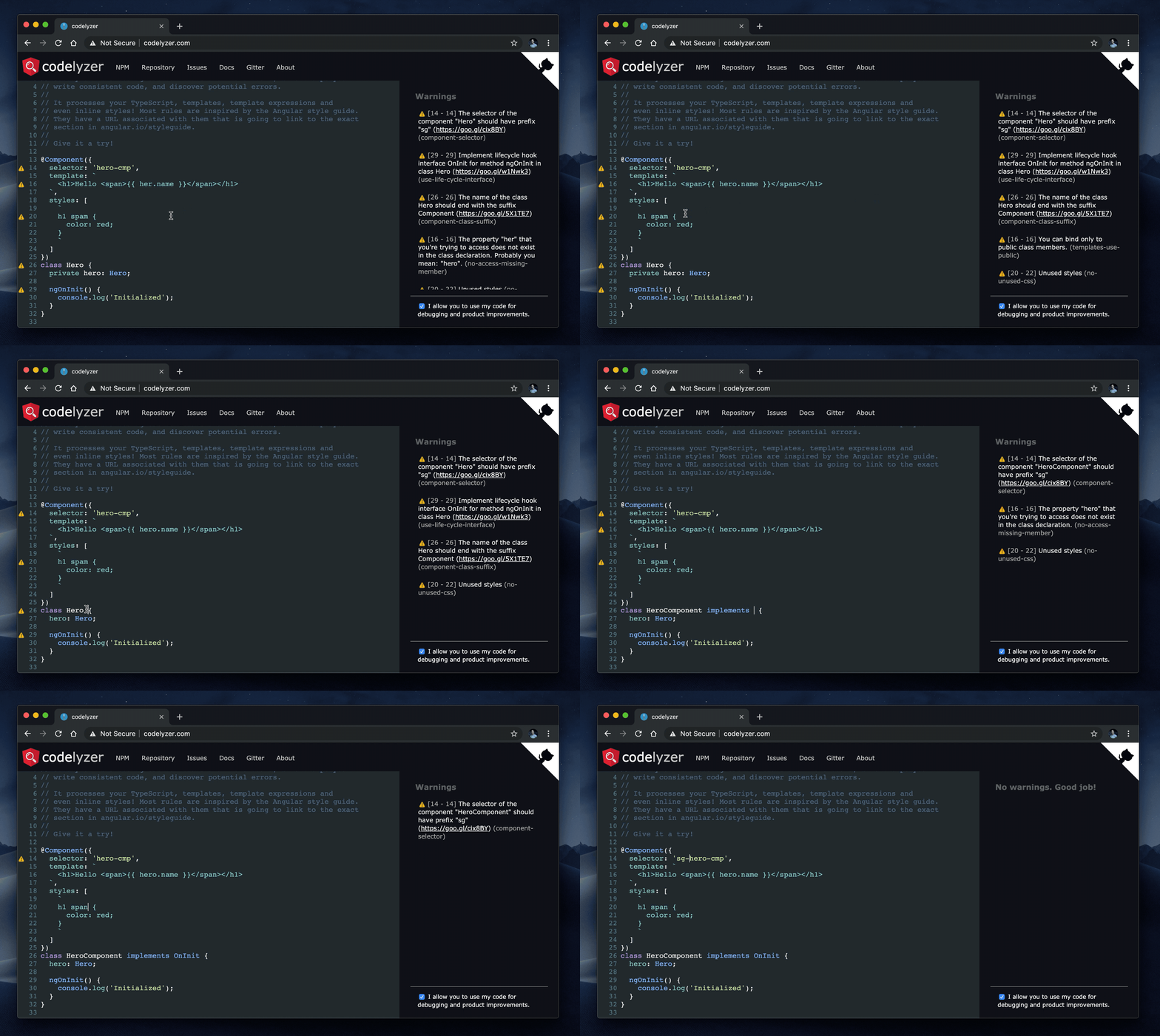
You should see the following output:
component.ts[4, 13]: The selector of the component "Codelyzer" should have prefix "sg" (https://goo.gl/cix8BY)
component.ts[12, 3]: Implement lifecycle hook interface OnInit for method ngOnInit in class Codelyzer (https://goo.gl/w1Nwk3)
component.ts[9, 7]: The name of the class Codelyzer should end with the suffix Component (https://goo.gl/5X1TE7)
Editor Configuration
Note that you need to have tslint plugin install on your editor.
Codelyzer should work out of the box with Atom but for VSCode you will have to open Code > Preferences > User Settings, and enter the following config:
{
  "tslint.rulesDirectory": "./node_modules/codelyzer",
  "typescript.tsdk": "node_modules/typescript/lib"
}
Now you should have the following result:
Enjoy!
Changelog
You can find it here.
Recommended configuration
Below you can find a recommended configuration which is based on the Angular Style Guide.
{
  // The rules component-selector and directive-selector have the following arguments:
  // [ENABLED, "attribute" | "element", "prefix" | ["listOfPrefixes"], "camelCase" | "kebab-case"]
  "component-selector": [true, "element", ["cmp-prefix1", "cmp-prefix2"], "kebab-case"],
  "directive-selector": [true, "attribute", ["dir-prefix1", "dir-prefix2"], "camelCase"],

  "component-max-inline-declarations": true,
  "contextual-lifecycle": true,
  "no-conflicting-lifecycle": true,
  "no-host-metadata-property": true,
  "no-input-rename": true,
  "no-inputs-metadata-property": true,
  "no-output-native": true,
  "no-output-on-prefix": true,
  "no-output-rename": true,
  "no-outputs-metadata-property": true,
  "no-queries-metadata-property": true,
  "prefer-inline-decorator": true,
  "template-banana-in-box": true,
  "template-no-negated-async": true,
  "use-lifecycle-interface": true,
  "use-pipe-transform-interface": true,

  // The rules component-class-suffix and directive-class-suffix have the following arguments:
  // [ENABLED, "suffix" | ["listOfSuffixes"]]
  // Where "suffix" is/are your custom(s) suffix(es), for instance "Page" for Ionic components.
  "component-class-suffix": [true, "Component"],
  "directive-class-suffix": [true, "Directive"]
}
Rules Status
| Rule | Status |
| --------------------------------------------- | :------------: |
| component-class-suffix | Stable |
| component-max-inline-declarations | Stable |
| component-selector | Stable |
| contextual-decorator | Stable |
| contextual-lifecycle | Stable |
| directive-class-suffix
Related Skills
node-connect
333.3kDiagnose OpenClaw node connection and pairing failures for Android, iOS, and macOS companion apps
frontend-design
82.0kCreate distinctive, production-grade frontend interfaces with high design quality. Use this skill when the user asks to build web components, pages, or applications. Generates creative, polished code that avoids generic AI aesthetics.
openai-whisper-api
333.3kTranscribe audio via OpenAI Audio Transcriptions API (Whisper).
commit-push-pr
82.0kCommit, push, and open a PR
