
Sikka
Sikka - A Firewall for Meteor Apps
Install / Use
/learn @meteorhacks/SikkaREADME
Sikka - A Firewall for Meteor Apps 
This is an application level firewall for Meteor. Sikka can detect malicious users of your app and block those users. We've build basic rate limiting support and it is well tested and works with most of the Meteor deployments techniques. We also have a huge roadmap and a feature set.
Installation
meteor add meteorhacks:sikka
Sikka comes with sufficient set of defaults, which is okay for a common Meteor app. But, it's better if you can tweak them for your needs. Refer following section for that.
All of the configurations are based on either environment variables or with Meteor.settings
Supported Features
Let's talk about supported features.
DDP Rate Limiting
You can configure a maximum number of DDP requests allowed per IP. If any of the IPs exceed that limit, we'll block that IP for couple of minutes.
We don't disconnect the DDP connection, but rather ignore the traffic. By doing that, attacker can't detect whether we've blocked his requests or our app goes down.
Here are some parameters you can configure.
|Description | Environment Variable | Meteor.settings key | default |
|------------------|-------------------------|---------------------------|---|
|Per IP rate limit (per sec) | SIKKA_PER_IP_MAX_RPS | sikka.rateLimits.perIp | 20|
|Time to block an IP | SIKKA_BLOCK_IP_FOR_MILLIS | sikka.times.blockIpFor | 120000|
Human Verification (Captcha Support)
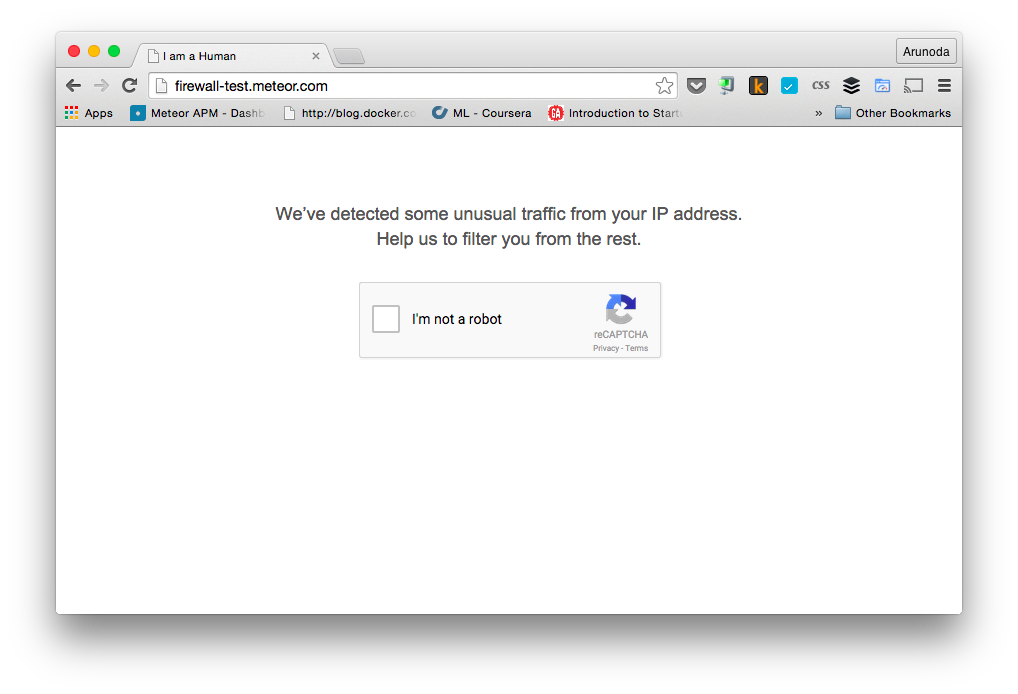
Sometimes, it's possible for attacker to exist with legitimate users. So, when we block requests, legitimate users won't be able access our app. To solve this issue, we ask users to verify them as humans by completing a captcha.
Here are some parameters you can configure
|Description | Environment Variable | Meteor.settings key | default |
|------------------|-------------------------|---------------------------|---|
|Captcha Site Key | SIKKA_CAPTCHA_SITE_KEY | sikka.captcha.siteKey | |
|Captcha Secret | SIKKA_CAPTCHA_SECRET | sikka.captcha.secret | |
|Per Human Rate Limit (per sec) | SIKKA_PER_HUMAN_MAX_RPS | sikka.rateLimits.perHuman | IP Rate Limit |
|Millis Human Lifetime (expired after that) | SIKKA_HUMAN_LIVES_UPTO_MILLIS | sikka.times.humanLivesUpto | 3600000 |
Here is an example of a settings.json file:
{
    "sikka": {
         "captcha": {
             "siteKey": "your_new_site_key",
             "secret":  "your_new_secret_key"
         }
    }
}
You can apply the settings with:
meteor --settings path/to/settings.json
Visit Google's Recaptcha website to get Captcha keys for your domain. We've added a default set of keys works on locally, meteor.com and onmodulus.net to make your development experience simpler. But, you should get a new pair of keys for a production deployment.
Humans Only Mode
Let's say, your app is under an attack. So, you can make your app to reject all DDP requests and ask for human verification by default. This is how you can configure it.
To enable this mode. Just export following environment variable or Meteor settings key.
- Environment Variable:
SIKKA_ONLY_FOR_HUMANS - Meteor Settings key:
sikka.onlyForHumans
Support Deployment Methods
If your app behind a proxy or a SSL terminator, it needs to add x-forwarded-for header with the actual IP address.
Tested Proxies / SSL Terminators
- [x] proxy of meteor.com
- [x] proxy of modulus.io
- [x] Cloudflare
- [x] Cloudflare with SSL
- [x] Nginx with proxy_set_header
Failed Proxies / SSL Terminators
- [x] Meteor Up's SSL terminator - we'll have a fix soon.
Related Skills
node-connect
344.4kDiagnose OpenClaw node connection and pairing failures for Android, iOS, and macOS companion apps
frontend-design
99.2kCreate distinctive, production-grade frontend interfaces with high design quality. Use this skill when the user asks to build web components, pages, or applications. Generates creative, polished code that avoids generic AI aesthetics.
openai-whisper-api
344.4kTranscribe audio via OpenAI Audio Transcriptions API (Whisper).
qqbot-media
344.4kQQBot 富媒体收发能力。使用 <qqmedia> 标签,系统根据文件扩展名自动识别类型(图片/语音/视频/文件)。
