
MHRadialProgressView
iOS 7 radial animated progress view.
Install / Use
/learn @mehfuzh/MHRadialProgressViewREADME
MHRadialProgressView is an iOS drop-in class radial animated progress view.
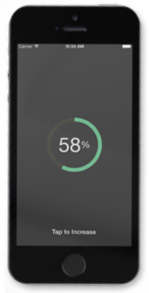 (by placeit)
##Requirements MHRadialProgressView works on iOS 6 and above and is compatible with ARC projects. It depends on the following Apple frameworks:
- Foundation.framework
- UIKit.framework
##Including MHRadialProgressView to your project
Source files
You can directly add the MHRadialProgressView.h and MHRadialProgressView.m source files to your project.
- Download the latest zip from github or clone the source in your desired directory.
- Open your project in Xcode, then drag and drop
MHRadialProgressView.handMHRadialProgressView.monto your project (use the "Product Navigator view"). Make sure to select Copy items when asked if you extracted the code archive outside of your project. - Include MHRadialProgressView with
#import "MHRadialProgressView.h".
Cocoapods
CocoaPods is the recommended way to add MHRadialProgressView to your project.
- Add a pod entry for MHRadialProgressView to your Podfile
pod 'MHRadialProgressView', '~> 0.2' - Install the pod(s) by running
pod install. - Include MHTextField with
#import "MHRadialProgressView.h"
Usage
-
Initialize the view with steps that define a particular operation complete.
self.progressView = [[MHRadialProgressView alloc] initWithFrame:CGRectMake(0, 0, 150, 150) points:@[@5, @10, @2, @9]]; -
Add it as subview:
[self.view addSubview:self.progressView]; -
Make progress by calling the following method:
[self.progressView moveNext];
By default, the progress view displays % value. However you can override the style by calling the following method:
// Default is MHProgressStylePercentage. Sets the progress style
- (void)setProgressStyle:(MHProgressStyle)style;
It is also possible to format the label that displays the progress value using the folloiwng method:
- (void)setLabelWithFormat:(NSString*)format;
For unordered progres (often by steps associated wtih user action), you can increase the progress by value:
- (void) moveNext:(NSNumber*)value;
License
This code is distributed under the terms and conditions of the MIT license.
Related Skills
node-connect
344.4kDiagnose OpenClaw node connection and pairing failures for Android, iOS, and macOS companion apps
frontend-design
99.2kCreate distinctive, production-grade frontend interfaces with high design quality. Use this skill when the user asks to build web components, pages, or applications. Generates creative, polished code that avoids generic AI aesthetics.
openai-whisper-api
344.4kTranscribe audio via OpenAI Audio Transcriptions API (Whisper).
qqbot-media
344.4kQQBot 富媒体收发能力。使用 <qqmedia> 标签,系统根据文件扩展名自动识别类型(图片/语音/视频/文件)。
