
Cocona
Micro-framework for .NET console application. Cocona makes it easy and fast to build console applications on .NET.
Install / Use
/learn @mayuki/CoconaREADME

Micro-framework for .NET Core console application. Cocona makes it easy and fast to build console applications on .NET.🚀


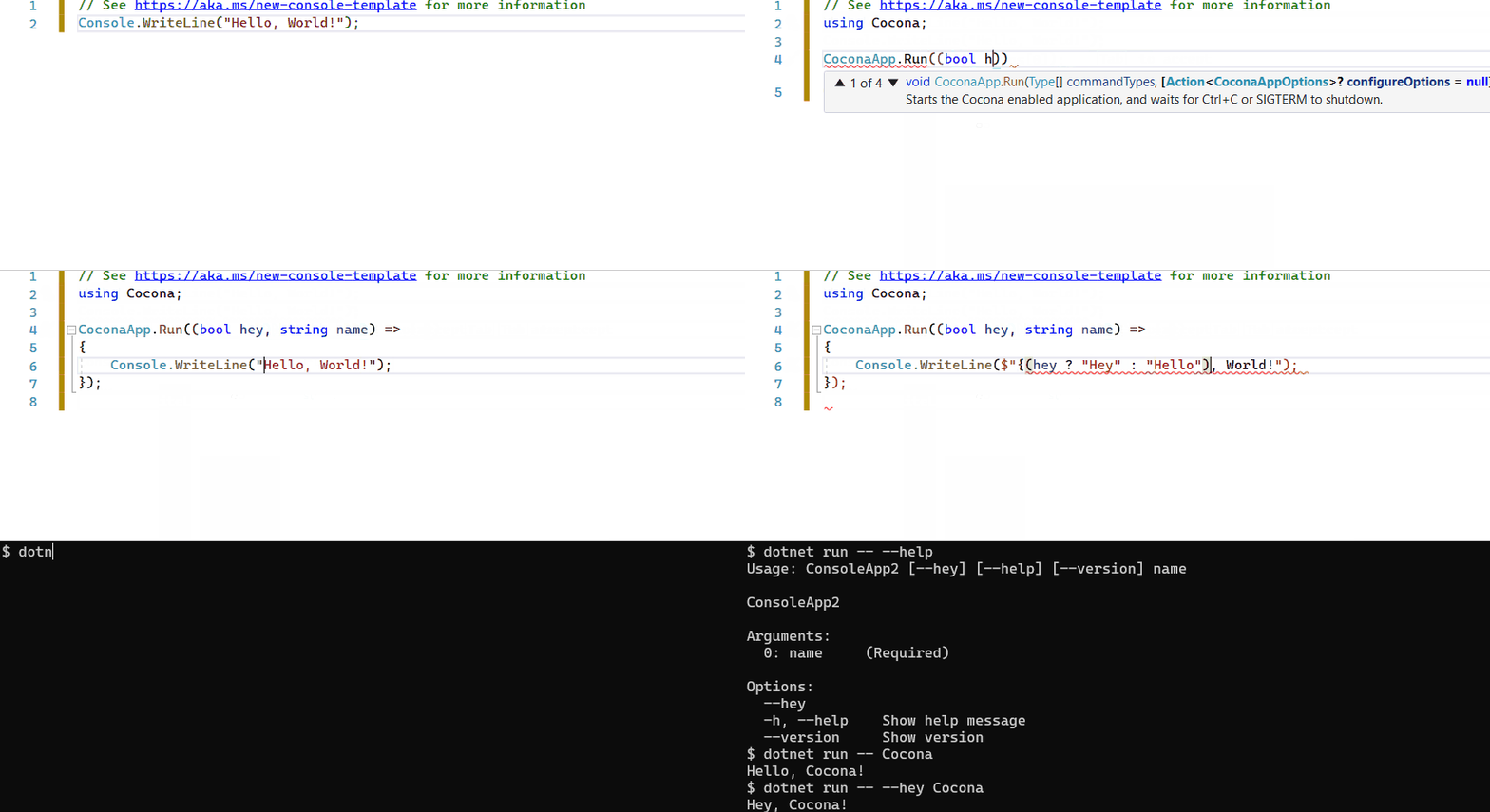
⏱ Create a console application with Cocona in seconds.
CoconaApp.Run((string? name, bool hey) =>
    Console.WriteLine($"{(hey ? "Hey" :"Hello")} {(name ?? "Guest")}!"));
Feature
- 🚀 Make it easy to build console applications on .NET.
- ASP.NET Core-like Minimal API
publicmethod as a command- Provides ASP.NET Core MVC-like development experience to console application development.
- ✨ Command-line option semantics like UNIX tools standard. (
getopt/getopt_longlike options)- Your app can handle both
-rf /and-r -f /:-) - Support single command and multiple commands style
myapp --foo --bar -n arg0 "arg1"(e.g.dir,cp,ls...)myapp server -m "Hello world!"(e.g.dotnet,git,kubectl...)
- Your app can handle both
- ❓ Built-in help documentation support.
- You want to see a help message; you type
-hor--help. - Built-in similar commands suggestion
- Shell command-line completion support for
bashandzsh
- You want to see a help message; you type
- 🛠 Highly modulable/customizable CLI framework.
- Cocona built on top of
Microsoft.Extensions.*framework. Cocona natively supports Logging, DI, Configuration and ConsoleLifetime. - Don't you need
Microsoft.Extensions.*? then you can use a lightweight version of Cocona (named Cocona.Lite).
- Cocona built on top of
You can find sample code for various features.
Table of contents
- Installing
- Requirements
- Getting Started
- Command-line handling basics
- Cocona in action
- Performance & Cocona.Lite
- Advanced
- Related projects
- License
Installing
Install NuGet package from NuGet.org
$ dotnet add package Cocona

# A lightweight version is also available if you prefer less dependency.
$ dotnet add package Cocona.Lite
Requirements
- .NET 6 (Required to use Minimal API)
- .NET 5
- .NET Standard 2.0, 2.1
Getting Started
using Cocona;
CoconaApp.Run((string name) =>
{
    Console.WriteLine($"Hello {name}");
})
using Cocona;
class Program
{
    static void Main(string[] args)
    {
        // Cocona parses command-line and executes a command.
        CoconaApp.Run<Program>(args);
    }

    // public method as a command ™
    public void Hello(string name)
    {
        Console.WriteLine($"Hello {name}");
    }
}
Try to run!
$ dotnet run
Usage: ConsoleAppSample [--name <String>]

Options:
  --name <String>    (Required)
  -h, --help         Show help message
  --version          Show version

$ dotnet run -- --name Cocona
Hello Cocona
Extra: Publish the application as a single-file executable
If your application runs on .NET Core 3.0 or later, you can publish the app as a single-file executable. (see. What's new in .NET Core 3.0)
PS> dotnet publish -r win-x64 -p:PublishSingleFile=true
PS> app.exe --name Cocona

$ dotnet publish -r linux-x64 -p:PublishSingleFile=true
$ ./app --name Cocona
Command-line handling basics
Command
Minimal API style
If your application has a single command, you can easily define and run it with CoconaApp.Run.
CoconaApp.Run((string name, int age) => { ... });
This is equivalent to the following code using the Minimal API Builder.
var builder = CoconaApp.CreateBuilder();
var app = builder.Build();

app.AddCommand((string name, int age) => { ... });

app.Run();
If you want your application to have more than one command, you can add named commands. See Sub commands for details.
var app = CoconaApp.Create(); // is a shorthand for `CoconaApp.CreateBuilder().Build()`

app.AddCommand("list", () => { ... });
app.AddCommand("add", () => { ... });
app.AddCommand("delete", () => { ... });

app.Run();
You can add (classic) Class-based style commands with the AddCommands<T> method.
app.AddCommands<MyCommand>();
Public method as a command (Class-based style)
By default, Cocona treats public methods as commands.
If an application has one public method, Cocona calls it on startup. If there are more than one, they are treated as sub-commands. (see also Sub commands)
// Treats a method name as a command name. (Below method is named `command`)
public void Command() { ... }

// Specify a command name using CommandAttribute.
[Command("commandname")]
public void Command() { ... }

// Cocona will ignore this method.
[Ignore]
public void Ignored() { ... }
If you want to specify a method as a command manually, set false to TreatPublicMethodsAsCommands option at startup. All command methods require CommandAttribute.
CoconaApp.Run<Program>(args, options =>
{
    // If the option value is `false`, All command methods require `CommandAttribute`.
    options.TreatPublicMethodsAsCommands = false;
});
Options
Cocona exposes method parameters as command-line options (also known as flags).
// This command accepts `--name <string>` and `--hey` options.
app.AddCommand((string name, bool hey) => { ... });
// This command accepts `--name <string>` and `--hey` options.
public void Hello(string name, bool hey) { ... }
If the parameter of a method is defined as nullable, Cocona will treat them as non-mandatory option for a command. (That is, the parameters are treated as required option by default excepts boolean).
If a parameter is boolean, it's assumed that false default value is specified.
// `--name` is non-mandatory option.
// If the user runs the application without this option, the parameter will be `null`.
app.AddCommand((string? name) => { ... });
If method parameters are optional argument, Cocona treats those as optional command options. (That is, the parameters are treated as required option by default excepts boolean).
If a parameter is boolean, it's assumed that false default value is specified.
// `--name "default user"` is specified implicity.
public void Hello(string name = "default user") { ... }
Do you want to use short-name option -f instead of --force?
You can specify short-name to an option using OptionAttribute.
// The command accepts `-f` or `--force` option.
// Cocona's command-line parser accepts getopt-like styles. See below.
// $ remove --force --recursive
// $ remove -r -f
// $ remove -rf
app.AddCommand(([Option('f')]bool force, [Option('r')]bool recursive) => { ... });
// The command accepts `-f` or `--force` option.
// Cocona's command-line parser accepts getopt-like styles. See below.
// $ remove --force --recursive
// $ remove -r -f
// $ remove -rf
public void Remove([Option('f')]bool force, [Option('r')]bool recursive) { ... }
If a parameter is T[] or IEnumerable<T>, a command accepts one or more options by the same name.
// $ compile -I../path/to/foo.h -I/usr/include/bar.h -I/usr/include/baz.h nantoka.c
// include = new [] { "../path/to/foo.h", "/usr/include/bar.h", "/usr/include/baz.h" };
app.AddCommand(([Option('I')]string[] include, [Argument]string file) => { ... });
// $ compile -I../path/to/foo.h -I/usr/include/bar.h -I/usr/include/baz.h nantoka.c
// include = new [] { "../path/to/foo.h", "/usr/include/bar.h", "/usr/include/baz.h" };
public void Compile([Option('I')]string[] include, [Argument]string file) { ... }
You can also specify a description for options that app
