RayTrophi
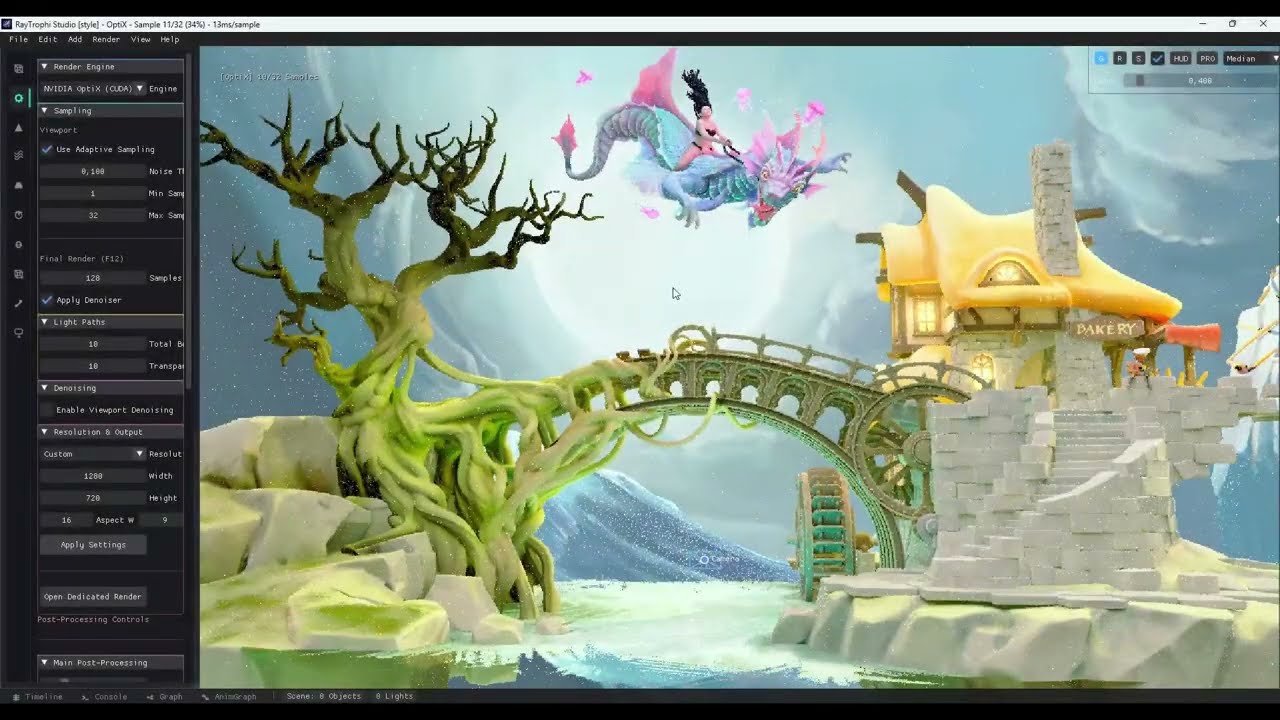
Ray tracing engine with OptiX, Embree, and CPU acceleration. Supports animation, PBR, and volumetrics.
Install / Use
/learn @maxkemal/RayTrophiREADME
🌟 RayTrophi - Advanced Real-Time Ray Tracing Engine
<div align="center">




A high-performance, production-ready ray tracing renderer with hybrid CPU/GPU rendering
Features • Quick Start • Architecture • Performance • Gallery
</div>📖 Overview
RayTrophi is a state-of-the-art physically-based ray tracing engine designed for architectural visualization, product rendering, and real-time graphics. It combines the flexibility of CPU rendering with the raw power of GPU acceleration through NVIDIA OptiX.
🎯 Key Highlights
-
Hybrid Rendering: Seamlessly switch between CPU (Embree/Custom BVH) and GPU (OptiX & Vulkan) acceleration
-
Production-Ready: Principled BSDF, advanced materials, volumetrics, subsurface scattering
-
High Performance: Optimized BVH construction (<1s for 3.3M triangles), 75% memory-optimized triangle structure
-
Real-time Preview: Modern interactive UI with ImGui, animation timeline
-
Industry Standard: AssImp loader supports 40+ 3D formats (GLTF, FBX, OBJ, etc.)
📊 Project Statistics
<!-- STATS_START -->| Metric | Value | | :--- | :--- | | Files (Source) | 249 | | Lines of Code | 136,184 | | UI Control Points | 1,015+ | | Last Updated | 2026-03-10 |
<!-- STATS_END -->Full Technical Report: ARCHITECTURE.md
✨ Features
🎨 Rendering Capabilities
-
Materials
- ✅ Principled BSDF (Disney-style uber-shader)
- ✅ Lambertian, Metal, Dielectric
- ✅ Volumetric rendering with noise-based density
- ✅ Subsurface Scattering (SSS)
- ✅ Clearcoat, Anisotropic materials
- ✅ Hair System: GPU-accelerated hair rendering and simulation
-
Lighting
- ✅ Point lights, Directional lights
- ✅ Area lights (mesh-based)
- ✅ Emissive materials
- ✅ HDR/EXR Environment Maps (equirectangular projection)
- ✅ Global Volumetric Clouds:
- Any Sky Mode: Decoupled rendering works seamlessly with HDRI, Solid Color, or Nishita Sky.
- Physical Scattering: Henyey-Greenstein phase function with controllable Anisotropy (Silver Lining).
- High Quality: Adaptive ray marching (up to 128 steps) and jittered sampling to eliminate banding artifacts.
- Dynamic Control: Wind/Seed offsets, Coverage, Density, and Altitude layers.
- Soft Horizon: Smart density fading prevents black horizon artifacts.
- ✅ Advanced Nishita Sky Model:
- Physical atmosphere (Air, Dust, Ozone, Altitude) matching Blender concepts.
- Day/Night Cycle: Automatic transition with procedural stars and moon.
- Moon Rendering: Horizon size magnification, redness, atmospheric dimming, and phases.
- Sun Glow: High Mie Anisotropy (0.98) for realistic sun halos.
- Light Sync: Automatically synchronizes Scene Directional Light with Sky Sun position.)
- ✅ Soft shadows with multiple importance sampling
-
Advanced Features
- ✅ Accumulative Rendering: Progressive path tracing for noise-free, high-quality output
- ✅ Adaptive Sampling: Intelligent sampling engine focusing on noisy areas
- ✅ Depth of Field (DOF)
- ✅ Motion Blur
- ✅ Intel Open Image Denoise (OIDN) integration
- ✅ Tone mapping & post-processing
- 🧪 [EXPERIMENTAL] Vulkan RT Backend (Active Development): Hardware ray tracing pipeline built on Vulkan Ray Tracing (
VK_KHR_ray_tracing_pipeline). Features GPU-accelerated skeletal animation via compute skinning shaders, TLAS/BLAS refit for dynamic geometry, persistent descriptor sets, and a single-submit trace+readback command buffer. Gracefully falls back to OptiX or CPU if Vulkan dependencies (vulkan-1.dll) or a compatible GPU are absent.
| Feature | OptiX | Vulkan RT | Notes | |---------|:-----:|:---------:|-------| | Principled BSDF | ✅ | ✅ | Full parity | | Lambertian / Metal / Dielectric | ✅ | ✅ | Full parity | | Subsurface Scattering (SSS) | ✅ | ✅ | Minor colour tint difference | | Clearcoat & Anisotropic | ✅ | ✅ | Full parity | | Volumetric Rendering | ✅ | 🧪 | Minor density differences | | Hair System | ✅ | 🧪 | Shader computation differences | | HDR / EXR Environment | ✅ | ✅ | Full parity | | Nishita Sky & Day/Night Cycle | ✅ | ✅ | Full parity | | Volumetric Clouds | ✅ | 🧪 | Minor scattering differences | | Water / Ocean (FFT) | ✅ | 🧪 | Wave reflection differences | | Skeletal Animation (GPU Skinning) | ✅ | ✅ | Vulkan compute shader | | Depth of Field (DOF) | ✅ | ✅ | Full parity | | Motion Blur | ✅ | ✅ | Full parity | | Soft Shadows (MIS) | ✅ | ✅ | Full parity | | Area Lights | ✅ | ✅ | Full parity | | Tone Mapping & Post-FX | ✅ | ✅ | Full parity | | OIDN Denoising | ✅ | ✅ | Full parity | | Adaptive Sampling | ✅ | ✅ | Full parity | | Progressive / Accumulative Render | ✅ | ✅ | Full parity |
</details>Legend: ✅ Full support | 🧪 Supported, minor output differences possible
- ✅ Advanced Animation:
- Bone animation with quaternion interpolation
- Multi-track timeline with keyframe editing (Location/Rotation/Scale/Material)
- Batch Animation Rendering: Export animation sequences to image files with material keyframe support
- Cancellable renders with "Stop Animation" button
- Real-time playback preview with scrubbing
- ✅ Advanced Cloud Lighting Controls:
- Light Steps control for volumetric cloud quality
- Shadow Strength for realistic cloud shadows
- Ambient Strength for cloud base illumination
- Silver Intensity (Silver Lining) for sun-edge effects
- Cloud Absorption for light penetration control
- ✅ Full Undo/Redo System (v1.2):
- Object transforms (move, rotate, scale)
- Object deletion and duplication
- Light transforms (move, rotate, scale)
- Light add/delete/duplicate
- Keyboard shortcuts: Ctrl+Z (Undo), Ctrl+Y (Redo)
- ✅ Advanced Selection System (NEW v1.3):
- Box Selection: Right-click drag to select multiple objects
- Mixed Selection: Select lights + objects together
- Ctrl+Click: Add/remove from selection
- Select All/None buttons: Quick selection in Scene panel
- Multi-object transform: Move multiple selected items at once
- ✅ Idle Preview (NEW v1.3):
- During gizmo manipulation, pause mouse for 0.3s to preview position
- See render result before releasing - adjust if needed
- Blender-like UX for precise positioning
🚀 Performance & Optimization
-
Multi-BVH Support
- Embree BVH (Intel, production-grade)
- Custom ParallelBVH (SAH-based, OpenMP parallelized)
- OptiX GPU acceleration structure
- 🧪 Vulkan RT TLAS/BLAS architecture — dynamic refit, compute skinning, single-submit pipeline (Experimental)
-
Optimizations
- SIMD vector operations
- Multi-threaded tile-based rendering
- Progressive refinement
- Memory Optimization: Triangular footprint reduced from 612 to 146 bytes (75% reduction)
- Robust Texture System: Crash-proof loader for Unicode paths and corrupted formats
- Cached Texture Management (Optimized Hit/Miss logic)
- Deferred BVH Update (NEW v1.3): Gizmo manipulation doesn't block - BVH updates only when needed
- O(n) Multi-Delete (NEW v1.3): Delete 100+ objects instantly (was O(n²))
🖥️ User Interface
- Modern ImGui-based Dark UI with Docking
- Animation Timeline:
- Multi-track visualization with group hierarchy (Objects/Lights/Cameras/World)
- Per-Channel Keyframing: Separate Location/Rotation/Scale keyframes
- Expandable L/R/S sub-channels with color coding
- Context menu for insert/delete/duplicate operations
- Drag-to-move keyframes, zoom/pan/scrub navigation
- Render Quality Presets (Low, Medium, High, Ultra)
- Dynamic Resolution Scaling
- Scene hierarchy viewer and Material editor
📦 Asset Browser & Library System
- Metadata-driven asset discovery for
model,anim_clip,vdb, andvdb_sequence - Hybrid library workflow: built-in project
assetsroot plus user-added local libraries - Extended VDB / VDB sequence metadata with grids, bounds, shader presets, and sequence info
- Asset cards with preview/thumbnail cache, favorites, tags, and saved collection/smart-folder presets
- Drag-and-drop scene placement with viewport ghost preview and auto-selection of the newly appended object
- Project-scoped UI persistence for asset browser layout, library list, and saved collection filters
- Performance metrics (FPS, rays/s, memory usage)
- Box Selection: Right-click drag for multi-selection
- Transform Gizmo Idle Preview: Pause during drag to preview position
�️ Procedural Tools & Systems
🏔️ Advanced Terrain Editor
<img src="docs/images/terrain_header.jpg" width="100%" alt="Terrain Editor System">- Sculpting Brushes: Intuitive brushes for raising, lowering, smoothing, and flattening terrain geometry in real-time.
- Hydraulic & Fluvial Erosion:
- Simulate realistic water flow and sediment transport
- Create natural-looking riverbeds and valleys automatically
- Control erosion strength, rain amount, and solubility
- Heightmap Support: Import/Export 16-bit heightmaps for external workflows (World Machine, Gaea).
- Node-Based Workflow:
Related Skills
openhue
344.1kControl Philips Hue lights and scenes via the OpenHue CLI.
sag
344.1kElevenLabs text-to-speech with mac-style say UX.
weather
344.1kGet current weather and forecasts via wttr.in or Open-Meteo
tweakcc
1.5kCustomize Claude Code's system prompts, create custom toolsets, input pattern highlighters, themes/thinking verbs/spinners, customize input box & user message styling, support AGENTS.md, unlock private/unreleased features, and much more. Supports both native/npm installs on all platforms.