
CommonMarkAttributedString
Create NSAttributedStrings from Markdown Text
Install / Use
/learn @mattt/CommonMarkAttributedStringREADME
CommonMarkAttributedString


CommonMarkAttributedString is a Swift package that lets you create attributed strings using familiar CommonMark (Markdown) syntax. It's built on top of CommonMark, which is fully compliant with the CommonMark Spec.
Supported Platforms
- macOS 10.10+
- Mac Catalyst 13.0+
- iOS 9.0+
- tvOS 9.0+
Usage
import CommonMarkAttributedString

let commonmark = "A *bold* way to add __emphasis__ to your `code`"

let attributes: [NSAttributedString.Key: Any] = [
    .font: NSFont.systemFont(ofSize: 24.0),
    .foregroundColor: NSColor.systemBlue,
]

let attributedString = try NSAttributedString(commonmark: commonmark, attributes: attributes)

You can also use CommonMarkAttributedString to create attributed strings that have multiple paragraphs, with links, headings, lists, and images.
let commonmark = #"""
# [Universal Declaration of Human Rights][uhdr]

## Article 1.

All human beings are born free and equal in dignity and rights.
They are endowed with reason and conscience
and should act towards one another in a spirit of brotherhood.

[uhdr]: https://www.un.org/en/universal-declaration-human-rights/ "View full version"
"""#

let attributes: [NSAttributedString.Key: Any] = [
    .font: NSFont.systemFont(ofSize: NSFont.systemFontSize),
    .foregroundColor: NSColor.textColor,
    .backgroundColor: NSColor.textBackgroundColor,
]

let attributedString = try NSAttributedString(commonmark: commonmark, attributes: attributes)
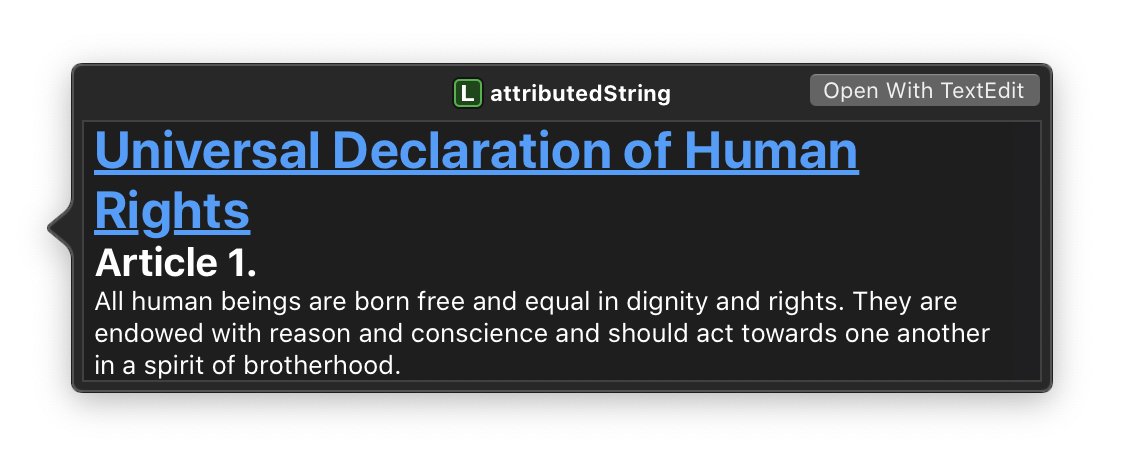
Supported CommonMark Elements
- [x]
Code - [x] Emphasis
- [x] Link (inline links, link references, and autolinks)
- [x] Strong
- [x] > Block Quotes
- [x] Headings
- [x] Raw
<html><sup>*</sup> - [x] • Bulleted Lists <sup>*</sup>
- [x] 1. Ordered Lists <sup>*</sup>
- [x] 🖼 Images <sup>*</sup>
Raw Inline HTML
According to the CommonMark specification,
each inline HTML tag is considered its own element.
That is to say,
CommonMark doesn't have a concept of opening or closing tags.
So, for example,
the CommonMark string <span style="color: red;">hello</span>
corresponds to a paragraph block containing three inline elements:
Code(<span style="color: red;">)Text(hello)Code(</span>)
Parsing and rendering HTML is out of scope for this library,
so whenever CommonMarkAttributedString receives text containing any HTML,
it falls back on NSAttributedString's built-in HTML initializer.
Bulleted and Ordered Lists
CommonMarkAttributedString renders bulleted and ordered lists using conventional indentation and markers --- disc (•), circle(◦), and square (■) for unordered lists and decimal numerals (1.), lowercase roman numerals (i.), and lowercase letters (a.) for ordered lists.
- Level 1
- Level 2
- Level 3
- Level 2
- Level 1
- Level 2
- Level 3
- Level 2
Images
Attributed strings can embed images using the NSTextAttachment class.
However,
there's no built-in way to load images asynchronously.
Rather than load images synchronously as they're encountered in CommonMark text,
CommonMarkAttributedString provides an optional attachments parameter
that you can use to associate existing text attachments
with image URL strings.
let commonmark = ""
let attachments: [String: NSTextAttachment] = [
"https://example.com/image.png": NSTextAttachment(data: <#...#>, ofType: "public.png")
]
let attributedString = try NSAttributedString(commonmark: commonmark, attributes: attributes, attachments: attachments)
Requirements
- Swift 5.1+
Installation
Swift Package Manager
Add the CommonMarkAttributedString package to your target dependencies in Package.swift:
import PackageDescription

let package = Package(
  name: "YourProject",
  dependencies: [
    .package(
        url: "https://github.com/mattt/CommonMarkAttributedString",
        from: "0.2.0"
    ),
  ]
)
Then run the swift build command to build your project.
License
MIT
Contact
Mattt (@mattt)
Related Skills
node-connect
343.3kDiagnose OpenClaw node connection and pairing failures for Android, iOS, and macOS companion apps
frontend-design
92.1kCreate distinctive, production-grade frontend interfaces with high design quality. Use this skill when the user asks to build web components, pages, or applications. Generates creative, polished code that avoids generic AI aesthetics.
openai-whisper-api
343.3kTranscribe audio via OpenAI Audio Transcriptions API (Whisper).
qqbot-media
343.3kQQBot 富媒体收发能力。使用 <qqmedia> 标签,系统根据文件扩展名自动识别类型(图片/语音/视频/文件)。
