
Smockin
Dynamic API, S3 & Mail mocking for web, mobile & microservice development.
Install / Use
/learn @matthewgallina/SmockinREADME
NEW! in version 2.20.3
- Dependency updates
- We will be looking to update this project to run on a later version of (JDK 21+)
Note, 2.3.232 IS NOT compatible with previous versions of H2 you should therefore use the various exporters to save all of your previous data before moving to this version of sMockin.
<br /> <br />Dynamic API, S3 Bucket & Mail Server mocking for application development & QA testing
-
Visit us: https://www.smockin.com
-
Contact us or follow us on Twitter: <b>@smockin_com</b>
-
User Guide: https://www.smockin.com/help
OVERVIEW
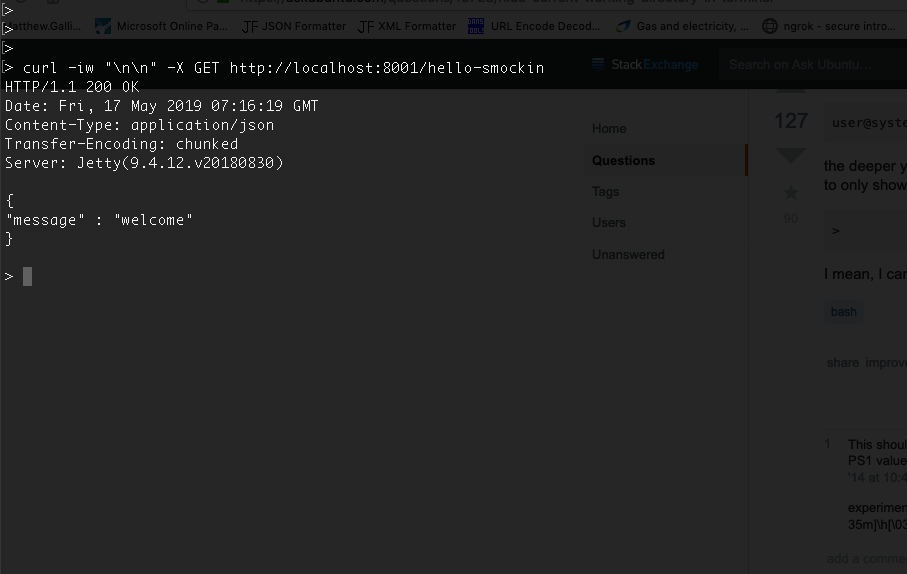
sMockin is a development tool used to dynamically mock API endpoints, S3 buckets & Email Accounts.
Featuring a rich UI an built in mock servers, creating and managing mocks can be done quickly, both with or without code.
Whether you are a developer who needs to simulate RESTFul API endpoints or an engineer working with complex microservice infrastructure, sMockin can help by mimicking any services that are either unavailable or otherwise too difficult or time consuming to set up.
sMockin runs as a small web app which can be either installed locally onto a personal machine or hosted centrally and used by multiple users.
<br/>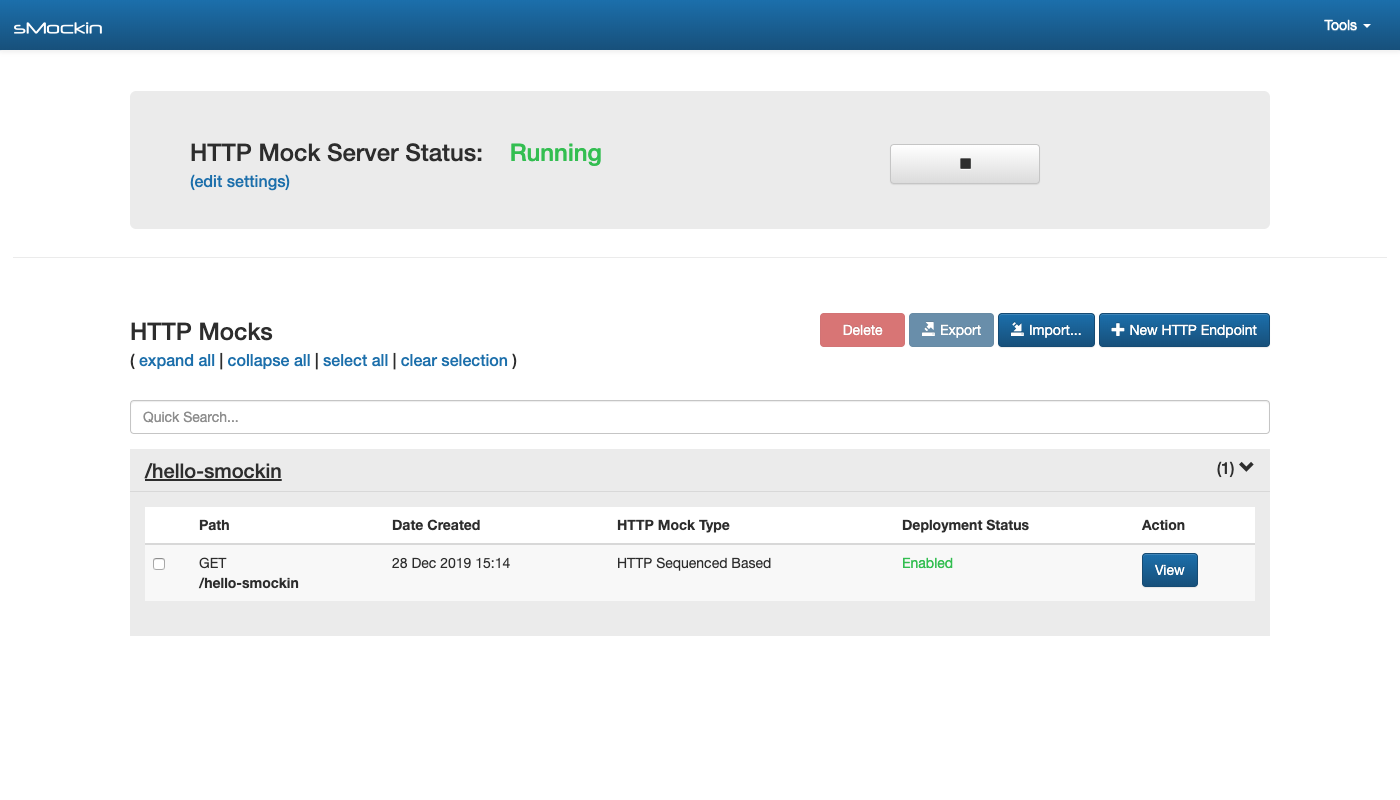
KEY FEATURES
- Create dynamic API mocks to mimic real world application behaviour.
- Create & manage S3 Bucket mocks where an AWS account may not be available.
- (NEW) Create & manage mock mail inboxes.
- Run sMockin centrally and create user accounts for your team.
- Import / Export mocks to share between your team & version control.
- Monitor and log traffic going to the HTTP or S3 mock servers.
- Choose whether to build your API mocks using JavaScript or without code.
- A rich and complete UI solution.
- Leverages Ngrok allowing you to make your API mocks publicly accessible.
REQUIREMENTS
- Java 11
- Maven 3
Please Note - All bash scripts were written and tested on GNU Bash version 3.2.57(1)-release. - All BAT files were were written and tested on Windows 7.
<br/>QUICK START
Clone this repo:
git clone https://github.com/mgtechsoftware/smockin.git
Change the current directory to smockin and build the project:
cd smockin

mvn clean install
Run the install and start scripts (for windows, use the equivalent .bat files):
./install.sh

./start.sh
Finally from your browser open the dashboard:
http://localhost:8000/index.html
(If running sMockin for the first time then please allow 20 - 30 secs for the app to fully start up.)
<br />For further details, please consult the Installation and Getting Started guides in the Wiki.
You can also check out the latest help guide here
<br/>TROUBLESHOOTING
Please consult the Configuration & Troubleshooting guide.
<br/>LICENCE
sMockin is licensed in accordance with the terms of the Apache License, Version 2.0.
The full text of this license can be found at https://www.apache.org/licenses/LICENSE-2.0
<br/>ACKNOWLEDGEMENTS / THIRD PARTIES
sMockin is built upon the following frameworks:
    Spring Boot                 -       https://projects.spring.io/spring-boot
    Hibernate                   -       http://hibernate.org
    Spark                       -       http://sparkjava.com
    Maven                       -       https://maven.apache.org
    AngularJS                   -       https://angularjs.org
    UI Bootstrap                -       https://angular-ui.github.io/bootstrap
    vkBeautify                  -       https://github.com/vkiryukhin/vkBeautify
    H2                          -       http://www.h2database.com
    HikariCP                    -       https://brettwooldridge.github.io/HikariCP
    Apache Commons              -       https://commons.apache.org/
    Apache Http Components      -       https://hc.apache.org/
    Apache Commons IO           -       https://commons.apache.org/proper/commons-io/
    JUnit                       -       http://junit.org
    Mockito                     -       http://site.mockito.org/
    Apache ActiveMQ             -       http://activemq.apache.org/
    Apache FtpServer            -       https://mina.apache.org/ftpserver-project/
    RAML Parser 2               -       https://github.com/raml-org/raml-java-parser
    Jasypt                      -       http://www.jasypt.org/
    Java-JWT                    -       https://github.com/auth0/java-jwt
    JWT-Decode                  -       https://github.com/auth0/jwt-decode
    JQuery                      -       https://jquery.com/
    Code Mirror                 -       https://codemirror.net/
    S3proxy                     -       https://github.com/gaul/s3proxy
    GreenMail                   -       https://greenmail-mail-test.github.io/greenmail/
    java-ngrok                  -       https://github.com/alexdlaird/java-ngrok
    Ngrok                       -       https://ngrok.com/
RECENT RELEASE FEATURES
<br />New in version 2.20.0
- Ngrok is now built into sMockin.
- Your API mocks can now be made publicly accessible in seconds!
Change of JDK version
- Java 11 (or later) is now required to build the main branch.
- Java 8 users can continue to build sMockin from this branch: https://github.com/matthewgallina/smockin/tree/jdk8
IMPORTANT! New in version 2.19.0
From 2.19.0 onwards, sMockin's internal H2 database has been upgraded to v2.1 (moving away from v1.4).
Unfortunately v2 of H2 is not backwards compatible with v1.4, which means you will need to export your existing data and migrate this to the new DB.
<br />NOTE, the latest version of sMockin to continue using v1.4 of H2 will be kept here:
https://github.com/matthewgallina/smockin/tree/2.18.4
<br />To upgrade to 2.19.0, please follow the steps below:
- In your current version of sMockin (2.18.x or earlier), use the Export feature to backup any mock data your wish to keep.
- Next, go to the user home directory sMockin is running from and rename the config directory .smockin to .smockin_2.18.4.
- Download version 2.19.0 (or later) of sMockin. We recommend keeping the previous version of sMockin on your system also for the short term, so you can switch between versions until all of your data has been moved across.
- Using the new version of sMockin, run the install script. This will create a new .smockin config directory, containing the newer H2 database.
- Launch the new version of sMockin using one of the start/run scripts.
- From the sMockin dashboard, use the Import feature to save your mock data to the new database.
Unfortunately not all data can be automatically exported and so will need to be handled manually. This includes:
- Mail mocks and messages
- Server configuration
- Key/Value Data
Should you wish to switch between versions of sMockin (as suggested above), then this can be done by simply switching the .smockin config directory in your user home and ensuring this aligns with version of sMockin you wish to run.
A good practice we advise is to rename/suffix any unused .smockin config directories with the version of the sMockin application they align too, so as to make them easily identifiable.
For example:
.smockin_2.18.4 <- unused config dir <br /> .smockin_2.19.0 <- unused config dir <br /> .smockin <- this is the active config dir
<br /> <br />New in version 2.18.0
- Introducing the Email Mock Server!
- Swap in the sMockin mock mail server (running on port 8003) as your application's delivery mail server.
- Create Email accounts in the sMockin UI.
- View all received email messages from the UI (including mail attachments).
- Support for mail inbox auto-generation so as to support random addresses during testing.
Mail messages can be stored in-memory or saved to database.
<br /> <br />New in version 2.17.0
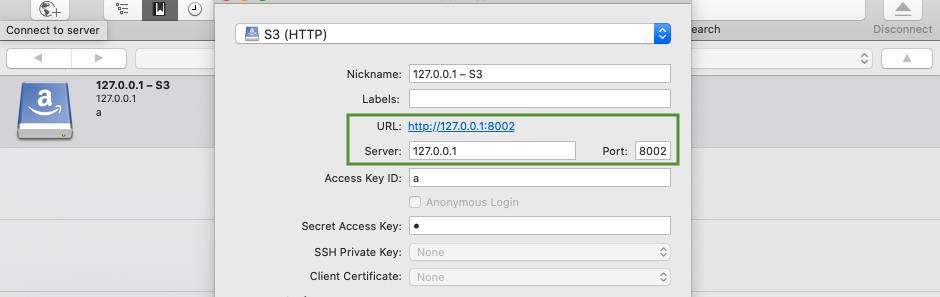
- Introducing S3 bucket mocking!
Simply create a mock bucket, build your S3 content and point your application to the S3 mock server.
Featuring different synchronisation modes, developing and testing around S3 has never been easier.
Once you've created your first bucket, this can be accessed from port 8002 using any S3 client like so:
New in version 2.11.0
- Introducing Block, mock and Swap!
With a number of users discovering sMockin as a great way to monitor live dev traffic, you can now intercept and manipulate on the fly, any requests via the live logging tool.
Combined with the proxy server, this now gives developers and QA engineers, complete visibility and control over all HTTP traffic running between your applications.
<br /> <br />New in version 2.10.0
- The sMockin proxy server now supports multiple url destinations which can be mapped to specific paths.
For example, say you are running 3 independent microservices for each of the following services:
/v1/product   -> localhost:9001
/v1/customer  -> localhost:9002
/v1/address   -> localhost:9003
You can now add these 'Path to URL' mappings to sMock
Related Skills
gh-issues
337.4kFetch GitHub issues, spawn sub-agents to implement fixes and open PRs, then monitor and address PR review comments. Usage: /gh-issues [owner/repo] [--label bug] [--limit 5] [--milestone v1.0] [--assignee @me] [--fork user/repo] [--watch] [--interval 5] [--reviews-only] [--cron] [--dry-run] [--model glm-5] [--notify-channel -1002381931352]
node-connect
337.4kDiagnose OpenClaw node connection and pairing failures for Android, iOS, and macOS companion apps
oracle
337.4kBest practices for using the oracle CLI (prompt + file bundling, engines, sessions, and file attachment patterns).
tmux
337.4kRemote-control tmux sessions for interactive CLIs by sending keystrokes and scraping pane output.
