BitcoinUtxoVisualizer
Visualize Bitcoin UTXO set
Install / Use
/learn @martinus/BitcoinUtxoVisualizerREADME
BitcoinUtxoVisualizer
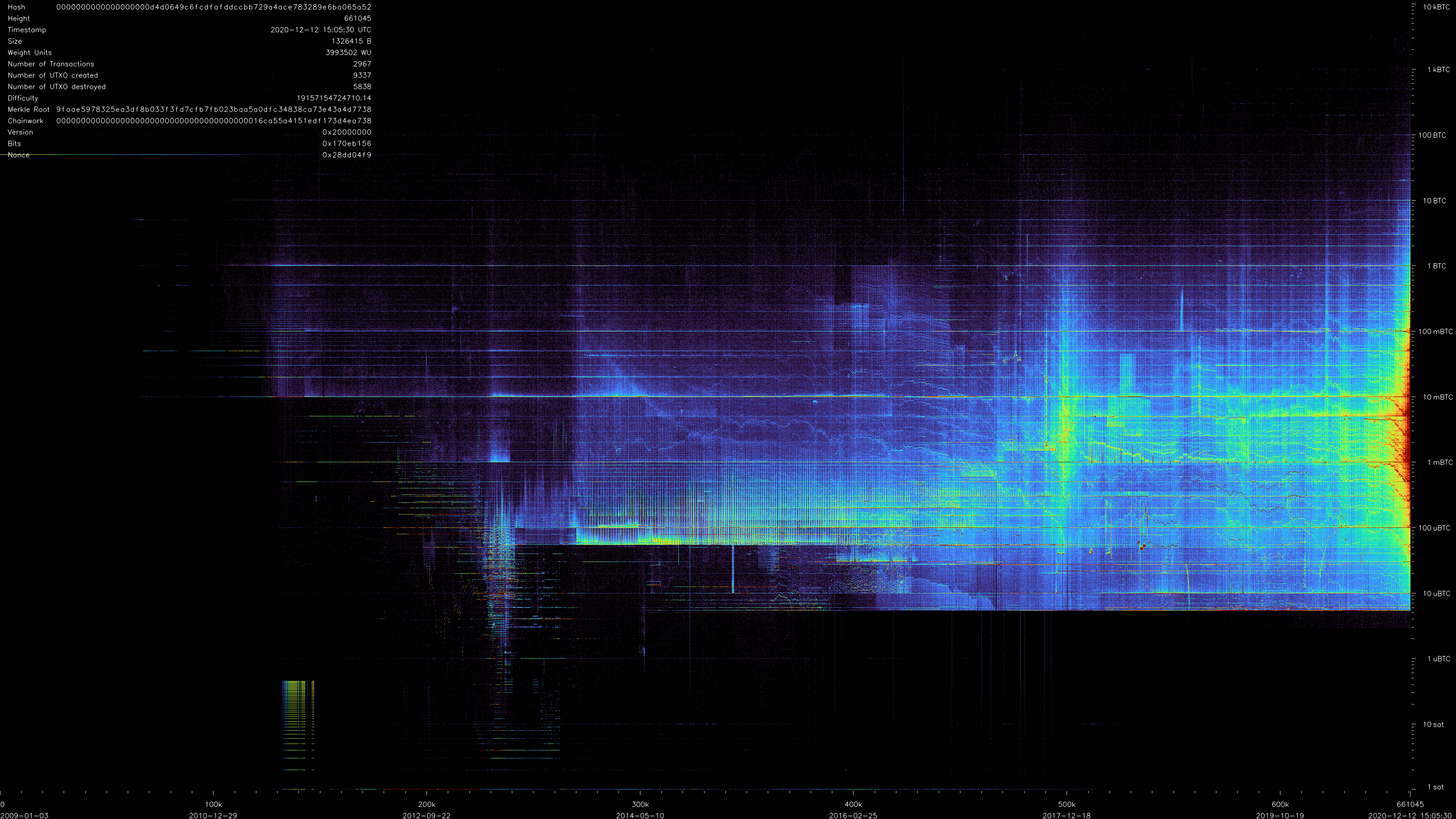
BitcoinUtxoVisualizer (short buv) can generated videos of the evolution of the evolution of Bitcoin's UTXO (Unspent Transaction Outputs).
Watch the video on Youtube:
<!-- How to create this gif from the video: ffmpeg -ss 02:50:00 -i Bitcoin\ UTXO\ evolution\ -\ Block\ 0\ to\ 661045.mp4 -c copy out.mp4 ffmpeg -i out.mp4 -frames:v 20 -vf "fps=10,scale=838:-1:flags=lanczos" -c:v pam -f image2pipe - |convert -delay 10 - -loop 0 -layers optimize output.gif # compress more, see https://stackoverflow.com/a/47343340/48181 mogrify -layers 'optimize' -fuzz 7% output.gif -->
Installation
WARNING: Generating such video is a time & resource intensive task, as Bitcoin's database is continuously growing.
This currently only works in Linux. Prerequisites are a C++ compiler g++ (>= v9) (or, my prefered choice, clang++), CMake (>= 3.13), and OpenCV (libopencv-dev).
- fetch
git clone --recurse-submodules https://github.com/martinus/BitcoinUtxoVisualizer.git - compile
mkdir BitcoinUtxoVisualizer/build cd BitcoinUtxoVisualizer/build cmake -DCMAKE_BUILD_TYPE=Release .. make -j12 - Run all tests, should print
SUCCESS!./buv
How To Generate a UTXO Movie
This is a 3 step process:
1. Bitcoin Core
- Have a fully synced Bitcoin Core node running locally.
- Make sure to enable transaction index by adding
txindex=1tobitcoin.conf. buvmakes heavy use of Bitcoin Core's JSON RPC, so you need to enable this as well. Also, make sure the RPCs have enough threads for processing. To sum this up, I have these settings in mybitcoin.conffile:server=1 rest=1 rpcport=8332 rpcthreads=12 rpcworkqueue=24 txindex=1 dbcache=2000 # generate username & password with 'bitcoin/share/rpcauth.py <username> -' rpcauth=martinus:xxxxxxxxxxxxxxxxxxxxxxxxxxxxxxxxxxxxxxxxxxxxxxxxxxxxxxxxx
2. Preprocess UTXO Data
Once Bitcoin Core is fully synced and RPC is enabled, you can preprocess the UTXO database. This fetches all blocks with full transaction data from bitcoin core, extracts UTXO data, and writes a compact data file. First, configure by editing buv.json. For this step, you only need to update bitcoinRpcUrl and the output blkFile:
"bitcoinRpcUrl": "http://127.0.0.1:8332",
"blkFile": "/run/media/martinus/big/bitcoin/BitcoinUtxoVisualizer/changes.blk1",
The output blkFile will be ~7.5GB large (as of Block 660,000). It contains block information & all satoshi amounts that were added or removed for each block. The format is tuned to be very compact and very fast to parse.
./buv -ns -tc=utxo_to_change -cfg=../buv.json
On my computer this takes about 1 1/2 hours, saturates 12 cores, and takes ~6.5GB of RAM. I have spent a long time to speed this up, initially this took 4 days and >30GB of RAM.
3. Generate UTXO Video
After generating the blkFile, this file can be converted into an image stream that is directly piped into ffmpeg to generates a video. Preview is possible with ffplay.
The configuration file buv.json has several options to configure the output.
Generate Preview
To watch a preview, I usually update buv.json to start at a reasonably late block:
"startShowAtBlockHeight": 200000,
-
In one window, start
ffplay:ffplay -f rawvideo -pixel_format rgb24 -video_size 3840x2160 -framerate 60 -i "tcp://127.0.0.1:12987?listen" -
In another window, start
buvto connect toffplayand pipe its output into it../buv -ns -tc=visualizer -cfg=../buv.jsonOnce
buvhas processed up to block 200000 ffplay will pop up and show a life preview.
If you are happy with what you see, instead of ffplay use ffmpeg and start buv again:
ffmpeg -f rawvideo -pixel_format rgb24 -video_size 3840x2160 -framerate 60 -i "tcp://127.0.0.1:12987?listen" -c:v libx264 -profile:v high -bf 2 -g 30 -preset slower -crf 24 -pix_fmt yuv420p -movflags faststart out.mp4
For 660000 this will create a ~3 hour 4K x 60Hz video, where each frame represents a single block. The video is about 21GB large.
Here is the final image of that video. Click for high resolution 4k image: