
PieLauncher
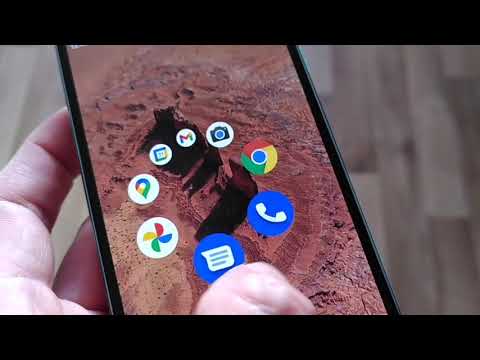
Android home screen launcher that uses a dynamic pie menu instead of tables of icons.
Install / Use
/learn @markusfisch/PieLauncherREADME
Pie Launcher
Android home screen launcher that uses a dynamic pie menu instead of tables of icons.
Once you get used to it, you can launch your most frequently used apps using muscle memory without even looking at the screen.
Apps you don't use regularly are quickly available with just one tap and by typing the first one or two letters of the app name.
If you find this app useful and wish to support its continued development,
you can buy me a coffee or
send some Bitcoin decimals to bc1q2guk2rpll587aymrfadkdtpq32448x5khk5j8z.
<a href="https://www.buymeacoffee.com/markusfisch" target="_blank"><img src="https://cdn.buymeacoffee.com/buttons/v2/default-yellow.png" alt="Buy Me A Coffee" style="height: 60px !important;width: 217px !important;"/></a> <a href="https://liberapay.com/markusfisch/" target="_blank"><img src="https://liberapay.com/assets/widgets/donate.svg" alt="Liberapay" style="height: 60px !important"/></a> <a href="https://ko-fi.com/markusfisch" target="_blank"><img src="https://storage.ko-fi.com/cdn/brandasset/kofi_s_tag_dark.png" alt="Ko-fi" style="height: 60px !important"/></a>
Video
Screenshots
<img src="fastlane/metadata/android/en-US/images/phoneScreenshots/screencap-zoomed.png" alt="Screenshot Zoomed" width="160"/> <img src="fastlane/metadata/android/en-US/images/phoneScreenshots/screencap-search.png" alt="Screenshot Search" width="160"/>
Get it
<a href="https://f-droid.org/de/packages/de.markusfisch.android.pielauncher/"><img src="https://fdroid.gitlab.io/artwork/badge/get-it-on.png" alt="Get it on F-Droid" height="80"/></a> <a href="https://play.google.com/store/apps/details?id=de.markusfisch.android.pielauncher"><img src="https://play.google.com/intl/en_us/badges/images/generic/en_badge_web_generic.png" alt="Get it on Google Play" height="80"></a>
Guide
How to use the pie menu
Tap and hold to open the pie menu. Then swipe to choose an app to start.

How to open the app list
Tap once to open the list. Then type the name of an app you want to start. Usually, one or two letters are enough, even if you mistyped a letter. If the app in the top left is the one you want, you can hit the Search key on your keyboard to start it.

How to close the app list quickly
Swipe down to close the app list.

How to edit the pie menu
Long press an app in the listing of apps to enter the editor for the pie menu. Use 4, 6, or 8 icons in the pie menu to make the most out of it.

How to access Private space
Private space
is a new feature in Android 15. If you enabled private space on your device,
use . in the app search to unlock and access it.
Troubleshooting
There's a short delay after doing the home gesture
This is an Android bug that Google needs to fix. All 3rd party launchers suffer from this bug. See:
- Homescreen interaction delay with gesture navigation?
- What is up with home gesture animations with 3rd party launchers.
- Nova Launcher Tweet
A possible workaround is to use the back gesture instead of the home gesture wherever possible (this may not be desirable in a browser app, as it also closes the open tab).
The back gesture works immediately and without any delay.
The soft keyboard takes too long to appear
This is an issue of your keyboard app that may do too much work. Unfortunately, GBoard is not the best choice for all devices. Please check for a lighter alternative keyboard.
The launcher is unresponsive after unlocking the device
On some devices, after unlock, the home screen appears frozen: taps produce haptic feedback but the pie menu doesn't open. This is a known Android bug affecting all 3rd party launchers (issuetracker.google.com/issues/353538494). It occurs when another app (e.g. Assistant, Tasker, or an incoming call) controls the display while the screen is off, causing Android to skip the initial draw of the launcher's window on unlock.
Pie Launcher works around this by forcing a redraw when the window regains focus. If this doesn't help on your device, you can enable Force relaunch in the settings, which fully recreates the home screen on each restart.
Home returns to the default launcher
Please set Pie Launcher as your default home screen launcher.
You can either do this manually from your phone's Settings → Apps → Default apps. Or from the settings within Pie Launcher (enter the editor and tap on the settings icon) where there should be an item "Make default launcher".
Related Skills
node-connect
342.5kDiagnose OpenClaw node connection and pairing failures for Android, iOS, and macOS companion apps
frontend-design
85.3kCreate distinctive, production-grade frontend interfaces with high design quality. Use this skill when the user asks to build web components, pages, or applications. Generates creative, polished code that avoids generic AI aesthetics.
openai-whisper-api
342.5kTranscribe audio via OpenAI Audio Transcriptions API (Whisper).
qqbot-media
342.5kQQBot 富媒体收发能力。使用 <qqmedia> 标签,系统根据文件扩展名自动识别类型(图片/语音/视频/文件)。
