
Vedo
A python module for scientific analysis of 3D data based on VTK and Numpy
Install / Use
/learn @marcomusy/VedoREADME





Your friendly python module for scientific analysis and visualization of 3d objects.<br>
💾 Installation
pip install vedo
- To install the latest dev version of
vedo:
pip install -U git+https://github.com/marcomusy/vedo.git
- To install from the conda-forge channel:
conda install -c conda-forge vedo
📙 Documentation
The webpage of the library with documentation is available here.
📌 Need help? Have a question, or wish to ask for a missing feature? Do not hesitate to ask any questions on the image.sc forum or by opening a github issue.
🎨 Features
The library includes a large set of working examples for a wide range of functionalities
<details> <summary>working with polygonal meshes and point clouds <i><b>[click to expand]</b></i> </summary> <i>- Import meshes from VTK format, STL, Wavefront OBJ, 3DS, Dolfin-XML, Neutral, GMSH, OFF, PCD (PointCloud),
- Export meshes as ASCII or binary to VTK, STL, OBJ, PLY ... formats.
- Analysis tools like Moving Least Squares, mesh morphing and more..
- Tools to visualize and edit meshes (cutting a mesh with another mesh, slicing, normalizing, moving vertex positions, etc..).
- Split mesh based on surface connectivity. Extract the largest connected area.
- Calculate areas, volumes, center of mass, average sizes etc.
- Calculate vertex and face normals, curvatures, feature edges. Fill mesh holes.
- Subdivide faces of a mesh, increasing the number of vertex points. Mesh simplification.
- Coloring and thresholding of meshes based on associated scalar or vectorial data.
- Point-surface operations: find nearest points, determine if a point lies inside or outside of a mesh.
- Create primitive shapes: spheres, arrows, cubes, torus, ellipsoids...
- Generate glyphs (associate a mesh to every vertex of a source mesh).
- Create animations easily by just setting the position of the displayed objects in the 3D scene. Add trailing lines and shadows to moving objects is supported.
- Straightforward support for multiple sync-ed or independent renderers in the same window.
- Registration (alignment) of meshes with different techniques.
- Mesh smoothing.
- Delaunay triangulation in 2D and 3D.
- Generate meshes by joining nearby lines in space.
- Find the closest path from one point to another, traveling along the edges of a mesh.
- Find the intersection of a mesh with lines, planes or other meshes.
- Interpolate scalar and vectorial fields with Radial Basis Functions and Thin Plate Splines.
- Add sliders and buttons to interact with the scene and the individual objects.
- Visualization of tensors.
- Analysis of Point Clouds
- Moving Least Squares smoothing of 2D, 3D and 4D clouds
- Fit lines, planes, spheres and ellipsoids in space
- Identify outliers in a distribution of points
- Decimate a cloud to a uniform distribution.
- Import data from VTK format volumetric TIFF stacks, DICOM, SLC, MHD and more
- Import 2D images as PNG, JPEG, BMP
- Isosurfacing of volumes
- Composite and maximum projection volumetric rendering
- Generate volumetric signed-distance data from an input surface mesh
- Probe volumes with lines and planes
- Generate stream-lines and stream-tubes from vectorial fields
- Slice and crop volumes
- Support for other volumetric structures (structured and grid data)
- Polygonal 3D text rendering with Latex-like syntax and unicode characters, with 30 different fonts.
- Fully customizable axis styles
- donut plots and pie charts
- Scatter plots in 2D and 3D
- Surface function plotting
- 1D customizable histograms
- 2D hexagonal histograms
- Polar plots, spherical plots and histogramming
- Draw latex-formatted formulas in the rendering window.
- Quiver, violin, whisker and stream-line plots
- Graphical markers analogous to matplotlib
- Integration with the Qt5 framework.
- Interoperability with the trimesh, pyvista and pymeshlab libraries.
- Export 3D scenes and embed them into a web page.
- Embed 3D scenes in jupyter notebooks with K3D (can export an interactive 3D-snapshot page here).
⌨ Command Line Interface
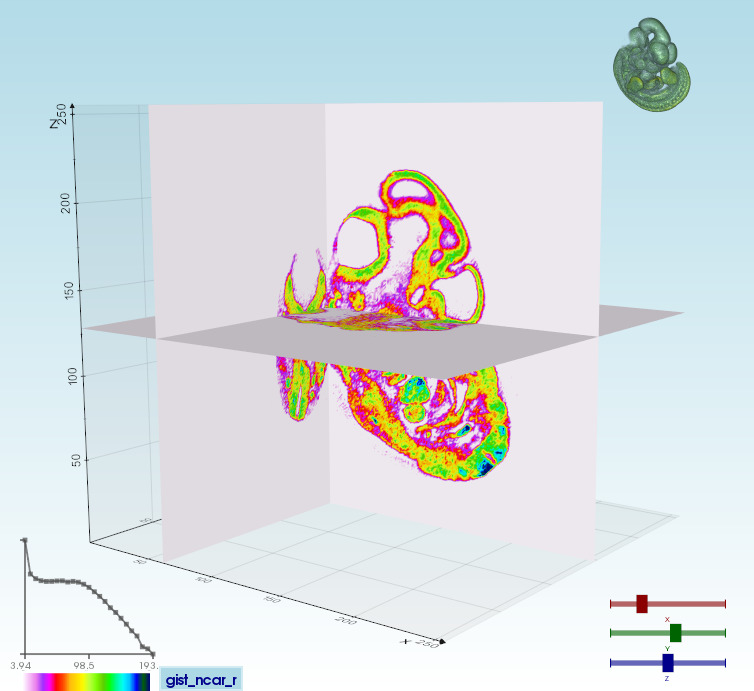
Visualize a polygonal mesh or a volume from a terminal window simply with:
vedo https://vedo.embl.es/examples/data/embryo.tif
|Volume 3D slicing<br>vedo --slicer embryo.slc| Ray-casting<br>vedo -g| 2D slicing<br>vedo --slicer2d|
|:--------|:-----|:--------|
|  |
|  |
|  |
|
Type vedo -h for the complete list of options.<br>
🐾 Gallery
vedo currently includes 300+ working examples and notebooks. <br>
Run any of the built-in examples. In a terminal type: vedo -r warp2
Check out the example galleries organized by subject here:
<a href="https://vedo.embl.es/#gallery" target="_blank">
✏ Contributing
Any contributions are greatly appreciated! If you have a suggestion that would make this better, please fork the repo and create a pull request. This is how:
# 1. Fork the repository on GitHub then clone your fork locally:
git clone https://github.com/your-username/vedo.git
# 2. Create a new branch for your feature or bugfix:
git checkout -b feature/my-feature
# 3. Make your changes and commit them:
git commit -m "Description of my feature"
# 4. Push your changes to your fork:
git push origin feature/my-feature
# 5. Open a Pull Request on the main repository.
You can also simply open an issue with the tag "enhancement".
📜 References
Scientific publications leveraging vedo:
- X. Diego et al.: "Key features of Turing systems are determined purely by network topology", Phys. Rev. X 8, 021071, DOI.
- M. Musy, K. Flaherty et al.: "A Quantitative Method for Staging Mouse Limb Embryos based on Limb Morphometry", Development (2018) 145 (7): dev154856, DOI.
- F. Claudi, A. L. Tyson, T. Branco, "Brainrender. A python based software for visualisation of neuroanatomical and morphological data.", eLife 2021;10:e65751, DOI.
- J. S. Bennett, D. Sijacki, "Resolving shocks and filaments in galaxy formation simulations: effects on gas properties and star formation in the circumgalactic medium", Monthly Notices of the Royal Astronomical Society, Volume 499, Issue 1, DOI.
- J.D.P. Deshapriya et al., "Spectral analysis of craters on (101955) Bennu". Icarus 2020, DOI.
- A. Pollack et al., "Stochastic inversion of gravity, magnetic, tracer, lithology, and fault data for geologically realistic structural models: Patua Geothermal Field case study", Geothermics, Volume 95, September 2021, DOI.
- X. Lu et al., "3D electromagnetic modeling of graphitic faults in the Athabasca Basin using a finite-volume time-domain approach with unstructured grids", Geophysics, DOI.
- M. Deepa Maheshvare et al., "A Graph-Based Framework for Multiscale Modeling of Physiological Transport", Front. Netw. Physiol. 1:802881, DOI.
- F. Claudi, T. Branco, "Differential geometry methods for constructing manifold-targeted recurrent neural networks", bioRxiv 2021.10.07.463479, DOI.
- J. Klatzow, G. Dalmasso, N. Martínez-Abadías, J. Sharpe, V. Uhlmann, "µMatch: 3D shape correspondence for microscopy data", Front. Comput. Sci., 15 February 2022. DOI
- G.
Related Skills
claude-opus-4-5-migration
82.3kMigrate prompts and code from Claude Sonnet 4.0, Sonnet 4.5, or Opus 4.1 to Opus 4.5
model-usage
334.9kUse CodexBar CLI local cost usage to summarize per-model usage for Codex or Claude, including the current (most recent) model or a full model breakdown. Trigger when asked for model-level usage/cost data from codexbar, or when you need a scriptable per-model summary from codexbar cost JSON.
TrendRadar
49.7k⭐AI-driven public opinion & trend monitor with multi-platform aggregation, RSS, and smart alerts.🎯 告别信息过载,你的 AI 舆情监控助手与热点筛选工具!聚合多平台热点 + RSS 订阅,支持关键词精准筛选。AI 智能筛选新闻 + AI 翻译 + AI 分析简报直推手机,也支持接入 MCP 架构,赋能 AI 自然语言对话分析、情感洞察与趋势预测等。支持 Docker ,数据本地/云端自持。集成微信/飞书/钉钉/Telegram/邮件/ntfy/bark/slack 等渠道智能推送。
mcp-for-beginners
15.6kThis open-source curriculum introduces the fundamentals of Model Context Protocol (MCP) through real-world, cross-language examples in .NET, Java, TypeScript, JavaScript, Rust and Python. Designed for developers, it focuses on practical techniques for building modular, scalable, and secure AI workflows from session setup to service orchestration.
