Gust
A Task-Based Workflow Orchestration Engine
Install / Use
/learn @marciok/GustREADME
Table of Contents
Motivation
As a CTO and founder, I was tired of spending buckets of money to set up and manage Airflow, dealing with multiple databases, countless processes, Docker complexity, and of course its outdated and buggy UI. So we decided to build something that kept what we liked about Airflow and ditched what we didn’t. The result is Gust: a platform that’s 10× more efficient, faster, and far easier to set up.
Gust is the perfect fit for our needs, and I encourage you to try it and push it even further. There’s still plenty of room for improvements and new features. If you spot something or want to contribute an idea, don’t be shy! Drop an Issue or submit a PR.
Overview
DAG Code Example
defmodule HelloWorld do
  # `schedule` and `on_finished_callback` are optional.
  # You can use special expressions provided by the quantum package, ex: @daily, @hourly, and etc..
  # https://hexdocs.pm/quantum/crontab-format.html
  use Gust.DSL, schedule: "* * * * *", on_finished_callback: :notify_something

  # Gust logs are stored and displayed through GustWeb via Logger.
  require Logger

  # Gust.Flows is used to query Dag, Run, and Task.
  alias Gust.Flows

  # Defining a callback for when run is done.
  def notify_something(status, run) do
    dag = Flows.get_dag!(run.dag_id)
    message = "DAG: #{dag.name}; completed with status: #{status}"
    Logger.info(message)
  end

  # Declaring "first_task" task; setting a downstream task and telling Gust to store its result.
  task :first_task, downstream: [:second_task], save: true do
    greetings = "Hi from first_task"
    Logger.info(greetings)

    # You can get secrets created on the Web UI
    secret = Flows.get_secret_by_name("SUPER_SECRET")
    Logger.warning("I know your secret: #{secret.value}")

    # The return value must be a map when `save` is true.
    %{result: greetings}
  end

  # Declaring "second_task" task; using context to fetch another task result.
  task :second_task, ctx: %{run_id: run_id} do

    # Getting "first_task"'s result
    task = Flows.get_task_by_name_run("first_task", run_id)

    Logger.info(task.result)
  end
end
Web Interface
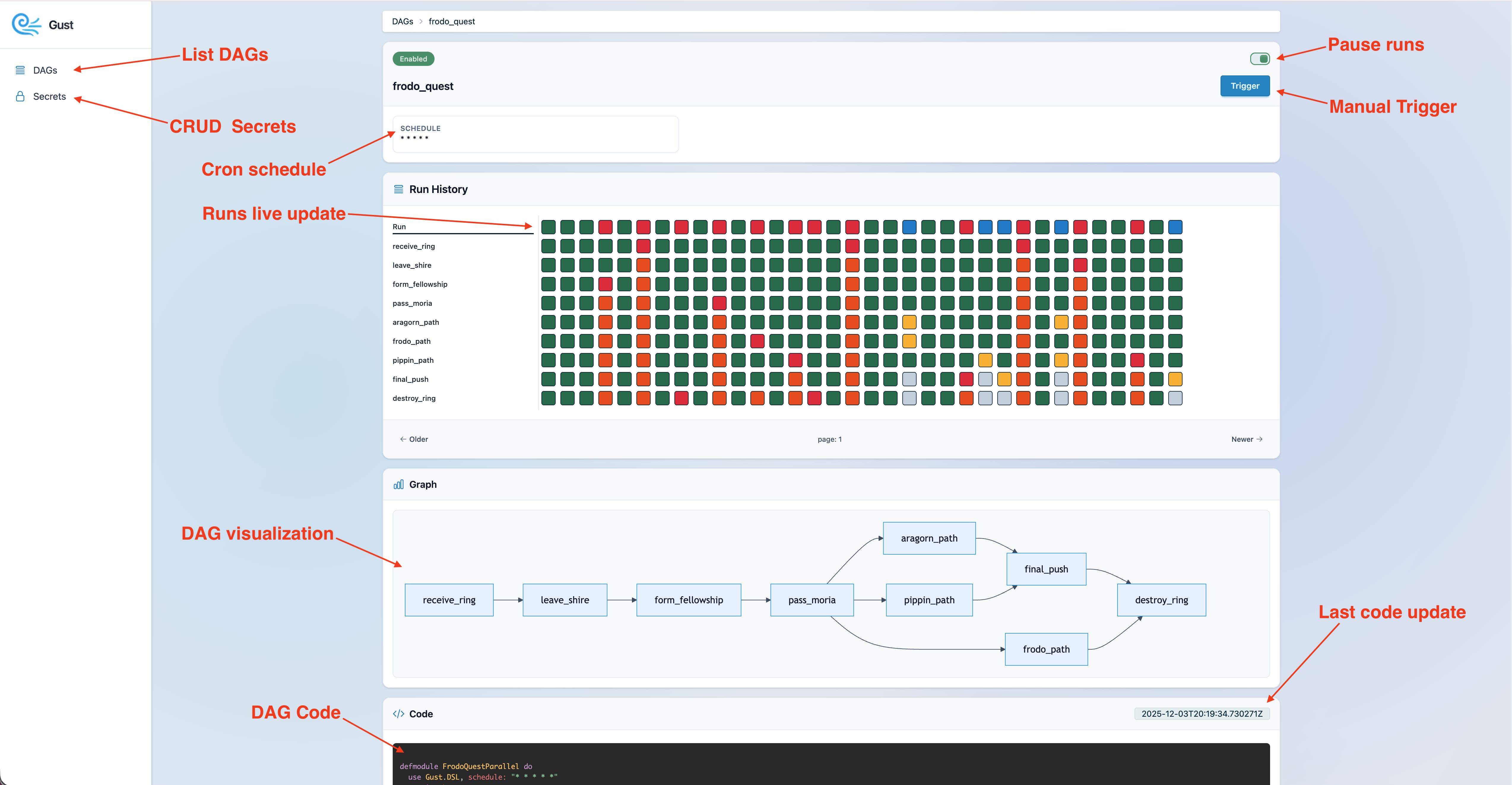
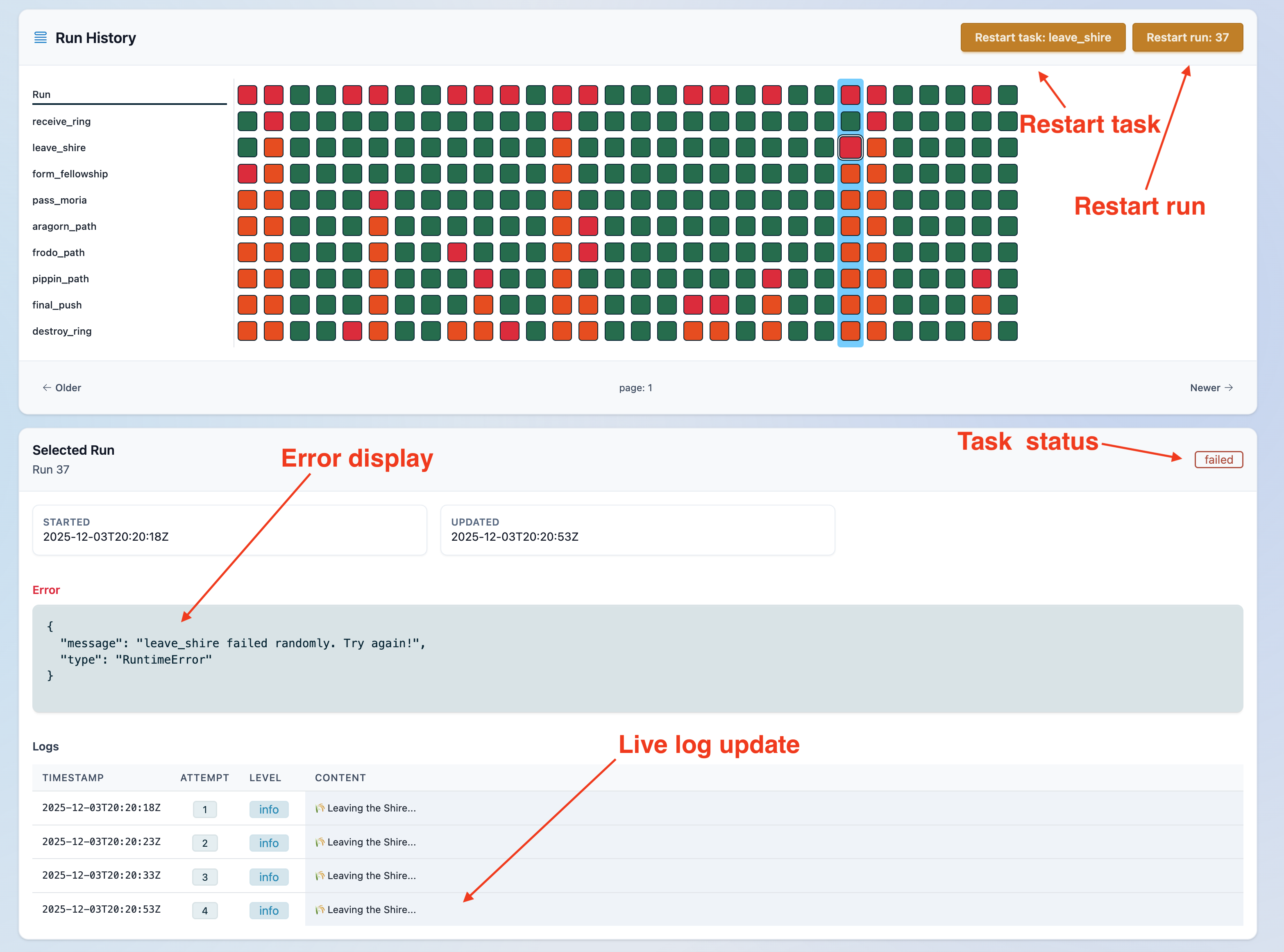
Features
- Task orchestration with Cron-style scheduling and dependency-aware DAGs via the Gust DSL.
- Support multiple nodes.
- Support for Python DAGs
- Manual task controls: stop running tasks, cancel retries, and restart tasks on demand.
- Run-time tracking, corrupted-state recovery, and graceful handling of syntax errors during development.
- Retry logic with backoff, plus state clearing for clean restarts.
- Hook for finished dag run.
- Web UI for live monitoring, runs and secrets editing.
Getting started
Prerequisites
- [x] macOS/Ubuntu
- [x] Elixir must be at least this version
- [x] Postgres
Creating a new Gust app
- Replace
my_appfor your app name and run:
GUST_APP=my_app bash -c "$(curl -fsSL https://raw.githubusercontent.com/marciok/gust/main/setup_gust_app.sh)"
-
Configure Postgres credentials on
my_app/config/dev.exs -
Run database setup:
mix ecto.create --repo Gust.Repo && mix ecto.migrate --repo Gust.Repo -
Run Gust start:
mix gust.start -
Check the docs on how to customize your DAG 🎉
Multi-node
You can run Gust on multiple nodes by passing a role:
core: Starts only children who are responsible for the pool and executing DAGs
GUST_ROLE=core iex --sname core -S mix run --no-halt
web: Starts the server and reads DAG's file children.
GUST_ROLE=web iex --sname web -S mix phx.server
If you don't pass anything Gust will run as single role, that means both core and web will be enabled.
Multi-node on Docker
To use Gust on Docker it is straight forward, generate a Docker file using the Phoenix command:
mix phx.gen.release --docker
Include this line to copy your dags folder:
COPY dags /app/dags
After the Dockerfile is set, create a docker-compose.yml to include the rest of the dependencies.
services:
  db:
    image: postgres:16-alpine
    container_name: gust_db
    environment:
      POSTGRES_USER: gust
      POSTGRES_PASSWORD: gust
      POSTGRES_DB: gust_prod
    ports:
      - "5432:5432"
    volumes:
      - gust_pgdata:/var/lib/postgresql/data
    healthcheck:
      test: ["CMD-SHELL", "pg_isready -U gust -d gust_prod"]
      interval: 5s
      timeout: 3s
      retries: 20

  web:
    build:
      context: .
      args:
          RELEASE_NAME: gust_web # Set a release name for DNSCluster to connect nodes
    depends_on:
      db:
        condition: service_healthy
    ports:
      - "4000:4000"
    environment:
      RELEASE_COOKIE: "a-very-long-random-secret-same-for-all-nodes"
      PHX_SERVER: "true"
      PHX_HOST: "localhost"
      PORT: "4000"
      B64_SECRETS_CLOAK_KEY: YOUR_KEY
      SECRET_KEY_BASE: YOUR_KEY
      DATABASE_URL: "ecto://gust:gust@db:5432/gust_prod"
      POOL_SIZE: "10"
      GUST_ROLE: "web" # Web Gust role
      DNS_CLUSTER_QUERY: "core" # Query 'core' to connect nodes.
      # Note: You have to update `server` file so nodes can connect.
    command: ["/app/bin/server"] # See server script configuration below".
  core:
    deploy:
      replicas: 3
    build:
      context: .
      args:
          RELEASE_NAME: gust_core # Set a release name for DNSCluster to connect nodes
    depends_on:
      db:
        condition: service_healthy
    environment:
      RELEASE_COOKIE: "a-very-long-random-secret-same-for-all-nodes"
      B64_SECRETS_CLOAK_KEY: YOUR_KEY
      SECRET_KEY_BASE: YOUR_KEY
      DATABASE_URL: "ecto://gust:gust@db:5432/gust_prod"
      POOL_SIZE: "10"
      GUST_ROLE: "core" # Core Gust role
      # Note: You have to create `start-core` on `rel/overlays/bin/`
    command: ["/app/bin/start-core"] # See start-core script instructions below.
volumes:
  gust_pgdata:
Edit server file to allow nodes to connect:
#!/bin/sh
set -eu

IP="$(hostname -i | awk '{print $1}')"
export RELEASE_DISTRIBUTION=name # Needed for DNSCluster
export RELEASE_NODE="gust@${IP}" # Needed for DNSCluster

cd -P -- "$(dirname -- "$0")"
PHX_SERVER=true exec ./my_app start
Create a start-core file on rel/overlays/bin/ and chmod a+x rel/overlays/bin/start-core
#!/bin/sh
set -eu
IP="$(hostname -i | awk '{print $1}')"

export RELEASE_DISTRIBUTION=name # Needed for DNSCluster
export RELEASE_NODE="gust@${IP}" # Needed for DNSCluster

exec /app/bin/my_app start
Note: There's some repetition, in the future we will have one file to start both Gust roles
How to Run Tests Locally
- Start Postgres.
- Copy
.env.exampleto.env.test:cp .env.example .env.test - Load test environment variables:
source .env.test - Install dependencies:
mix setup - Create and migrate the test database:
MIX_ENV=test mix ecto.create MIX_ENV=test mix ecto.migrate - Run tests:
mix test
Useful Commands
mix test test/path/to/file_test.exs
mix test --failed
MIX_ENV=test mix coveralls.html --umbrella
Common Failures
connection refused: Postgres is not running orPGHOST/PGUSER/PGPASSWORDare incorrect.database "gust_rc_test" does not exist: runMIX_ENV=test mix ecto.create && MIX_ENV=test mix ecto.migrate.
Sponsors

Find the best offers and save money on car subscription service.
License
Gust is released under the MIT License.