
Gitbanner
:balloon: Generates a git repo to show a cool banner on your Github profile
Install / Use
/learn @mappum/GitbannerREADME
gitbanner
Generates a git repo to show a cool banner on your Github profile.
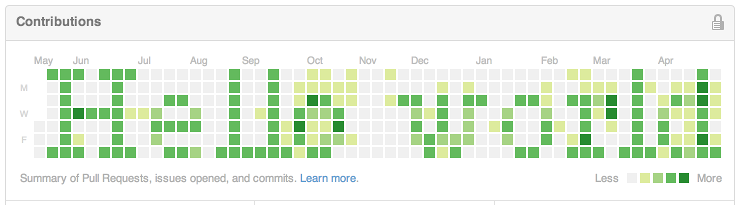
Gitbanner works by creating a new git repository and filling it with dummy commits, with dates set to correspond to the pixels on your Github "Contributions" graph.
You can see an example on @iamtrask's profile: https://github.com/iamtrask
Installing
First, you might need to install some dependencies:
- node-canvas - (Cairo)
- nodegit
Once those are set up, just do
npm install -g gitbanner
Usage
1. Generate your repo:
gitbanner <Github email> <text>
NOTICE: Gitbanner needs the email associated with your Github account, otherwise Github won't think you made the commits.
You will see a preview of your banner. If it doesn't look too great, try using a different font:
gitbanner -f "7pt Arial" <email> <text>
2. Create a repo on Github.
3. Push the repo to Github:
cd banner
git push -f git@github.com:USERNAME/REPO_NAME.git master
Notes
If you ever feel like removing the banner from your profile, you can simply delete the repository. Github will instantly update your Contributions graph.
If you want, you can specify a longer banner width (gitbanner -w X ...). Any width longer than 52 will be cut off on Github, but the banner will be slowly revealed as the weeks go by.
Related Skills
node-connect
350.8kDiagnose OpenClaw node connection and pairing failures for Android, iOS, and macOS companion apps
frontend-design
110.4kCreate distinctive, production-grade frontend interfaces with high design quality. Use this skill when the user asks to build web components, pages, or applications. Generates creative, polished code that avoids generic AI aesthetics.
openai-whisper-api
350.8kTranscribe audio via OpenAI Audio Transcriptions API (Whisper).
qqbot-media
350.8kQQBot 富媒体收发能力。使用 <qqmedia> 标签,系统根据文件扩展名自动识别类型(图片/语音/视频/文件)。
