
ScrollStackController
🧩 Easy scrollable layouts in UIKit - an UIStackView which scroll and uses root views of child view controllers.
Install / Use
/learn @malcommac/ScrollStackControllerREADME




Create complex scrollable layout using UIViewControllers or plain UIViews and simplify your code!
ScrollStackController is a class you can use to create complex layouts using scrollable UIStackView but where each row is handled by a separate UIViewController; this allows you to keep a great separation of concerns.
You can think of it as UITableView but with several differences:
- Each row can manage different
UIViewControllerindependently: no more massive controllers, a much cleaner and maintainable architecture. - You can still use plain
UIViewinstances if need a lightweight solution: this is especially useful when you are using ScrollStackController as layout-helper or your view don't have a complex logic and you can still use the main controller. - Powered by AutoLayout since the beginning; it uses a combination of
UIScrollView + UIStackViewto offer an animation friendly controller ideal for fixed and dynamic row sizing. - You don't need to struggle yourself with view recycling: suppose you have a layout composed by several different screens. There is no need of view recycling but it cause a more difficult managment of the layout. With a simpler and safer APIs set
ScrollStackViewis the ideal way to implement such layouts.
| | Features Highlights |
|--- |--------------------------------------------------------------------------------- |
| 🕺 | Create complex layout without the boilerplate required by view recyling of UICollectionView or UITableView. |
| 🧩 | Simplify your architecture by thinking each screen as a separate-indipendent UIVIewController. |
| 🧩 | Support for lightweight mode to layout UIView without UIViewController. |
| 🌈 | Animate show/hide and resize of rows easily even with custom animations! |
| ⏱ | Compact code base, less than 1k LOC with no external dependencies. |
| 🎯 | Easy to use and extensible APIs set. |
| 🧬 | It uses standard UIKit components at its core. No magic, just a combination of UIScrollView+UIStackView. |
| 🧨 | Support SwiftUI's View and autosizing based upon View's content |
| 🐦 | Fully made in Swift 5 from Swift ❥ lovers |
❤️ Your Support
Hi fellow developer!
You know, maintaing and developing tools consumes resources and time. While I enjoy making them your support is foundamental to allow me continue its development.
If you are using ScrollStackController or any other of my creations please consider the following options:
Table of Contents
- ❤️ Your Support
- Table of Contents
- When to use
ScrollStackControllerand when not - How to use it
- Adding Rows
- Removing / Replacing Rows
- Move Rows
- Hide / Show Rows
- Hide / Show Rows with custom animations
- Reload Rows
- Sizing Rows
- Fixed Row Size
- Fitting Layout Row Size
- Collapsible Rows
- Working with dynamic UICollectionView/UITableView/UITextView
- Rows Separator
- Using plain UIViews instead of view controllers
- Tap On Rows
- Get the row/controller
- Set Row Insets
- Change ScrollStack scrolling axis
- Subscribe to Row Events
- System Requirements
- Example App
- Installation
- When to use
- Contributing
- Copyright & Acknowledgements
When to use ScrollStackController and when not
ScrollStackController is best used for shorter screens with an heterogeneous set of rows: in these cases you don't need to have view recycling.
Thanks to autolayout you will get updates and animations for free.
You can also manage each screen independently with a great separation of concerns; morehover unlike UITableView and UICollectionView, you can keep strong references to UIViewController (and its views) in an ScrollStack view and make changes to them at any point.
ScrollStackController is not suitable in all situations.
ScrollStackController lays out the entire UI at first time when your screen loads.
If you have a long list of rows you may experience delays.
So, ScrollStackController is generally not appropriate for screens that contain many views of the same type, all showing similar data (in these cases you should use UITableView or UICollectionView).
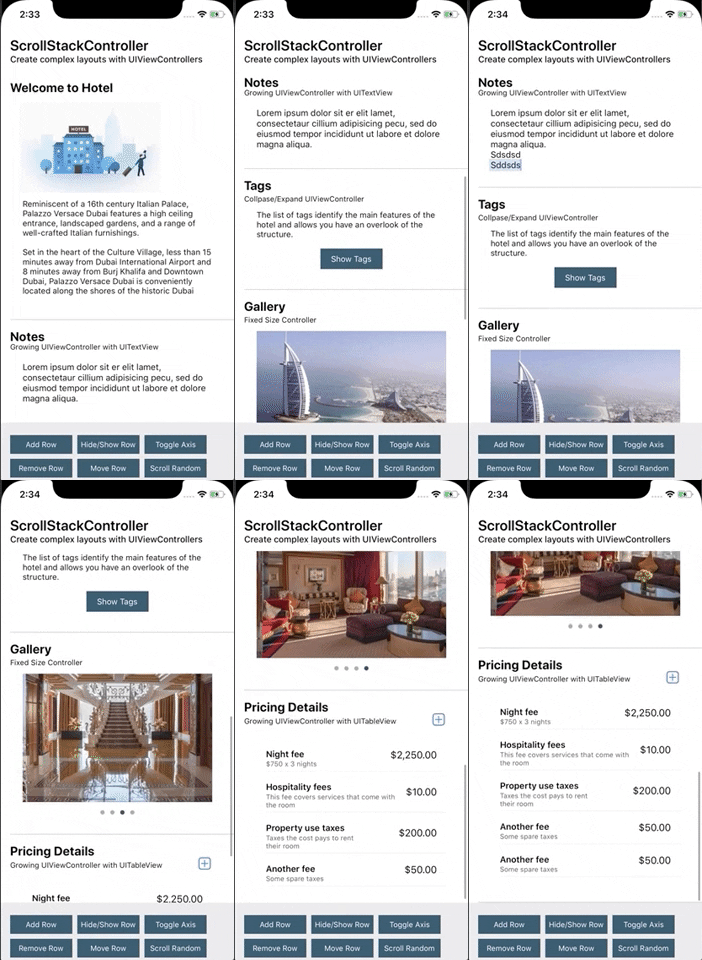
How to use it
The main class of the package is ScrollStack, a subclass of UIScrollView. It manages the layout of each row, animations and keep a strong reference to your rows.
This is an overview of the architecture:

ScrollStackController: is a subclass ofUIViewController. You would to use it and add as a child controller of your view controller. This allows you to manage any child-controllers related events for each row you will add to the stack controller.ScrollStack: the view of theScrollStackControlleris aScrollStack, a subclass ofUIScrollViewwith anUIStackViewwhich allows you to manage the layout of the stack. You can access to it viascrollStackproperty of the controller.- Each row is a
ScrollStackRow, which is a subclass ofUIView. Inside there are two views, thecontentView(a reference to managedUIViewController'sview) and theseparatorView. A row strongly reference managed view controller, so you don't need to keep a strong reference by your own. - Separator view are subclass of
ScrollStackSeparatorclass.
As we said, usually you don't want to intantiate a ScrollStack control directly but by using the ScrollStackController class.
It's a view controller which allows you to get the child view controller's managment for free, so when you add/remove a row to the stack you will get the standard UIViewController events for free!
This is an example of initialization in a view controller:
class MyViewController: UIViewController {

    private var stackController = ScrollStackViewController()

    override func viewDidLoad() {
        super.viewDidLoad()

        stackController.view.frame = contentView.bounds
        contentView.addSubview(stackController.view)
    }

}
Now you are ready to use the ScrollStack control inside the stackController class.
ScrollStack have an extensible rich set of APIs to manage your layout: add, remove, move, hide or show your rows, including insets and separator management.
Each row managed by ScrollStack is a subclass of ScrollStackRow: it strongly reference a parent UIViewController class where you content is placed. UIViewController's view will be the contentView of the row itself.
You don't need to handle lifecycle of your rows/view controller until they are part of the rows inside the stack.
To get the list of rows of the stack you can use the rows property.
// Standard methods
let allRows = scrollStack.rows
let isEmpty = scrollStack.isEmpty // true if it does not contains row
let notHiddenRows = scrollStack.rows.filter { !$0.isHidden }

// By Visibility
let currentlyVisibleRows = scrollStack.visibleRows // only currently visible rows (partially or enterly)
let enterlyVisibleRows = scrollStack.enterlyVisibleRows // only enterly visible rows into the stack

// Shortcuts
let firstRow = scrollStack.firstRow
let lastRow = scrollStack.lastRow
Let's take a look below.
<a name="addingrows"/>Adding Rows
ScrollStack provides a comprehensive set of methods for managing rows, including inserting rows at the beginning and end, inserting rows above or below other rows.
To add row you can use one the following methods:
addRow(controller:at:animated:) -> ScrollStackRow?addRows(controllers:at:animated:) -> [ScrollStackRow]?
Both of these methods takes as arguments:
controller/s: one or moreUIViewControllerinstances; each view of these controllers will be as a row of the stack inside aScrollStackRow(a sort of cell).at: specify the insertion point. It's an enum with the following options:top(at first index),bottom(append at the bottom of the list),atIndex(specific index),afterorbelow(after/below a row which contain a speci
