
Flow
Declarative approach to populate and manage UITableViews (see https://github.com/malcommac/FlowKit)
Install / Use
/learn @malcommac/FlowREADME
Flow
<p align="center" > <img src="https://raw.githubusercontent.com/malcommac/Flow/master/Assets/logo.png" width=300px height=230px alt="Flow" title="Flow"> </p> <p align="center" > <h1>THE ENTIRE PROJECT WAS MOVED TO THE NEW HOME AND IT'S NOW CALLED OWL.</h1> <h2><a href="https://github.com/malcommac/Owl">https://github.com/malcommac/Owl</a></br> This repository will be removed in few months. </p>




Flow is a Swift lightweight library which help you to better manage content in UITableViews. It's easy and fast, perfectly fits the type-safe nature of Swift.
Say goodbye to UITableViewDataSource and UITableViewDelegate : just declare and set your data, let Flow take care of the rest!
WHAT YOU CAN DO
The following code is the only required to create a complete TableView which shows a list of some country flags.
Each flag is represented by a class (the model) called CountryModel; the instance is represented into the tableview by the CountryCell UITableViewCell subclass.
let countries: [CountryModel] = ... // your array of countries
let rows = Row<CountryCell>.create(countries, { row in // create rows
row.onTap = { _, path in // reponds to tap on cells
  print("Tap on '\(row.item.name)'")
  return nil
}
tableManager.add(rows: rows) // just add them to the table
tableManager.reloadData()
A complete table in few lines of code; feel amazing uh? Yeah it is, and there's more: You can handle tap events, customize editing, easy create custom footer and headers and manage the entire content simply as like it was an array!.
A complete article about this topic can be found here: "Forget DataSource and Delegates: a new approach for UITableView"
MAIN FEATURES
Main features of Flow includes:
- Declare the content: Decide cell's class, the model and use array-like methods to add/remove or manage rows into the table. No more data source, no more delegate, just plain understandable methods to manage what kind of data you want to display (auto animations included!).
- Separation of concerns: Let the cell do its damn job; passing represented item (model) to the cell you can add a layer of separation between your model, your view controller and the cell which represent the model itself. Stop doing cell population inside the
tableView(tableView: UITableView, cellForRowAtIndexPath indexPath: NSIndexPath)datasource function. Be SOLID. - Type-safe: Describe your cell classes, the model to represent and let the library take care of you. Allocation and configuration is automatic: no more reuse identifier strings, no more dequeue operations, no more casts.
- FP (Functional Programming) Style. Cell configurations is easy; you can observe events and manage the behaviour of the cells in a functional style.
- AutoLayout support: Provide a simple mechanism to specify the height of a cell or leave the class decide the best one upon described constraints.
- Animations: Like
performBatchUpdatesofUICollectionViewFlow manage automatically what kind of animations perform on the table as you change the layout.
OTHER LIBRARIES YOU MAY LIKE
I'm also working on several other projects you may like. Take a look below:
<p align="center" >| Library | Description | |-----------------|--------------------------------------------------| | SwiftDate | The best way to manage date/timezones in Swift | | Hydra | Write better async code: async/await & promises | | Flow | A new declarative approach to table managment. Forget datasource & delegates. | | SwiftRichString | Elegant & Painless NSAttributedString in Swift | | SwiftLocation | Efficient location manager | | SwiftMsgPack | Fast/efficient msgPack encoder/decoder |
</p>DOCUMENTATION
Main Architecture
Flow is composed by four different entities:
TableManager: a single table manager is responsible to manage the content of aUITableViewinstance.Section: represent a section in table. It manages the list of rows and optional header and footer.Row: represent a single row in a section; a row is linked to a pair of objects: the model (any class; if not applicableVoidis valid) and the cell (a subclass of theUITableViewCellconforms toDeclarativeCellprotocol).SectionView: A section may show header/footer; these objects maybe simpleStringor custom views:SectionView. As forRow,SectionViewis linked to a model and a view (subclass ofUITableViewHeaderFooterView).
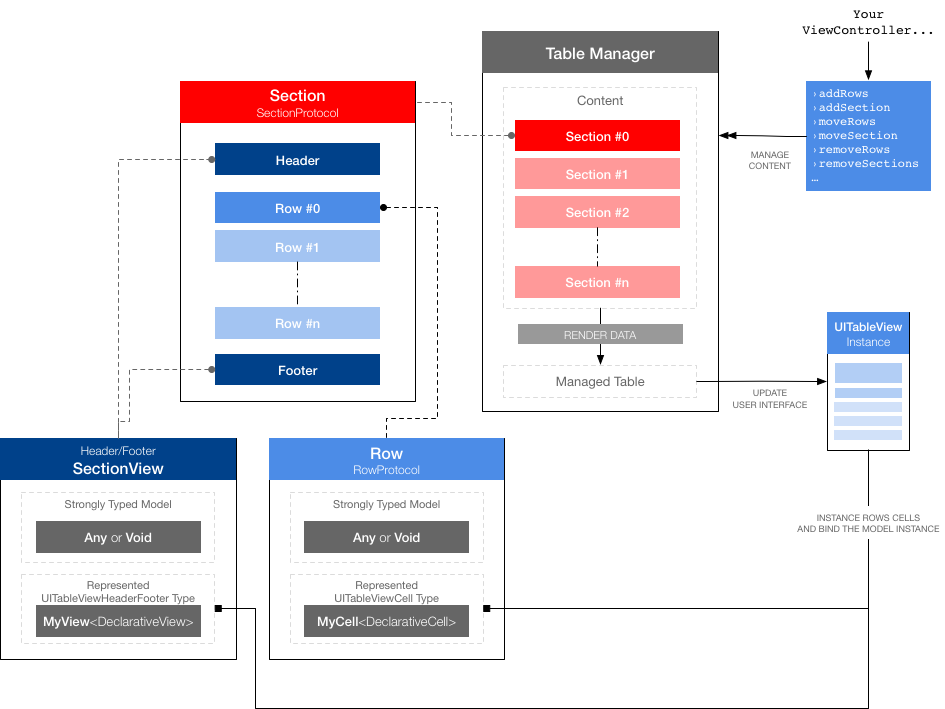
Demo Application
A live working example can be found in FlowDemoApp directory. It demostrates how to use Flow in a simple Login screen for a fake social network app. Check it out to see how Flow can really help you to simplify UITableView management.
<a name="create_tablemanager" />Create the TableManager
In order to use Flow you must set the ownership of a UITableView instance to an instance of TableManager:
self.tableManager = TableManager(table: self.table!)
From now the UITableView instance is backed by Flow; every change (add/remove/move rows or sections) must be done by calling appropriate methods of the TableManager itself or any child Section/Row.
Prepare a Cell (for Row)
A row is resposible to manage the model and its graphical representation (the cell instance).
To create a new Row instance you need to specify the model class received by the instance cell and the cell class to instantiate into the table.
While sometimes a model is not applicable (your cell maybe a simple static representation or its decorative), the cell class is mandatory.
The cell must be a subclass of UITableViewCell conforms to DeclarativeCell protocol.
This protocol defines at least two important properties:
- the model assocated with the Cell (
public typealias T = MyClass) - a method called right after the row's cell is dequeued (
public func configure(_: T, path: IndexPath))
This is an example of a CountryCell which is responsible to display data for a single country (class CountryModel):
import UIKit
import Flow

public class CountryCell: UITableViewCell, DeclarativeCell {
    // assign to the cell the model to be represented
    public typealias T = CountryModel
    // if your cell has a fixed height you can set it directly at class level as below
    public static var defaultHeight: CGFloat? = 157.0

    // this func is called when a new instance of the cell is dequeued
    // and you need to fill the data with a model instance.
    public func configure(_ country: CountryModel, path: IndexPath) {
      self.countryNameLabel.text = country.name.capitalized()
      self.continentLabel.image = country.continent
      self.flagImageView.setURL(country.countryURL)
      // ... and so on
    }
}
If your cell does not need of a model you can assign public typealias T = Void.
User interface of the cell can be made in two ways:
- Prototype (only in Storyboards): create a new prototype cell, assign the class to your class (here
CountryCell) and set thereuseIdentifierin IB to the same name of the class (againCountryCell). By default Flow uses as identifier of the cell the same name of the class itself (you can change it by overridingreuseIdentifierstatic property). - External XIB File: create a new xib file with the same name of your cell class (here
CountryCell.xib) and drag an instance ofUITableViewCellclass as the only single top level object. Assign to it the name of your
